Cpp Runner Pro
English | 中文
English
A high-performance VS Code extension for compiling and running C/C++ files with persistent terminal management.
Performance Focused: Built with efficiency in mind - minimal overhead, instant terminal creation, and smart caching for the fastest possible workflow.
Quick Start

Open a C++ source file, click the play button in the top-right editor toolbar to compile and run your C/C++ file with a single click.
Configuration
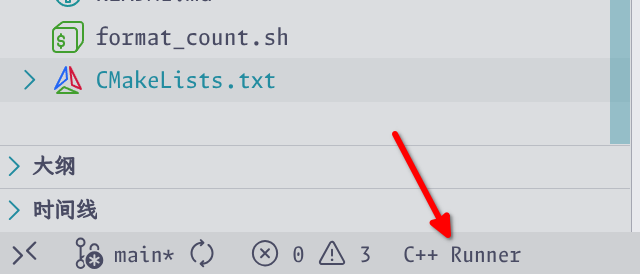
Open a C++ source file, click the icon in the bottom-left status bar or run the "Show Configuration" command to access the configuration webview.
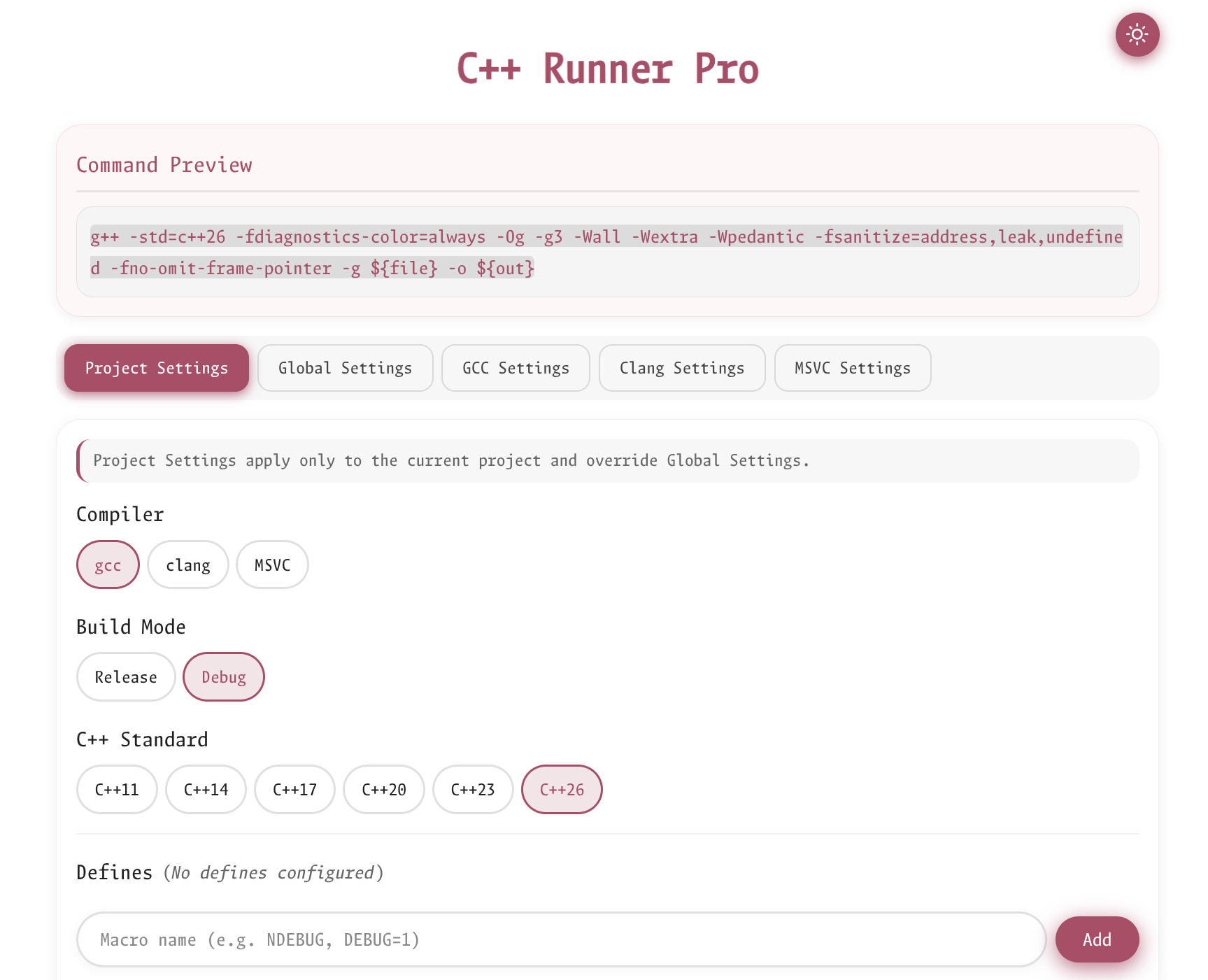
In the configuration webview, you can preview the compile command and set compile/runtime parameters and behaviors.
Features
- One-Click Compile & Run: Click the play button in the editor toolbar or press
Ctrl+F6 (Mac: Cmd+F6) to compile and run your C/C++ file
- Persistent Terminals: Compile terminal and run terminals persist across executions, allowing you to review output and interact with programs
- Multiple Run Instances: Run multiple instances of the same executable simultaneously (e.g., a server and multiple clients)
- Smart Terminal Reuse: Automatically reuses idle terminals when re-running the same program
- Shell Integration: Accurately detects compilation exit codes and program completion status
- Auto-Compile: Automatically compiles when source file has been modified
- Configurable Webview: Easy-to-use configuration panel accessible from the status bar
Terminal Management
Compile Terminal
- A single persistent terminal named "C++ Compile" with a gear icon
- Pre-created at extension activation, always appears first in the terminal list
- Shared for all compilations across the workspace
- Detects compilation errors with exit codes
Run Terminals
- Named "C++ Run: <executable>" with a play icon
- Supports multiple instances for the same executable
- When program is running: Prompts you to:
- Switch to existing terminal
- Create a new terminal
- Close existing and create new
- Close all terminals for this executable
- When program has finished: Automatically reuses the idle terminal
Commands
| Command |
Description |
Keybinding |
C++ Runner Pro: Run C++ File |
Compile and run the current file |
Ctrl+F6 / Cmd+F6 |
C++ Runner Pro: Compile C++ File |
Compile without running |
- |
C++ Runner Pro: Show Compile Terminal |
Focus the compile terminal |
- |
C++ Runner Pro: Show Running Terminals |
Show running terminals picker |
- |
C++ Runner Pro: Close All Terminals |
Close all C++ Runner terminals |
- |
C++ Runner Pro: Show Configuration |
Open the configuration webview |
- |
Compiler Settings
| Setting |
Description |
Default |
cpp-runner-pro.compiler |
Default compiler (gcc/clang/msvc) |
gcc |
cpp-runner-pro.standard |
C++ standard |
c++23 |
cpp-runner-pro.buildMode |
Build mode (debug/release) |
debug |
cpp-runner-pro.outputDirectory |
Output directory for executables |
./build |
Per-Compiler Options
Each compiler (gcc, clang, msvc) supports:
| Setting |
Description |
path |
Path to compiler executable |
warnings_options |
Warning flags (e.g., -Wall -Wextra) |
debug_options |
Debug mode flags (e.g., -g -O0) |
release_options |
Release mode flags (e.g., -O3 -DNDEBUG) |
sanitizers_options |
Sanitizers to enable (address, leak, undefined, thread) |
Example Configuration
{
  "cpp-runner-pro.compiler": "gcc",
  "cpp-runner-pro.standard": "c++20",
  "cpp-runner-pro.buildMode": "debug",
  "cpp-runner-pro.outputDirectory": "./build/${mode}",
  "cpp-runner-pro.gcc": {
    "path": "g++",
    "warnings_options": ["-Wall", "-Wextra", "-Wpedantic"],
    "debug_options": ["-Og", "-g3"],
    "release_options": ["-O3", "-DNDEBUG"],
    "sanitizers_options": ["address", "undefined"]
  }
}
Requirements
- A C/C++ compiler (GCC, Clang, or MSVC) installed and available in PATH
- VS Code 1.105.0 or higher
Known Issues
This extension has only been tested on Linux with fish shell and GCC/Clang compilers. Your feedback is greatly appreciated! Please feel free to submit GitHub Issues for any bugs or feature requests.
中文
一个高性能的 VS Code 扩展,用于编译和运行 C/C++ 文件,具有持久化终端管理功能。
注重性能:以效率为核心设计 - 最小的开销、即时的终端创建、智能缓存,为您带来最快速的工作流程。
快速开始
打开一个C++源文件,点击右上角编辑器工具栏中的运行按钮,一键编译并运行您的 C/C++ 文件。
配置
打开一个C++源文件,点击左下角状态栏中的图标或运行"Show Configuration"命令访问配置界面。
在配置界面中,您可以预览编译命令,设置编译和运行时的参数和行为。
功能特性
- 一键编译运行:点击编辑器工具栏的运行按钮或按
Ctrl+F6(Mac: Cmd+F6)编译并运行 C/C++ 文件
- 持久化终端:编译终端和运行终端在多次执行之间保持存在,方便查看输出和与程序交互
- 多实例运行:支持同时运行同一可执行文件的多个实例(如同时运行服务器和多个客户端)
- 智能终端复用:重新运行同一程序时自动复用空闲终端
- Shell 集成:准确检测编译退出码和程序完成状态
- 自动编译:源文件修改后自动检测并编译
- 可视化配置面板:通过状态栏访问的易用配置界面
终端管理
编译终端
- 单一持久化终端,名称为"C++ Compile",带有齿轮图标
- 扩展激活时预创建,始终出现在终端列表最前面
- 整个工作区的所有编译共享此终端
- 通过退出码检测编译错误
运行终端
- 名称为"C++ Run: <可执行文件名>",带有运行图标
- 支持同一可执行文件的多个实例
- 程序正在运行时:提示您选择:
- 切换到现有终端
- 创建新终端
- 关闭现有并创建新的
- 关闭此可执行文件的所有终端
- 程序已运行完毕时:自动复用空闲终端
命令
| 命令 |
描述 |
快捷键 |
C++ Runner Pro: Run C++ File |
编译并运行当前文件 |
Ctrl+F6 / Cmd+F6 |
C++ Runner Pro: Compile C++ File |
仅编译不运行 |
- |
C++ Runner Pro: Show Compile Terminal |
显示编译终端 |
- |
C++ Runner Pro: Show Running Terminals |
显示运行终端选择器 |
- |
C++ Runner Pro: Close All Terminals |
关闭所有 C++ Runner 终端 |
- |
C++ Runner Pro: Show Configuration |
打开配置界面 |
- |
编译器设置
| 设置 |
描述 |
默认值 |
cpp-runner-pro.compiler |
默认编译器 (gcc/clang/msvc) |
gcc |
cpp-runner-pro.standard |
C++ 标准 |
c++23 |
cpp-runner-pro.buildMode |
构建模式 (debug/release) |
debug |
cpp-runner-pro.outputDirectory |
可执行文件输出目录 |
./build |
各编译器选项
每个编译器 (gcc, clang, msvc) 支持:
| 设置 |
描述 |
path |
编译器可执行文件路径 |
warnings_options |
警告选项(如 -Wall -Wextra) |
debug_options |
调试模式选项(如 -g -O0) |
release_options |
发布模式选项(如 -O3 -DNDEBUG) |
sanitizers_options |
启用的检测器 (address, leak, undefined, thread) |
配置示例
{
  "cpp-runner-pro.compiler": "gcc",
  "cpp-runner-pro.standard": "c++20",
  "cpp-runner-pro.buildMode": "debug",
  "cpp-runner-pro.outputDirectory": "./build/${mode}",
  "cpp-runner-pro.gcc": {
    "path": "g++",
    "warnings_options": ["-Wall", "-Wextra", "-Wpedantic"],
    "debug_options": ["-Og", "-g3"],
    "release_options": ["-O3", "-DNDEBUG"],
    "sanitizers_options": ["address", "undefined"]
  }
}
系统要求
- 已安装 C/C++ 编译器(GCC、Clang 或 MSVC)并可在 PATH 中访问
- VS Code 1.105.0 或更高版本
已知问题
本扩展仅在 Linux 操作系统下,使用 fish shell 和 GCC/Clang 编译器进行过测试。非常期待您的反馈,欢迎在 GitHub Issues 提交问题或功能建议!
License
MIT License - see LICENSE for details.

