🃏 Joker Neon Theme
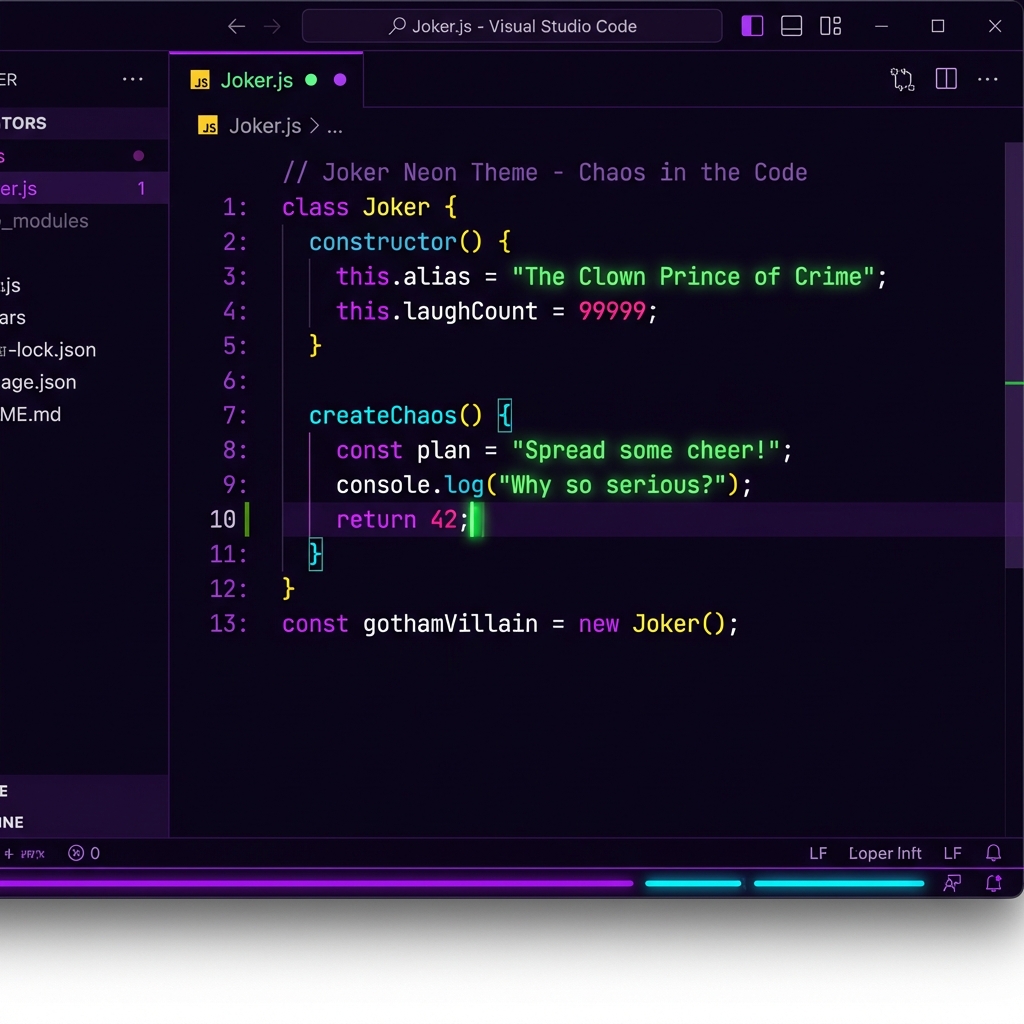
A dark VS Code theme inspired by the Joker from Batman movies, featuring vibrant neon colors and a chaotic, eye-catching aesthetic.
🎨 Color Palette
The theme features the iconic Joker color scheme:
- Purple (#bf00ff) - Keywords, primary accents (Joker's suit)
- Neon Green (#00ff41) - Strings, success states (Joker's hair)
- Hot Pink (#ff1e8c) - Numbers, operators, errors (Joker's lips)
- Cyan (#00ffff) - Functions, links (chaos and mayhem)
- Yellow (#ffed4e) - Classes, warnings (Joker's smile)
- Deep Purple/Black (#0a0514) - Background (dark Gotham nights)
✨ Features
- Dark Mode - Deep purple-black backgrounds for reduced eye strain
- Neon Syntax Highlighting - Vibrant, high-contrast colors that pop
- Complete UI Theming - Matching colors for sidebar, terminal, and all UI elements
- Optimized Readability - Despite the vibrant colors, carefully chosen contrast ratios
- Semantic Highlighting Support - Enhanced syntax coloring for supported languages
📦 Installation
Method 1: Install from VSIX (Manual)
- Open VS Code
- Press
Ctrl+Shift+P (Windows/Linux) or Cmd+Shift+P (Mac)
- Type "Extensions: Install from VSIX..."
- Select the
.vsix file
- Restart VS Code
Method 2: Install from Source
Copy the entire joker-neon-theme folder to your VS Code extensions directory:
- Windows:
%USERPROFILE%\.vscode\extensions\
- macOS:
~/.vscode/extensions/
- Linux:
~/.vscode/extensions/
Restart VS Code
Activate the theme:
- Press
Ctrl+K Ctrl+T (Windows/Linux) or Cmd+K Cmd+T (Mac)
- Select "Joker Neon" from the list
🎯 Recommended Settings
For the best experience, add these settings to your settings.json:
{
	"editor.fontFamily": "'Fira Code', 'Cascadia Code', Consolas, monospace",
	"editor.fontLigatures": true,
	"editor.fontSize": 14,
	"editor.lineHeight": 1.6,
	"editor.cursorBlinking": "phase",
	"editor.cursorStyle": "line",
	"workbench.colorTheme": "Joker Neon"
}
🖼️ Screenshots
The theme looks great with:
- JavaScript/TypeScript
- Python
- HTML/CSS
- JSON
- Markdown
- And many more!
🤡 Why "Joker Neon"?
"Why so serious?" - This theme brings the chaotic energy and vibrant aesthetic of the Joker to your coding experience. The combination of deep purples, neon greens, and hot pinks creates a visually striking environment that's both fun and functional.
📝 License
MIT License - Feel free to use and modify!
🐛 Issues & Suggestions
Found a bug or have a suggestion? Feel free to open an issue or submit a pull request!
Enjoy coding with a smile! 🃏💚💜

