Copilot & BYOK Usage Tracker

Track token usage and costs across GitHub Copilot, BYOK providers, and chat models — all in one place. Manage BYOK providers visually. Browse 100+ AI coding tools, plans, and CLI agents.
✨ Features
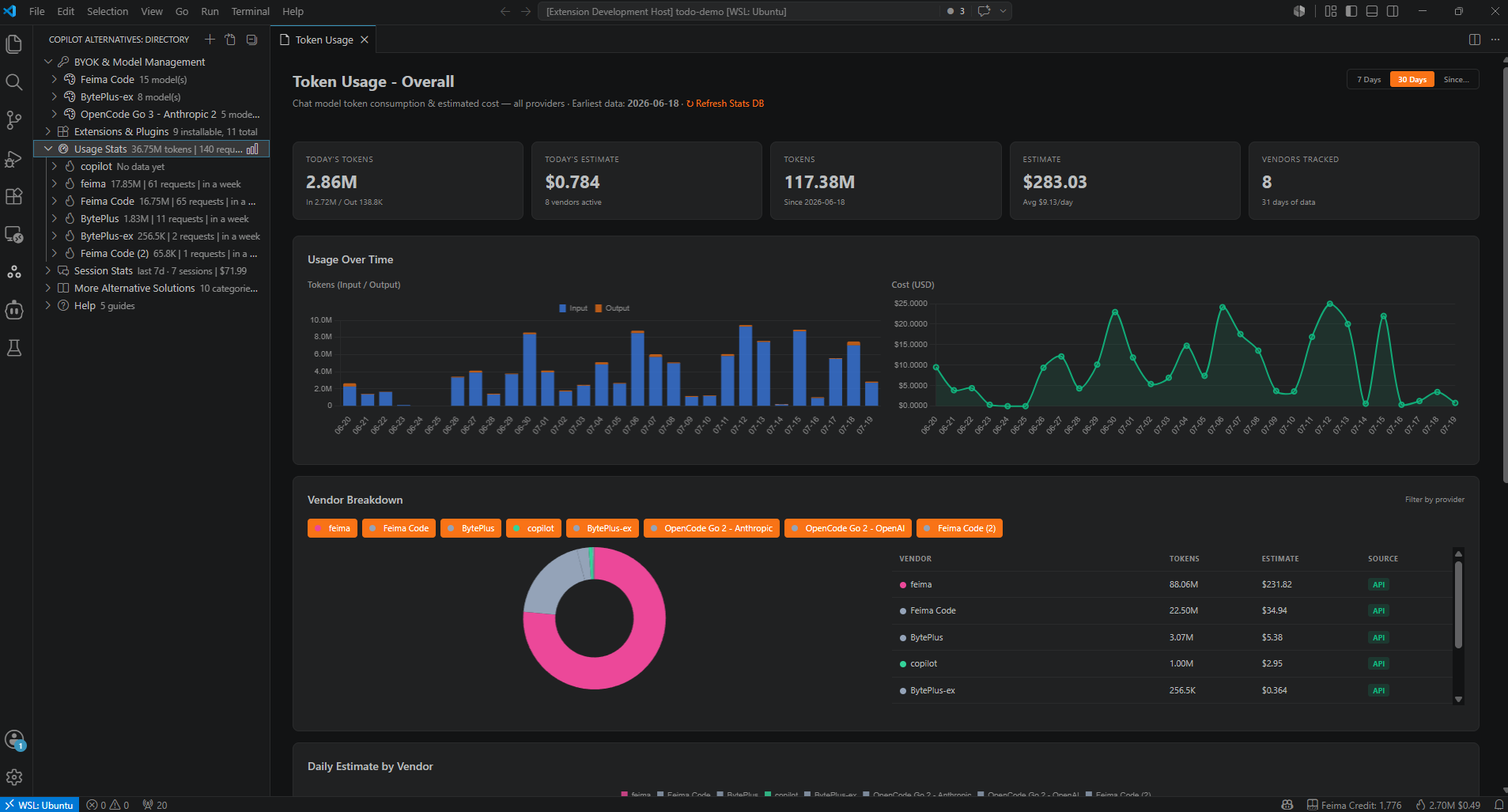
📊 Token Usage Tracker
See exactly how many tokens you're consuming and what it costs — per vendor, per model, per day.
- Real-time tracking — Automatically reads VS Code's chat session store; no manual setup required
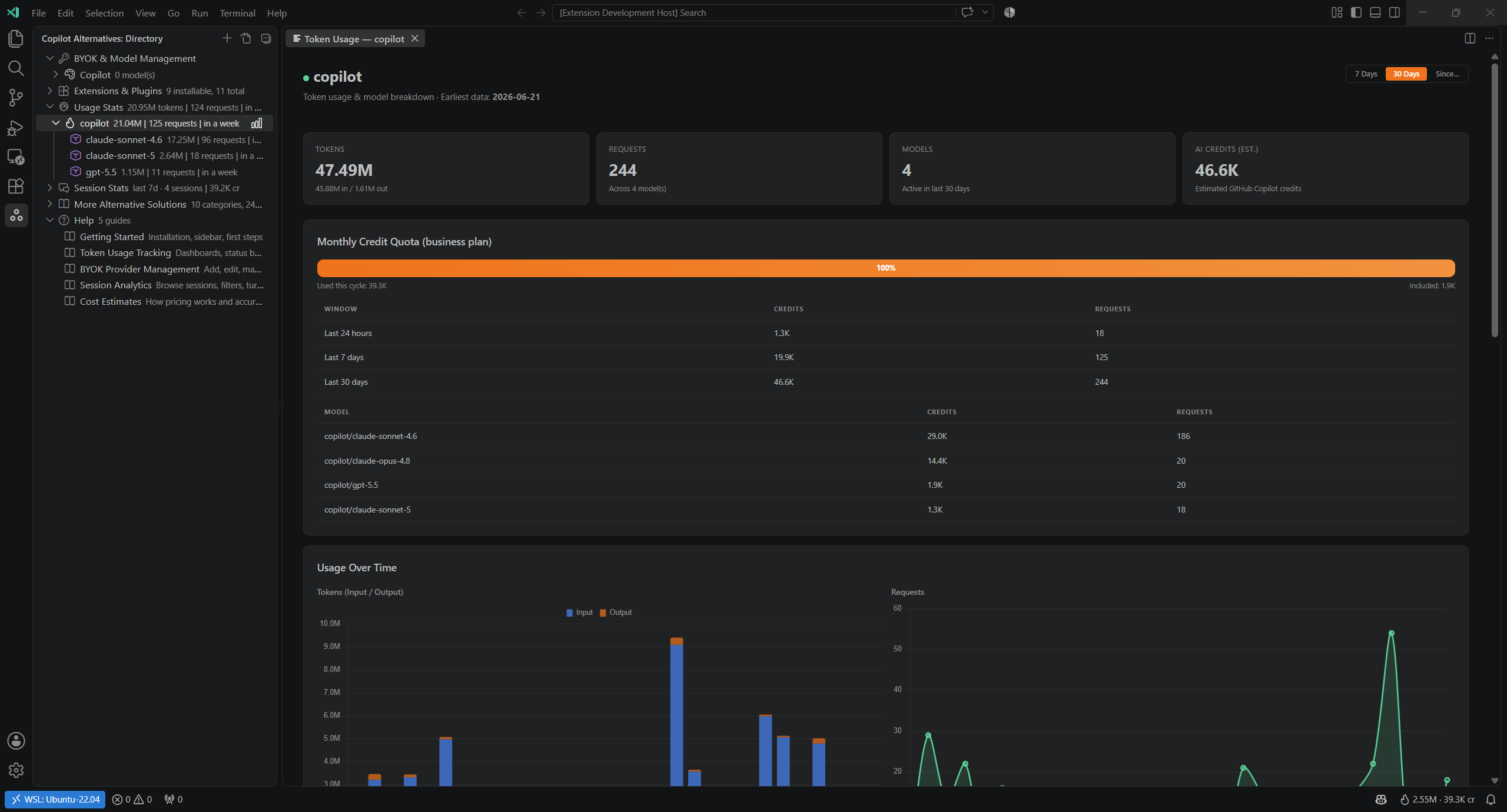
- GitHub Copilot AI credits — Copilot usage is tracked in AI credits (cr), matching how Copilot plans are actually billed, using real GitHub-reported credit counts when available and falling back to a model-aware estimate otherwise
- Monthly Credit Quota — Sign in with GitHub to resolve your Copilot plan and see credit consumption against your actual monthly allowance, with a rolling 24h / 7 day / 30 day credits breakdown
- Rich dashboards — Chart.js-powered overview, vendor, and model dashboards with stacked bars, donut charts, and trend lines
- Daily / weekly / monthly views — Switch time ranges with one click, or pick a custom "since" date
- Status bar indicator — Always-visible today's token count and estimated cost; hover for 24h, week, and month summaries (plus Copilot credits, if detected)
- My Yearly Budget — Set your own yearly budget target and see projected spend at a glance
- Export — Dump your usage data for external analysis
🔑 BYOK Provider Manager
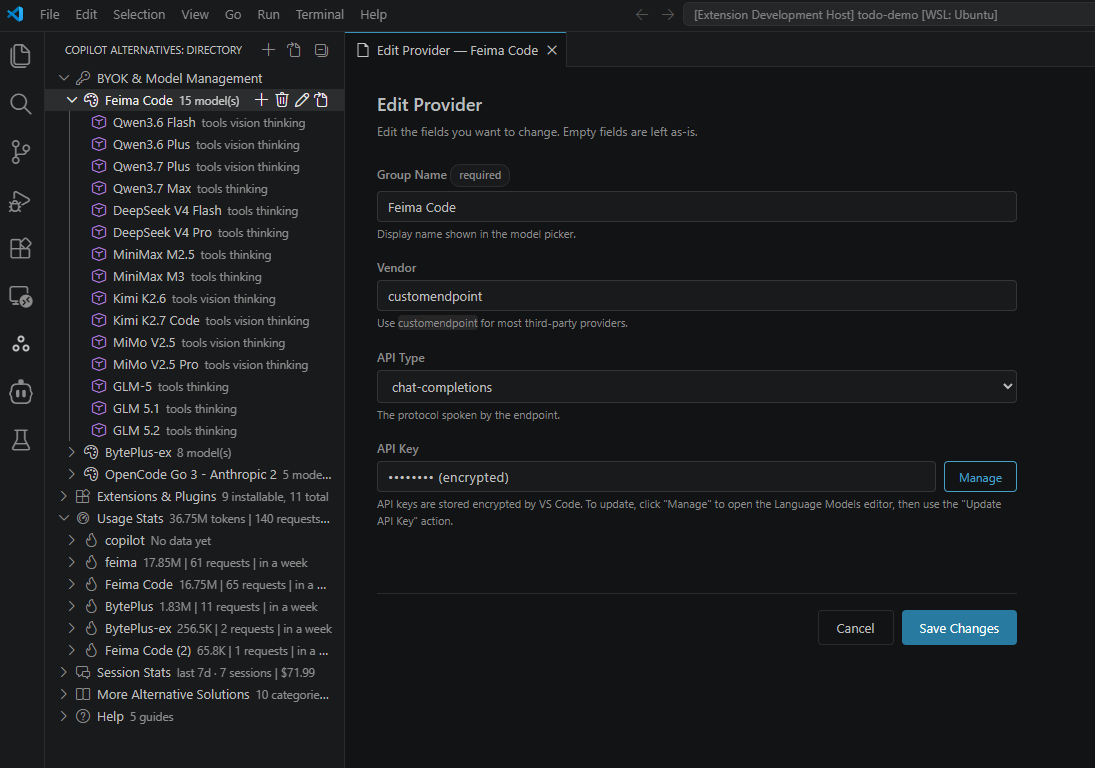
Bring Your Own Key — add, edit, and remove chat language model providers without touching JSON files.
- Template catalog — 13+ pre-configured providers (DeepSeek, Mistral, OpenRouter, Alibaba, Feima Code, BytePlus, ClinePass, OpenCode Go, Z.ai, Kimi, Baidu)
- Single & multi-key providers — Group multiple API keys (e.g. one for OpenAI-compatible, one for Anthropic-compatible) into a single provider
- Webview editors — Create and edit providers and models through form-based UI, not raw JSON
- Open
chatLanguageModels.json — Jump to the file directly when you need manual edits
- Auto-refresh — Sidebar updates instantly when providers are added, edited, or removed externally
📝 Session History & Analytics
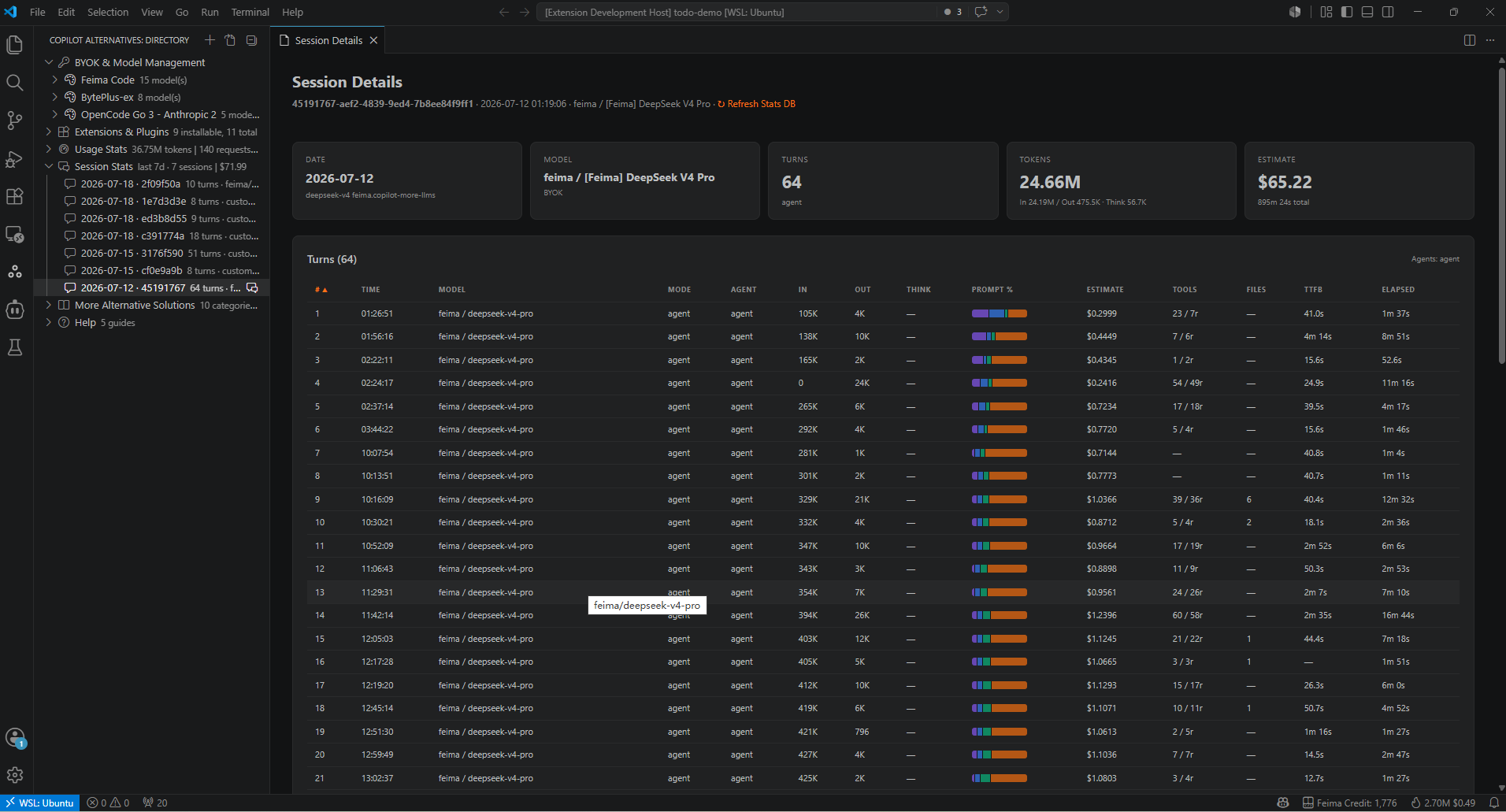
Browse your past chat sessions with full turn-by-turn detail.
- Session list — All sessions in the sidebar, filterable by vendor, model, or date
- Turn detail — Input/output tokens, tool calls, timing (latency, TTFT), prompt category breakdowns
- Session dashboard — Rich webview showing voting, token distribution, and per-turn tables
- Credits or cost — Sessions from GitHub Copilot show AI credits consumed; sessions from other vendors show estimated $ cost
- Copy session IDs — Quickly grab a session ID for bug reports or sharing
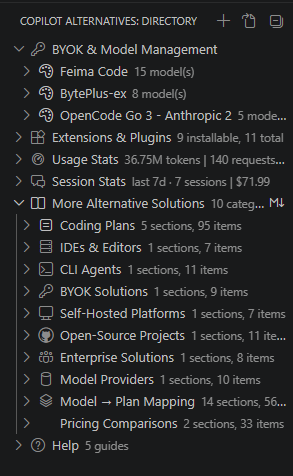
Browse 100+ AI coding tools, plans, and CLI agents from the sidebar.
- Coding plans (IDE-native, CLI-native, multi-model BYOK-friendly)
- IDEs & Editors, CLI Agents, Extensions & Plugins
- BYOK Solutions, Self-Hosted Platforms, Open-Source Projects
- Enterprise Solutions, Model Providers, Pricing Comparisons
🚀 Quick Start
- Install the extension from the VS Code Marketplace
- Open the sidebar — Click the Copilot Alternatives icon in the Activity Bar, or run
Copilot Alternatives: Open Sidebar
- Check your usage — Run
Copilot Alternatives: Show Token Usage Dashboard to see your token consumption and estimated costs
- Add a BYOK provider — Run
Copilot Alternatives: BYOK: Add Provider to configure your own API keys
- Browse sessions — Expand the "Session Stats" section in the sidebar to review past conversations
Heads up: Usage data is imported automatically from VS Code's chat session store on startup. The first load may take a moment if you have extensive history (configurable via backfillDays).
⚙️ Configuration
All settings are under copilotAlternatives.tokenUsage.*:
| Setting |
Default |
Description |
backfillDays |
60 |
How many days of chat history to import on first load (1–365) |
watcherWindowDays |
1 |
How far back the real-time watcher scans for new session files on startup (1–30) |
yearlyBudgetTarget |
250000 |
Yearly AI token budget target in USD (displayed on the overview dashboard) |
📋 Commands
Token Usage
| Command |
Description |
Show Token Usage Dashboard |
Open the main usage overview with charts |
Show Vendor Usage |
Open per-vendor cost and token breakdown |
Show Model Usage |
Open per-model cost and token breakdown |
Show Overview Usage |
Open the overview dashboard |
Export Token Usage Data |
Export usage data to file |
Refresh Stats DB from local sessions |
Clear cache and reimport from disk |
Sign in with GitHub to Detect Copilot Plan |
Resolve your Copilot plan to show a monthly credit quota |
Debug Token Usage |
Dump internal state to output channel |
BYOK Management
| Command |
Description |
BYOK: Add Provider |
Add a BYOK provider from templates |
BYOK: List Providers |
List currently configured BYOK providers |
BYOK: Remove Provider |
Remove a BYOK provider |
BYOK: Open Templates Folder |
Open the bundled template directory |
Add BYOK Provider (Single Key) |
Create a single-key provider inline |
Add BYOK Provider (Multi Key) |
Create a multi-key provider inline |
Open chatLanguageModels.json |
Open the raw config file for manual editing |
Session Analytics
| Command |
Description |
Show Session Details |
Open a session's detailed turn-by-turn view |
Toggle Session Filter |
Open session filter (vendor, model, date) |
Clear Session Filter |
Remove active session filter |
Copy Session ID |
Copy a session's unique ID to clipboard |
🔒 Privacy & Data
- All data stays local — Usage is stored in a SQLite database inside VS Code's
globalStorage directory
- No external network calls — The extension reads VS Code's own session files and computes costs locally
- No code or conversation content is uploaded — Only token counts, model IDs, and timestamps are stored
- No telemetry — The extension does not phone home or report usage to any server
❓ Q&A
Does this track GitHub Copilot usage, or only BYOK providers?
Both. The extension reads VS Code's own chat session store, which logs every chat interaction regardless of which provider handled it — Copilot, BYOK, or built-in models. All usage is tracked automatically.
How accurate are the cost estimates?
Costs are estimated using static pricing tables bundled in the extension for popular models (GPT-4o, Claude, Gemini, DeepSeek, etc.). The extension matches your model ID to the closest known pricing entry. If an exact match isn't found, it falls back to a vendor-level average. Estimates are approximate — actual billing depends on your provider's specific pricing tier.
How is GitHub Copilot usage tracked, since it isn't billed per-token?
GitHub Copilot plans are billed in AI credits, not a per-token dollar rate. The extension shows credits (cr) for Copilot usage instead of a $ estimate — in the status bar, dashboards, sidebar, and session details. Real GitHub-reported credit counts are used whenever available; otherwise credits are estimated from token usage. Run Sign in with GitHub to Detect Copilot Plan to resolve your plan and see a Monthly Credit Quota tile showing consumption against your actual monthly allowance. This lookup is best-effort (via an undocumented internal endpoint) and may occasionally be unavailable.
Signing in only reuses (or requests) a standard GitHub authentication session to look up your plan name and monthly credit allowance — no code, chat content, or session data is ever sent as part of this lookup.
Why don't my Copilot credits match GitHub's own usage page?
Small differences are expected: the extension estimates credits from tokens when a turn didn't report a real credit count; its 24h/7d/30d windows roll from "now" rather than resetting on your billing cycle start day; and it only sees sessions run from this machine's VS Code chat session store. Treat the extension's numbers as a local trend indicator, and GitHub's own usage page as the authoritative billing source.
Will this slow down VS Code?
No. Usage data is stored in a lightweight SQLite database. The background file watcher only scans the most recent session files (configurable via watcherWindowDays, default 1 day). Historical backfill runs once on activation, and you can limit how far back it goes via backfillDays (default 60 days).
Where is my data stored? Can I delete it?
Everything lives in a SQLite database inside VS Code's globalStorage directory. To reset all data, run Refresh Stats DB from local sessions from the command palette — this clears the database and reimports from disk. Note this is a full rebuild: it wipes the entire database first, then reimports only session files within your current backfillDays window (by file last-modified time). If you rely on older history, increase backfillDays before reloading.
You normally never need to run this — the live watcher and startup backfill keep your data current automatically. Only use it if your data looks stale, missing, or out of sync.
No — it works out of the box. The extension auto-discovers your chat session files and starts tracking immediately. The only optional configuration is the yearly budget target and backfill preferences under copilotAlternatives.tokenUsage.*.
What if my model isn't recognized?
Models are matched through a layered resolver: first by vendor prefix (e.g. openai/gpt-4o), then by heuristic name matching, and finally falling back to unknown vendor with a conservative pricing estimate. You can check how your model was resolved in the Token Usage output channel (View → Output → Copilot Alternatives).
How does BYOK management relate to the built-in VS Code chat model settings?
The BYOK manager is a visual frontend for VS Code's chatLanguageModels.json file. Adding a provider here is equivalent to editing the JSON directly — both methods produce the same result. The extension simply gives you templates, form editors, and inline actions so you don't have to hand-edit JSON.
More importantly, it makes managing multiple vendors and multiple API keys significantly easier:
- Multiple vendors — Switch between DeepSeek, Mistral, OpenRouter, Alibaba, and others without digging into JSON config. Each vendor appears as a named entry you can edit or remove from the sidebar.
- Multiple keys per vendor — Some providers offer separate OpenAI-compatible and Anthropic-compatible endpoints under one account. The extension lets you group multiple API keys into a single provider entry, keeping things organized.
- Auto-populated models & endpoints — When you pick a provider template, all supported models and their API endpoint URLs are filled in automatically. You only need to paste your API key — no need to look up which model IDs or base URLs the provider supports.
Can I export my usage data?
Yes. Run Export Token Usage Data to dump your tracking data. The exported format includes daily token counts, vendor breakdowns, and estimated costs.
Is this extension free?
Yes, completely free and open-source under the MIT license. No paid features, no account required, no usage limits.
The directory is a curated, bundled catalog shipped with each extension release. It does not fetch live data from the internet. Updates to pricing, new tools, and model listings arrive with extension updates.
📖 Resources
Enjoy tracking your AI usage? ⭐ Star the repo on GitHub!

