Skip to content
| Marketplace
Sign in
Visual Studio Code>Machine Learning>Feima AI FlowNew to Visual Studio Code? Get it now.
Feima AI Flow

Feima AI Flow

Feima Code

| (0) | Free
Orchestrate multiple AI roles in a single command — pipeline, iterative, or fork-join — with tool use, context injection, and a built-in library of production-ready flows for code review, sprint planning, incident response, and more
Installation
Launch VS Code Quick Open (Ctrl+P), paste the following command, and press enter.
Copied to clipboard
More Info

Feima AI Flow

Orchestrate multiple AI roles in a single command. Assemble a team of specialized reviewers, planners, or investigators — each with its own perspective, tools, and context — and let them work together on your task. All defined in a version-controlled .flow.yaml file you own.

🚀 Run your first flow in 60 seconds →


Why AI Flow?

"I spend more time managing AI than it saves me."

You start a code review in Copilot Chat. Then you need a security perspective, so you start over in a new chat. Then a performance review — another chat. You're copy-pasting context, repeating yourself, and stitching results together by hand.

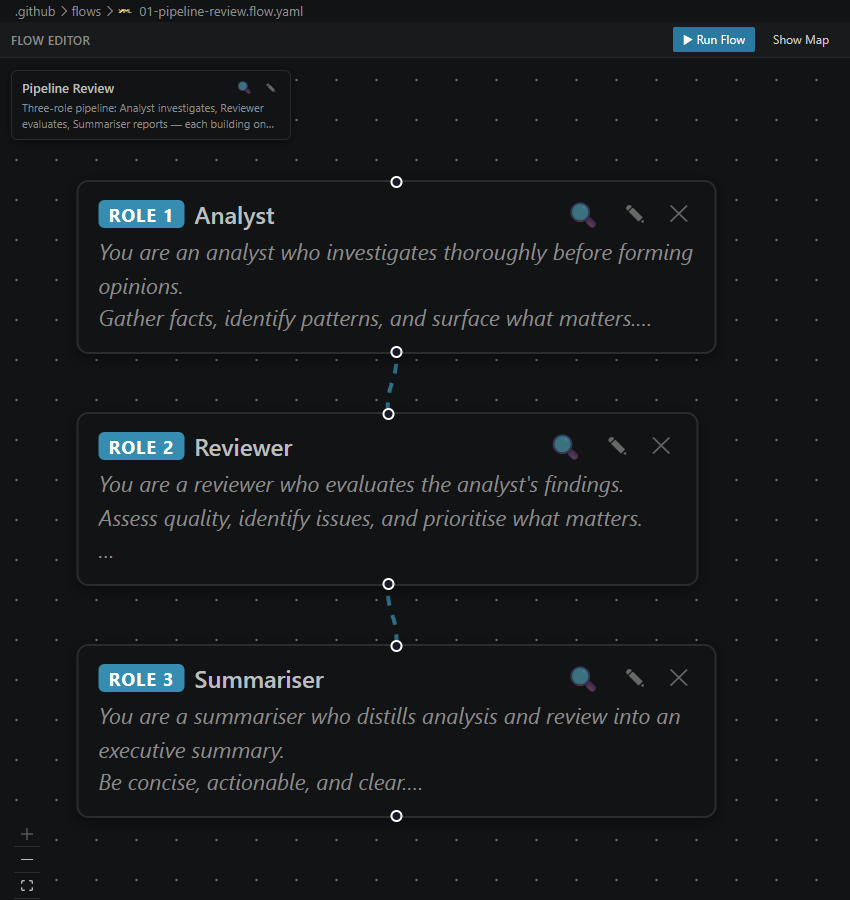
With AI Flow: One @flow command. Three specialized roles run in sequence — each building on the previous output. You get a single prioritized report. No context switching. No manual stitching.

Flow orchestration diagram showing three roles running in sequence with context flowing between them


"Code reviews are shallow when I'm the only reviewer."

Solo reviews miss things. Security blind spots. Performance bottlenecks. Edge cases you didn't think of. But getting multiple human reviewers for every PR isn't realistic.

With AI Flow: The built-in Code Review flow runs Logic & Correctness, Style & Security, and a Verdict synthesizer — each with a dedicated system prompt tuned for their lens. You get depth without the scheduling headache.

Code review flow output showing prioritized findings from three perspectives


"PR descriptions are an afterthought — and it shows."

You merge a 400-line change with a one-line description. Future you (and your teammates) will suffer. But writing detailed PR descriptions feels like overhead when you just want to ship.

With AI Flow: Point the PR Description flow at your branch. A Code Historian figures out intent, an Impact Assessor surfaces breaking changes, and a PR Writer composes a description reviewers actually want to read.

Visual flow editor showing a PR description pipeline


"Incidents are chaos. Everyone has a theory, nobody has a process."

Alert fires. Slack explodes with guesses. The loudest voice (HiPPO) drives the investigation — not the data. Hours later you find the real root cause was something nobody checked.

With AI Flow: Paste the alert into the War-Room Triage flow. It runs parallel investigations across application, infrastructure, and data layers — then synthesizes findings into a structured report. Process over panic.


"Sprint planning eats half a day. Every. Single. Sprint."

You gather the team. Debate story points. Re-rank the backlog. Negotiate dependencies. Half a day gone — and half the estimates are still wrong.

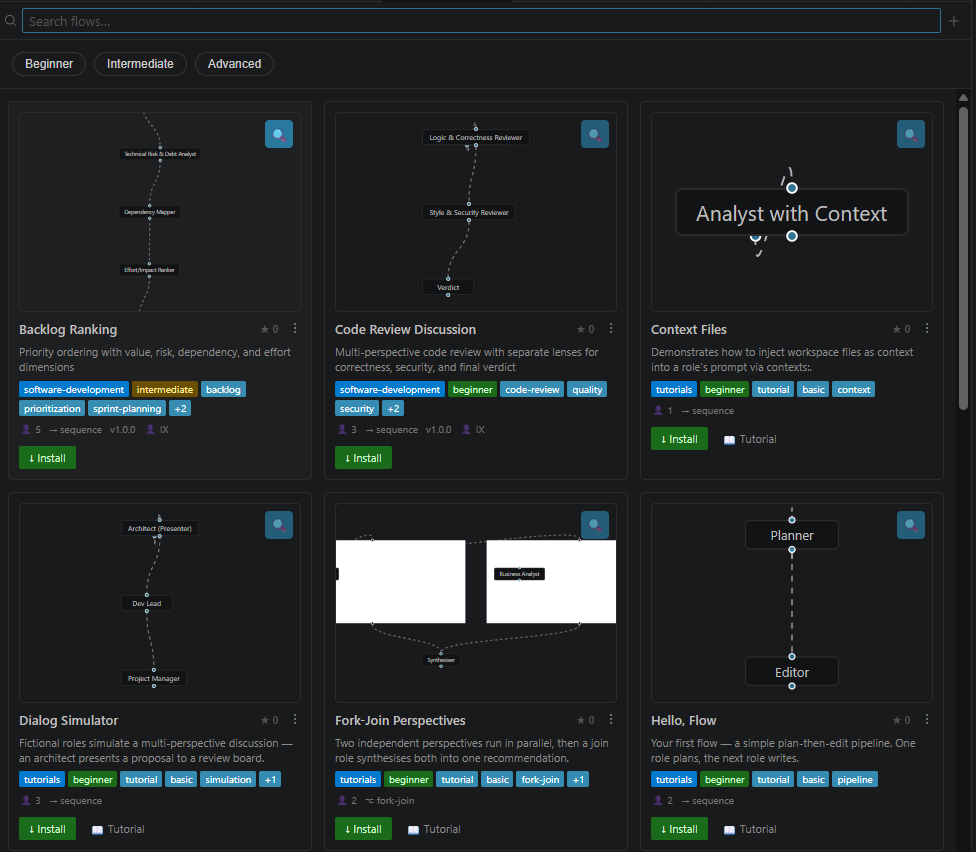
With AI Flow: The Story Estimation flow runs a virtual scrum team (Product Owner, Dev Lead, QA Lead) against your stories. Backlog Ranking orders them across business value, risk, dependencies, and effort. Two flows. Full planning loop. Minutes, not hours.

Flow gallery showing built-in planning flows


"My tests pass. My coverage is fine. Production still breaks."

You wrote tests for the happy path and the obvious error cases. But the model you used didn't hunt for adversarial edge cases — nulls in nested objects, race conditions, Unicode in unexpected places.

With AI Flow: The Test Writing flow generates tests in two passes. First pass: standard coverage. Second pass: an adversarial Edge Case Hunter actively looks for gaps the first pass missed. Consistently better coverage than single-prompt generation.


"I want to automate, but I don't want a black box."

No-code automation tools hide the logic. Prompt chains in SaaS products lock you into a platform. You want automation you can version, review, and own.

With AI Flow: Every flow is a .flow.yaml file checked in alongside your code. Plain text. Version-controlled. Reviewable in PRs. Sharable across teams. You own the orchestration logic — not a vendor.

# code-review.flow.yaml — owned by your team, versioned in your repo
name: Code Review
description: Multi-lens review: correctness, security, style
category: "software-development"
roles:
  - name: Logic & Correctness
    prompt: |
      You are a senior engineer. Review for logical errors, edge cases, and correctness.
  - name: Style & Security
    prompt: |
      Review for code style violations and OWASP Top 10 security issues.
  - name: Verdict
    prompt: |
      Synthesize findings into a prioritized, actionable review.

Quick Start

Install the extension, then type in Copilot Chat:

@flow #file:code-review.flow.yaml

Review the changes in src/auth/login.ts

That's it. Three specialized reviewers run in sequence — each building on the previous output. You get a prioritized review with actionable findings.

No setup, no configuration. The built-in library has production-ready flows:

Flow What It Does Try It
Code Review Multi-lens review: correctness, security, style Run in Copilot
PR Description Auto-generate PR descriptions from your diff Run in Copilot
Story Estimation Virtual scrum team sizes your stories Run in Copilot
Backlog Ranking Multi-dimension priority ordering Run in Copilot
Test Writing Generate tests with adversarial edge case hunting Run in Copilot
War-Room Triage Incident response with parallel investigation Run in Copilot

Click any "Run in Copilot" button to open VS Code with the command pre-filled. Or browse all flows with @flow /browse.


How It Works

Define Roles, Not Just Prompts

Each role in a flow is a fully-configured AI agent with its own system prompt, tools, and context. Roles run in sequence — each sees the output of previous roles and builds on it.

┌─────────────────┐     ┌─────────────────┐     ┌─────────────────┐
│  Security       │     │  Performance    │     │  Synthesis      │
│  Reviewer       │ ──▶ │  Reviewer       │ ──▶ │  (Lead Engineer) │
│                 │     │                 │     │                 │
│  • OWASP focus  │     │  • Bottleneck   │     │  • Prioritize   │
│  • Severity     │     │    hunting      │     │  • Risk rating  │
│    scoring      │     │  • Scalability  │     │  • Action plan  │
└─────────────────┘     └─────────────────┘     └─────────────────┘

Three Orchestration Patterns

Pattern Use When YAML Config
Pipeline Sequential review, each role building on prior output roles:
Iterative Refinement loops — run until quality converges stages: + iterations
Fork-Join Parallel investigations merged by a synthesizer groups: + join:

Built-in Tool Use

Roles can read files, search your codebase, and run terminals — all within the flow execution. Give each role exactly the tools it needs:

tools:
  - copilot_readFile
  - copilot_findTextInFiles
  # or "*" for all available tools

Omit tools entirely for conversation-only roles.

Smart Context Management

Attach files via #file: in chat or declare them in your flow with contexts:. Context files are injected at lower priority — the token budget is never wasted, and critical prompts always fit.


Discover & Customize

Command What It Does
@flow /browse Open the interactive flow gallery with previews
@flow /list List all built-in flows grouped by category
@flow /search <query> Find flows by name, tag, or category
@flow /install <id> Copy a built-in flow into your workspace to customize

Built-in Categories

  • Software Development — Code Review, PR Description, Test Writing, SDD Full Cycle
  • Planning — Story Estimation, Backlog Ranking
  • Operations — Incident Triage, War-Room Response
  • Design & UX — Design Critiques, Accessibility Audits
  • Creative — Brainstorming, Story Development
  • Education — Tutoring, Concept Exploration

Features

  • 🔀 Pipeline, Iterative & Fork-Join orchestration — pick the pattern that fits your workflow
  • 🎭 Multi-role discussions — each role gets its own system prompt, tools, and context window
  • 🧠 Progressive disclosure — token-budget-aware rendering keeps critical content in frame
  • 🛠️ Full tool-use loop — roles call VS Code tools (files, search, terminal) autonomously
  • 📎 Context injection — attach files via #file: or flow contexts:, managed for budget
  • 📚 Production-ready library — flows for code review, sprint planning, incident response, and more
  • 🔍 Discoverable — @flow /search and @flow /browse to find the right flow fast
  • 🎨 Visual editor — React Flow canvas for viewing and editing flows visually
  • 🤖 Background execution — hand off long-running flows to the GitHub Copilot SDK
  • 📄 Version-controlled — .flow.yaml files are plain text, checked in, reviewable in PRs

Requirements

  • VS Code 1.85 or later
  • GitHub Copilot Chat extension (pre-installed in VS Code)
  • Feima Copilot More LLMs (bundled as extension pack — provides enhanced model selection)

For Developers

See DEVELOPMENT.md for build instructions, project structure, architecture, release process, and coding conventions.

See AGENTS.md for the AI assistant reference.


License

MIT

  • Contact us
  • Jobs
  • Privacy
  • Manage cookies
  • Terms of use
  • Trademarks
© 2026 Microsoft