IP Lens
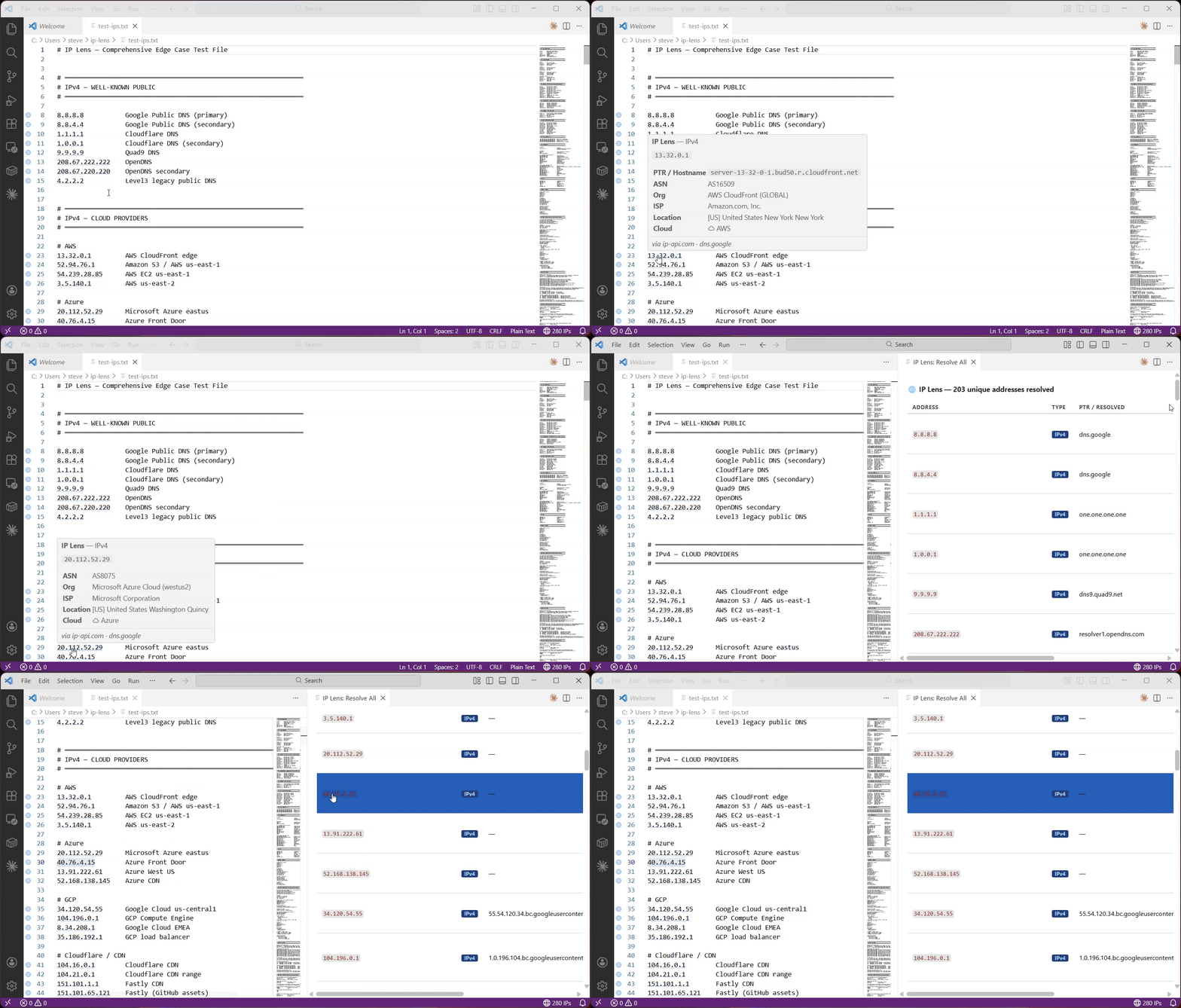
Hover over any IP address or hostname for instant DNS lookups, WHOIS/ASN info, and geolocation — without leaving your editor. Detects IPv4, IPv6, CIDR blocks, and hostnames in any text file and enriches them with live data from configurable DNS and IP info providers.
Features
- Dotted underlines on every detected IP address and hostname
- Blue = IPv4 · Green = IPv6 · Orange = hostname
- Hover card — PTR/reverse DNS, ASN, organisation, ISP, country, city, and cloud provider badge
- Gutter icon on every line that contains an address
- Status bar counter —
🌐 N IPs in the bottom-right; click to open the Resolve All panel
- Resolve Selected Text — select any text, right-click → IP Lens: Resolve Selected Text to look up an address even if it wasn't detected automatically; opens a side panel with full DNS, ASN, geo, and cloud info
- Resolve All panel — right-click → IP Lens: Resolve All IPs in File or use the Command Palette to open a side panel with a full table of every unique address in the file; click any row to jump to and select that address in the editor
- Private IP resolution — RFC 1918 Class A/B/C, Loopback, Link-local, IPv6 ULA are classified locally; reverse PTR lookups use your system's DNS resolver so internal hostnames resolve automatically on your network
- Configurable providers — choose your DNS-over-HTTPS resolver and IP info API independently; optionally override the DNS server used for private PTR lookups
- TTL cache — results are cached per-session; configurable expiry
Usage
IP Lens activates automatically on supported file types. No API keys required.
| Action |
Result |
| Hover over an underlined address |
Shows DNS, ASN, geo, cloud info |
Click status bar 🌐 N IPs |
Opens Resolve All panel |
| Select text → right-click |
IP Lens: Resolve Selected Text — look up any address, even undetected ones |
| Right-click in editor |
IP Lens: Resolve All IPs in File |
| Click a row in Resolve All panel |
Jumps to that address in the editor |
| Command Palette |
IP Lens: Clear Resolution Cache |
Supported File Types
Activates on: plaintext, log, ini, csv, yaml, json, markdown, shellscript, properties
Add more via the ipLens.activateOnLanguages setting, or use "*" to activate everywhere.
Settings
| Setting |
Default |
Description |
ipLens.enableGutterIcon |
true |
Show globe icon in the gutter on lines with IPs |
ipLens.activateOnLanguages |
(list above) |
Language IDs where IP Lens runs |
ipLens.cacheTTLSeconds |
300 |
How long to cache resolved results |
ipLens.dnsProvider |
dns.google |
DNS-over-HTTPS provider for PTR and A record lookups on public IPs |
ipLens.ipInfoProvider |
ip-api.com |
Provider for ASN, geolocation, and organisation data |
ipLens.localDnsResolver |
(system) |
DNS server for reverse PTR lookups of private/RFC 1918 addresses (e.g. 192.168.1.1 or 192.168.1.1:53). Leave empty to use the OS resolver |
DNS Providers (public IPs)
| Value |
Endpoint |
dns.google (default) |
dns.google/resolve |
cloudflare |
cloudflare-dns.com/dns-query |
quad9 |
dns.quad9.net/dns-query |
These DoH providers are used for public IP PTR lookups and hostname A record resolution only. Private/RFC 1918 addresses always use native DNS (see ipLens.localDnsResolver).
IP Info Providers
| Value |
Notes |
ip-api.com (default) |
Free, 45 req/min, no key required |
ipwho.is |
Free, no stated rate limit, no key required |
Changing either provider immediately clears the cache and re-resolves on next hover.
Data Sources
All lookups are made client-side from your machine. No data is sent to any server other than the configured providers.
| Data |
Source |
| PTR / reverse DNS (public IPs) |
Configured DoH provider |
| PTR / reverse DNS (private IPs) |
System resolver (or ipLens.localDnsResolver if set) |
| Forward DNS (A record) |
Configured DoH provider |
| ASN, org, ISP, geo |
Configured IP info provider |
| Cloud provider |
Detected from ASN/org string (local, no request) |
| Private IP classification |
Local only, no request made |
Privacy
- No telemetry is collected by this extension
- Lookups are only triggered on hover, Resolve Selected Text, or Resolve All
- Results are cached in memory for the session duration (configurable TTL); nothing is written to disk
| |

