A VS Code extension for parsing and analyzing email headers from .eml files — or any text file containing pasted email headers.
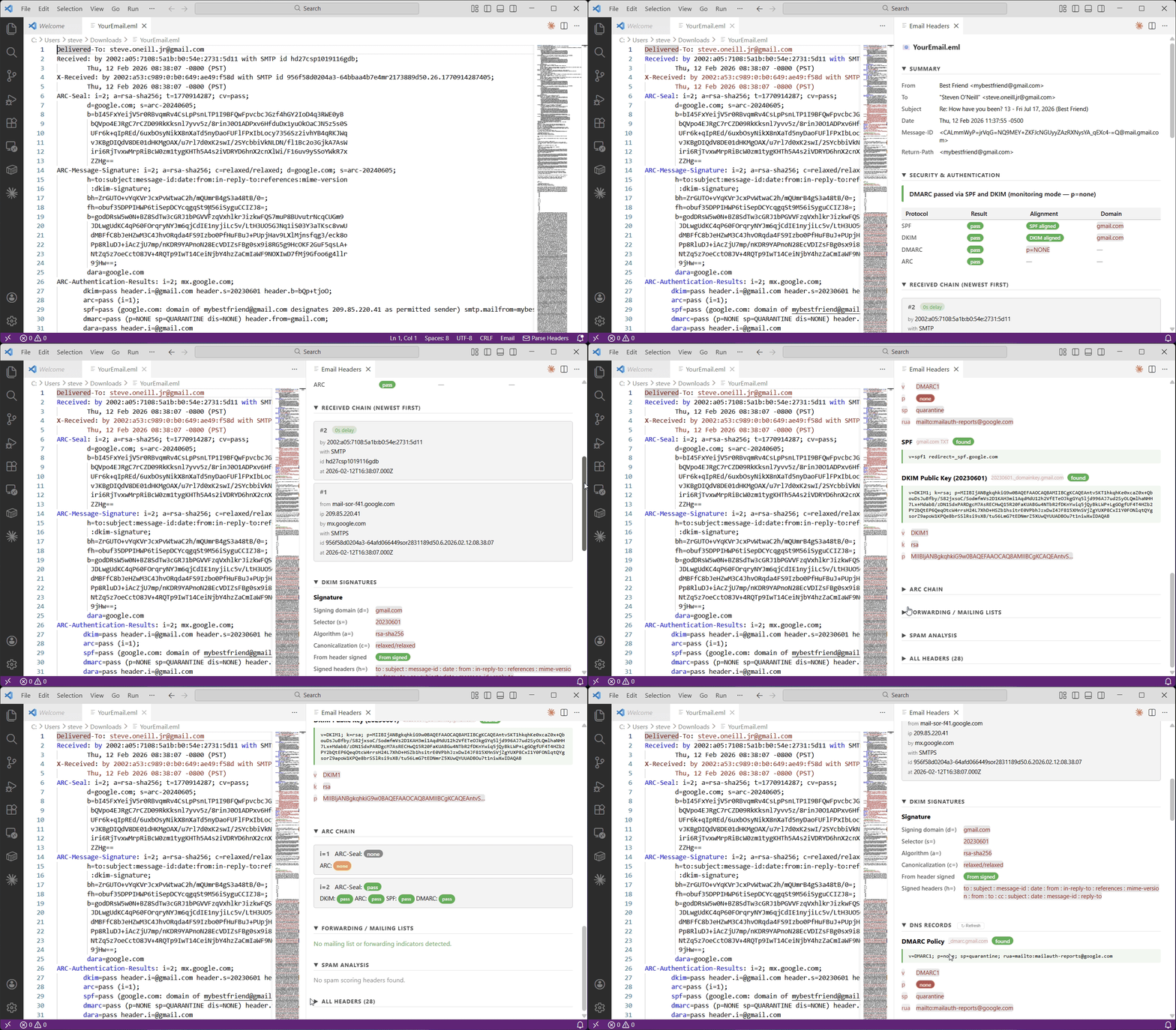
Features
- Automatic detection — open an
.eml file or paste raw headers into a .txt file and the extension activates automatically
- Syntax highlighting —
.eml files get color-coded header names, IP addresses, email addresses, and authentication results
- Security & Authentication — DMARC verdict with plain-English explanation, SPF/DKIM/DMARC/ARC result table with alignment status
- Received chain — hop-by-hop routing with timestamps and delay highlighting
- DKIM breakdown — signing domain, selector, algorithm, canonicalization, and whether the From header is covered
- ARC chain — ARC-Seal and ARC-Authentication-Results per instance
- Forwarding & mailing list detection — flags List-* headers, Resent-* headers, and X-Forwarded-To
- Spam analysis — X-Spam-Score and X-Spam-Status headers
- DNS Records — live lookup of published DMARC, SPF, and DKIM public key records for the sending domain, with tag-by-tag breakdown
- All headers — full raw header dump in a collapsible table
Usage
- Open an
.eml file, or paste raw email headers into any .txt file
- Click Parse Headers in the notification that appears, or click the Parse Headers status bar item
- You can also run the command palette entry:
Email: Parse Headers
The analysis panel opens beside your file and updates each time you invoke the command.
Reading the Security Section
| Badge |
Meaning |
Green pass |
Authentication passed |
Orange softfail / none |
Partial or neutral result — not a hard failure |
Red fail / hardfail |
Authentication failed |
aligned |
Signing/envelope domain matches the From domain (relaxed) |
not aligned |
Domain mismatch — DMARC may fail even if SPF/DKIM pass |
The verdict at the top summarizes DMARC disposition in plain English, e.g.:
- DMARC passed via DKIM and SPF
- DMARC failed: SPF passed but didn't align (sender.com vs example.com) — policy: REJECT
- DMARC passed via DKIM (monitoring mode — p=none)
Notes
- All analysis is performed locally — no data leaves your machine
- The extension uses relaxed organizational domain matching (e.g.
mail.example.com aligns with example.com)
- DNS lookups query only the sending domain's publicly published records — no email content is transmitted
- Public Suffix List (PSL) is not used, so unusual ccTLD second-levels (e.g.
co.uk) may produce incorrect alignment results
| |

