Gist Clip
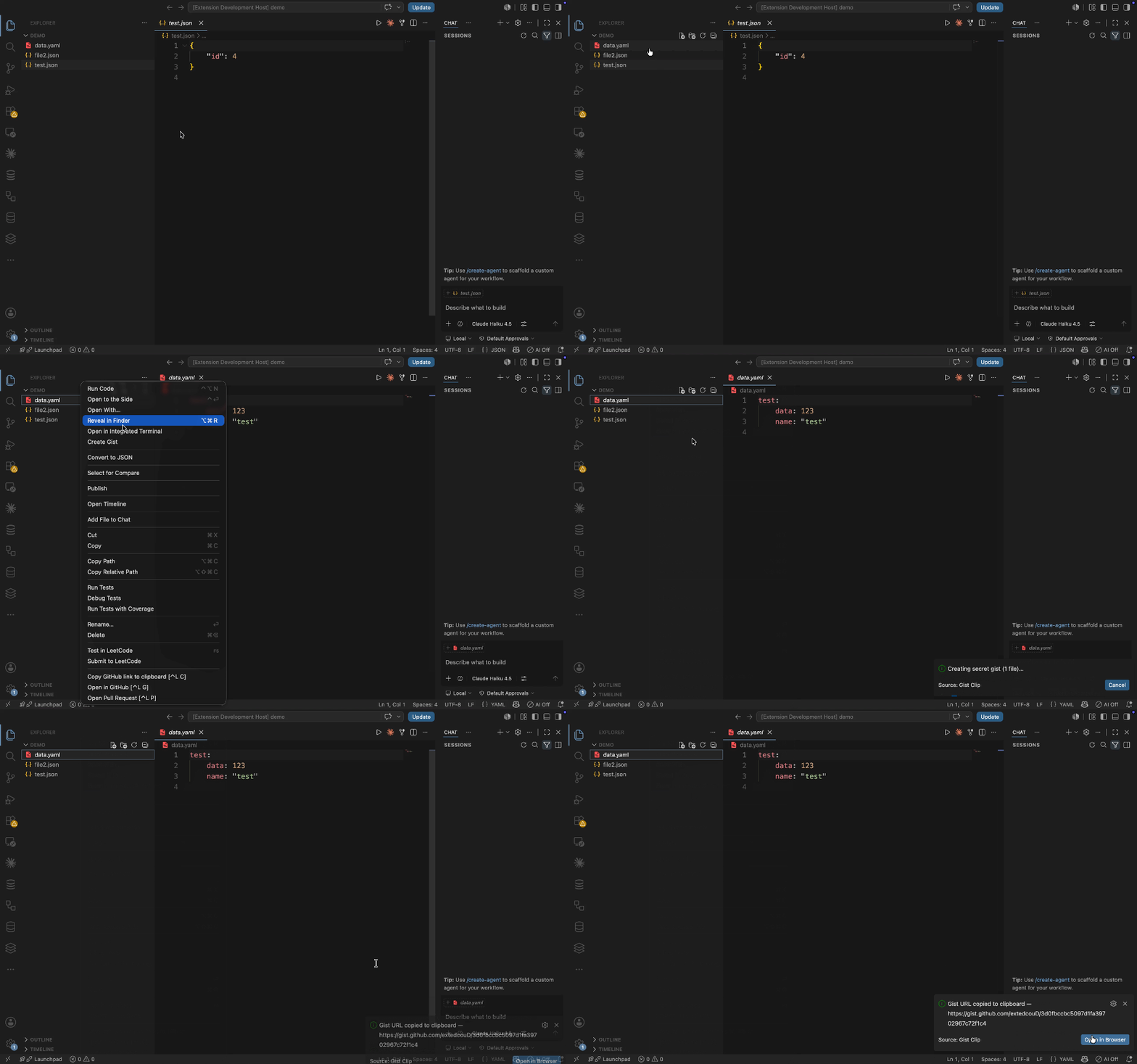
Right-click any file → Create Gist → the URL is on your clipboard, ready to paste and send.


Create a GitHub gist from a file straight from the Explorer — no browser, no tokens to manage. Gist Clip shells out to your locally-authenticated gh CLI, so it uses the GitHub account you're already signed into. Gists are secret (unlisted) by default.
Features
- One right-click — "Create Gist" on any file in the Explorer.
- URL straight to your clipboard — paste it wherever you need.
- No tokens to manage — uses your existing
gh auth login.
- Secret by default — flip
gistClip.public to share publicly.
- Multi-select → one combined gist.
- Never hangs — a hardened timeout, a Cancel button on the loader, and a single-flight lock so an in-progress run can never clobber the URL already on your clipboard.
Requirements
Usage
- Right-click a file (or select several) in the Explorer.
- Click Create Gist.
- The gist URL is copied to your clipboard. The notification offers Open in Browser.
Multiple selected files become a single gist. Folders and empty files are skipped with a warning.
Settings
| Setting |
Default |
Description |
gistClip.public |
false |
Create public (listed) gists instead of secret ones. |
gistClip.ghPath |
"" |
Path to the gh binary. Empty = auto-detect (PATH, then Homebrew paths). |
gistClip.timeoutMs |
20000 |
Kill gh and report a timeout after this many ms. 0 disables (not advised). |
gistClip.saveBeforeCreate |
"warn" |
Unsaved edits in selected files: save, warn, or ignore (gh reads disk). |
How it works
- Runs
gh gist create <files…> via child_process (no shell) and copies the resulting URL.
- The
gh binary is auto-detected (PATH, then common Homebrew locations) and cached for speed; override with gistClip.ghPath.
- The spinner and the single-flight lock wrap only the create-and-copy step — result popups appear afterward, so dismissing or ignoring them never leaves the task stuck "busy".
Install
From the Marketplace (once published): search Gist Clip in the Extensions view.
From source:
git clone https://github.com/extedcouD/gist-clip.git
cd gist-clip
npm install
npm run compile
npx @vscode/vsce package            # → gist-clip-<version>.vsix
code --install-extension gist-clip-*.vsix
Development
npm install
npm run watch                       # incremental compile
Press F5 (with this folder open as the workspace root) to launch an Extension Development Host, or:
code --extensionDevelopmentPath=. .
Contributing
Issues and pull requests are welcome — see CONTRIBUTING.md.
License
MIT © extedcouD

