100doo — Agent Orchestrator
English | 한국어
Run multiple AI coding agents — Claude / Codex / DeepSeek / GLM / Grok / Antigravity / Solar / opencode, plus custom Anthropic-compatible vendors (LM Studio, Ollama, OpenRouter …) — in parallel on isolated git worktrees, from a single VS Code window.
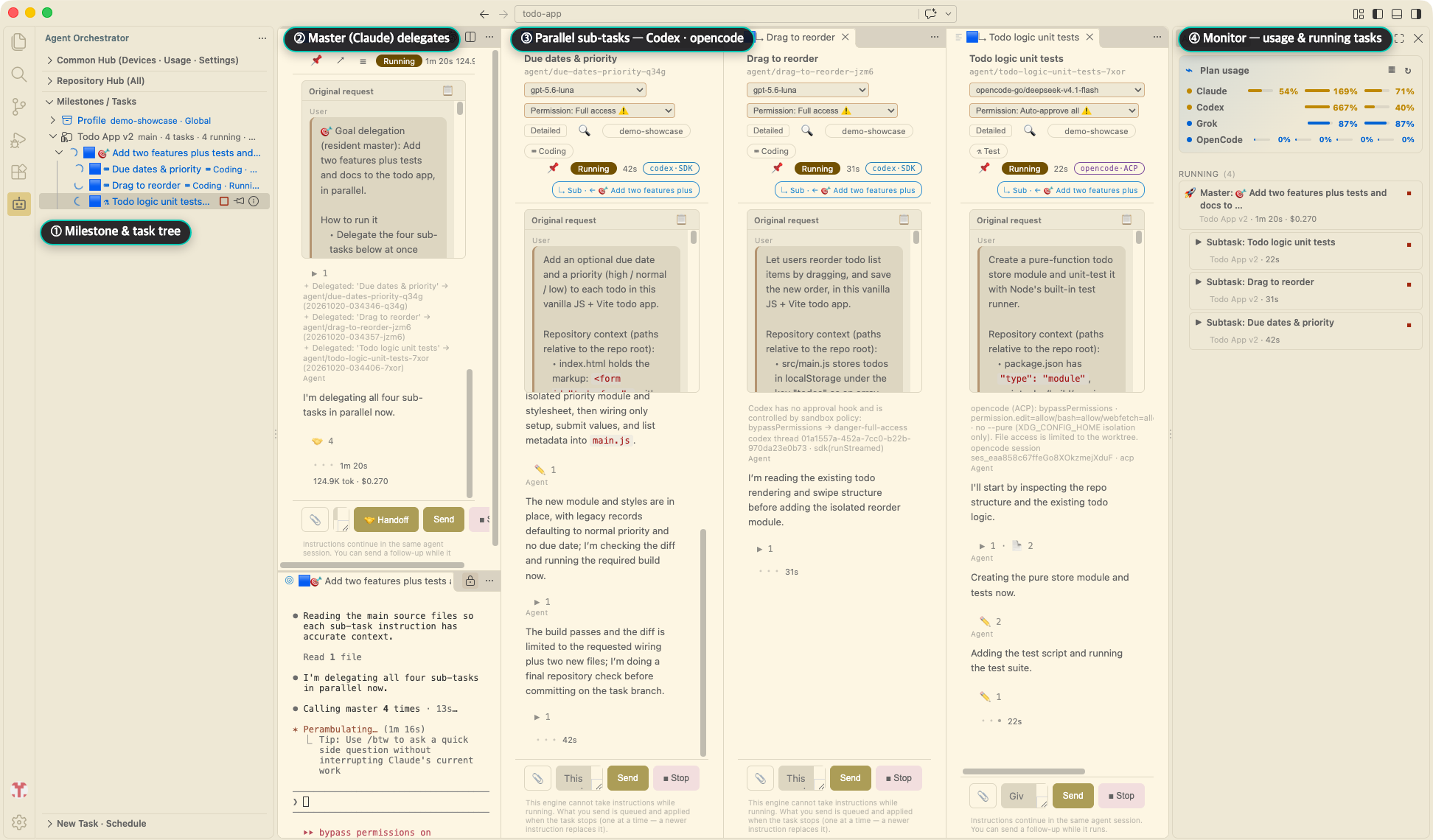
This is not a tool for driving one agent; it is a tool for operating a team of agents: delegate a goal to a master agent, watch sub-tasks run in parallel, verify the results, and merge.
Key features
- Isolated execution — every task runs on its own git worktree/branch; your main branch stays safe. Review the diff and merge with one click.
- Self-cleaning worktrees — a finished task with a clean worktree releases the directory automatically while keeping its branch, logs, diff and merge; re-running or opening it re-leases the worktree from the same branch. Uncommitted changes lock it instead (with ask to commit / discard actions), and
agentOrch.maxLiveWorktrees caps how many worktrees may live on disk at once (agentOrch.worktreeRelease: never restores the old keep-everything behaviour).
- Dependency-cache reclaim — archived milestones default to reclaiming their npm cache (override with
agentOrch.dependencyCacheArchivedMaxGenerations / dependencyCacheArchivedGraceDays); a repository cap (dependencyCacheMaxTotalGB, default 80) and idle TTL (dependencyCacheMaxIdleDays) bound growth, and leftover cleanup can delete leftover caches by hand. A monorepo milestone can declare several npm roots (Configure Dependency Roots), each fingerprinted and restored on its own.
- Goal delegation (master–sub) — a master agent splits a goal into sub-tasks and runs them in parallel; monitor master and the delegation stack in one view.
- Subtasks by kind (
work_kind) — the master names a kind (coding / research / verify / test / docs); the profile Subtasks by kind section or agentOrch.subtaskByKind picks the vendor. Unmapped kinds follow the default sub slot; research / verify default to no-merge.
- Agent swap & fallback — switch a task to another agent or profile and continue on the same worktree (
Swap Agent…); a delegated subtask stopped by a usage limit, auth error, or missing CLI moves on to a fallback profile (agentOrch.defaultSubtaskFallbackProfiles).
- Chat-style task panes — prompts, responses, and tool runs clearly separated; keep instructing in the same session, restored across VS Code restarts.
- Scheduled runs — run at a set time; missed schedules start when VS Code reopens.
- macOS companion app — a menu-bar app that keeps supervising tasks and runs schedules even when VS Code is closed. Get it at https://100doo.com .
- Verification agent (opt-in) — a read-only session cross-checks instructions, diff, and report; a fail blocks auto-merge only.
- Subtask gate (opt-in) — the extension runs your build/tests after each delegated subtask and sends new failures back to the same worktree before merge (
Agent: Enable Subtask Gate).
- Multi-repo hub — full multi-root support: per-repository milestones, vendor profiles, and monitoring in one window, plus a hub view of every repo used on this machine.
- Multi-device (opt-in) — pair your other machines (code, mobile QR, or mDNS discovery) and control their tasks from the same tree: logs, instructions, approvals, diffs, merges, remote dispatch, and task transfer; execution stays on the device that runs it.
- Brainstorming & debate — discussion-only sessions that never touch code; pick 2–3 participants for round-based debates whose conclusion prefills a new-task form.
- Chronicle — each milestone as a timeline of shipped results with a commit-activity heatmap and optional curation (Agent: Open Chronicle).
- Prompt packs & profiles — manage role prompts and extra rules as packs; save run defaults, models, and permissions as per-repository profiles.
- Dashboard — per-vendor cost/success-rate stats and per-engine stats with trend graphs; task/log search, task pinning, archive/restore. Open Model Comparison lines models up on local run metrics (cost, duration, error and merge rates).
- Labs — experimental features (intent documents, multi-device, debate, …) are turned on from one panel (
Agent: Open Labs).
- Safety — execution only in trusted workspaces; vendor API keys in VS Code SecretStorage (
Agent: Manage Vendors); file locks and a schedule ledger prevent duplicate runs.
Requirements
- VS Code 1.106+ and
git — milestones/tasks are git-worktree based (an empty folder can be initialized through onboarding)
- Claude Code CLI installed and logged in (
claude on PATH, or set agentOrch.claudePath)
- Other vendors: the corresponding CLI (
codex, grok, agy, opencode) and/or API keys via Agent: Manage Vendors (DeepSeek, GLM, Solar)
- Local / custom models: any host that serves the Anthropic Messages API (
POST {baseUrl}/v1/messages) — register it with Agent: Manage Vendors (LM Studio, Ollama, and OpenRouter presets included; plain http is allowed on private networks only, and an API key is optional)
Claude execution engines
| Engine |
Default |
How it runs |
Scope |
terminal (TUI) |
Yes |
The visible official Claude Code TUI, mirrored read-only via hooks + transcript JSONL |
All Claude master, delegated subtask, verification, merge-fix, scheduled, and unattended sessions |
sdk |
No |
Claude Agent SDK |
Live instruction injection, in-process approval, instant permission-mode changes, headless paths |
cli |
No |
claude -p with stream-json |
Fallback path |
agentOrch.engine defaults to terminal, so Claude tasks run in the official TUI you can see and type into and the
extension never handles your Claude login — the claude CLI must be installed and logged in (Agent: Doctor checks it).
sdk and cli are not removed and stay selectable. Users who never saved the setting get a one-time notice about
the change and how to switch back; anyone who explicitly saved sdk or cli keeps their current behavior with no
notice. The desktop app does not read agentOrch.engine (it has always run the claude CLI) and is unaffected.
Unattended runs: a TUI approval prompt needs a human unless you allow it in advance. Set sub permission to
bypassPermissions (subs run in an isolated worktree) via the tree's Execution permissions group, and
agentOrch.approvalWaitTimeoutMinutes (default 30) stops an unattended session from waiting forever.
The terminal engine never reads terminal output;
its read-only pane mirror uses hooks, transcript JSONL, and terminal-close events. Follow-up text is best-effort
bracketed paste—if the TUI is not accepting input, open the terminal and type there. The terminal opens below its task
pane with a configurable ratio (terminalLocation, terminalEditorSplit, terminalSplitRatio), and a watchdog repairs
broken layouts.
When terminal is selected, all Claude master, delegated subtask, verification, merge-fix, scheduled, and unattended
sessions use the terminal TUI. Automatic non-master TUIs close after completion; a resident master TUI closes after a
successful merge all. DeepSeek/GLM and other vendor terminal engines are outside this release.
Reload vs crash recovery (history isolation): A normal window reload or extension deactivate disposes transient
terminals and cleans identity/lease state—it does not enter recoveryBlocked. Only after an extension-host crash
may the host reattach in limited observation, and only when the durable creationOptions.name matches exactly one
live terminal and the strict history lock reacquires. Survivors without creationOptions.name (typical after reload
layout restore), zero/mismatch/duplicate candidates, or lock failure become recoveryBlocked: Resume/new launch and
history deletion are blocked until you close residual terminals and run Confirm Terminal Closed, Then Recover
(agentOrch.confirmTerminalRecovery). The product never adopts a terminal by display title, cwd, or PID.
| Setting |
Default |
Notes |
agentOrch.engine |
terminal |
terminal (official Claude Code TUI, default), sdk (Claude Agent SDK), or cli (claude -p stream-json). One global setting for every Claude role |
agentOrch.terminalLocation |
editor |
editor tab or bottom panel; global application UI preference, not per milestone/profile |
agentOrch.terminalEditorSplit |
below |
With terminalLocation=editor only: below opens the TUI in the editor group directly under that task's panel (task on top, terminal beneath), beside restores the previous left/right split |
agentOrch.terminalSplitRatio |
0.33 |
Vertical share of the bottom terminal group (range 0.2–0.6); skipped—default 50/50 split kept—when the editor area holds editors the extension did not open |
agentOrch.terminalRevealOnStart |
true |
Reveal TUI at start. When false, it is hidden until attention is needed where VS Code PTY/platform behavior permits |
agentOrch.terminalHistoryIsolation |
required |
Fail-closed task history isolation (OS lock + private epoch). No auto-fallback. Use launcherOnly only if you explicitly accept multi-window duplicate-writer risk and no crash-recovery safety |
agentOrch.launcherHandshakeTimeoutMs |
15000 (min 3000) |
Wait for launcher-started callback, counted from when the terminal shell starts; grows with machine load (up to 4×) |
agentOrch.terminalHistoryLockTimeoutMs |
5000 |
Strict history lease acquire wait |
Authentication and policy
The terminal engine does not collect or relay Claude login, OAuth, or API tokens. It uses the credentials of the
official Claude CLI that the user installed and logged into. This does not mean the extension never stores any token:
compatible-vendor API keys such as DeepSeek, GLM, Grok, and Solar may be stored in VS Code SecretStorage. Subscription
and API key use remain subject to each vendor's terms; third-party integrations should use the vendor's official
API-key route.
Plan usage for Claude and Codex is read through the official CLIs as well — claude -p /usage (the extension reads the
usage the CLI caches in its own config folder) and codex app-server — so neither the extension nor the desktop app reads
Claude or Codex login tokens. Grok has no non-interactive usage command yet, so Grok plan usage still reads the Grok CLI
login file.
Multiple subscription accounts (experimental)
Use more than one Claude or Codex subscription account (for example personal and work). Turn on Vendor multi-account in
Labs; while it is off, none of the account features exist.
- Register accounts in the Subscription accounts section of the Vendor Management panel. An account is just a name and a
config folder (
CLAUDE_CONFIG_DIR for Claude, CODEX_HOME for Codex). Sign in with the CLI itself.
- The default account is the implicit entry for the CLI's usual folder (
~/.claude, ~/.codex). With no accounts registered
nothing changes.
- The extension never handles credentials. Login and tokens stay with the CLI; the extension stores only names and folder
paths (
~/.agent-orch/accounts.json). Cloud-sync folders (Dropbox, iCloud …) cannot be used as an account folder.
- Plan usage shows each registered account next to the default account (tree and monitor). Every account, the default included, is looked up through its CLI (
claude -p /usage, codex app-server). Other accounts are looked up about every 15 minutes and never used for limit decisions. The desktop app and the mobile view show the same rows; the dashboard still shows the default account only.
- Removing an account from the list is not logging out. The folder and its login stay as they were.
- The task panel header and the tree tooltip show the account name for tasks stamped with a non-default account.
- Cross-device transfer is blocked for tasks stamped with a non-default account during the experiment.
- Importing a profile that refers to an account id missing on this device shows a warning; such tasks stop when run.
Privacy
100doo collects no telemetry. Your code, prompts, and task history stay on your computer, and agent traffic goes directly to the AI services you choose. See the privacy policy.
Source code
The source code is currently not public. We plan to open the repository after v1.0. Until then, feedback and bug reports are welcome through the Marketplace Q&A.
License
Apache License 2.0 — © ExperLab
한국어
여러 AI 코딩 에이전트 — Claude / Codex / DeepSeek / GLM / Grok / Antigravity / Solar / opencode, 그리고 직접 등록하는 Anthropic 호환 벤더(LM Studio·Ollama·OpenRouter …) — 를 격리된 git worktree 위에서 병렬로 실행하는 VS Code 확장.
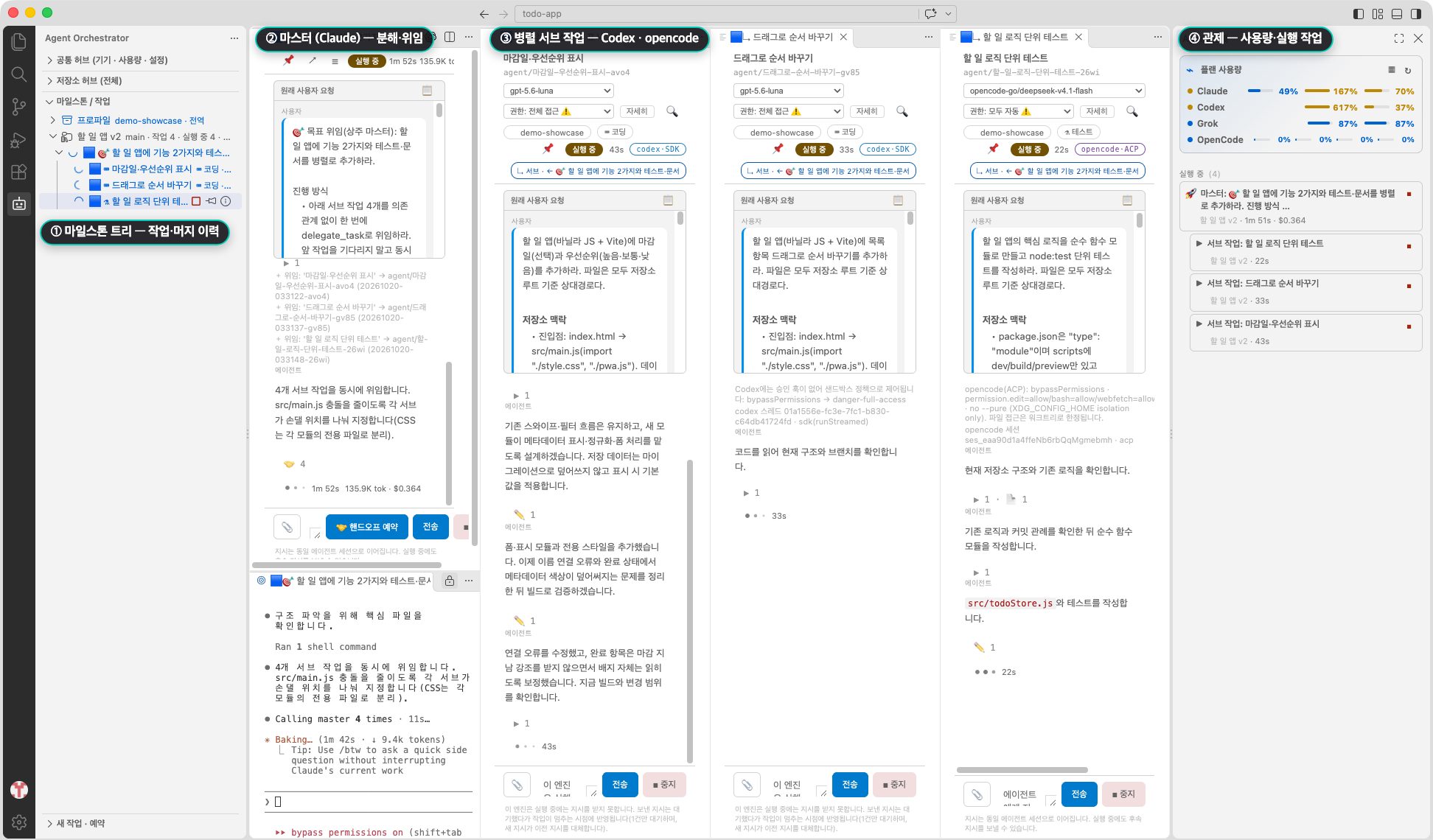
에이전트 하나를 돌리는 도구가 아니라 에이전트 팀을 운영하는 도구입니다. 마스터 에이전트에게 목표를 위임하고, 서브 작업이 병렬로 도는 것을 관제하고, 결과를 검증한 뒤 머지합니다.
핵심 기능
- 작업별 격리 실행 — 작업마다 전용 git worktree/브랜치. 메인 브랜치는 안전하며, diff 확인 후 클릭 한 번으로 머지.
- 워크트리 자동 정리 — 완료된 작업의 워크트리가 깨끗하면 자동 해제(브랜치·로그·diff·머지는 그대로 유지), 재실행·열기 시 같은 브랜치로 자동 재대여. 미커밋 변경이 남으면 해제 대신 잠금(커밋 요청 / 폐기 후 반납 액션),
agentOrch.maxLiveWorktrees로 디스크에 살아 있는 워크트리 수 상한 지정(agentOrch.worktreeRelease: never면 예전처럼 전부 유지).
- 의존성 캐시 회수 — 보관 마일스톤 캐시는 기본 전량 회수(
agentOrch.dependencyCacheArchivedMaxGenerations / dependencyCacheArchivedGraceDays로 조정), 저장소 총량 상한(dependencyCacheMaxTotalGB, 기본 80 GB)과 유휴 TTL(dependencyCacheMaxIdleDays)이 폭주를 막고, 잔여 정리에서 남은 캐시를 손으로 지울 수 있다. 모노레포 마일스톤은 npm 루트를 여러 개 등록할 수 있고(의존성 루트 설정), 루트마다 지문·복원을 따로 처리한다.
- 목표 위임 (마스터–서브) — 마스터가 목표를 서브 작업으로 분해해 병렬 실행; 마스터와 위임 스택을 한 화면에서 관제.
- 종류별 서브 실행기 (
work_kind) — 마스터는 종류(coding / research / verify / test / docs)만 선언하고, 프로파일 종류별 서브 또는 agentOrch.subtaskByKind가 벤더를 고름. 미매핑은 기본 서브 슬롯으로 폴백, research / verify는 기본 머지 제외.
- 에이전트 교체 · 자동 폴백 — 작업을 다른 에이전트·프로파일로 바꿔 같은 워크트리에서 이어 가고(
에이전트 교체…), 한도·인증 오류·CLI 없음으로 멈춘 위임 서브는 대체 프로파일로 넘어감(agentOrch.defaultSubtaskFallbackProfiles).
- 채팅형 작업창 — 프롬프트/응답/도구 실행 구분 표시, 같은 세션에서 이어서 지시, VS Code 재시작 후에도 복원.
- 예약 실행 — 실행 시각 지정, 트리에 남은 시간 표시, 밀린 예약은 다시 열 때 기동.
- macOS 동반 앱 — 트레이에서 상시 관제하고, VS Code가 꺼져 있어도 예약 실행을 이어 갑니다. https://100doo.com 에서 받습니다.
- 검증 에이전트 (opt-in) — 읽기 전용 세션이 지시문·diff·보고를 대조해 pass/fail 판정; fail은 자동 머지만 차단.
- 서브 작업 게이트 (opt-in) — 위임 서브가 끝날 때마다 확장이 빌드·테스트를 돌려 새 실패를 머지 전에 같은 워크트리로 돌려보냄(
Agent: 서브 작업 게이트 켜기).
- 멀티 저장소 허브 — 멀티루트 정식 지원: 한 창에서 저장소별 마일스톤·프로파일·관제, 이 기계에서 쓴 저장소를 허브 뷰로 집계.
- 다중 기기 (opt-in) — 다른 기기를 페어링(코드·모바일 QR·mDNS 발견)해 그 기기의 작업을 같은 트리에서 관제: 로그·추가 지시·승인·diff·머지·원격 디스패치·작업 이관; 실행은 해당 기기에 고정.
- 브레인스토밍 · 난상토론 — 코드를 건드리지 않는 논의 전용 세션; 참가자 2~3명 라운드 토론 후 결론을 새 작업 폼에 프리필.
- 연대기 — 마일스톤을 결과물의 타임라인으로: 커밋 활동 히트맵 + 선택적 큐레이션 (Agent: 연대기 열기).
- 프롬프트 팩 · 프로파일 — 역할 프롬프트·추가 규칙을 팩으로, 실행 기본값·모델·권한을 저장소별 프로파일로.
- 대시보드 — 벤더별 비용·성공률과 엔진별 통계·추이 그래프; 작업·로그 검색, 작업 고정, 보관/복원. 모델 비교 열기로 로컬 실행 계측 기준 모델별 비용·소요·오류율·머지율을 나란히 비교.
- 실험실 — 의도 문서·다중 기기·토론 등 실험 기능을 한 패널에서 켬(
Agent: 실험실 열기).
- 안전 장치 — 신뢰된 워크스페이스에서만 실행; 벤더 API 키는 SecretStorage 저장(
Agent: 벤더 관리); 파일 락·발화 원장이 중복 실행 차단.
요구 사항
- VS Code 1.106 이상,
git — 마일스톤/작업은 git worktree 기반 (빈 폴더는 온보딩으로 초기화 가능)
- Claude Code CLI 설치·로그인 (
claude가 PATH에 있거나 agentOrch.claudePath 지정)
- 다른 벤더: 해당 CLI(
codex·grok·agy·opencode) 또는 Agent: 벤더 관리로 등록한 API 키(DeepSeek·GLM·Solar)
- 로컬·커스텀 모델: Anthropic Messages API(
POST {baseUrl}/v1/messages)를 서빙하는 호스트라면 Agent: 벤더 관리로 직접 등록 (LM Studio·Ollama·OpenRouter 프리셋 제공, 평문 http는 사설망만 허용, API 키는 없어도 됨)
- 사양이 낮은 로컬 서버는 동시 실행 한도로 보호한다 — 벤더 정의의
maxConcurrent(프리셋 기본 1) 또는 설정 agentOrch.vendorMaxParallel(내장 벤더 포함, { "codex": 2 } 형태)로 지정하며, 자리를 기다리는 작업은 트리에 ⏳ 슬롯 대기로 표시된다(다른 벤더는 막히지 않는다)
Claude 실행 엔진
| 엔진 |
기본 |
실행 방식 |
범위 |
terminal (TUI) |
예 |
사용자가 보는 공식 Claude Code TUI, hooks·트랜스크립트 JSONL로 읽기 전용 미러 |
Claude 마스터·위임 서브·검증·merge-fix·예약·무인 세션 모두 |
sdk |
아니오 |
Claude Agent SDK |
라이브 지시 주입·in-process 승인·권한 모드 즉시 변경·헤드리스 경로 |
cli |
아니오 |
claude -p + stream-json |
폴백 경로 |
agentOrch.engine 기본값이 terminal이라 Claude 작업은 사용자가 보고 입력할 수 있는 공식 TUI에서 실행되며
확장은 Claude 로그인 자격을 취급하지 않습니다 — claude CLI 설치·로그인이 필요합니다(Agent: Doctor로 확인).
sdk·cli는 제거되지 않고 계속 선택할 수 있습니다. 설정을 저장한 적 없는 사용자에게는 전환 사유와 되돌리는
법을 담은 1회 안내가 뜨고, sdk/cli를 명시 저장해 둔 사용자는 안내 없이 현행 그대로입니다. 데스크톱 앱은
agentOrch.engine을 읽지 않고 claude CLI 고정이라 영향을 받지 않습니다.
무인 실행 주의: TUI 승인 프롬프트는 미리 허용해 두지 않으면 사람이 봐야 넘어갑니다. 트리의 실행 권한 그룹에서
서브 권한을 bypassPermissions로 두면(서브는 격리 워크트리에서 실행) 통과하며,
agentOrch.approvalWaitTimeoutMinutes(기본 30분)가 무인 세션의 무한 대기를 끊습니다.
터미널 엔진은 터미널 출력을 읽지 않으며,
읽기 전용 패널 미러는 hooks·트랜스크립트 JSONL·터미널 종료 이벤트만 사용합니다. 패널 후속 지시는
bracketed paste best-effort이므로 TUI가 입력 대기 상태가 아니면 유실될 수 있습니다. 이때 터미널을 열어 직접
입력하세요. 터미널은 작업창 바로 아래에 설정 가능한 비율로 열리며(terminalLocation·terminalEditorSplit·
terminalSplitRatio) 워치독이 깨진 배치를 복구합니다.
terminal을 선택하면 Claude 마스터·위임 서브·검증·merge-fix·예약·무인 세션 모두 terminal TUI를 사용합니다.
자동 비-master TUI는 완료 뒤 자동으로 닫히며, resident master TUI는 성공적인 일괄 머지 뒤 자동으로 닫힙니다.
DeepSeek/GLM 및 다른 벤더의 terminal 엔진은 이번 릴리스 범위 밖입니다.
리로드 vs 크래시 복구(히스토리 격리): 정상 창 리로드·비활성화는 일시 터미널을 정리하고 identity/lease를
비우며 recoveryBlocked가 아닙니다. extension host 비정상 종료 후에만, durable creationOptions.name이
정확히 하나인 후보와 일치하고 strict history lock을 다시 잡을 수 있을 때 제한 관찰로 붙습니다.
creationOptions.name이 없는 생존 터미널(리로드 레이아웃 복원에서 흔함), 후보 0/불일치/중복, lock 실패는
**recoveryBlocked**입니다. Resume·새 실행·히스토리 삭제가 막히므로 잔존 터미널을 직접 닫은 뒤
「터미널 종료 확인 후 복구」 (agentOrch.confirmTerminalRecovery)를 실행하세요. 표시 이름·cwd·PID로
터미널을 추정·adopt하지 않습니다.
| 설정 |
기본값 |
설명 |
agentOrch.engine |
terminal |
terminal(공식 Claude Code TUI, 기본) / sdk(Claude Agent SDK) / cli(claude -p stream-json). Claude 전 역할에 적용되는 전역 설정 하나 |
agentOrch.terminalLocation |
editor |
editor 탭 또는 하단 panel; 마일스톤/프로파일별로 덮어쓰지 않는 전역 application UI 취향 |
agentOrch.terminalEditorSplit |
below |
terminalLocation='editor'일 때만 유효. below는 TUI를 그 작업의 작업창 바로 아래 에디터 그룹에 열어 위=작업창 / 아래=터미널 한 열을 만들고, beside는 종전 좌우 동작으로 되돌립니다 |
agentOrch.terminalSplitRatio |
0.33 |
아래 터미널 그룹의 세로 비율(범위 0.2~0.6). 에디터 영역에 확장이 만들지 않은 에디터가 섞여 있으면 비율 적용을 건너뛰고 기본 50/50 분할을 유지합니다 |
agentOrch.terminalRevealOnStart |
true |
시작 시 TUI 표시. false면 VS Code PTY/플랫폼 동작이 허용하는 한 주의가 필요할 때까지 숨깁니다 |
agentOrch.terminalHistoryIsolation |
required |
실패 폐쇄형 작업 history 격리(OS lock + private epoch). 자동 폴백 없음. launcherOnly는 멀티 윈도우 중복 writer·크래시 복구 부재를 명시한 선택 |
agentOrch.launcherHandshakeTimeoutMs |
15000 (최소 3000) |
터미널 셸이 뜬 뒤 launcher-started 콜백 대기. 기기 부하만큼 늘어남(최대 4배) |
agentOrch.terminalHistoryLockTimeoutMs |
5000 |
strict history lease 획득 대기 |
인증과 정책
터미널 엔진은 Claude 로그인/OAuth/API 토큰을 수집·중계하지 않고, 사용자가 설치·로그인한 공식 Claude CLI의
자격을 그대로 씁니다. 그렇다고 확장 전체가 어떤 토큰도 저장하지 않는 것은 아닙니다. DeepSeek·GLM·Grok·Solar 등
호환 벤더 API 키는 VS Code SecretStorage에 저장될 수 있습니다. 구독/API 키 사용에는 각 벤더 약관이 적용되며,
서드파티 연동에는 각 벤더의 공식 API 키 경로를 권장합니다.
Claude·Codex 플랜 사용량도 공식 CLI로 읽습니다. claude -p /usage(CLI가 자기 설정 폴더에 남긴 사용량을 확장이 읽음)와
codex app-server를 쓰므로, 확장과 데스크톱 앱 어디서도 Claude·Codex 로그인 토큰을 읽지 않습니다. Grok은 아직
비대화형 사용량 명령이 없어 Grok 플랜 사용량은 Grok CLI 로그인 파일을 읽습니다.
구독 계정 여러 개 쓰기 (실험)
Claude·Codex 구독 계정을 둘 이상(예: 개인·회사) 쓰는 기능입니다. 실험실의 "벤더 멀티계정"을 켜야 하며, 꺼져 있으면 계정 기능은 전혀 보이지 않습니다.
- 등록: 벤더 관리 패널의 구독 계정 구역. 계정은 이름과 설정 폴더(
CLAUDE_CONFIG_DIR·CODEX_HOME)뿐이며 로그인은 CLI에서 직접 합니다.
- 기본 계정은 CLI 기본 폴더(
~/.claude·~/.codex)를 뜻하는 암묵 항목입니다. 등록하지 않으면 동작이 그대로입니다.
- 확장은 자격증명을 다루지 않습니다. 로그인·토큰은 CLI 몫이고 확장은 이름과 폴더 경로만 저장합니다. 클라우드 동기화 폴더는 계정 폴더로 쓸 수 없습니다.
- 플랜 사용량에 등록한 계정마다 한 행이 생깁니다(트리·관제). 기본 계정을 포함해 모든 계정을 그 CLI로 조회합니다(
claude -p /usage, codex app-server). 다른 계정은 약 15분마다 조회하고 한도 판정에는 쓰지 않습니다. 데스크톱 앱과 모바일 화면에도 같은 행이 보이며, 대시보드는 여전히 기본 계정만 보입니다.
- 목록에서 빼기는 로그아웃이 아닙니다. 폴더와 로그인 상태는 그대로 남습니다.
- 비기본 계정 작업은 작업창 헤더·트리 툴팁에 계정 이름이 표시되고, 기기 간 이관은 막힙니다.
- 가져온 프로파일이 이 기기에 없는 계정 id를 가리키면 가져올 때 경고합니다.
개인정보
100doo는 사용 통계를 수집하지 않습니다. 코드·프롬프트·작업 기록은 사용자 컴퓨터에만 남고, 에이전트 통신은 사용자가 고른 AI 서비스로 바로 갑니다. 자세한 내용은 개인정보 처리방침을 보세요.
소스 코드
소스 코드는 현재 비공개입니다. v1.0 이후 저장소 공개를 계획하고 있습니다. 그 전까지 피드백과 버그 신고는 마켓플레이스 Q&A로 부탁드립니다.
라이선스
Apache License 2.0 — © ExperLab

