Dynamo Tools is an extensive tool kit for use by BBx developers. It works with BBj as well older BBx versions including pro5 and VPro5. Dynamo Tools provides a Visual Studio Code extension that significantly improves the productivity for Business Basic developers.
Features
This extension provides code completion for:
- Templated string variables
- BBj Templated String objects
- Custom Object classes, constructor, instance, and static methods
- Global fields and methods
- Called program names and arguments
- Line labels including symbolic line labels
It also provides documentation links to:
- classes
- constructor methods
- instance methods
- static methods
- called programs
Installation
Although Dynamo Tools is a licensed product, this Dynamo Tools VS Code Extension is provided at no charge and may be installed from the Visual Studio Code Marketplace. It will make your life as a BBj developer much easier.
It works with, or without, the BBj Programming Language Support VS Code extension.
Configuration
This extension is driven by what are called Company Libraries. You can select and prioritize company libraries on the Company Libraries Configuration Page. You can access this page from using the 'books' icon located on the top to the right of any open tabs.
| Library Code |
Description |
| BB |
BBj Language |
| BJ |
BBj Admin API |
| BG |
BBj GridExWidget |
| CD |
Dynamo Tools |
| DY |
Dynamo ERP |
| DS |
Dynamo ERP demo data |
| XXX |
Your own library |
All libraries are optional, although the BBj Language Library is added automatically.
- You can install the two letter Library Codes using the Download New button.
- You can refresh the remote library timestamps to see if a new version is available using the Refresh Remote button.
- You can download the latest version using the Download Updates button.
- You can import your own libraries as well. These will have 3 letter Library Codes. Contact support@excellware.com to request the library schema.
- You can view the library statistics such as number of classes, methods, called programs, etc. using the Stats button.
- You can prioritize the installed libraries by highlighting a library row and using the up/down arrows.
Usage
- The code completion contents are derived from the Dynamo Tools Data Dictionary and from a source code repository.
- Enable the option to Export your Dynamo Tools Data Dictionary using Company Information Maintenance located on the Development Projects view. This option should only be enabled on the one server where the master copy of the Data Dictionary is maintained. The Company Library is updated upon exiting Data Dictionary Maintenance.
Code Completion
- String template code completion triggered by DDNAME (Data Dictionary Name) followed by a period, i.e., CM01. Pasted field name will match the case of the DDNAME.
- BBj Templated String object code completion is triggered by DDNAME followed by !., i.e., cm01!. Getters and Setters for each field will be offered.
- Arguments for all called routines are triggered by the word 'call' followed by a space.
- Constructor signatures for Custom Objects are triggered by the word 'new' followed by a space.
- Signatures for instance methods of objects are triggered by entering a period after an object variable or chained method.
- Static Method code completion is triggered by class name followed by a period, i.e., DT.
- Line Label code completion is triggered by GOTO, GOSUB, err=, end=, dom=, tbl=, etc.
- Global fields and local methods are displayed by entering '#'.
Testing
- Open the sample test program from the Command Palette with "Dynamo Tools: Open Test Cases".
Congiuration Note
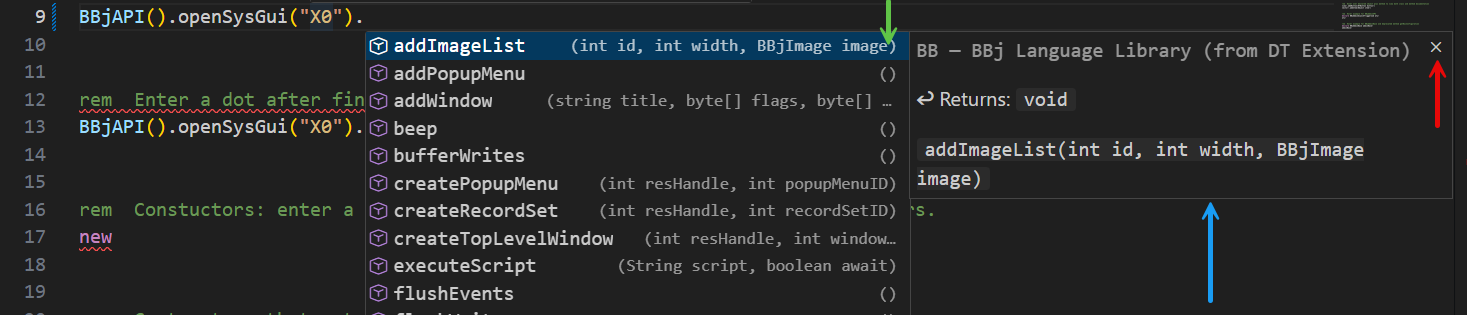
The code completion features will display two panels as shown below. But in some cases the secondary panel indicated with the blue arrow, that indicates which Company Library the highlighted option is located in does not appear. If you ever close this secondary panel using the X indicated by the red arrow, the secondary panel will close and not ever open, even after restarting. But if you hover your mouse over the area indicated by the green arrow, a chevron will appear. Clicking on it will re-open the secondary panel and it will remain open for subsequent completions.
Supported Programming Languages
- intended for BBj
- but works with most BBx (pro5/VPro5) programs too
- this extension attempts to automatically classify programs as BBj files based on a .bbj file name extension and the contents of the file. Should the Language Mode (displayed at the bottom right of the page) not be BBj, then click the button at the top right labelled: "Dynamo Tools: Reopen as BBj".
Release Notes
See CHANGELOG.md for a complete list of changes.
Support
Issues & Requests
Please email any Feature Requests or Problem Reports to support@excellware.com.
License
This project is licensed under the MIT License.
Thank You
Thank you for using our products!
-Len Krause and the Excellware team

