
embeddedflow (Beyond an LVGL Design Tool)Design LVGL UIs in .embf projects with a live WASM preview (intro: https://youtu.be/c0BiBdthhYo), named styles, bindings, animations, and C codegen for LVGL 8/9. Installation Launch VS Code Quick Open ( Ctrl+P), paste the following command, and press enter.Copied to clipboard |

embeddedflow — LVGL UI design in VS CodeDesign touch UIs for embedded devices without leaving your editor. embeddedflow lets you lay out screens in a visual preview, wire navigation and interactions, and export ready-to-build C code for LVGL. Introduction
Design visually in VS Code, preview with real LVGL, and generate firmware-ready C code. What's new in v1.5.6 / v1.5.7Install the latest
Earlier 1.5.x
What's new in v1.3.0
What's new in v1.2.x (pre-release)
What's new in v1.1.xv1.1.x improves preview fit-to-window zoom, settings/navigation in the station sample, reliable What's new in v1.0.0v1.0.0 is the first feature-complete release for day-to-day LVGL UI design in VS Code: edit named styles, data fields, bindings, and animations in the Properties panel, generate matching C, and use the new knob widget.
Earlier highlights (still included): grouped widgets, canvas rulers & pan, page flows, If you installed an older Marketplace build and see "command not found", install v0.3.3 or newer and reload the window. Why embeddedflow?Building LVGL interfaces by hand means juggling object trees, styles, screen loads, and event callbacks in C. embeddedflow keeps your UI in a single You get:
No separate designer app. No cloud account required for local design. Everything runs inside VS Code or Cursor (and companion hosts for Visual Studio / Eclipse where offered). Features (detailed)Project format (
|
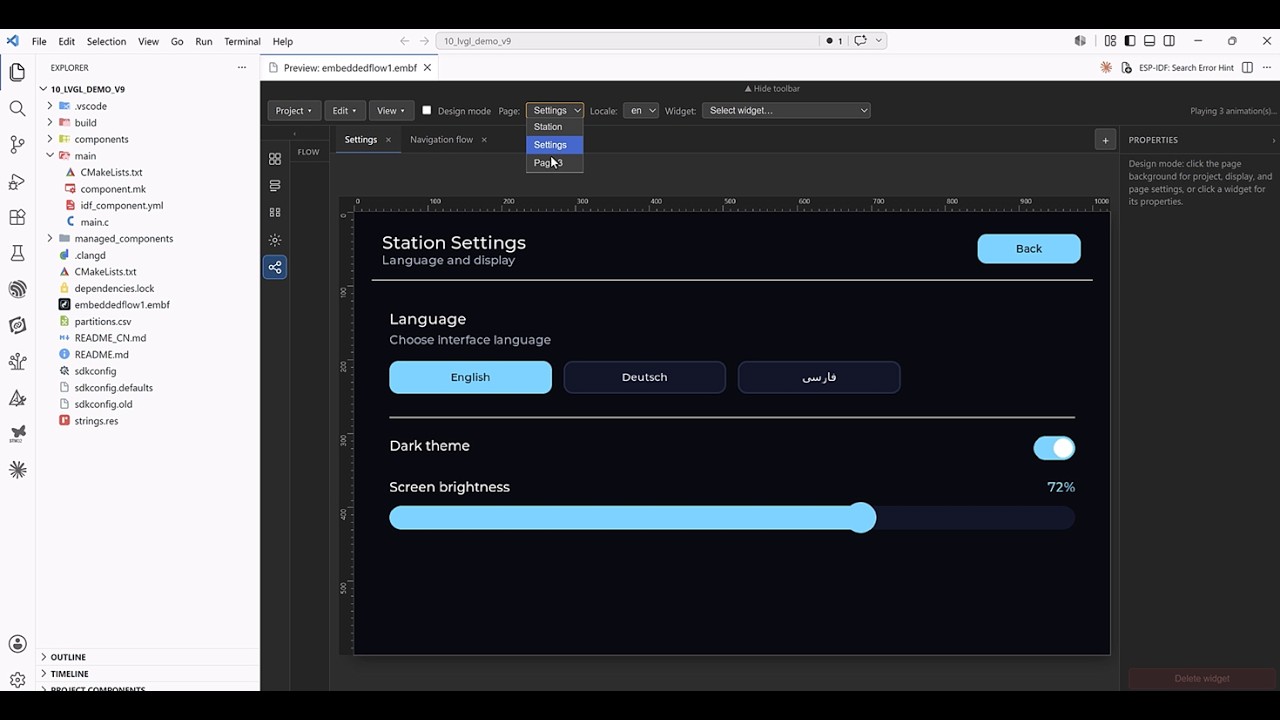
| Mode | Purpose |
|---|---|
| Design | Place, select, drag, resize, and edit widgets; overlay shows selection and snap guides |
| Run | Interact with the UI (buttons, sliders, etc.) and test navigation / swipes like an end user |
Preview toolbar
- Workspace tabs — closable tabs for each page preview and Navigation flow
- Page selector and page list sidebar (add, rename, remove pages)
- Design toggle
- Zoom — auto-fit or fixed scale (10%–400%)
- Widget dropdown — quick selection of widgets on the active page
- Undo / Redo — design edits with history preserved across reloads when supported by the host
- New Project — create a starter
.embfwithout leaving the preview
Canvas interaction (design mode)
- Click to select; Shift add to selection; Ctrl/Cmd toggle selection
- Rubber-band marquee on empty canvas (with same modifiers)
- Drag to move selection; magnetic snap to edges and centers of other widgets
- Multi-select inspector — align, distribute, match size, combine into group
- Delete / Backspace removes selected widget(s)
- Escape clears selection; in group-edit mode, exits back to the whole group
Widget palette
Add widgets from the sidebar: label, button, slider, switch, bar, arc, knob, checkbox, dropdown, roller, textarea, line, image, container, panel, spinner.
Property inspector
- Position, size, hidden flag
- Type-specific fields (text, ranges, options, etc.)
- Appearances — styles/events where applicable
- Images — asset id combobox, browse to register files into
project.images[] - Page inspector — page name, display, theme, codegen path; named styles and data fields lists
- Widget inspector —
styleRefs, numeric bindings, and animations where applicable
Groups (container / panel)
- Combine into group — merge multi-selected siblings into one container
- Ungroup — lift children to the parent level
- Save to library — reuse the group on other pages/projects
- United selection — one click selects the whole group
- Edit contents — edit children independently (double-click or inspector); orange outline shows group bounds while editing
Flows & navigation
Define behavior declaratively in the project JSON and edit from the Navigation flow workspace tab (or the Flow icon in the left rail):
- Flow diagram — pages as draggable nodes; connection lines show widget clicks and swipe transitions; bidirectional pairs use one double-headed connector
- Page inspector (flow) — select a node to list, add, edit, or remove transitions for that page
- Widget events — e.g. button click → navigate,
set_locale,select_button_group(exclusive highlight),play_animations, set theme, or other actions - Page navigation — target page, animation (slide, fade, etc.), duration
- Swipe gestures — swipe left/right/top/bottom to open a page with the same transition options
- Preview — run mode follows navigation stack; back navigation where configured
Generated C includes navigation and event wiring aligned with your flows (LVGL 8 and 9).
C code generation
embeddedflow: Generate C Code writes firmware-oriented sources (default ui_output next to the .embf, or project.outputPath / workspace setting):
ui.c/ui.h— application entry- Per-page screen sources
- Event handlers and navigation stubs matching flows
- Respects LVGL version and include path from the project
- With strings.res:
ui_strings.c/h, per-locale.deffiles,ui_strings_refresh.c, and (when RTL locales exist)ui_rtl_fonts.c/hplusembf_font_latin1_*.c— add those sources to your firmwareCMakeLists.txt/ build (codegen does not emit CMake)
Optional: embeddedflow.liveGenerateOnSave regenerates on save (skips when parse/semantic errors exist).
Configure in .embf:
project.lvglVersion—8.4.0,9.2.2,9.3.0,9.4.0,9.5.0project.lvglInclude— e.g.lvgl.hvslvgl/lvgl.hfor ESP-IDF
Editor integration
- Language —
.embfwith JSON schema validation (embf.schema.json) - Commands on editor title bar when a
.embffile is active - Explorer — New Project, Open Preview, Generate Code on folders/files
- Sample —
sample/demo.embfincluded in the extension package - Output log — embeddedflow: Show Output Log for codegen and diagnostics
Workspace settings
| Setting | Description |
|---|---|
embeddedflow.defaultLvglVersion |
LVGL version for New Project wizard |
embeddedflow.autoOpenPreview |
Open/refresh preview when opening .embf or on startup if a root .embf exists |
embeddedflow.outputDirectory |
Default codegen folder when not set in the project |
embeddedflow.liveGenerateOnSave |
Regenerate C on save |
Commands
| Command | What it does |
|---|---|
| embeddedflow: Open UI Preview | Live LVGL canvas for the current .embf |
| embeddedflow: New Project | Wizard: folder, name, LVGL version → new .embf |
| embeddedflow: Generate C Code | Export C sources |
| embeddedflow: Add Font to Project | Register a font; optional lv_font_conv conversion |
| embeddedflow: Open String Resources | Edit linked strings.res (locales and translation keys) |
| embeddedflow: Show Output Log | Extension log |
Getting started
- Install from the Marketplace or install the latest
.vsixand reload. - Run embeddedflow: New Project or open
sample/demo.embf. - Click Open UI Preview (editor toolbar or Command Palette).
- Enable Design to add and arrange widgets; disable it to test interactions.
- Run embeddedflow: Generate C Code and copy output into your firmware tree.
Who is this for?
- Firmware developers using LVGL on microcontrollers
- Teams who want a repeatable UI workflow in the same repo as application code
- Anyone prototyping embedded touch UIs before committing to full C layout code
Requirements
- VS Code 1.85+ or Cursor
- For firmware: your LVGL / ESP-IDF / SDK project to compile generated C
Feedback
- Website: https://erminity.com
- Issues & feature requests: contact Erminity via the website
Licensing
EmbeddedFlow is proprietary software owned by Erminity. See LICENSE and EULA (product files LICENSE / EULA.md).
Community
- Free for personal, educational, and non-commercial use
- No source code distribution
Premium
- Commercial use allowed
- Paid subscription (monthly / yearly), licensed per user
Enterprise
- Everything in Premium
- Dedicated support
- Custom licensing and pricing — Contact Sales at https://erminity.com
Third-party components used by the product (for example LVGL for preview) remain under their own licenses — see docs/THIRD-PARTY.md.