Parley
Chat with local (and remote) LLMs right inside VS Code — LM Studio style. Bring your own
models and keys, keep every conversation as a versionable file, and use tools, embedded model
management and neural text‑to‑speech without leaving the editor.
Why Parley
- 🔒 Local‑first & private — runs against your own LLM (LM Studio, Ollama…), your keys live in
VS Code SecretStorage, the managed server binds to
127.0.0.1, and there is no telemetry.
- 🧩 Five backends, one UI — OpenAI‑compatible, Ollama, OpenRouter, Google Gemini and
Anthropic Claude, switchable per conversation.
- 📄 Conversations as files — each chat is a human‑readable
.chat (config + history) you can
diff, version and share.
- 🦙 Models, batteries included — manage an embedded Ollama and browse/download GGUF models
from Hugging Face without installing anything.
- 🔧 Agentic tools — workspace filesystem + MCP servers (function calling) on every backend.
- 🗣️ Read aloud — system voices or self‑contained neural Piper TTS.
Features
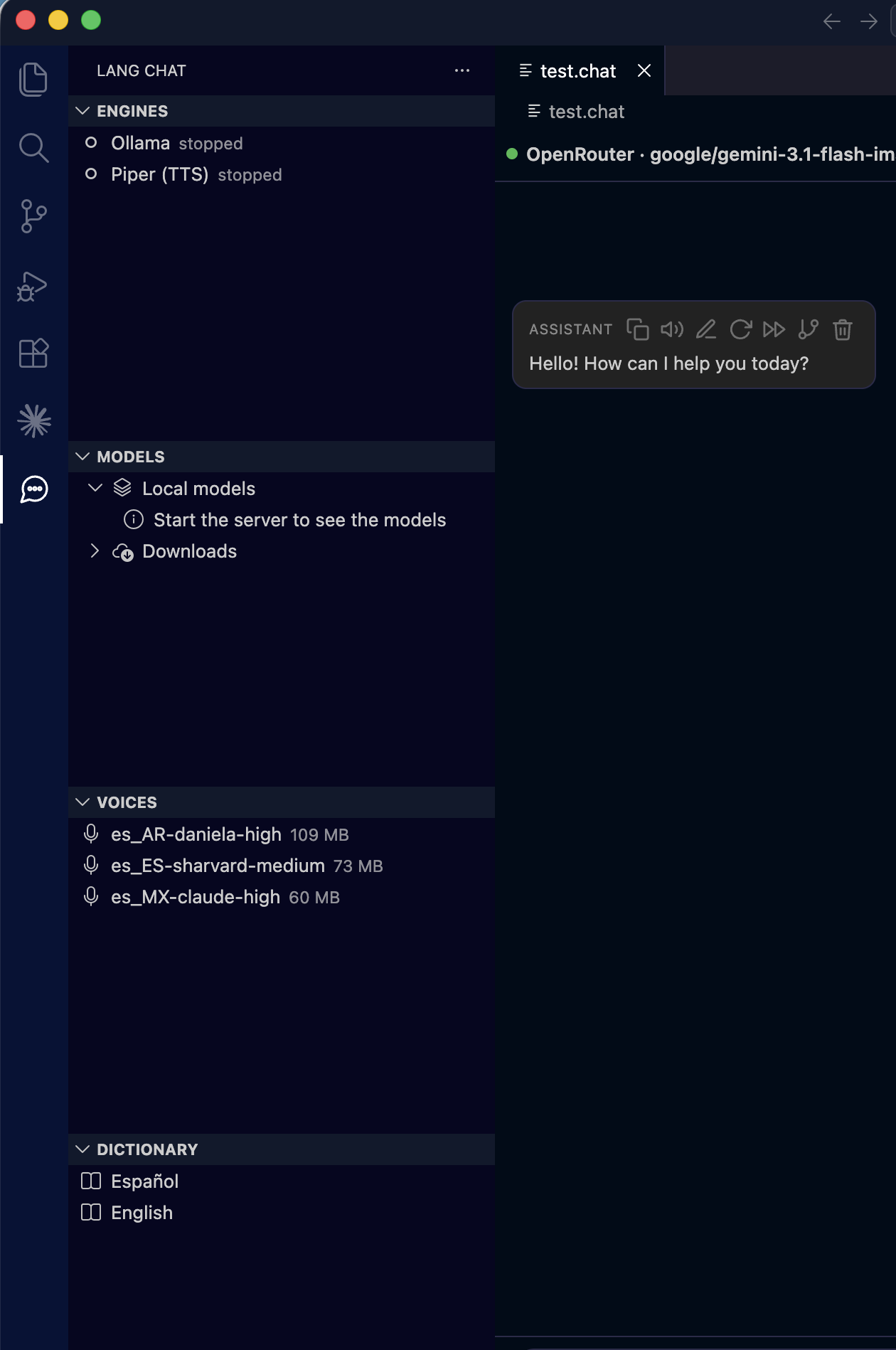
Sidebar — Engines · Models · Voices · Dictionary, with a .chat open |
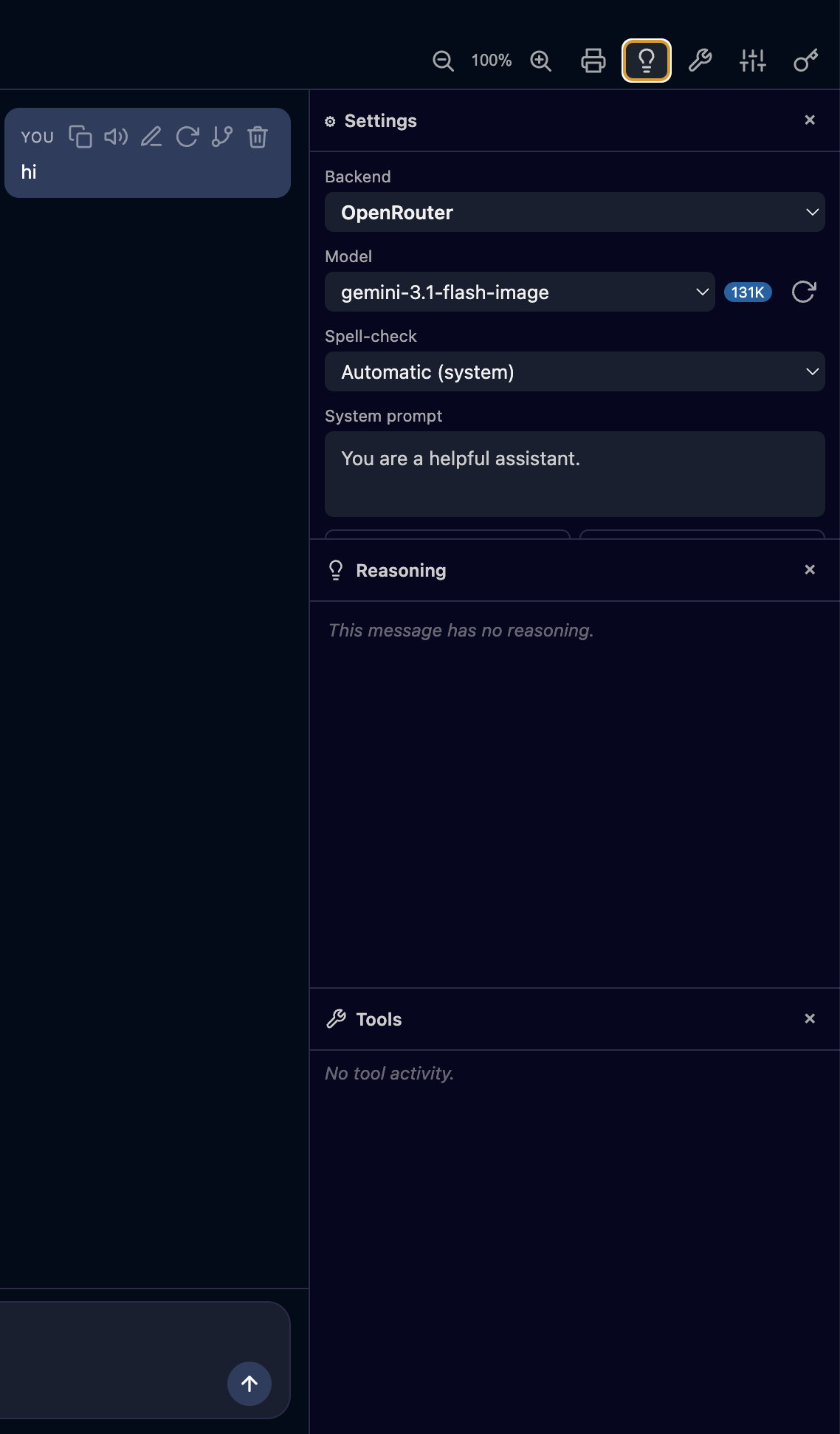
Chat with the Reasoning & Tools panels |
 |
 |
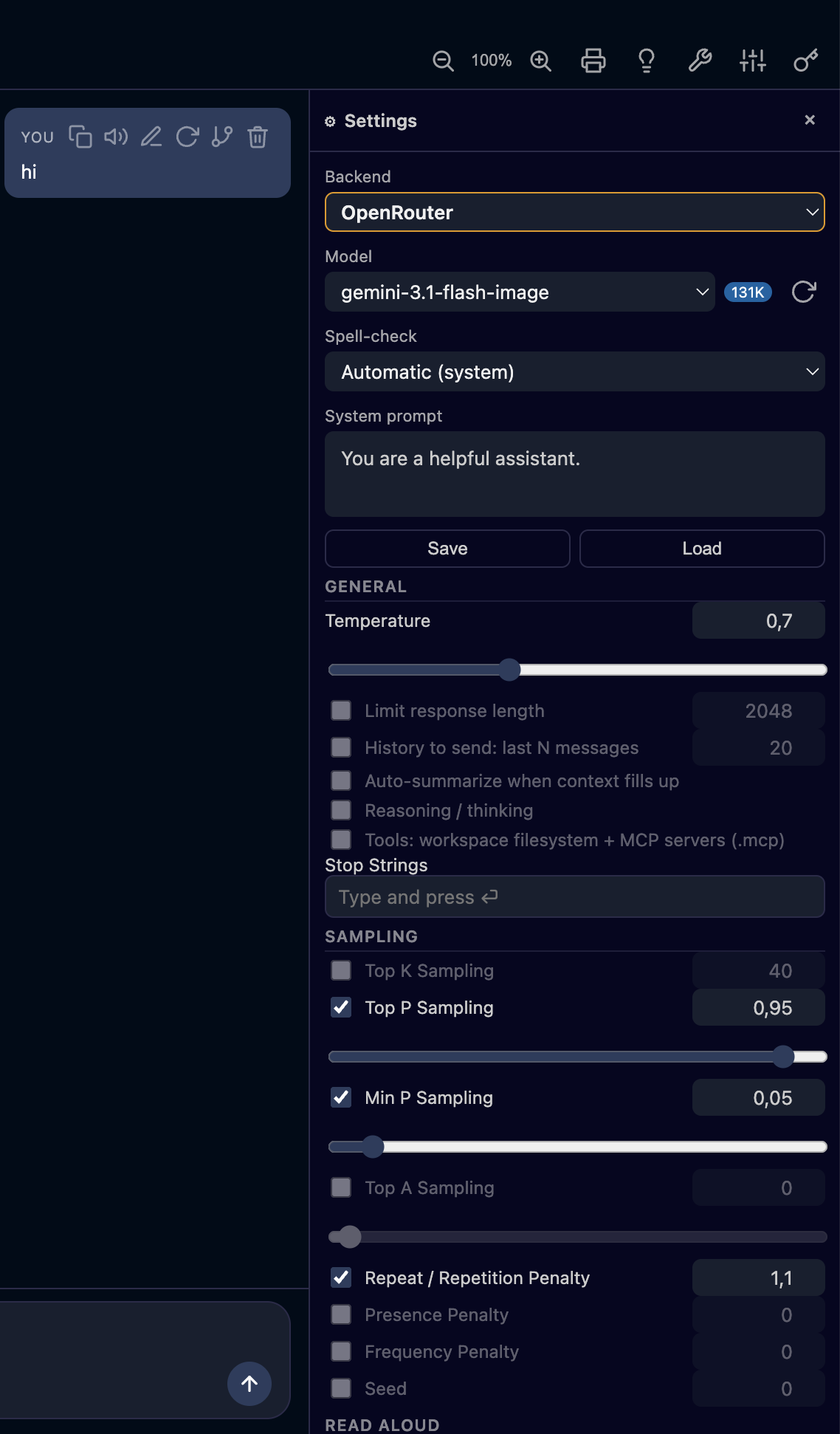
| Per‑conversation settings (⚙) — backend, model, sampling, read‑aloud |
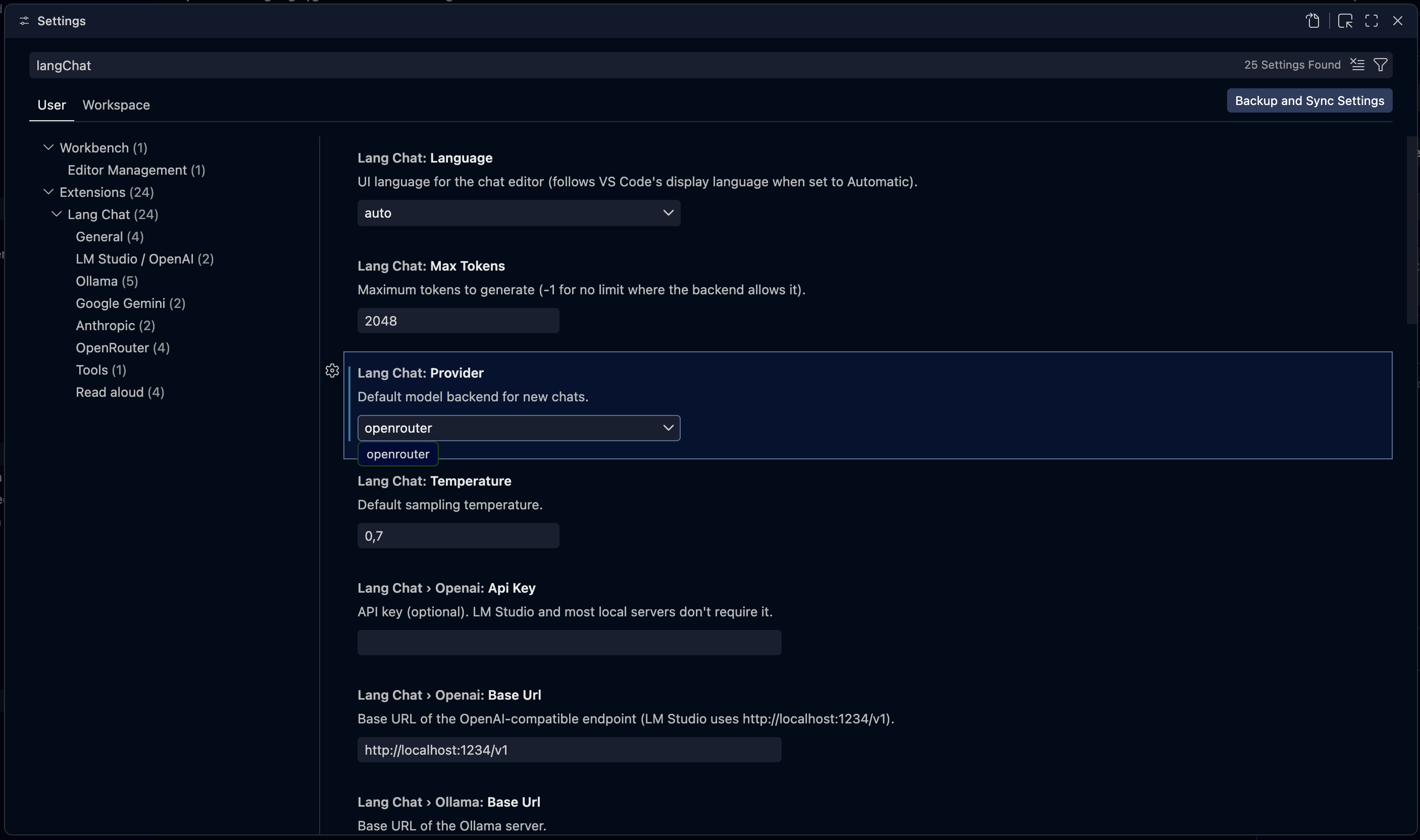
Parley settings in VS Code |
 |
 |
- 💬 Streaming responses, token by token, with a Stop button and auto‑save after each turn.
- 🧠 Reasoning / thinking panel for models that expose it.
- 📊 Markdown + Mermaid in chat bubbles:
```mermaid blocks render as diagrams with a
GitHub‑style viewer — pan pad, zoom (pinch / Ctrl·⌘+wheel), fullscreen and copy‑as‑image.
The library is lazy‑loaded only when a chat contains a diagram.
- 🦙 Embedded Ollama + Hugging Face GGUF explorer: capability badges, quantization options
and downloads with progress (shows size and free disk space first; retry/cancel).
- 🔧 Tools (function calling): native workspace filesystem + MCP servers — agentic loop.
- 🗣️ Read aloud (TTS): system voices (Web Speech) or neural Piper (local, managed daemon).
- 🔎 Find & replace in chat (
Ctrl/Cmd+F find · Ctrl/Cmd+H replace), 🔍 zoom (Alt/Option + wheel), 🌳 fork,
🕓 compare versions, ♻️ regenerate / continue / merge / edit / delete messages.
- 🖼️ Attachments (images & documents) and image generation — image‑output models like
Gemini flash‑image ("nano‑banana") render their images inline (copy / save to disk).
- 📎
@file mentions in the composer: type @, pick a workspace file, insert its full path.
- 🧾 Export to standalone HTML / PDF.
- 🧮 Context management: auto‑summarize when context fills up, or send only the last N
messages — both shown visually in the chat.
- 🌍 6 languages (UI, spell‑check and TTS): English, Spanish, Portuguese, French, German,
Italian — switchable live, with a personal spell‑check dictionary per language.
Backends
Configure any of these per conversation (in the ⚙ panel) or as the default in Settings:
| Backend |
Endpoint / notes |
| OpenAI‑compatible |
LM Studio, llama.cpp server, vLLM, LocalAI… (default http://localhost:1234/v1) |
| Ollama |
A local Ollama server (http://localhost:11434) or the extension's own managed server |
| OpenRouter |
Hosted models via https://openrouter.ai/api/v1 |
| Google Gemini |
Generative Language API |
| Anthropic Claude |
Messages API |
Quick start
- Install Parley from the Marketplace.
- Command palette (
Cmd/Ctrl+Shift+P) → “Parley: New chat” → choose where to save the
.chat file.
- Pick a backend in the ⚙ panel and start chatting.
Have LM Studio (local server enabled) or Ollama running first — or use a hosted backend
(OpenRouter / Gemini / Anthropic) with an API key.
API keys are best stored securely: run “Parley: Set API Key (secure)” to keep them in VS
Code SecretStorage instead of plain settings.
Local models (embedded Ollama)
Parley can manage its own Ollama server without you installing anything:
- The Parley sidebar groups everything into sections: Engines (Ollama / Piper, with
run/stop/install), Models (local models + downloads), Voices and Dictionary.
- The + button opens an LM Studio‑style explorer: searches GGUF models on Hugging
Face, shows capability badges and quantization options, and downloads with progress.
- On first use it downloads the Ollama binary (SHA256‑verified, fail‑closed) into your global
storage; the server runs only on
127.0.0.1. Configure under Settings → Parley → Ollama.
.chat files
Each conversation is a .chat file (human‑readable JSON) storing the inference config + full
history. Opening it shows the chat UI; everything is persisted in the file, so it is
git‑versionable. A .chat may reference its system prompt from an external .md file
(systemPromptFile, confined to the .chat's directory).
With Tools on (⚙, available on every backend), the model can call tools in an agentic loop:
- Workspace filesystem & helpers (native, no setup):
fs_list, fs_read, fs_write,
fs_glob, fs_search, plus editor_context, web_fetch and get_datetime. File tools are
confined to the workspace folder (resolved + realpath‑checked against symlink escape).
- MCP servers: define them in a
.mcp/ folder (one *.json per server) or a .mcp.json
at the workspace root. Each server's tools are exposed as server__tool.
The loop runs up to parley.tools.maxIterations rounds per turn (default 8; 0 = unlimited,
ending only when the model stops requesting tools or you press Stop).
MCP servers and fs_write only run in a trusted workspace. Enabling Tools (⚙) in an
untrusted folder prompts you to Manage Trust up front, so tools don't fail mid-turn.
Privacy
- Your API keys can be stored in VS Code SecretStorage (not plain settings).
- The managed Ollama server and the Piper TTS daemon bind to
127.0.0.1 only.
- No telemetry — Parley does not phone home. Network traffic goes only to the LLM backend
you configure and, on demand, to Hugging Face / PyPI to download models and the TTS engine.
Configuration
Settings under Settings → Parley:
| Setting |
Default |
Description |
parley.provider |
openai |
Default backend: openai, ollama, openrouter, gemini or anthropic |
parley.language |
auto |
UI language: auto, en, es, pt, fr, de, it |
parley.openai.baseUrl |
http://localhost:1234/v1 |
OpenAI‑compatible endpoint |
parley.openai.apiKey |
(empty) |
Optional API key |
parley.ollama.baseUrl |
http://localhost:11434 |
Ollama server URL (used when managed is off) |
parley.ollama.managed |
true |
Use the extension's own downloaded Ollama server |
parley.ollama.port |
0 |
Managed server port (0 = pick a free one) |
parley.ollama.modelsPath |
(empty) |
Optional OLLAMA_MODELS path |
parley.ollama.maxConcurrentDownloads |
2 |
Parallel model downloads |
parley.openrouter.baseUrl |
https://openrouter.ai/api/v1 |
OpenRouter endpoint |
parley.openrouter.apiKey |
(empty) |
OpenRouter API key |
parley.openrouter.vendors |
(empty) |
Filter OpenRouter models by vendor (prefix before /) |
parley.openrouter.customModels |
(empty) |
Extra model ids to add even if the API doesn't list them |
parley.openrouter.sort |
(default) |
Provider routing preference (throughput / latency / price) |
parley.gemini.apiKey |
(empty) |
Google Gemini API key (Google AI Studio) |
parley.gemini.baseUrl |
https://generativelanguage.googleapis.com/v1beta |
Generative Language API endpoint |
parley.anthropic.apiKey |
(empty) |
Anthropic Claude API key (console.anthropic.com) |
parley.anthropic.baseUrl |
https://api.anthropic.com/v1 |
Anthropic Messages API endpoint |
parley.temperature |
0.7 |
Sampling temperature |
parley.maxTokens |
2048 |
Max tokens (-1 = unlimited) |
parley.tools.maxIterations |
8 |
Max agentic tool-loop rounds per turn (0 = unlimited) |
parley.tools.maxReadBytes |
100000 |
Max bytes returned by the native fs_read tool (0 = unlimited) |
Third‑party components & licenses
Parley is MIT licensed. It bundles or downloads third‑party components under their own terms:
| Component |
When |
License |
Hunspell dictionaries (media/dict/{en,es,pt,fr,de,it}.*) |
bundled |
each under its own license (see the matching media/dict/<lang>.LICENSE) |
nspell |
bundled (spell engine) |
MIT |
Mermaid (media/mermaid.min.js) |
bundled (diagram rendering, lazy‑loaded) |
MIT |
Piper (piper-tts) |
downloaded at runtime for neural TTS |
GPL |
| Ollama |
downloaded at runtime (managed server) |
MIT |
| Python (astral‑sh build‑standalone) |
downloaded at runtime (for Piper) |
PSF / per upstream |
The neural TTS engine (Piper) is GPL and is fetched on demand from PyPI; it is not shipped
inside the extension package.
Contributing
See ARCHITECTURE.md for a tour of the codebase (extension host ↔ webviews,
providers, the agentic loop, local engines, i18n and security) with diagrams.
License
Released under the MIT License.
| |

