Jotflow
Chat with local (and remote) LLMs right inside VS Code — LM Studio style. Bring your own
models and keys, keep every conversation as a versionable file, and use tools, embedded model
management and neural text‑to‑speech without leaving the editor.
Why Jotflow
- 🔒 Local‑first & private — runs against your own LLM (LM Studio, Ollama…), your keys live in
VS Code SecretStorage, the managed server binds to
127.0.0.1, and there is no telemetry.
- 🧩 Five backends, one UI — OpenAI‑compatible, Ollama, OpenRouter, Google Gemini and
Anthropic Claude, switchable per conversation.
- 📄 Conversations as files — each chat is a human‑readable
.chat (config + history) you can
diff, version and share.
- 🦙 Models, batteries included — manage an embedded Ollama and browse/download models from the
Ollama library (default) or Hugging Face GGUF repos, without installing anything.
- 🔧 Agentic tools — workspace filesystem + MCP servers (function calling) on every backend.
- 🗣️ Read aloud — system voices, self‑contained neural Piper, or Chatterbox voice
cloning (clone a voice from a short clip and read messages in it).
Features
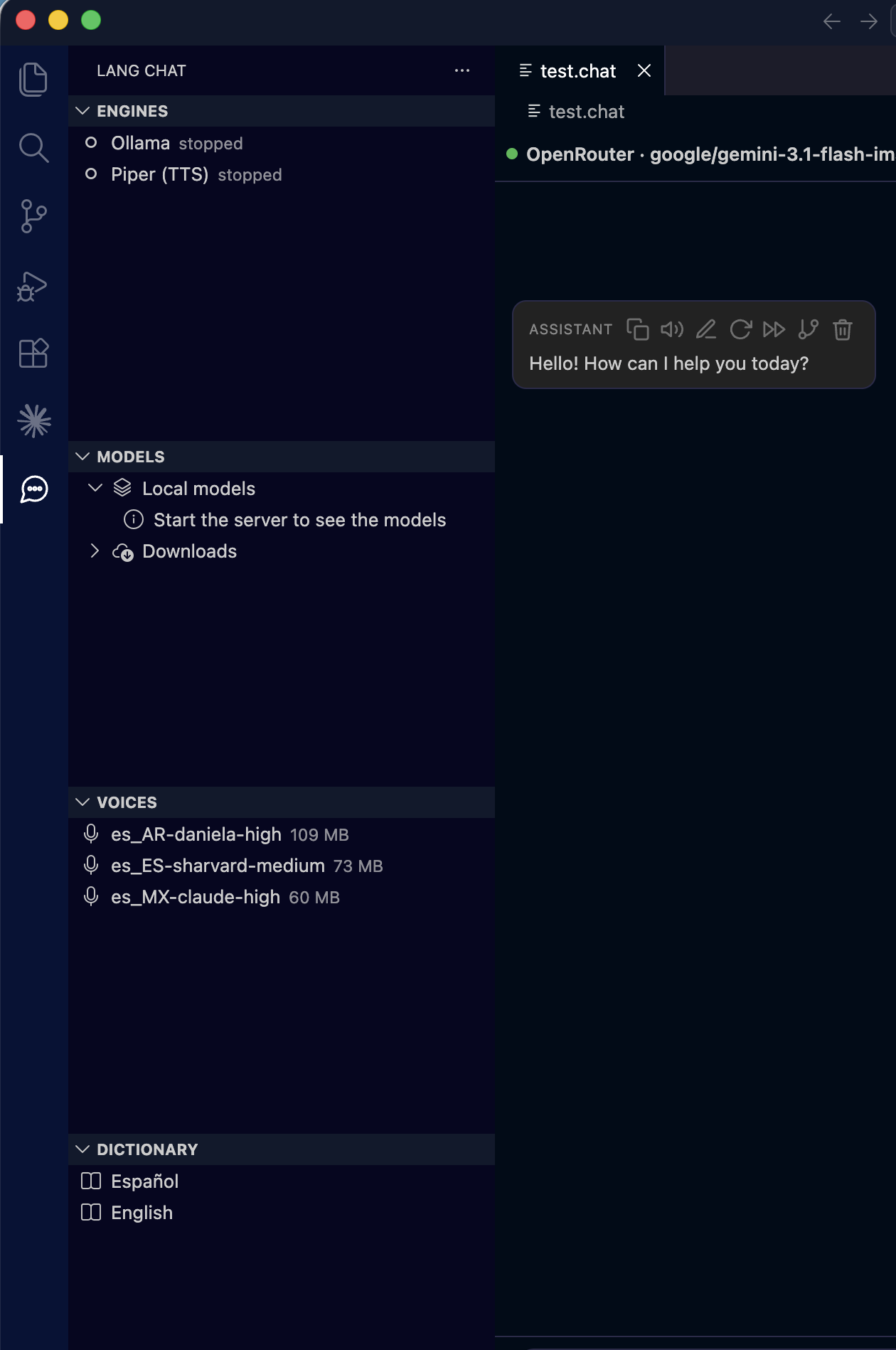
Sidebar — Engines · Models · Voices · Dictionary, with a .chat open |
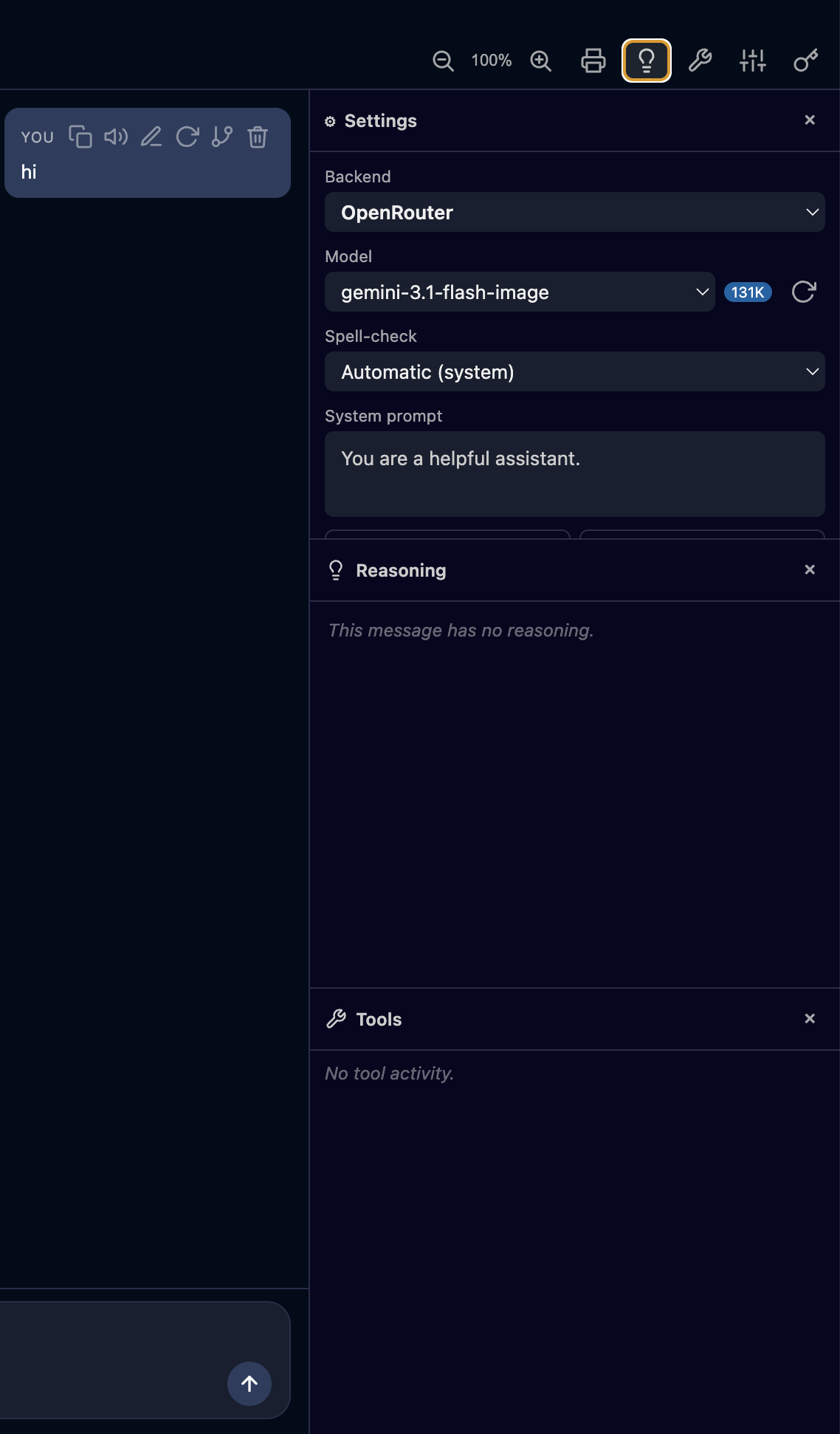
Chat with the Reasoning & Tools panels |
 |
 |
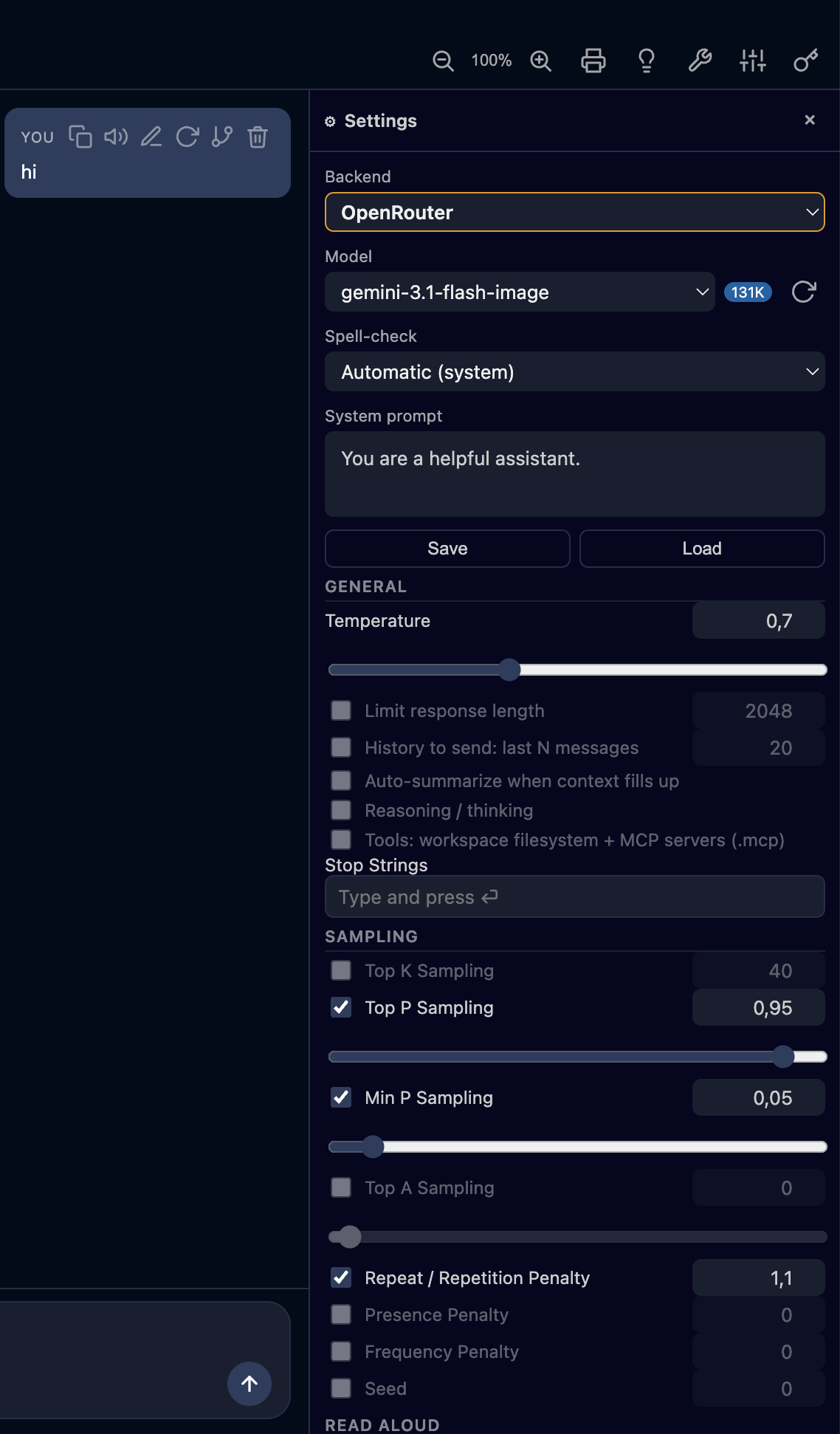
| Per‑conversation settings (⚙) — backend, model, sampling, read‑aloud |
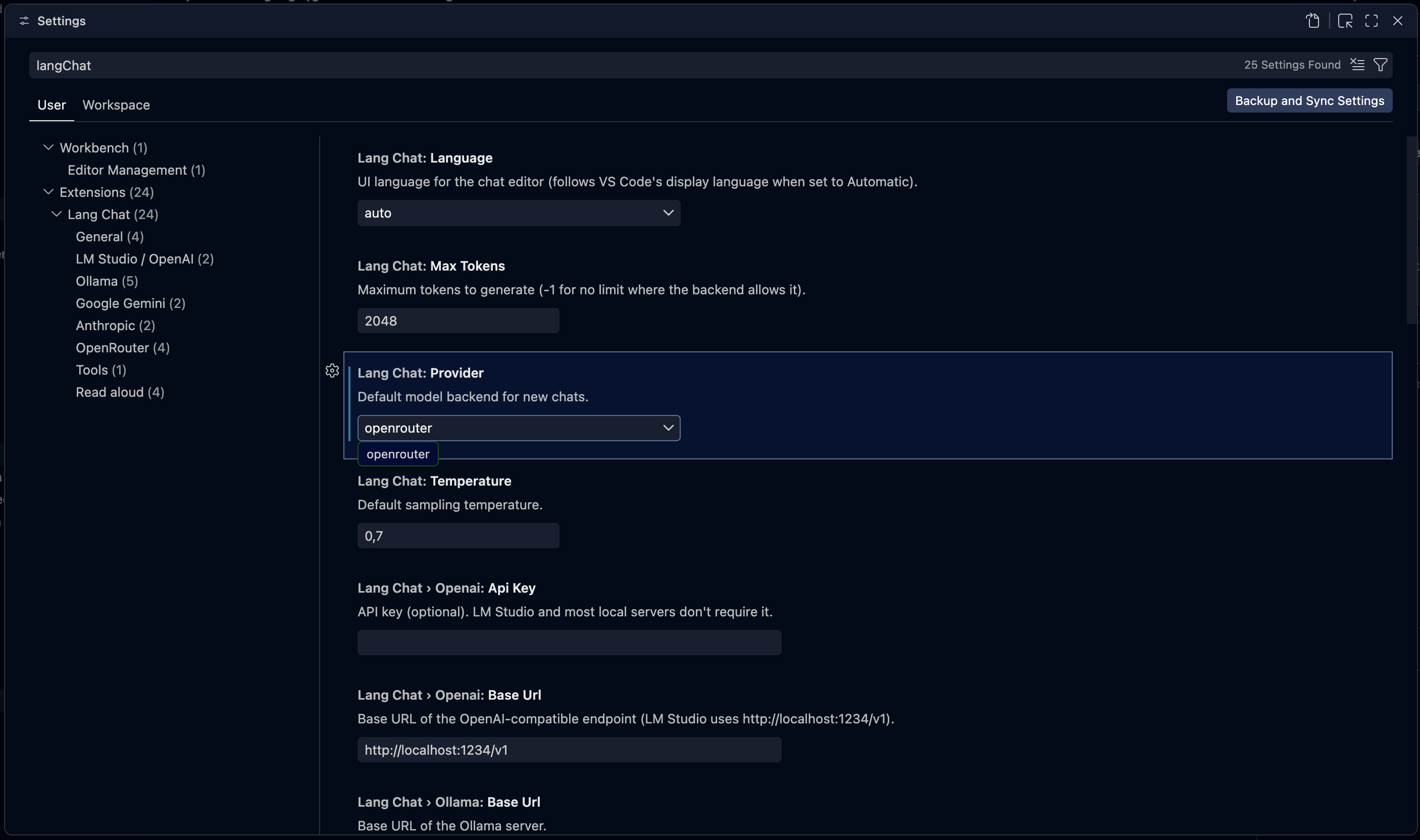
Jotflow settings in VS Code |
 |
 |
- 💬 Streaming responses, token by token, with a Stop button (keeps what was streamed so far)
and auto‑save after each turn. A loop guard cuts a model stuck repeating itself
(
la la la la …) and drops the repeated run.
- 🧠 Reasoning / thinking and Tools panels for models that expose them — each panel's
open/closed state is remembered per conversation (saved in the
.chat), so closing one keeps it
closed even while the next answer streams its reasoning or tool calls.
- 📊 Markdown + Mermaid in chat bubbles:
```mermaid blocks render as diagrams with a
GitHub‑style viewer — pan pad, zoom (pinch / Ctrl·⌘+wheel), fullscreen and copy‑as‑image.
The library is lazy‑loaded only when a chat contains a diagram.
- 🦙 Embedded Ollama + model explorer (Ollama library by default, Hugging Face GGUF optional
via
jotflow.models.source): capability badges, quantization options and downloads with
progress (shows size and free disk space first; retry/cancel).
- 🔧 Tools (function calling): native workspace filesystem + MCP servers — agentic loop.
- 🗣️ Read aloud (TTS): system voices (Web Speech), neural Piper (local, managed daemon), or
Chatterbox (Resemble AI) with zero‑shot voice cloning — create a voice by cloning a short
sample from a local audio/video file (ogg · mp4 · mp3 · wav) with a start/end trim, and read
messages aloud in it. Each cloned voice carries its language (multilingual). On Apple Silicon it
runs a fast 4‑bit model via MLX; other platforms use PyTorch.
- 🎛️ Engines panel: install / start / stop / delete each local engine (Ollama · Piper ·
Chatterbox) from one view, with download sources, a live progress bar and the RAM each engine uses.
- 🔎 Find & replace in chat (
Ctrl/Cmd+F find · Ctrl/Cmd+H replace), 🔍 zoom (Alt/Option + wheel,
remembered per conversation), 🌳 fork, 🕓 compare versions,
♻️ regenerate / continue / merge / edit / delete messages.
- 🎚️ Collapsible settings (⚙) — the per‑conversation parameters are grouped into foldable
sections (Response · Context · Capabilities · Sampling · Engine · Read aloud), collapsed by
default with the system prompt open; the open/closed state is remembered per conversation.
- 🖼️ Attachments (images & documents) and image generation — image‑output models like
Gemini flash‑image ("nano‑banana") render their images inline (copy / save to disk).
- 📎
@file mentions in the composer and when editing a message: type @, pick a workspace
file, insert its full path.
- 🧾 Export to standalone HTML / PDF.
- 🧮 Context management: auto‑summarize when context fills up, or send only the last N
messages — both shown visually in the chat.
- 🧱 Layered system prompt: an open inline base plus multiple ordered
.md files (⚙ panel) —
resolve them from a path/glob (e.g. systems/*.md) with Refresh, or add individual files;
reorder them and toggle any layer on/off. Refresh is additive (keeps your order, appends new
matches, never drops). At inference time the base and every enabled layer are concatenated, in order,
into the prompt that is sent.
- 🌍 6 languages (UI, spell‑check and TTS): English, Spanish, Portuguese, French, German,
Italian — switchable live, with a personal spell‑check dictionary per language.
Backends
Configure any of these per conversation (in the ⚙ panel) or as the default in Settings:
| Backend |
Endpoint / notes |
| OpenAI‑compatible |
LM Studio, llama.cpp server, vLLM, LocalAI… (default http://localhost:1234/v1) |
| Ollama |
A local Ollama server (http://localhost:11434) or the extension's own managed server |
| OpenRouter |
Hosted models via https://openrouter.ai/api/v1 |
| Google Gemini |
Generative Language API |
| Anthropic Claude |
Messages API |
Quick start
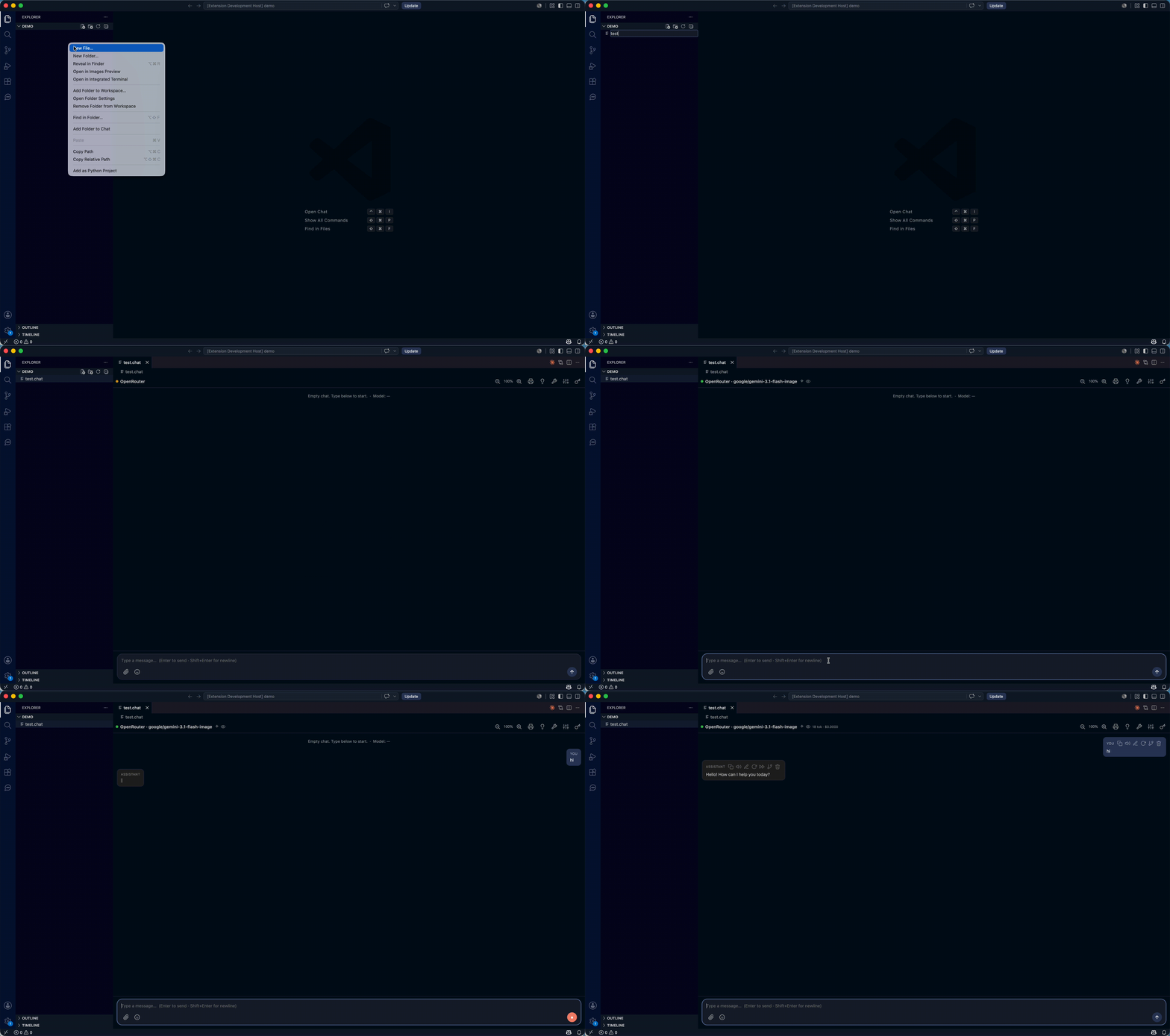
- Install Jotflow from the Marketplace.
- Command palette (
Cmd/Ctrl+Shift+P) → “Jotflow: New chat” → choose where to save the
.chat file.
- Pick a backend in the ⚙ panel and start chatting.
Have LM Studio (local server enabled) or Ollama running first — or use a hosted backend
(OpenRouter / Gemini / Anthropic) with an API key.
Set an API key with “Jotflow: Set API Key (secure)” — it's stored encrypted in VS Code
SecretStorage (there is no plain-settings option).
Local models (embedded Ollama)
Jotflow can manage its own Ollama server without you installing anything:
- The Jotflow sidebar groups everything into sections: Engines (Ollama / Piper / Chatterbox —
manage them from the gear (⚙) in the Engines view: install/start/stop/delete with a live
progress bar and RAM usage), Models (local models + downloads), Voices (grouped by engine ›
language › voice) and Dictionary.
- The + button opens an LM Studio‑style explorer. By default it browses the Ollama
library; set
jotflow.models.source to huggingface to search GGUF repos on Hugging Face
instead. It shows capability badges, quantization options and downloads with progress, and
renders each model's README (with its benchmarks table) and headline Context / Size.
- Cloud models (e.g.
gemma4:cloud, kimi-k2.7-code:cloud) are flagged ☁ and offer Register
(pulls a tiny stub, no weights) so you can pick them in chat — inference runs on Ollama Cloud.
Set an Ollama API key via “Jotflow: Set API Key” (stored encrypted in SecretStorage).
- On first use it downloads the Ollama binary (SHA256‑verified, fail‑closed) into your global
storage; the server runs only on
127.0.0.1. Configure under Settings → Jotflow → Ollama.
.chat files
Each conversation is a .chat file (human‑readable JSON) storing the inference config + full
history. Opening it shows the chat UI; everything is persisted in the file, so it is
git‑versionable. The system prompt is an open inline base plus any number of ordered .md layers
(systemPromptFiles): at send time the base and every enabled layer are concatenated in order to
build the prompt — so you can keep a shared persona/rules in reusable files, reorder them, and toggle
one off without deleting it. Each layer is confined to the workspace (the .chat's folder or any
workspace root). View preferences travel with it too (ui) — whether the Reasoning / Tools
panels are open, which ⚙ settings sections you left expanded, and the chat zoom level.
With Tools on (⚙, available on every backend), the model can call tools in an agentic loop:
- Workspace filesystem & helpers (native, no setup):
fs_list, fs_read, fs_write,
fs_edit (exact-text patch — cheaper/safer than a full rewrite), fs_delete, fs_move,
fs_glob, fs_search, plus editor_context, web_fetch, get_datetime and temp_dir. File
tools are confined to the workspace folder (resolved + realpath‑checked against symlink
escape) and never touch .git/, .vscode/ or the MCP configs. temp_dir returns a private
scratch directory outside the workspace (/tmp/jotflow-…) for throwaway files that must not
touch the project — bounded to that dir only, and cleaned up on close.
- Shell (
run_command, on by default): runs a shell command in the workspace root. It's
arbitrary code execution, so it only runs in a trusted workspace and shows a confirmation
card for each command (skip with jotflow.tools.shellAutoApprove, or remove the tool with
jotflow.tools.shell: false).
- MCP servers: define them in a
.mcp/ folder (one *.json per server) or a .mcp.json
at the workspace root. Each server's tools are exposed as server__tool. Jotflow advertises your
workspace folders as MCP roots (plus a server's own cwd), so servers know which directories to
operate within — re-advertised if the folders change. A server can also elicit input from you
mid-task (a confirmation or a small form, rendered as a VS Code prompt); set
jotflow.mcp.autoAcceptElicitations to skip the dialog on plain yes/no confirmations.
The loop runs up to jotflow.tools.maxIterations rounds per turn (default 8; 0 = unlimited,
ending only when the model stops requesting tools or you press Stop).
MCP servers and fs_write only run in a trusted workspace. Enabling Tools (⚙) in an
untrusted folder prompts you to Manage Trust up front, so tools don't fail mid-turn.
Privacy
- Your API keys are stored only in VS Code SecretStorage — never in plain settings.
- The managed Ollama server and the Piper / Chatterbox TTS daemons bind to
127.0.0.1 only.
- No telemetry — Jotflow does not phone home. Network traffic goes only to the LLM backend
you configure and, on demand, to Hugging Face / PyPI to download models and the TTS engines.
Chatterbox voice cloning uses a local audio/video file you pick — no external download.
Configuration
Settings under Settings → Jotflow:
API keys are not settings. Set them with the Jotflow: Set API Key command — they are stored
encrypted in VS Code SecretStorage, never in settings.json (which would sync in plaintext).
| Setting |
Default |
Description |
jotflow.provider |
openai |
Default backend: openai, ollama, openrouter, gemini or anthropic |
jotflow.language |
auto |
UI language: auto, en, es, pt, fr, de, it |
jotflow.models.source |
ollama |
Where the model explorer searches: ollama (library) or huggingface (GGUF) |
jotflow.openai.baseUrl |
http://localhost:1234/v1 |
OpenAI‑compatible endpoint |
jotflow.ollama.baseUrl |
http://localhost:11434 |
Ollama server URL (used when managed is off) |
jotflow.ollama.managed |
true |
Use the extension's own downloaded Ollama server |
jotflow.ollama.port |
0 |
Managed server port (0 = pick a free one) |
jotflow.ollama.modelsPath |
(empty) |
Optional OLLAMA_MODELS path |
jotflow.ollama.maxConcurrentDownloads |
2 |
Parallel model downloads |
jotflow.openrouter.baseUrl |
https://openrouter.ai/api/v1 |
OpenRouter endpoint |
jotflow.openrouter.vendors |
(empty) |
Filter OpenRouter models by vendor (prefix before /) |
jotflow.openrouter.customModels |
(empty) |
Extra model ids to add even if the API doesn't list them |
jotflow.openrouter.sort |
(default) |
Provider routing preference (throughput / latency / price) |
jotflow.gemini.baseUrl |
https://generativelanguage.googleapis.com/v1beta |
Generative Language API endpoint |
jotflow.anthropic.baseUrl |
https://api.anthropic.com/v1 |
Anthropic Messages API endpoint |
jotflow.temperature |
0.7 |
Sampling temperature |
jotflow.maxTokens |
2048 |
Max tokens (-1 = unlimited) |
jotflow.stopOnRepetition |
true |
Cut a response once the model gets stuck repeating itself (answer, thinking or tool call); the text before the loop is kept |
jotflow.tools.maxIterations |
8 |
Max agentic tool-loop rounds per turn (0 = unlimited) |
jotflow.tools.maxReadBytes |
100000 |
Max bytes returned by the native fs_read tool (0 = unlimited) |
jotflow.mcp.autoAcceptElicitations |
false |
Auto-accept confirmation prompts from MCP servers (yes/no) without a dialog; data requests still ask |
jotflow.tools.shell |
true |
The run_command shell tool (arbitrary code execution; trusted workspace + per-command confirmation card) |
jotflow.tools.shellAutoApprove |
false |
Run run_command commands without the confirmation dialog (dangerous) |
jotflow.tts.chatterboxModel |
multilingual |
Chatterbox model: multilingual (23 languages) or english (lighter). Ignored on Apple Silicon (always the MLX multilingual model) |
jotflow.tts.chatterboxDevice |
auto |
Compute device for the PyTorch Chatterbox backend: auto / mps / cuda / cpu |
jotflow.tts.chatterboxExaggeration |
0.5 |
Chatterbox emotion/intensity (0–1) |
Third‑party components & licenses
Jotflow is MIT licensed. It bundles or downloads third‑party components under their own terms:
| Component |
When |
License |
Hunspell dictionaries (media/dict/{en,es,pt,fr,de,it}.*) |
bundled |
each under its own license (see the matching media/dict/<lang>.LICENSE) |
nspell |
bundled (spell engine) |
MIT |
Mermaid (npm devDep → media/dist/mermaid.min.js) |
prebuilt UMD copied at build (diagram rendering, lazy‑loaded) |
MIT |
Piper (piper-tts) |
downloaded at runtime for neural TTS |
GPL |
Chatterbox (chatterbox-tts / mlx-audio on Apple Silicon) |
downloaded at runtime for voice‑cloning TTS |
MIT |
ffmpeg (imageio-ffmpeg) |
downloaded at runtime (trim a local file into a cloned-voice reference clip) |
LGPL |
| Ollama |
downloaded at runtime (managed server) |
MIT |
| Python (astral‑sh build‑standalone) |
downloaded at runtime (for Piper / Chatterbox) |
PSF / per upstream |
The neural TTS engines (Piper, Chatterbox) and their Python deps are fetched on demand from PyPI /
Hugging Face; they are not shipped inside the extension package. Piper is GPL.
Changelog
See CHANGELOG.md for the release history. 2.8.5 fixes Summarize on Ollama with
a large context (it no longer truncates the block being summarized). 2.8.4 lets you edit a message's
attachments (remove/add photos), not just its text. 2.8.3 fixes cross-folder system-prompt
globs (../systems/*.md) and flags missing layers in red. 2.8.2 polishes the side panels —
collapsible tool activity with 256-char previews, and a tidier system-prompt layer list
(start-truncated names, hover actions, no row jump). 2.8.0 drives the layered system prompt
from a path/glob + Refresh (additive — keeps your order, re-adds removed-but-matching files, never
drops hand-picked ones). 2.7.0 turns Jotflow into a coding
agent: fs_edit/fs_delete/fs_move/temp_dir file tools, a gated run_command shell
(on by default, confirmed per command), paginated fs_read, the full MCP roots + elicitation
surface, and tool confirmations rendered as an inline card in the chat. 2.6.8–2.6.14 unify all
source under src/ (host/webview/shared), gate every push with CI + Dependabot, make the model catalog
degrade gracefully (circuit breaker + contingency notice), vendor Mermaid from npm (so no
.js is committed), and move API keys to SecretStorage-only (the plaintext-settings path was
removed). 2.6.1–2.6.7 migrate the entire webview to TypeScript with an esbuild build (zero
hand-written .js in the repo — only vendored libs and generated bundles remain) and add integration
tests for the webview↔host protocol and the agentic turn. 2.6.0 drops the YouTube path for
Chatterbox voice cloning (removing yt-dlp entirely): a reference voice is now cloned from a local
audio/video file you pick (ogg/mp4/mp3/wav) with a start/end trim — no network fetch, no ToS gray
area. 2.5.0 reorganises the ⚙ settings into
collapsible sections (collapsed by default, state remembered per conversation) and remembers the
chat zoom per .chat. 2.4.0 makes the system prompt a
layered one — an open inline base plus multiple ordered .md files you can add, reorder and
toggle (concatenated, in order, at send time); the legacy single systemPromptFile is migrated into
one layer automatically. 2.3.5 stops a chat whose .attach
sidecar was deleted from failing every turn with a provider 400/502. 2.3.4 fixes a scroll jump
when deleting a message that has an image. 2.3.3 makes the Reasoning / Tools panels remember their
open/closed state per conversation (so they stop popping back open while streaming), fixes the
previously‑dead jotflow.tts.chatterboxExaggeration setting, and shows chat images at full bubble
width. 2.3.x adds Chatterbox voice‑cloning
TTS (clone a voice from a YouTube fragment; fast 4‑bit MLX on Apple Silicon), an engines management
panel (progress + RAM), and @file mentions while editing a message. 2.1.2 bundles the extension host with
esbuild for a smaller, faster package. 2.1.1 is a security hardening pass that clears all GitHub
CodeQL alerts (DOM-allowlist HTML sanitizer, Blob-URL images, etc.). 2.1.0 makes
the model explorer source configurable (Ollama library by default, Hugging Face optional), adds Ollama
cloud models (register + API key) and richer detail pages (README + Context/Size). 2.0.0 is the rebrand from
Parley to Jotflow (no functional change; the major bump reflects the new identity and extension ID). The
preceding quality passes against BEST-PRACTICES.md still apply: 1.6.0 / 1.6.1
closed a security + reliability audit, and 1.6.2 is a best-practices conformance pass over every
source file (module sizes, linting, test coverage) with no behavior change.
Contributing
See ARCHITECTURE.md for a tour of the codebase (extension host ↔ webviews,
providers, the agentic loop, local engines, i18n and security) with diagrams.
Development conventions are in BEST-PRACTICES.md.
License
Released under the MIT License.
| |

