Skip to content
| Marketplace
Sign in
Visual Studio Code>Other>WeatherBarNew to Visual Studio Code? Get it now.
WeatherBar

WeatherBar

Emanuele Bartolesi

| (0) | Free
Current weather for a city in your VS Code status bar
Installation
Launch VS Code Quick Open (Ctrl+P), paste the following command, and press enter.
Copied to clipboard
More Info

WeatherBar

Show current weather for a city in the VS Code status bar.

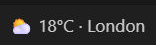
WeatherBar showing partly cloudy weather and 18°C in London in the VS Code status bar.

Features

  • Search for a city with WeatherBar: Set Location or click the status bar item.
  • Shows the current temperature, weather conditions, and feels-like temperature.
  • Supports Celsius and Fahrenheit with a configurable refresh interval.
  • Uses Open-Meteo's public forecast and geocoding APIs; no API key is required.

Settings

Setting Default Description
WeatherBar.location Empty City to look up.
WeatherBar.temperatureUnit celsius celsius or fahrenheit.
WeatherBar.refreshIntervalMinutes 15 Refresh interval from 5 to 60 minutes.

Requirements

Visual Studio Code 1.148 or later and an internet connection. City names and approximate coordinates are sent to Open-Meteo to retrieve weather data.

Development

Run npm install, npm test, and npm run compile from this directory.

  • Contact us
  • Jobs
  • Privacy
  • Manage cookies
  • Terms of use
  • Trademarks
  • Your Privacy Choices
  • Consumer Health Privacy
© 2026 Microsoft