Composure
See the stack your compose file declares, find out which file and line set
every value, and change it without reformatting the file. Composure edits by
splicing bytes at a located range instead of parsing the document and writing it
back out, so changing one image tag is a two-line diff and the comments, quoting
and key order around it are untouched — measured at 98.63% byte-identical round
trip across 146 real compose files, against 19.86% for the parse-and-re-emit
approach every YAML example teaches.
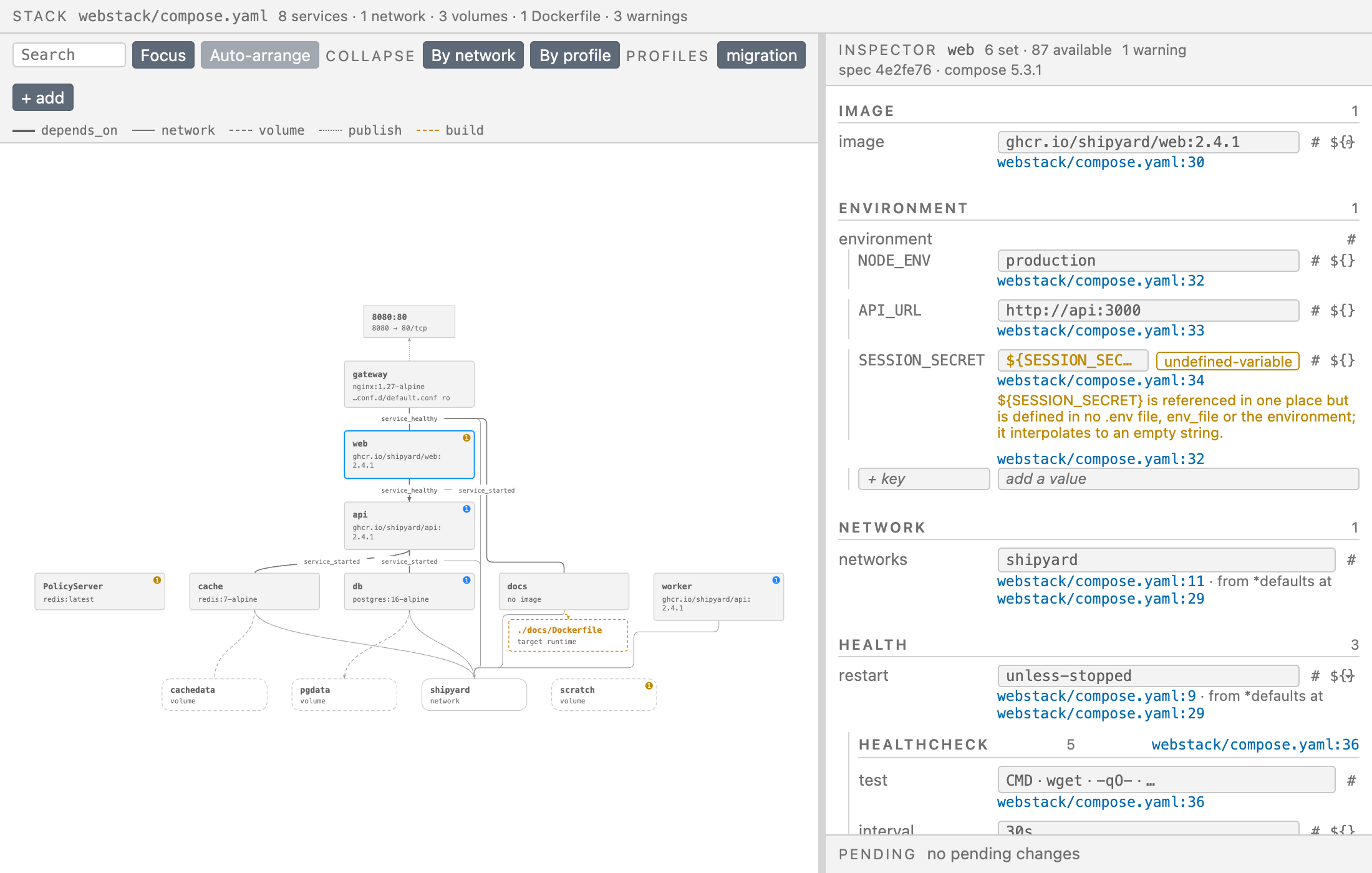
Open a compose file and the panel opens beside it. The graph is the resolved
project — overrides, -f chains, include:, extends:, .env interpolation,
anchors and merge keys all applied — and the inspector is every value that
resolution produced, each carrying where it came from.
No Docker daemon is required to read, resolve or edit. The only thing that
leaves your machine is a Docker Hub image lookup, and that is one setting away
from off.
Where a value came from
Every resolved value carries {file, line, column, merge step}. The inspector
prints it under the value, and clicking it moves your cursor to the line that
won — the inspector stays where it is.
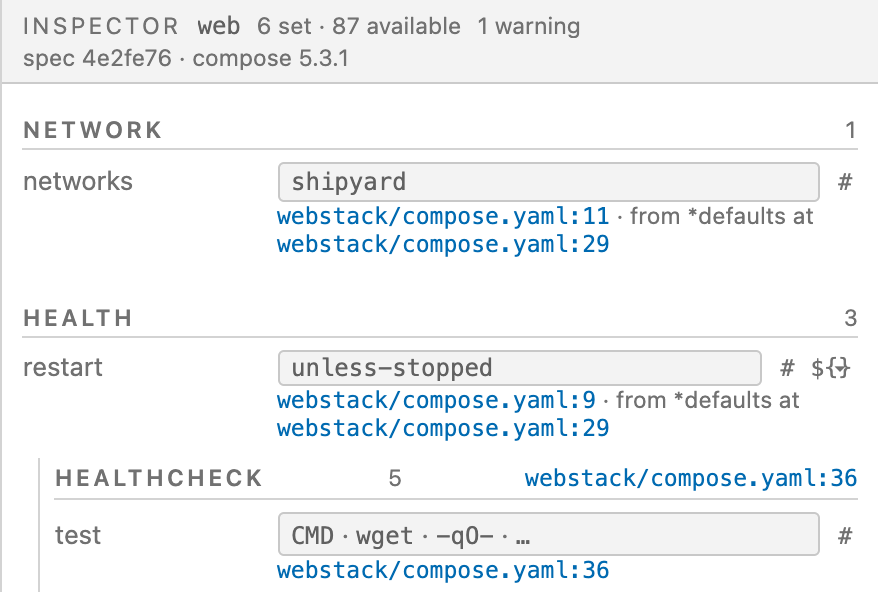
The service block here never mentions a network. networks: shipyard is at line
11, reached through the merge key *defaults on line 29 — which is the answer to
why is this service on that network, and it is not recoverable from
docker compose config, which returns a flattened document with no provenance.
Composure never calls it.
Every resolved leaf value carries provenance across the whole corpus
(resolve.corpus.leaf_provenance_pct, 100%, in the gate). The merged model is
also checked against docker compose config as an oracle: of the 74 corpus
projects both sides resolve, they agree on 74 and diverge on none.
What you have not set
available, not set lists every key the Compose specification permits on the
selected thing and this file does not use — generated at runtime from the
vendored specification, never from a list somebody typed once. Keys newer than
the docker compose on your machine are marked rather than hidden.
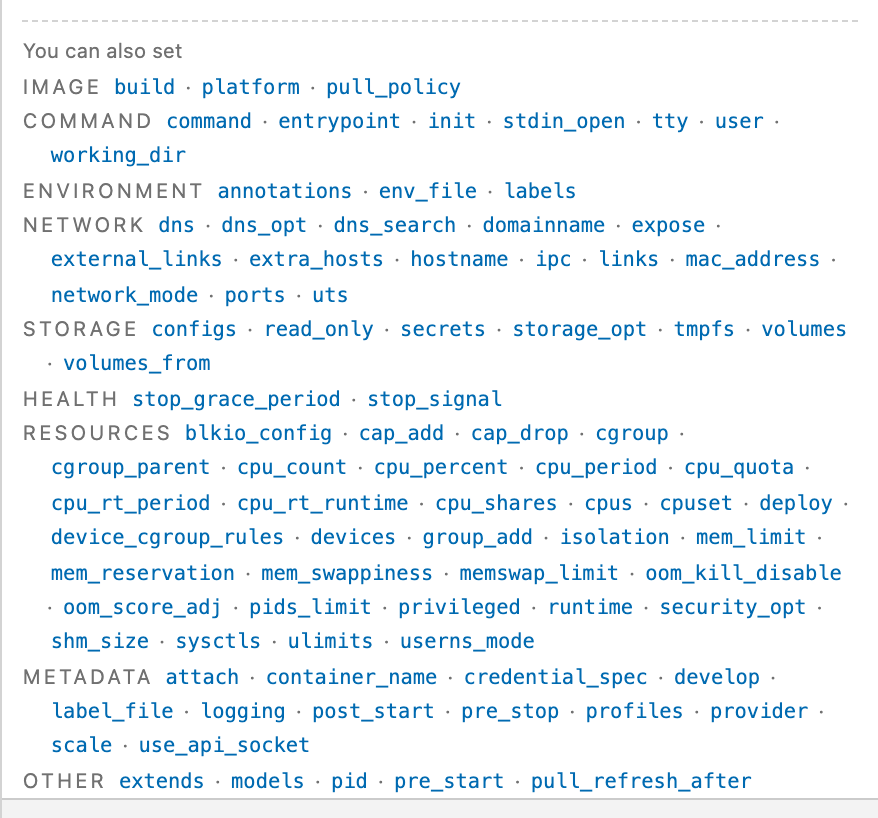
Reading a compose file tells you what someone declared. It does not tell you
what they could have declared and did not, which is usually the question behind
a stack that behaves oddly.
Problems, on the field that caused them
Diagnostics appear inline against the value they are about, and are also
published to VS Code's problems panel. Each one says what breaks and what to do
about it, rather than "invalid configuration".
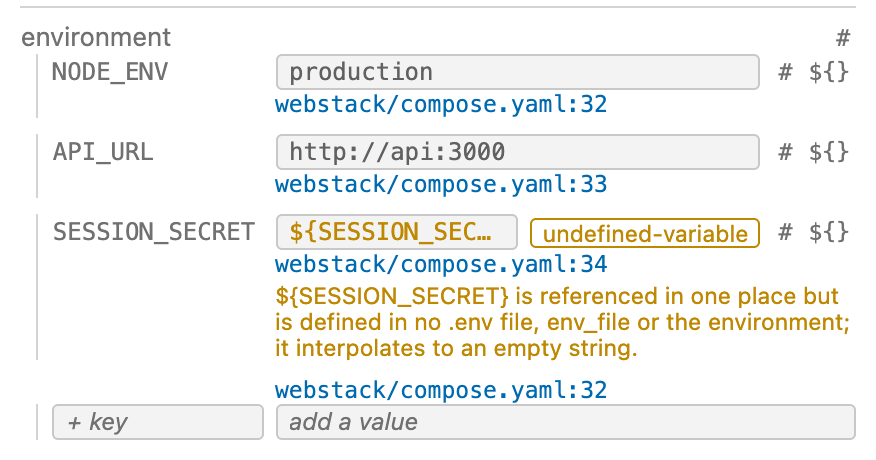
Ten rules run: host port collisions across the merged configuration; a
service_healthy dependency on a service that declares no healthcheck; circular
depends_on; volumes and networks declared and used by nothing; variables
referenced and defined nowhere; services nothing can reach; credentials in a
plain environment: block; a build: naming a Dockerfile that is not there; a
key the merge combined from two different shapes, a list in one file and a
mapping in another; and an obsolete top-level version:.
Edit, and read the diff first
Change a value and it stages. Nothing is written until you press the button that
names the file it will write.
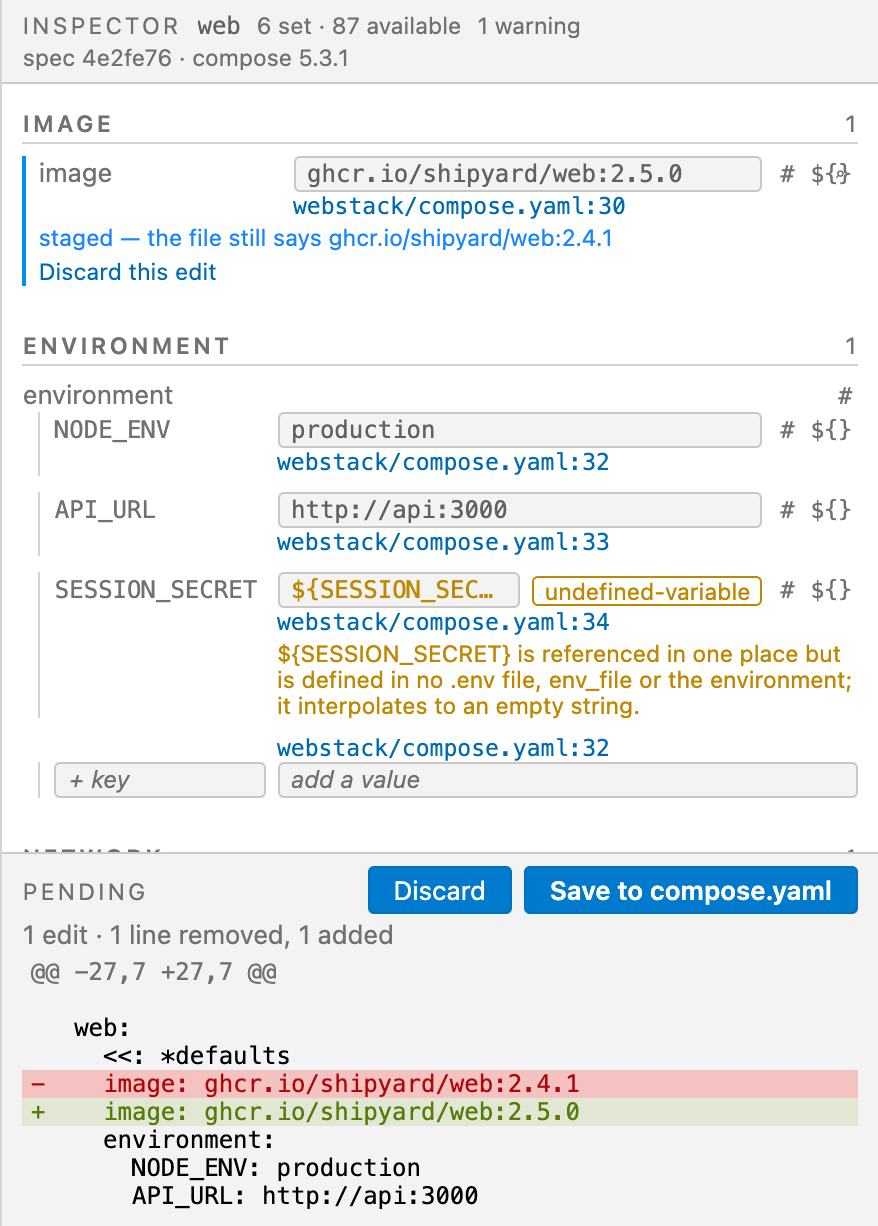
The staged field keeps saying what the file still holds, so the panel never
shows you a value your file does not have. Discard puts it back, and after a
write, undo is the editor's ⌘Z — there is no parallel history to learn.
Adding things
The same staging, for things the file does not have yet.
- A service, a network, a volume, a config or a secret, from
+ add on the
canvas. The name goes after the last thing in its block, at the file's
existing indentation, with the file's own line ending. Nothing else is
written: a network arrives as frontend:, not as an invented body.
- A key on a free-form mapping —
environment, labels, build.args —
from the + key row, and an entry on a list from + entry. Which mappings
are free-form comes from the specification, not from a list somebody typed.
- A comment, above a key or trailing a value, from the
# control on every
editable row. A run of comment lines above a key is treated as one comment,
and a # inside a quoted value is not mistaken for one.
- A build stage, from
+ add stage in the Dockerfile pane. FROM takes the
keyword casing the file already uses.
- A value moved out into a variable, from the
${} control on any scalar
row: it becomes ${NAME} in the compose file and NAME=value in the .env
Compose actually interpolates from. It is the only operation that touches two
files, so it shows both diffs before writing and the button reads
Save to compose.yaml and .env.
Dockerfiles
Opening a Dockerfile — or clicking a Dockerfile node on the canvas — opens a
form: one group per build stage, instructions in file order, each carrying its
line. Editing works the same way, through a separate engine written for a
separate grammar.
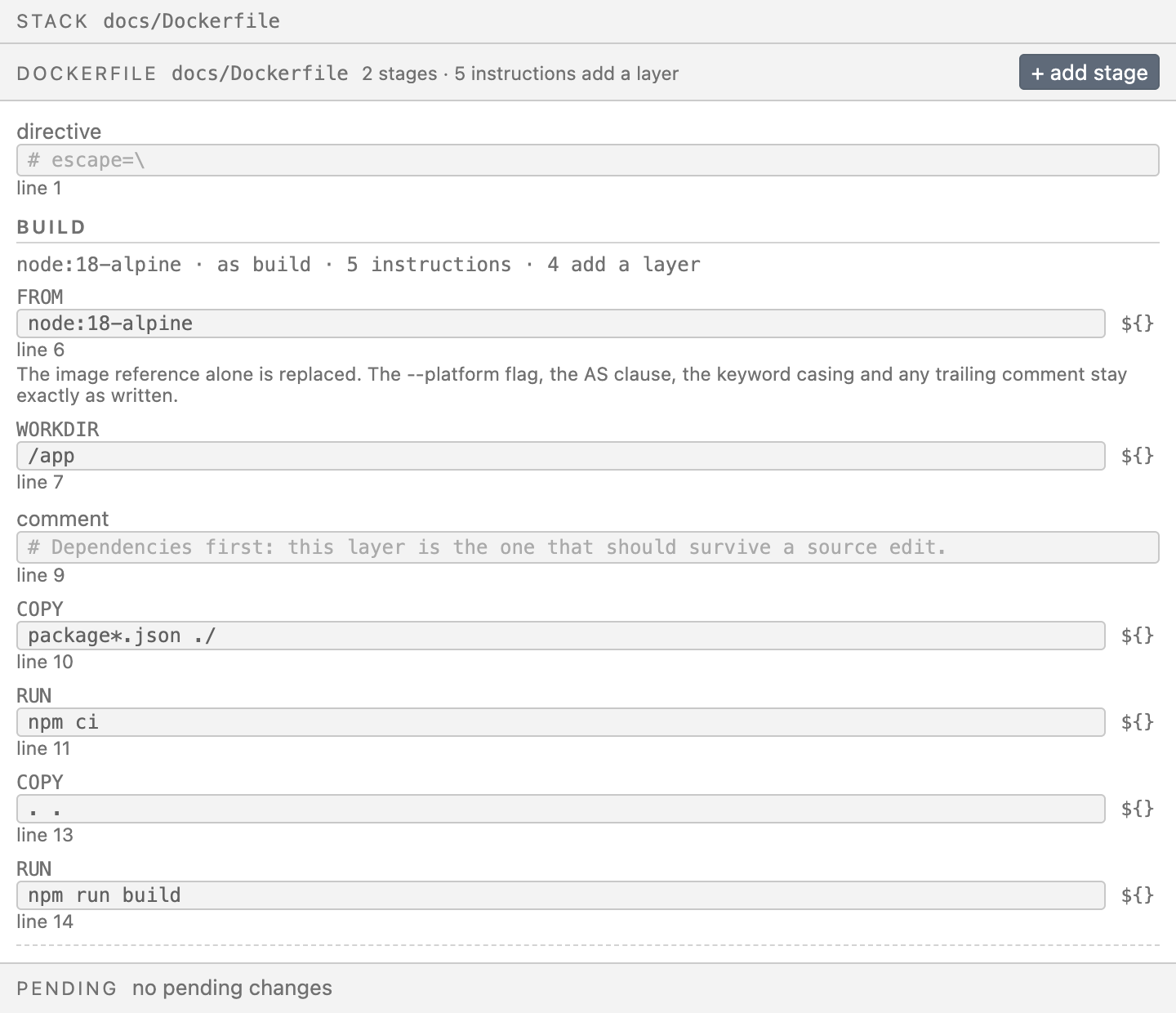
Continuations, heredocs, escape directives and keyword casing survive an edit
because they are never re-emitted. Each stage also lists Available here: —
every instruction the grammar permits that this stage does not use. The
Dockerfile engine scores 100% on all five of its measured properties across the
180 real Dockerfiles in the corpus.
Images
Typing in an image field searches Docker Hub. Choosing a result fills the
field; nothing is written until you save.
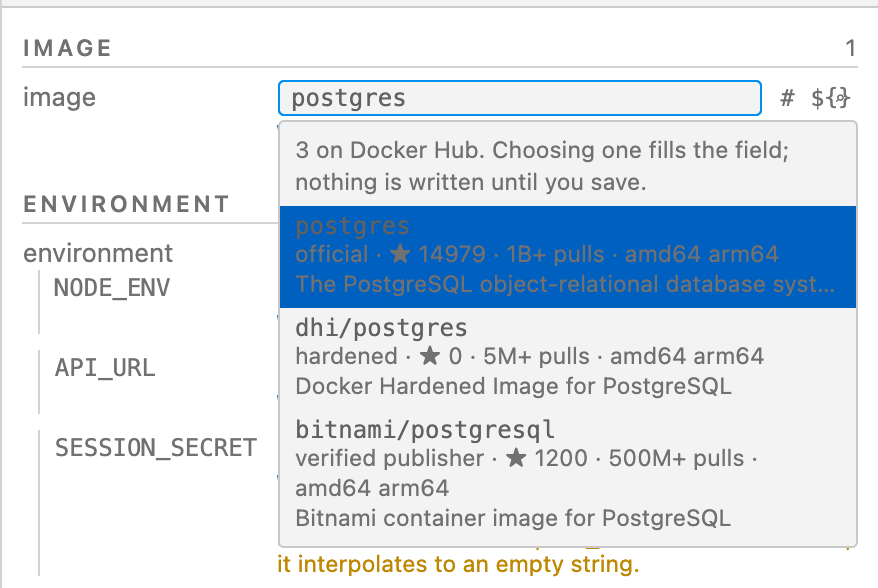
This is the only part of Composure that makes a network request. Set
composure.dockerHub to off and the panel is exactly what it is with no
network: no image search, no upgrade pills, no requests made.
How it works, and why that is the whole point
An edit locates the byte range of the thing being changed and patches the
original buffer. Unchanged bytes stay unchanged by construction, not by
effort — so comments, blank lines, indentation, quoting style, key order, flow
style, anchors, CRLF line endings and a UTF-8 BOM all survive without anyone
having written code to preserve them.
The alternative is what almost every YAML tool does: parse into a model, modify
it, serialise it back. Measured across 146 real compose files from ten public
repositories (awesome-compose, Immich, Paperless-ngx, Nextcloud, Sentry
self-hosted, GitLab, n8n, Grafana, Airflow, example-voting-app):
| Approach |
Byte-identical round trip |
Files damaged |
yaml.v3 parse → re-encode |
19.86% |
117 |
goccy parse → re-render |
58.22% |
59 |
| splice bytes in place |
98.63% (144 of 146) |
0 |
And on the operation you will actually perform. 71 of the 146 files had an
editable image scalar; changing one tag produced:
| Approach |
Minimal two-line diff |
Worst case |
yaml.v3 re-emit |
32.4% |
332 lines |
goccy re-emit |
62.0% |
22 lines |
| splice |
100% |
2 lines |
The 332-line worst case is Sentry's docker-compose.yml. One image tag rewrites
332 lines of it under re-emit, and two under splice.
An operation that cannot be performed safely is refused, with a reason, and
changes nothing. A flow-style mapping — web: {image: nginx, restart: always} —
cannot take a block child without the output becoming invalid YAML, so the
engine returns an error rather than writing it. So does an edit to a value that
defines an anchor others reference, an edit staged against a range the file has
since moved, a name already declared, and a scalar YAML would read as a number
when you meant text. An editor that emits an unparseable file is worse than one
that says no, because the damage surfaces later in someone else's terminal.
Every number above comes from make gate, which checks 29 metrics against a
committed baseline on every commit and fails the build when one drops. A failing
fidelity number is never fixed by moving the threshold. The corpus is fetched by
one command, the harness that measures it is in the repository, and the full
tables are in
RESULTS.md.
Requirements
VS Code 1.85 or later, or a fork on the same extension API — Cursor and Windsurf
work. The Go core ships inside the extension as a platform binary and is
spawned as a subprocess; there is nothing else to install and no daemon to run.
Packages are built for macOS (Apple silicon and Intel), Linux (x64 and arm64,
glibc and musl) and Windows x64. Each VSIX carries exactly one core binary, so
you download one platform's binary rather than five.
Getting started
- Install it — search Composure in the extensions panel, or
code --install-extension elzouhery.composure. On Cursor, Windsurf,
VSCodium and other forks it is on
Open VSX under the same
name, which is what those editors search.
- Open a folder containing a
compose.yaml, compose.yml,
docker-compose.yaml or docker-compose.yml.
- Open that file. The panel opens beside it.
Or run Composure: Show Stack from the command palette. Activation is on
workspaceContains, so the compose file has to be in the open folder rather
than opened on its own.
Settings
| Setting |
Default |
What it does |
composure.dockerHub |
on |
Whether Composure may ask Docker Hub how old an image is and what newer tags exist. The only part of Composure that leaves your machine. Set it to off and there are no upgrade pills, no image search, and no requests made. |
composure.corePath |
"" |
Absolute path to a composure core binary. For development only — when empty the shipped binary for your platform is used. Machine-scoped on purpose: it names an executable to run, and a .vscode/settings.json committed to a repository must not be able to redirect it. |
Also a CLI
The same binary runs headless, and every capability in the panel exists as a
subcommand first — resolve, explain, topology, impact, diagnose,
schema, dockerfile, editable, preview, apply, add, extract,
image. diagnose exits on the highest severity it found, so it works as a CI
gate with no wrapper; apply exits 3 and writes nothing when it refuses, which
is what makes a scripted edit across fifty repositories safe.
What it does not do
Stated plainly, because a page that overstates is the first thing a reader stops
trusting.
Decided against, and not coming.
- Kubernetes, Swarm and Terraform. Compose files and Dockerfiles, nothing
else.
- No runtime. It does not start, stop or restart anything and shows no
container status. It reads and edits files, and it needs no daemon to do it.
- Cross-registry image search. Docker Hub only, so nothing is claimed either
way about an image on ghcr.io or a private registry.
- Vulnerability data. Docker Hub's public API does not carry it.
- Deleting a service, a network or a key from the panel. One entry of a list
has a
Remove control; deleting a whole thing is destructive and is what git
and undo are for. The CLI has apply -op delete_key if you want it.
- Scaffolding. Adding a network writes
frontend: and nothing else. No
default driver, no starter healthcheck, no line you did not type.
- Nothing is quoted or unquoted for you. A value YAML would read as a number
when you meant text is refused, not guessed at.
Not built yet, and it says so when you hit it.
- Rewriting a block scalar, and rewriting a multi-line Dockerfile
instruction. Both are refused with a message naming the reason: doing either
in place needs a line-break and indentation policy, which is a formatting
opinion this engine deliberately does not have.
- Moving a Dockerfile literal into a build
ARG from the panel. The core
does it and the CLI performs it (composure extract -instruction N); the
stage form has no control for it. The compose half — ${}, into a .env —
is built.
- Layer cost. The Dockerfile view counts the instructions that add a layer.
It does not report the size of any one layer or which one breaks the cache.
- Multi-select. One node, one inspector.
Scope of the measurement. 98.63% is 146 compose files from ten public
repositories, and 100% on the Dockerfile metrics is 180 Dockerfiles. It is a
real corpus and it is not every compose file in the world.
Contrast is guarded by a test that refuses colour pairings VS Code never
promised, plus a human check against the four default themes. A user-authored
theme is not verified per pixel.
Composure also does not do schema completion or hovers in the text editor. Docker
DX does that well; Composure works in the panel beside it.
The full manual
📖 docs/USER-MANUAL.md
— the graph and what its edges mean, provenance, staging and the pending diff,
the full list of why an edit gets refused, adding services and instructions,
comments, moving a value into a .env or a build ARG, Docker Hub, the CLI,
and troubleshooting.
Licence
Apache-2.0, and the core stays Apache-2.0 permanently. Paid features, if they
ever exist, are additive and organisational. No capability is ever removed from
the free tier to create one.
This is a clean-room implementation. No source under BSL, SSPL, the Elastic
License or AGPL is an input to it, and a licence scan enforces that on every
commit. The extension carries zero runtime npm dependencies, asserted by a test.
The measured evidence behind every number above is published in
RESULTS.md
— the corpus, the benchmarks and the numbers the gate enforces on every commit.
The source repository is not public yet.

