snd-vscode
Snd — Bill Schottstaedt's programmable sound editor — as a VS Code session.
Two things at once, which is the whole point:
- The inferior Snd, the way
inf-snd.el does it: a real Snd process, its
s7 reachable from the editor, C-c C-e to evaluate the definition under
the cursor, Tab completion, snd-help on hover. The same key chords as
inf-snd.el, because anyone who already works this way has them in their
fingers.
- Snd's graphs as editor panels: waveform, single spectrum, sonogram, 3D
spectrogram, wavogram, and the user graph, drawn in VS Code from numbers Snd
computes. Which means they work in a headless Snd build, over ssh, and beside
the file being edited — three things Snd's own Motif window cannot do.
Snd stays the editor. Every edit happens in Snd, in Scheme, so there is one
edit history and it is the one that gets saved. The panels set the cursor,
the selection and the visible range, and ask for a redraw.
What is Snd
Snd is Bill
Schottstaedt's sound editor, built at CCRMA and developed there since the
1990s. Every edit is a Scheme (or Ruby, or Forth) function call, callable
from a script as freely as from a keystroke, and every display — waveform,
spectrum, sonogram — is a value some Snd function computed, not a fixed
widget. extsnd.html in the same manual documents the C and Scheme APIs this
extension is built on; sndclm.html covers the signal-processing library
(clm) Snd embeds. None of that changes here — this extension is a second
front end for the same editor, not a reimplementation of any part of it.
Why
Snd itself is not the fragile part. Its GUI is: Motif, drawn through X11, which
on macOS means XQuartz — a dependency Apple never carried and nobody else has
promised to keep working either. Every few releases something in that stack
shifts and a working installation stops being one, and none of it has anything
to do with the editor underneath.
So this takes the GUI out of the equation. Snd's own configure defaults to no
GUI at all — Motif is used only with --with-motif — and the binary this drives
has no X dependency whatsoever. What used to be a Motif window is a VS Code
panel, drawn from numbers Snd computes.
The editing stays where it belongs: in Snd, in s7, with one edit history, the
one that gets saved.
The panels
Every picture below is drawn from numbers Snd computed: the reductions come from
channel-amp-envs, the transforms from snd-spectrum and Snd's own sonogram and
spectrogram matrices, the wavogram from the samples themselves. Nothing here is a
second implementation of Snd's DSP, which is why the displays agree with Snd's
own and why they keep working in a build with no GUI at all.
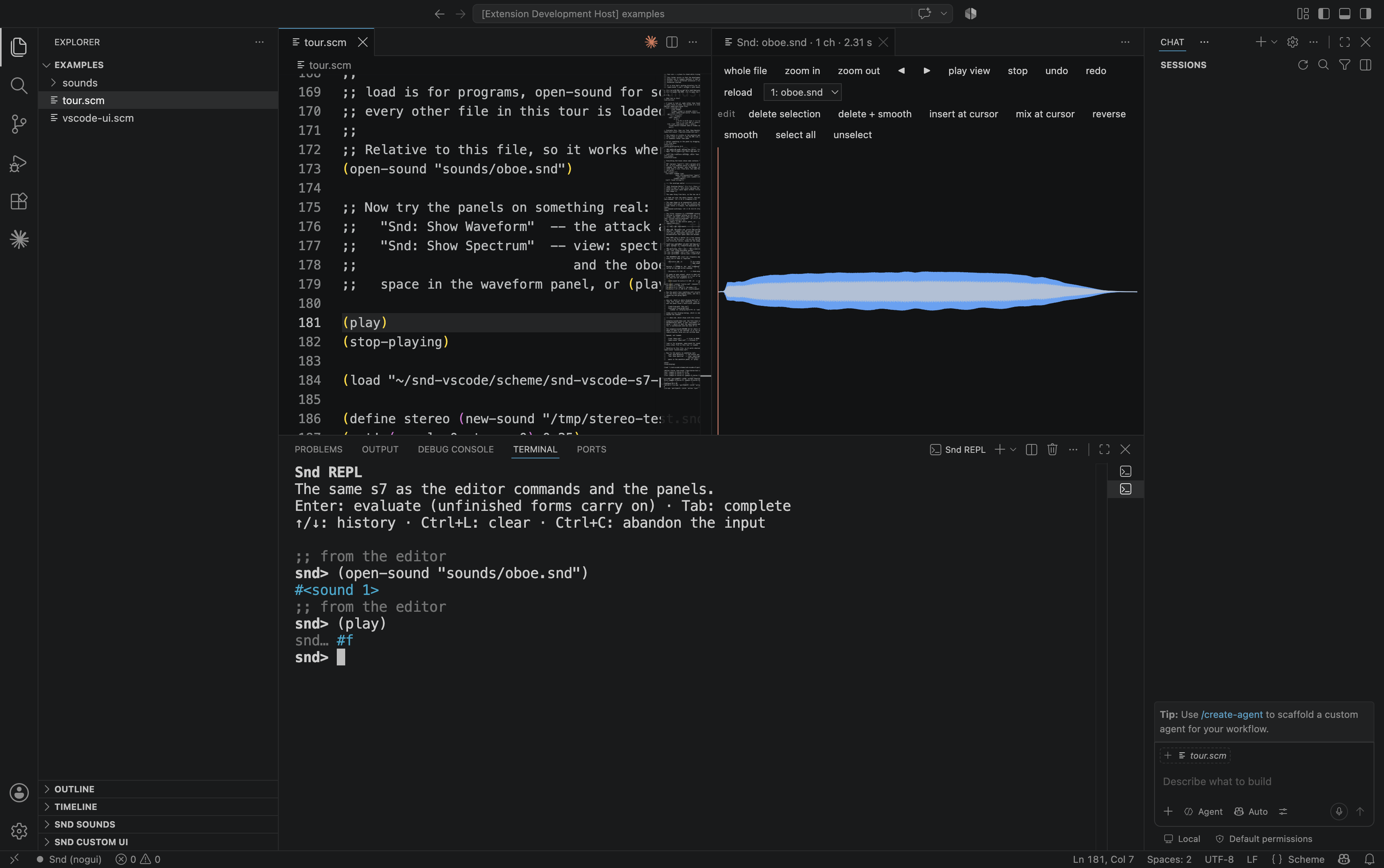
Waveform — Snd: Show Waveform. The min/max reduction Snd uses for its own
graph, with the transport, the edit operations and the selection beside it.
oboe.snd: the attack, the sustain, the decay.
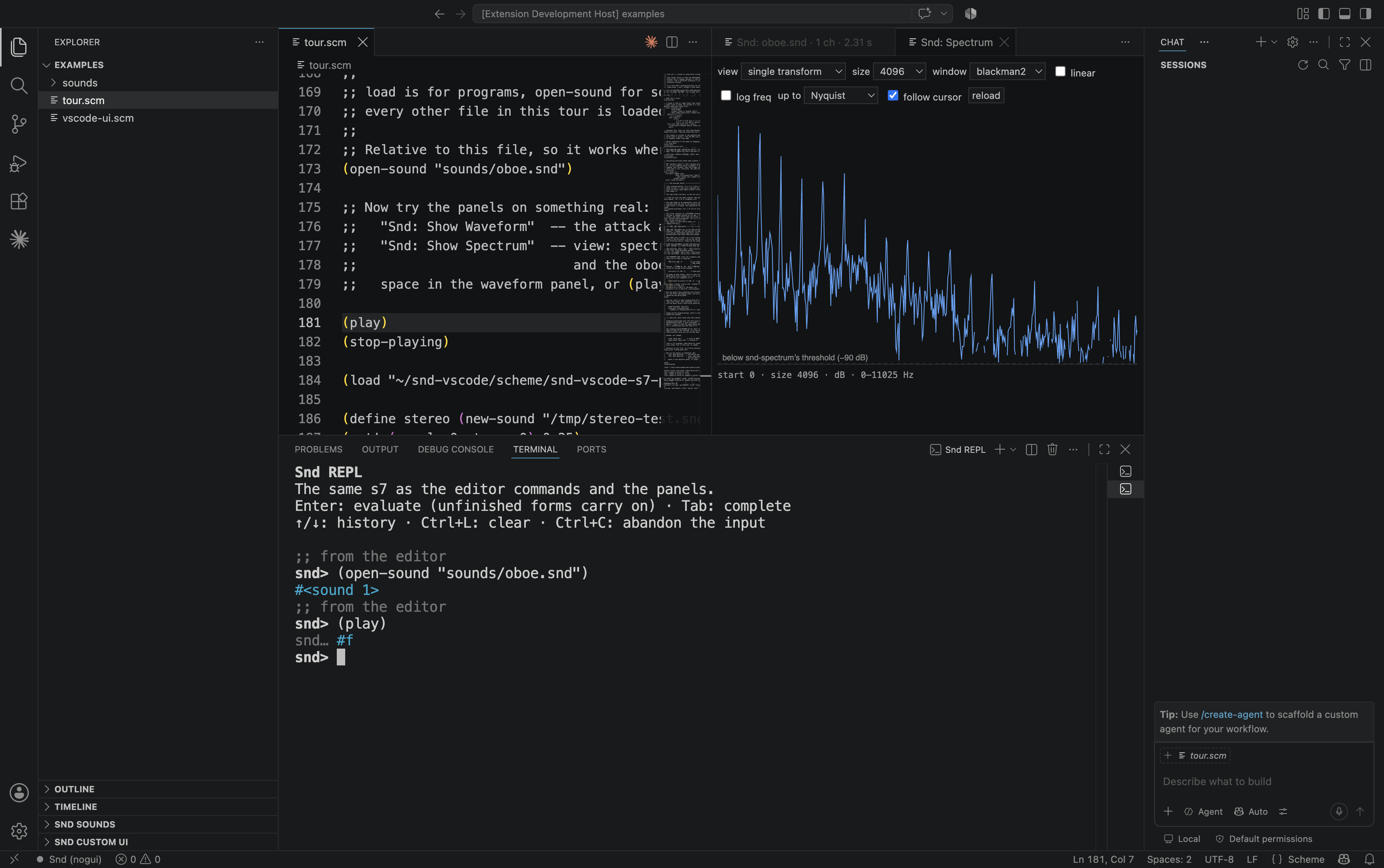
Single transform — Snd: Show Spectrum, view single transform. One FFT at
the cursor, in dB, with the oboe's harmonics standing up over the noise floor.
size, window and the frequency range are Snd's own variables; the panel sets
them and reads the result back.
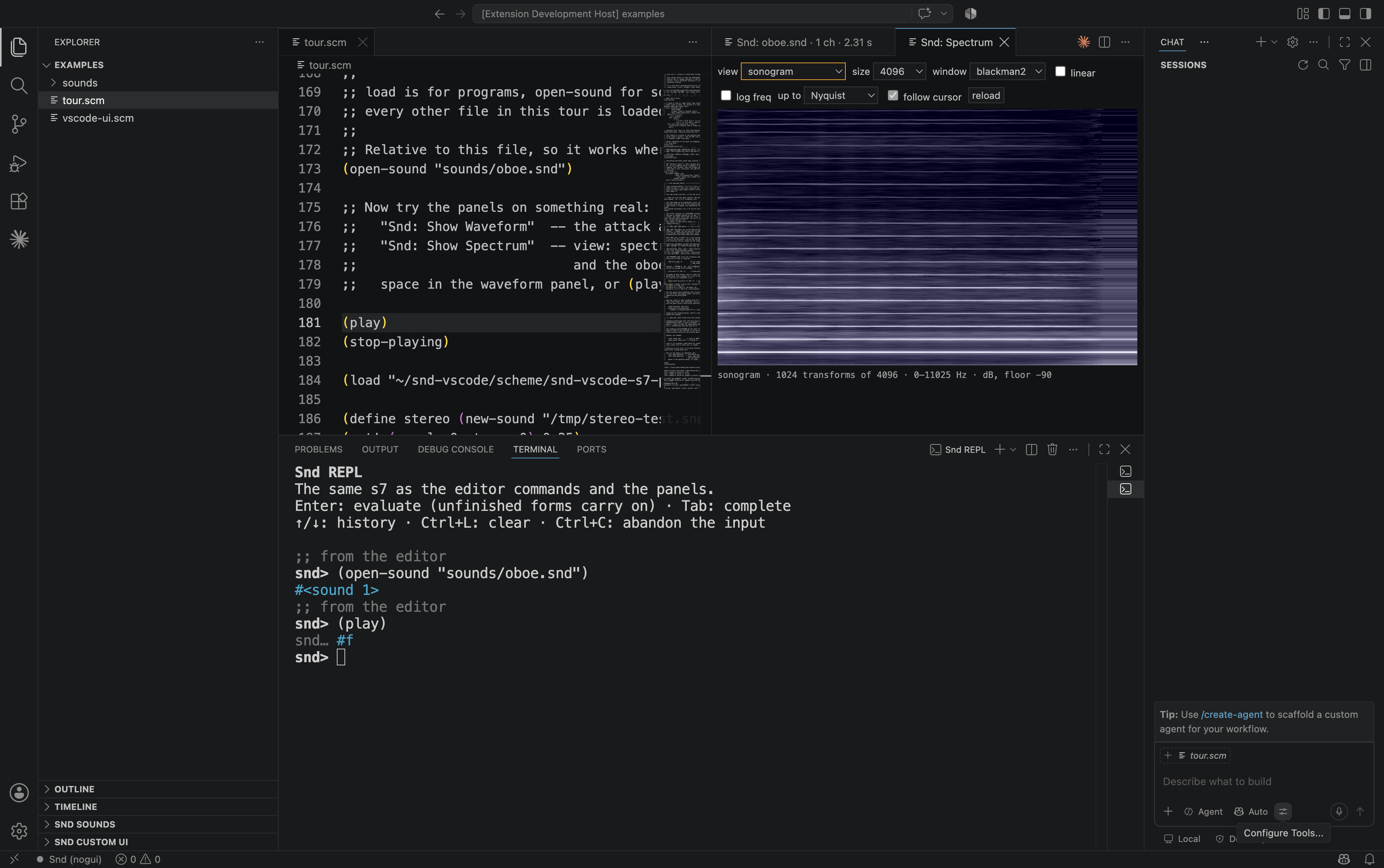
Sonogram — the same panel, view sonogram: 1024 transforms of 4096 points,
time to the right, frequency upward, level as brightness. The harmonics are the
horizontal lines.
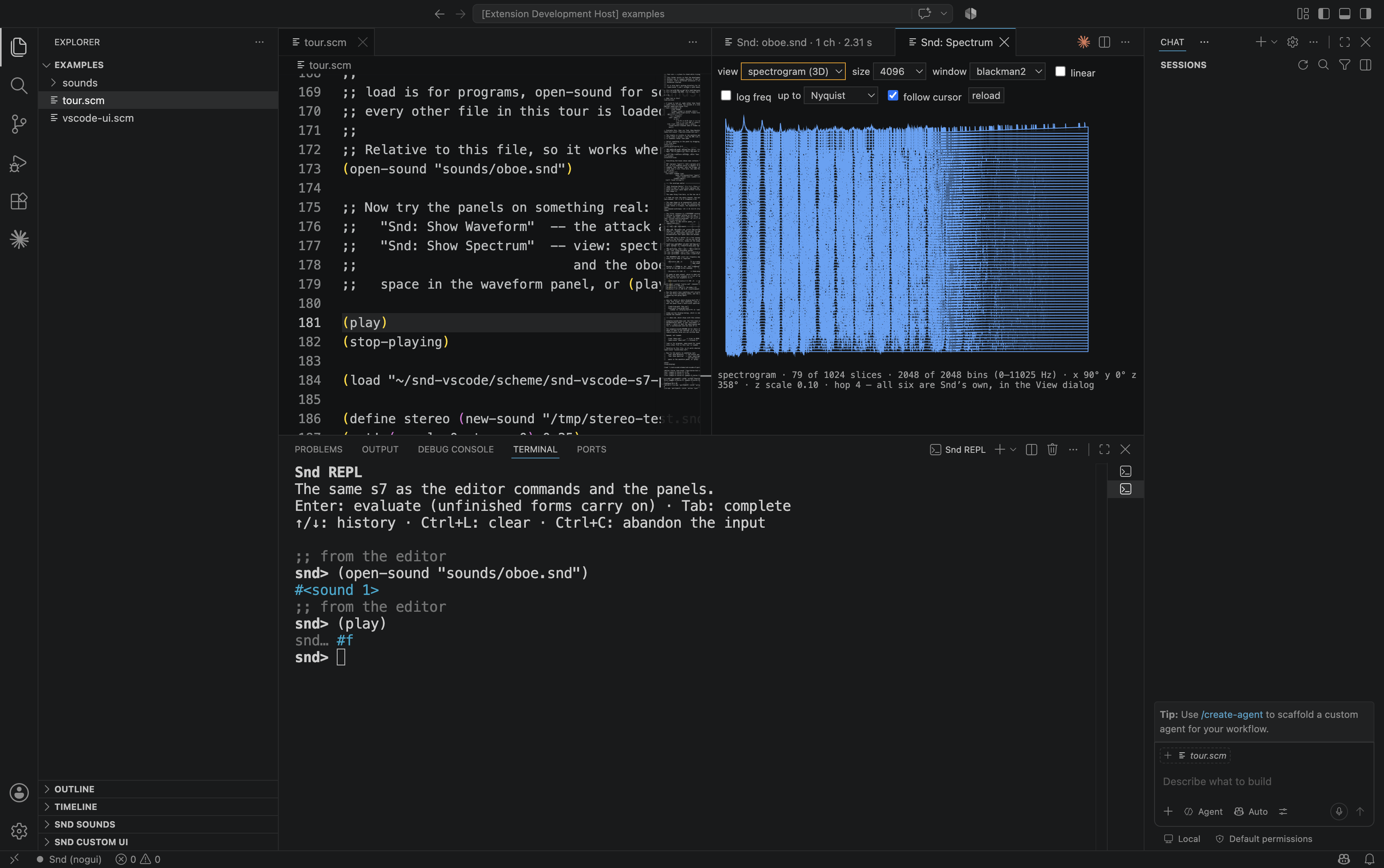
3D spectrogram — view spectrogram (3D), the same data as a surface, with
Snd's spectro-x-angle, -y-angle, -z-angle, -z-scale and -hop behind it.
At full Nyquist width a 330 Hz note puts everything of interest in the first few
percent, as here; up to is what makes it readable.
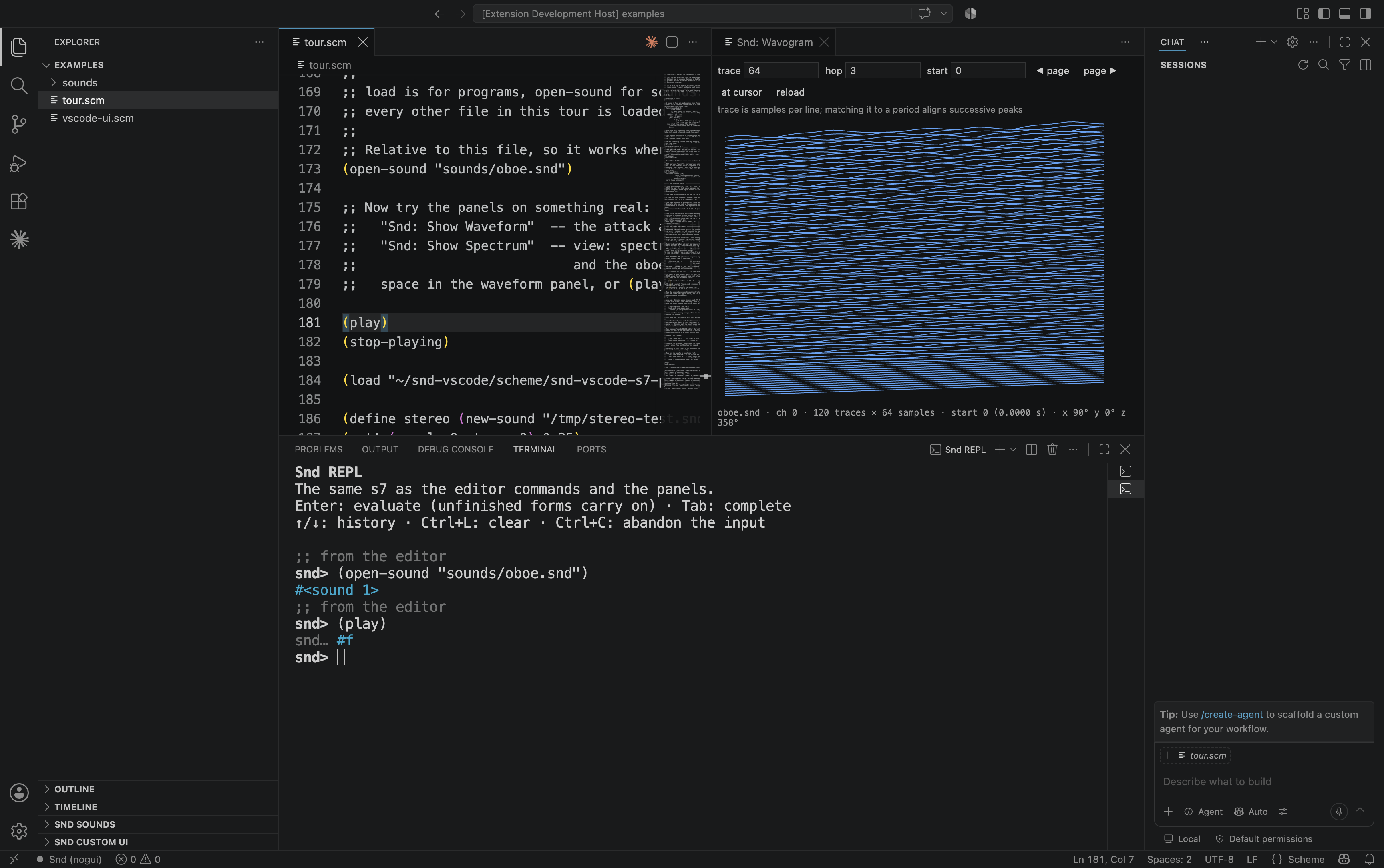
Wavogram — Snd: Show Wavogram. 120 traces of 64 samples, each line one
trace, painted back to front so that nearer traces hide the ones behind them.
Setting trace to a period aligns successive peaks and the pitch becomes a
shape.
Requirements
A Snd binary. Getting one is not the ordeal it has the reputation of being,
because the ordeal is Motif, and Motif is the part this extension
replaces.
Snd's own configure defaults to no GUI — Motif is used only with
--with-motif — and the headless build has no X dependency at all. sndlib
and s7 are in the tarball; on macOS the audio backend is CoreAudio, which is
part of the system. So there is no XQuartz, no libXm, no libXt, no Homebrew
archaeology:
tools/build-snd.sh # fetches snd-26.5, configures headless, builds
Two minutes and a C compiler. The binary lands in bin/<platform>-<arch>/snd,
which is where the extension looks before it looks at PATH. The script
refuses to continue if configure picked up Motif anyway, because that failure
otherwise surfaces much later and looks like something else.
To skip even that: .github/workflows/build-snd.yml builds the same binaries
in CI for macOS (arm64 and x64) and Linux. Snd's licence permits shipping
them — "permission to use, copy, modify, distribute, and license … No written
agreement, license, or royalty fee is required" — so a release can carry them
and nothing needs building on your machine.
Linux needs no bundled binary: Snd is packaged there — Planet CCRMA and most
distributions carry it — and a Snd on PATH is used as-is. macOS is what the
bundle is for, and what this extension was written to keep working.
If you already have a Snd you like, including a Motif one, point snd.path at
it and it wins over everything.
A built macOS/arm64 Snd is committed, in bin/darwin-arm64/, with its
checksum and provenance in bin/README.md. A binary in a repository is a real
cost; the alternative was worse — without one, a fresh clone falls back to
whatever snd is on PATH, and on a machine with a Motif build installed
that means Snd's own X window opening beside the panels on every clone.
For other platforms, tools/build-snd.sh puts a binary in bin/ on its own,
and the extension picks it up with no configuration. The session says so once
if it ends up on a GUI build from PATH.
Either build works, and the difference matters:
| build |
what you get |
how it is driven |
--with-motif |
Snd's own window and the VS Code panels |
Snd reads stdin through its X input callback — the path its own source calls "the emacs subjob connection" |
without Motif (snd-nogui) |
the VS Code panels only |
the bridge takes stdin itself and reads with read-line |
Same protocol, same commands, same panels. Point snd.path at the binary
you built; snd.mode only decides which name to guess when you leave it at
snd.
Whether a build has a GUI is decided when it is compiled. No setting here
can switch one on.
Windows ships as its own build, bin/win32-x64/, with the three DLLs
(libdl, libfftw3-3, libwinpthread-1) Snd needs to start — install from
the .vsix and nothing else needs to be on the machine, no Motif question to
answer. Building that binary needs MSYS2 with the
UCRT64 toolchain, which is a build-time requirement only, not a run-time one;
see CHANGELOG.md for the install steps and what changed getting there.
Starting it
cd snd-vscode
npm install
npm run compile
npm run index -- /path/to/snd-26.5   # the offline help index
Then open the folder in VS Code and press F5. A second VS Code window
opens with the extension loaded; open a .scm file in it and run
Snd: Start (C-c C-s) or just Snd: Open REPL (C-c C-z), which
starts a session if none is running.
Before the first start, tell it where your Snd is. From your Preferences
window, /usr/local/share/snd is the s7 file directory, so the binary is
most likely /usr/local/bin/snd:
{
  "snd.path": "/usr/local/bin/snd"
}
Only if you pointed snd.path at a Motif build: XQuartz has to be running
before the session starts — Snd builds its window during startup, and without a display it will
fail there rather than later. Snd: Open Log shows what Snd said.
If it does not come up, check the channel by hand first: see
SMOKETEST.md. That separates does Snd talk to the bridge from does the
extension talk to Snd, which otherwise fail as one symptom.
Custom Snd UI without Motif
The extension loads scheme/snd-vscode-ui.scm before the user's init files.
This matters: a menu created by ~/.snd must exist before the main bridge says
the session is ready. Snd's normal init sequence (~/.snd_prefs_s7,
~/.snd_s7, then SND_INIT_FILE or ~/.snd) is preserved; adding -noinit
to snd.args still requests a completely bare session.
In a headless Snd, the usual high-level calls now create controls in the
Snd Custom UI Explorer view instead of trying to create Motif widgets:
(define tools-menu (add-to-main-menu "My tools"))
(add-to-menu tools-menu "Normalize"
  (lambda () (scale-to 1.0)))

(define meter (make-variable-display "Meters" "Peak" 'meter '(0.0 1.0)))
(variable-display 0.72 meter)
Menus stay in the tree; dialogs and instrument displays use one generic VS
Code webview renderer. Slider, toggle, text, select, envelope, meter, graph,
button and separator descriptors are supported. Callback procedures stay in
s7 and are addressed by opaque ids — callback source is never copied to or
evaluated by the webview. Updates made with change-label,
change-menu-label, variable-display, or vscode-ui-update appear live.
For new code, the toolkit-independent constructors are
vscode-ui-menu, vscode-ui-menu-item, vscode-ui-dialog,
vscode-ui-slider, vscode-ui-toggle, vscode-ui-text,
vscode-ui-select, and vscode-ui-envelope. The small *motif* helper
environment also lets the non-X branches of Snd's menu scripts use
make-effect-dialog, add-sliders, activate-dialog, change-label, and
XtSetValues. See examples/vscode-ui.scm for a complete dialog.
This is intent compatibility, not an Xt emulator. Code whose meaning is
“add this command/control/dialog” is forwarded to VS Code. Code that walks
raw widget trees with main-widgets, XtAppAddActions, arbitrary XmN*
resources, or callbacks tied to X events still needs to be rewritten against
the declarative constructors. There is deliberately no fake snd-motif
feature: claiming it would send raw Xt scripts down a branch that cannot work
on macOS.
Installing from source
npm run gates # structural checks, tsc, node tests, s7 tests, real Snd
npm run gates needs an s7 for the Scheme half of the tests, and builds one
itself on the first run — the sources are in third-party/s7 (two files,
0BSD), so a fresh clone runs all 328 s7 checks without downloading anything.
Takes a few seconds, once.
The final gate starts an actual Snd, opens a temporary copy of oboe.snd, and
drives the bridge end to end. It catches build/version differences the s7
stubs cannot. A platform with no built Snd reports skip, never ok, and
prints every location it checked.
Commands
Two keymaps, chosen with snd.keymap. inf-snd.el's is the default,
because it is Snd's own — and because two of its chords have no SLIME
equivalent at all: C-c C-p for play and C-c C-t for stop only exist
in a keymap written for a sound editor.
inf-snd.el |
command |
SLIME |
C-c C-e |
evaluate the definition at the cursor |
C-M-x |
C-c C-r |
evaluate the selection |
C-c C-r |
C-c C-o |
evaluate the file, form by form |
C-c C-c |
C-c C-l |
(load …), so errors carry the file and line |
C-c C-k / C-c C-l |
C-c C-i |
snd-help for a symbol |
C-c C-d C-d |
C-c C-z |
the REPL (inferior Snd) |
C-c C-z |
C-c C-f |
open a sound file |
C-c C-f |
C-c C-p |
play |
— |
C-c C-t |
stop playing |
C-c C-t |
C-c C-s |
start the session |
— |
C-c C-c |
the control panel |
— |
| — |
evaluate the form that just ended |
C-x C-e |
| — |
evaluate and print into the buffer as a comment |
C-c C-p |
| — |
the source of a symbol, as the session has it |
M-. |
| — |
apropos over the live symbol table |
C-c C-d C-a |
| — |
the waveform panel |
C-c C-w |
Set "snd.keymap": "slime" for the SLIME/SLY chords instead. The setting is
exclusive rather than additive, because three chords disagree: C-c C-p is
eval-and-print in SLIME and play here, C-c C-t is trace against stop
playing, C-c C-e is an eval prompt against evaluate definition. Two
meanings on one chord is worse than either choice. "none" leaves the palette
only.
The command palette and the Snd Sounds tree also expose:
- Snd: Show Wavogram — Snd's time-domain 3D display.
wavo-trace is the
samples per line, wavo-hop their screen spacing, and the projection uses
Snd's own six Color/Orientation values. Opening it sets
time-graph-type to graph-as-wavogram, so a Motif Snd and VS Code show
the same mode immediately.
- Snd: Edit Header — header/sample type, rate, channels, data location,
data size, and comment, behind an explicit acknowledgement because these
fields rewrite the file header and are outside undo. An unchanged data
location is left to Snd to recalculate after a header-type change. A changed
comment is committed immediately when there are no pending sample edits;
otherwise it stays staged so Edit Header never saves those edits implicitly.
- Snd: Save Session State — writes the complete session as a loadable
Scheme program and remembers the last target as the next dialog default.
Everything in the right-hand column stays available as a command whichever
keymap is on — Snd: Evaluate Last Expression, Snd: Show Source of Symbol,
Snd: Apropos. Only the chords change. Two of the SLIME bindings are
approximations worth knowing about: C-c C-c is slime-compile-defun there,
and s7 has no separate compile step, so it evaluates the file; and M-. does
not jump to a file, because Snd's own functions are C and have no Scheme
source — it shows procedure-source for a closure and says so for a built-in.
The envelope editor
Built to Bill Schottstaedt's own description of the Edit Envelope dialog, and
using his labels, because those are what a Snd user already knows.
Three targets — what the envelope is: amp (amplitude), flt (the
spectrum, through an FIR filter of enved-filter-order taps), src (the
sampling rate, which changes length and pitch together).
Three scopes — where it goes. Nine combinations, seven of which exist:
|
the sound |
the selection |
a mix |
| amp |
env-sound |
env-selection |
mix-amp-env |
| flt |
filter-sound |
filter-selection |
— |
| src |
src-sound |
src-selection |
— |
The two empty cells are empty in Snd too: a mix has an amplitude envelope and
no filter or sampling-rate envelope. They are greyed out and refused by name
rather than falling back to the sound — which would envelope a whole file when
one mix was asked for.
The rest of his dialog: linear / exp with the base, clip (whether the
mouse is held at the y bounds), wave, the fir order, an undo/redo
pair moving through the envelope's own history — separate from Snd's edit
list, because undoing a breakpoint one did not mean to add must not undo an
edit to the sound — and define it, which names the curve through
define-envelope so it can be used anywhere an envelope is, exactly as in
Snd's own funcs.scm.
The y axis follows the target: a filter response is a gain from 0 to 1, an
amplitude envelope is a multiplier that may exceed 1, an src envelope is a
speed ratio where 1 is unchanged. In flt the x axis runs from 0 Hz to half
the sampling rate — labelled 0–1, as his documentation has it.
Type a name in the field and press Enter to load that envelope — Bill's other
way in, alongside the list. The panel re-reads when it comes back into view,
so a define-envelope typed in the REPL a moment ago is there.
The named envelopes are found by scanning the symbol table for even-length
lists of reals. There is no Scheme-visible registry to ask: the editor's list
lives in all_envs in snd-env.c, C-side only. define-envelope defines an
ordinary variable, which is why the heuristic is exactly right — and why his
funcs.scm is a hundred lines of them.
Space is his Undo&Apply: it takes back the previous audition, applies,
and plays the affected range. Each press replaces the last, so twenty presses
while dragging a point leave one entry in the edit history, not twenty.
apply keeps it. The replacing only happens while the audition is still the
top of the edit history — if anything else happened since, the next audition
stacks, because undoing would remove that other work instead.
Hooks: what the editor watches, and what it must not decide
Snd's customization model is hooks, and a Snd user's ~/.snd is mostly hook
functions. The bridge installs observers on eleven of them — start-playing,
stop-playing, after-open, close, new-sound, mark, mix-release,
mix-click, snd-error, snd-warning, mus-error — under two rules that
matter more than the list:
Additively. Never (set! (hook-functions h) …), always a cons onto what
is already there. Replacing would delete the user's own functions.
Never (hook 'result). In Scheme every function on a hook runs and their
return values are ignored; the result is how the user's own functions cancel an
edit, refuse an exit or suppress a warning. An observer that sets it takes that
decision away silently. Watching must not become deciding — a test checks it by
running a hook and looking at what the environment holds afterwards, and the
expected value is unspecified rather than #f, because #f is an answer
("do not cancel") and unspecified is no answer at all.
What this buys, concretely:
- the playhead knows when a play ends. It used to stop because
play-hook
stopped being called, which works and is an inference — a sound that ended
early left the green line standing. A running play with no position yet now
says "playing…" rather than drawing a line at 0, which would be a claim about
where the sound is.
- marks and mixes moved elsewhere — from a script, a Motif window, a drag —
refresh the tree. It used to be right only after the next edit.
- Snd's own errors and warnings arrive. They go to Snd's listener, and in a
headless build to a terminal that may not be open; from there, nowhere.
Errors are shown, warnings go to the status bar and the log — a modal box per
DAC underrun teaches people to dismiss everything.
Your own drawing code
Snd: User Graph (lisp-graph-hook).
Snd's third graph pane is where display-bark-fft (dsp.scm),
display-energy (examp.scm) and twenty years of private code put their
output, and all of it works the same way: a function on lisp-graph-hook
calls graph with a float-vector.
(hook-push lisp-graph-hook
  (lambda (hook) (display-energy (hook 'snd) (hook 'chn))))
The bridge wraps graph to record those calls, runs the hook on demand,
and the panel draws what came out. Snd's own graph still runs, so with a
Motif build the same curve appears in its third pane as well.
Wrapping a Snd function that user code calls is a real intrusion, and it is
the only one in the file: after this, graph is Snd's graph plus a recorder.
Said here rather than buried, because a Snd user has a right to know which of
their functions is no longer exactly theirs.
Two details that are easy to get wrong and are tested:
A list of numbers is an envelope, not a trace. "If 'data' is a list of
numbers, it is assumed to be an envelope (a list of breakpoints)." Its x
values are its own — (0 0 0.1 1 2 0) peaks near the start, and resampling it
as an evenly spaced curve moves the peak to the middle.
All traces share one y range. Snd draws a list of float-vectors in one
graph with one axis; scaling them separately would make curves of different
magnitude look the same size, which is the one thing a comparison graph must
not do.
graph-hook is the other half, and it has the opposite contract: "If it
returns #t, the display is not updated." Here the result matters, and the
panels read it — which is not an exception to the no-result rule but the other
side of it. An observer must not write a result; a caller standing in for
Snd's own redraw must read one, or a user function saying "do not draw this"
would be ignored while the hook looked supported.
Still missing: edit-hook for protected history, and before-transform-hook,
which the spectrum panel ignores because it computes its own transform.
"Editing in Snd is modelled after Emacs in many regards ... Where an operation
has an obvious analog in text editing, I've tried to use the associated Emacs
command." The chords are Bill's, live in the panel:
C-a C-e window start/end · C-f C-b forward/back · C-n C-p a
'line' (128 samples) · C-j next mark · C-d delete the sample · C-h
delete the previous one · C-k delete a line · C-o insert a zero · C-z
zero the sample · C-m place a mark · C-y paste the selection · C-w
delete it
C-u then digits gives a count first, and — Snd's rule — an integer is
samples while a decimal is seconds: C-u 2.1 C-f moves 2.1 seconds. The
conversion happens in the bridge, where the sampling rate is known.
Find
Not a text search. Snd's Find asks for a function of one sample:
(lambda (y) (> y .1)) finds the next sample above 0.1. Snd: Find
(C-c C-x) and Snd: Find Backwards prompt for it, move the cursor to the
hit, and report the value.
The predicate may be a closure, and that is the point — Bill's own example
keeps the previous sample in a let to find positive-going zero crossings:
(let ((last 0.0))
  (lambda (y)
    (let ((crossing (and (< last 0.0) (>= y 0.0))))
      (set! last y)
      crossing)))
Which is why the expression is evaluated rather than parsed into some
restricted query syntax: any restriction would rule out exactly the searches
worth having. It comes from a prompt, like the REPL, and no panel can send
one — a test checks that.
Snd's own search-procedure is set at the same time, so C-s in a Motif
window and Find here look for the same thing.
Sync
Snd groups sounds for simultaneous editing through the sync field: sounds
sharing a value other than 0 are edited and moved together.
Snd: Sync This Sound With… sets it, and the tree shows it — a sound edited
together with another one otherwise looks possessed, an edit here changing
something over there with nothing on screen to say why. "A new group" uses
sync-max + 1, which is how one gets a group guaranteed not to collect the
sounds already grouped.
The spectrogram
view → spectrogram (3D) in the spectrum panel. Bill's surface view, from
Snd's own angles.
spectro-x-angle, -y-angle, -z-angle and the three matching scales are Snd
variables, set from its Color/Orientation dialog or from this extension's View
dialog — so turning the surface here and turning it in Snd are the same act.
They are read, never assumed: the Motif defaults are 90/0/358 with a z scale of
0.1, and under OpenGL 300/320/0 with z scale 1.0, which are very different
pictures from the same code.
The rotation is Snd's own matrix, copied term for term from
rotate_matrix in snd-chn.c, and so is the way the result reaches the
screen:
xx = (int)(xyz[0] + x0);
yy = (int)(xyz[1] + xyz[2] + y0);
Screen y is the sum of the rotated y and z. There is no depth axis at all:
the third component is added to the vertical, which is what makes the level
stand up out of the plane whatever the angles are.
That one line is the whole difference between a landscape and a striped
rectangle. The first version here used the third component as depth, which is
the obvious reading and wrong: at Snd's own Motif defaults the level then went
entirely into a depth an orthographic view cannot show, every ribbon came out
the same height, and the picture rendered as a field of vertical stripes. No
amount of reasoning about rotations would have found it — it had to be read out
of the source.
The matrix and the screen mapping are interpolated into the webview from one
implementation rather than written twice, because the first line to drift would
be ry + rz. Slices are drawn back to front so the surface occludes itself,
and how many of them is spectro-hop's business — exactly the question that
variable exists to answer.
It is the same request as the sonogram: one matrix of bands by time slices,
drawn two ways. Snd makes the same choice — graph-as-sonogram and
graph-as-spectrogram differ in the drawing, not in what is computed — and a
second op would be a second chance for the two views to disagree about a window
or a dB floor.
oboe.snd
examples/sounds/oboe.snd ships with the extension: the file every worked
example in Snd's documentation opens, and the first sound in this project with
a real attack, harmonics that move, and a decay — which is what the spectrogram
and the waveform panel are for.
It is not in the Snd tarball, and its redistribution terms are not written
down anywhere I could find. examples/sounds/README.md records that as an open
question rather than assuming an answer, along with its checksum and the one
command that removes it. Nothing depends on it.
Snd's own instruments
oboe.snd, fm-violin.snd, pistol.snd — the files every example in the
documentation opens — are not in the Snd tarball. All 676 entries, no audio.
They live on Bill's site and are downloaded separately.
What does ship is the better half: v.scm is the fm-violin, clm-ins.scm two
dozen more instruments, dsp.scm the analysis library where display-bark-fft
lives, examp.scm the examples the reference quotes. Point snd.sourcePath
at your Snd sources and (load-from-path "v.scm") works; the session puts the
directory on *load-path* when it starts, and falls back to whatever
tools/build-snd.sh left in .build.
examples/tour.scm ends with three fm-violin notes rather than an open-sound
of a file nobody has — which also gives the panels something with structure in
them: overlapping notes in the waveform, FM sidebands appearing and going in the
spectrogram.
Regions and mixes
Snd's last two dialogs without a counterpart here, and both are lists rather
than windows — which is the one thing this side does better: the region
browser and the mix dialog are two more windows to arrange, and a tree is
simply there.
Regions sit beside the sounds, not under one, because that is where they
belong: a region outlives the selection and the sound it came from. There are
only max-regions of them and the oldest is dropped when a new one arrives —
worth knowing before wondering where one went. Play, insert or mix at the
cursor, save, or forget (which drops Snd's copy and touches no sound; the
confirmation says so, because "forget" reads like "delete").
Mixes hang under their channel. A mix is a piece of sound laid over a
channel and still movable: position and amplitude are settable, and each
change is an edit — that is exactly the difference from having mixed something
in destructively.
Marks can be added at the cursor, renamed and deleted from the tree. Snd's
marks follow the edit list, so a deleted mark comes back if you undo to a point
where it existed; no separate bookkeeping, and no confirmation dialog for
something that is undoable.
The dB floor, and why part of the spectrum is empty
snd-spectrum sets any bin whose raw magnitude is under 1e-6 to a flat
−90 dB — a literal in snd-sig.c, carrying Bill Schottstaedt's own comment
wondering whether it should be min-dB. Bins just above that threshold are
computed and can be lower: −105.14 in a test file here.
So −90 does not mean "very quiet", it means "did not reach the threshold", and
the panels treat it that way. Those bins are left out of the curve rather than
drawn down to a floor — joining measured points across an unmeasured stretch
draws a slope that is not in the data — and the sonogram scales against −90
rather than min-dB, so real measurements below −60 dB keep their shading
instead of collapsing into the same black as the unmeasured ones.
The Snd Sounds tree in the side bar shows the open sounds, their
channels, their marks and their edit history. Clicking a channel opens the
waveform; clicking an entry in the edit history moves Snd to that edit.
What is not there yet
Stated plainly, because a feature list that quietly omits things is worse
than a short one:
- No editing from the panels. Deliberate: every edit goes through Snd,
in Scheme, so there is one edit history and it is the one that gets saved.
- No session across a window reload. The channel is the pipe, so there is
nothing to reconnect to.
Snd: Save Session State is what survives it.
- No Ruby or Forth. The bridge is s7 Scheme.
- Regions and mixes are not in the tree. Marks and edit history are.
- The Files, Regions and Mixes dialogs have no panel. Marks and edit
history are in the tree; regions and mixes are not.
ladspa is reachable from the REPL only.
Not affiliated
This is an independent project. It is not part of Snd and not supported
by Bill Schottstaedt or by the Snd project — please do not send Snd's author bug
reports about it. Snd is his work, and so is s7; the questions I put to him about
snd-dac.c were answered generously and are cited where they informed the code,
which is not the same thing as endorsement.
Issues about this extension belong here.
Licence
GPL-3.0-or-later, following Snd's own terms. scheme/snd-vscode.scm is
loaded into Snd and is part of the same program.
Snd is by Bill Schottstaedt; s7 is his too. inf-snd.el, whose command set
and key chords this extension follows, is by Michael Scholz. Neither is
included here.

