
IC10 Language Support



中文版
写 IC10,最花时间的往往不是想逻辑,而是在游戏里改一遍、试一遍、再改一遍。这个扩展就是为了把这部分省下来——让你能在 VS Code 里像写普通代码那样写 IC10。
它提供完整的 IC10 语言支持:语法与语义高亮、实时诊断、悬停提示、智能补全(含设备名称搜索与设备感知)、伪代码内嵌提示、签名帮助、代码格式化,以及中英双语界面。背后是一套原生编译器核心,几千行的脚本写起来也依然跟手。
装好就能用,不需要额外准备任何东西。
[!TIP]
想获得更好的使用体验,请先读一读 《使用指南》:调试器的变量面板只对声明过默认值的未赋值设备字段显示得出值,否则会显示为「无法求值」;设备感知、类型窄化、内嵌提示等细节也都集中在那里。
特性
1. 语义高亮
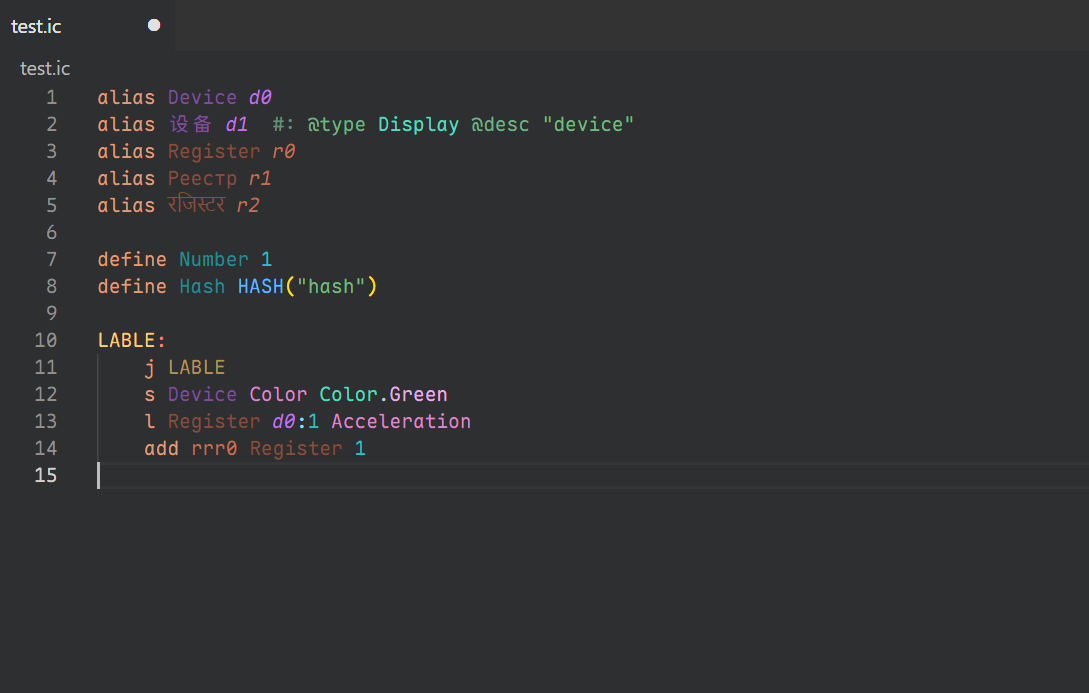
这里的颜色不只是"看起来像代码",而是由编译器的符号表决定的:
- 寄存器别名与原生寄存器区分着色
- 设备别名与原生设备引用区分着色
define 常量与原始数字字面量区分着色- 标签、宏调用(
HASH/STR)、类型注解各有独立颜色
- 同一个名字,在声明处和引用处也会有不同的呈现
[!TIP]
语义高亮的颜色跟随 VS Code 的语义令牌主题。想换成自己喜欢的配色,可以在设置里配置 editor.semanticTokenColorCustomizations,比如单独为寄存器别名、设备别名指定前景色或样式。具体写法参考 VS Code 官方文档。
2. 实时诊断
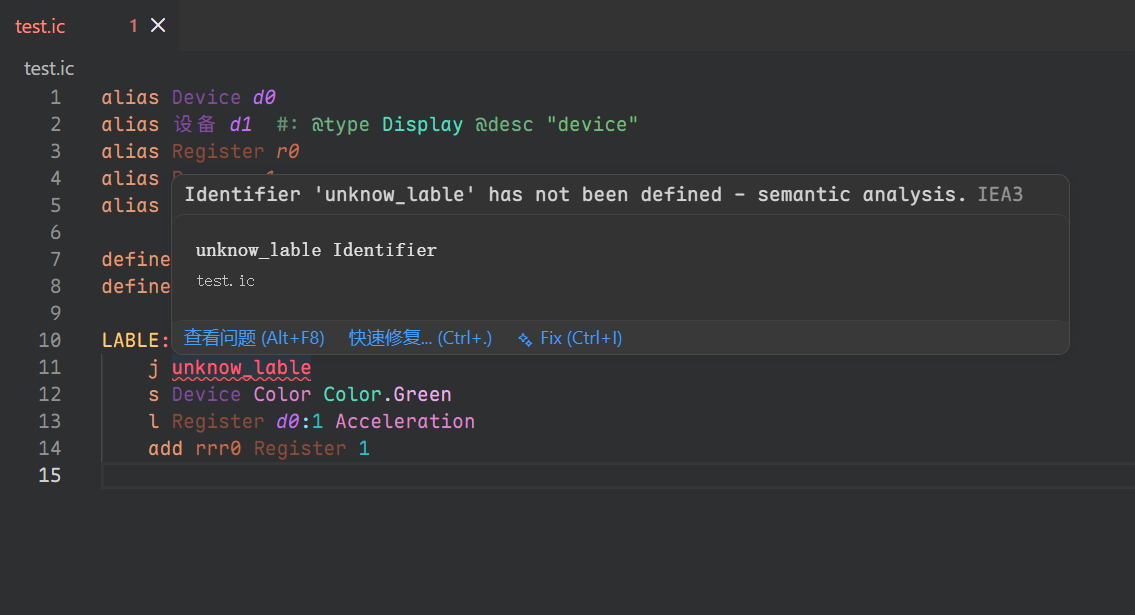
每次编辑后立即增量分析,把词法、语法与语义问题分类报在问题面板里——不用等保存,也不用切回游戏。
[!NOTE]
IC10 没有公开的官方语言规范,所以编译器的行为是拿 Stationeers 游戏里的实际运行结果一条条比对出来的。如果你遇到了我们还没覆盖到的情况,欢迎到 Issues 说一声。
3. 悬停提示
把鼠标停在任意符号上(别名、标签、常量、指令关键字),就能看到它的类型、值、描述等信息。
4. 智能补全
- 指令关键字补全(支持前缀匹配)
- 操作数补全:按当前指令的操作数类型约束(
typeN),自动筛选寄存器、设备引用、枚举值、跳转标签
- 设备感知:同一条语句里靠后的操作数,会依据前面那个设备别名所标注的类型(
#: @type)收窄到该设备真正拥有的候选——逻辑字段、槽位逻辑字段、槽位序号、批处理模式都只给出它实际有的那些。写法与例子见使用指南。
alias / define 专用补全- 设备名称的补全与搜索:
#: @type 的取值:列出设备类型名(枚举类型不在其中),插入的始终是类型名;主标签是当前语言的显示名,右侧灰字是英文名HASH("…") 的取值:补全游戏真正认的原始型号名(带括号的也照原样,如 StructureTransformerMedium(Reversed)),输入左引号即弹出- 按名称搜索:
Ctrl+Alt+Shift+R(命令 IC10: 搜索设备类型,即 ic10.searchDeviceType)打开快速选择面板,中英文片段都能模糊匹配(「微波」或 micro 皆可),回车把类型名插到光标处
- 显示名一律是"本地化名 + 英文名":中文界面下并排(
微波炉 Microwave),英文界面下两者相同、只显示一套
5. 伪代码内嵌提示
每条指令的行尾可以显示一段伪代码(add a a 1 → a = a + 1,beq a 10 5 → if a == 10 goto 5),按文件里最长的指令行左对齐。默认平时不显示,按住 Ctrl+Alt(macOS 为 Ctrl+Option)才出现——详情见使用指南。
6. 函数签名帮助
输入空格或逗号后,显示当前指令的参数签名与各操作数位置,并标出你正在输入的那一个。
7. 代码格式化
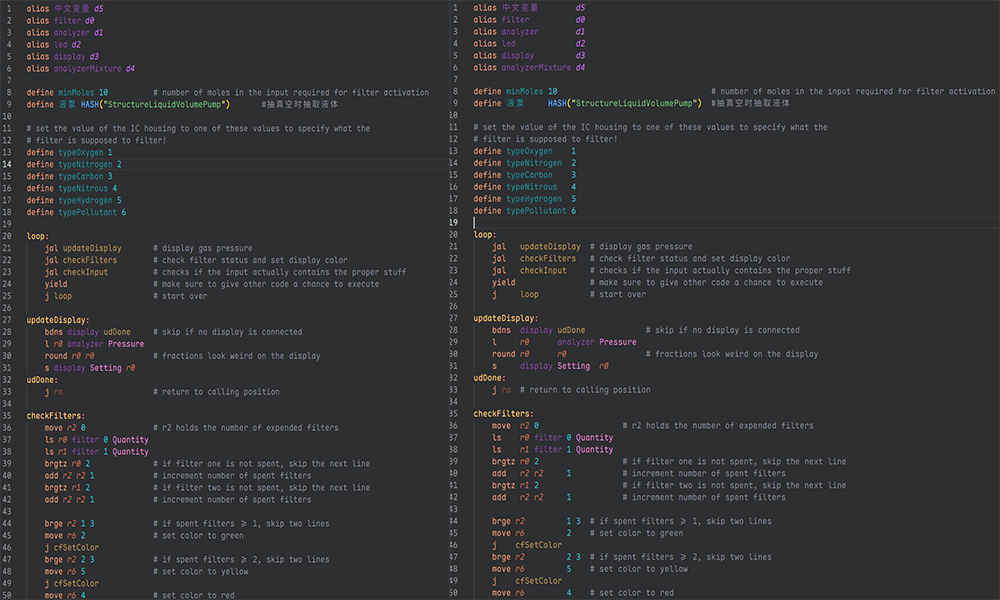
格式化配置可以从项目根目录的 .ic.yaml、.ic.yml 或 .ic.json 读取。支持的规则:
- 连续
alias / define 按列对齐
- 行尾注释同组内对齐,与代码之间的间隔可配置
- 标签下指令统一缩进(默认 4 空格或 Tab)
- 连续空行压缩到设定的上限
- 标签前保留的最小空行数可配置
- 激进模式:同一标签作用域内,指令操作数按列对齐
[!TIP]
如果代码里有 Unicode 字符(中文注释、特殊符号等),建议用等宽字体打开,否则格式化后的对齐位置看起来可能会偏。
8. 大文件也跟手
每次编辑只重新分析受影响的部分,几千行的脚本也不会一敲就卡。缓存还会跨会话保留,重新打开同一个文件时不必从头再来一遍。
9. 双语界面
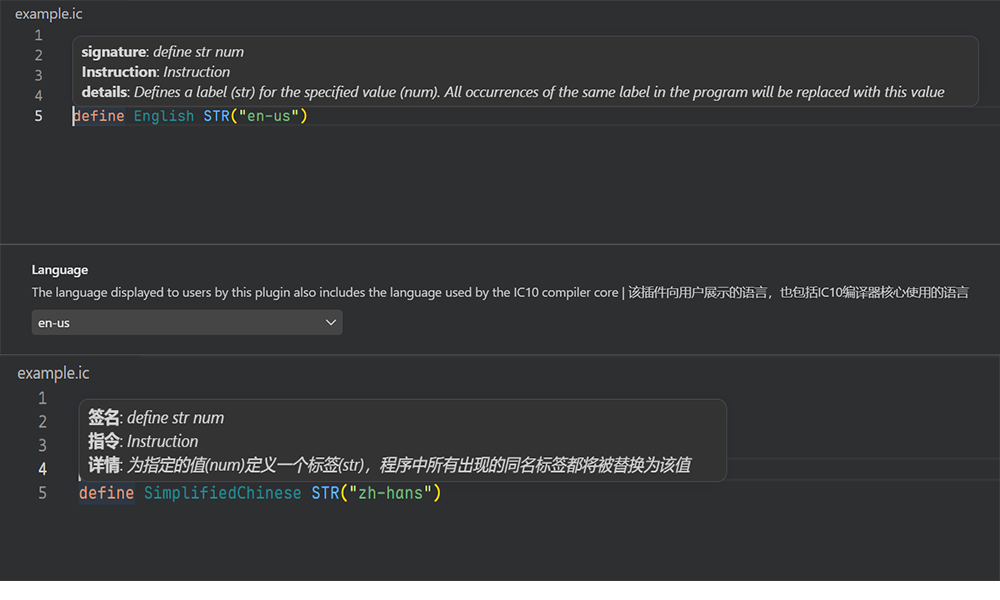
支持英语(en-us)和简体中文(zh-hans),诊断信息、悬停提示、补全文档等界面文本都在覆盖范围内,切换后即时生效。
10. 类型注解
给别名加一条特殊的尾随注释(#: @type …),编译器就能推断操作数的类型,补全与诊断都会更准确——写法、设备感知与常用的 @default 见使用指南。
11. 类型窄化
Ctrl+Alt+D/R/N/E/I/K 可以把补全列表主动收窄到设备 / 寄存器 / 数值 / 枚举 / 标识符 / 关键字,Ctrl+Alt+0 取消限制——快捷键表与生效规则见使用指南。
12. 调试器
在 VS Code 里直接运行 .ic 脚本:断点、单步执行、调用栈,以及按设备 / 寄存器 / 标签分组的变量面板——见使用指南。
使用指南
这一章把"知道了会顺手很多"的细节集中起来,建议正式上手前读一遍。
类型注解与设备感知
用法是给别名加一条特殊的尾随注释:
alias myDevice d0 #: @type DeviceType
#: 之后可以跟 @type(类型)、@desc(描述)、@default(默认值)、@builtin 等标签。编译器据此推断操作数的类型,补全和诊断都会更准确;输入 #: 时会提示可用标签。
设备感知说的是后面这件事:一个设备别名一旦标注了类型,同一条语句里靠后的设备相关操作数就会按这台设备的实际能力过滤——逻辑字段(LogicType)、槽位逻辑字段、槽位序号、批处理模式,都只给出它真正拥有的候选,而不是把标准库里所有设备的名字一股脑列出来。
alias furnace d0 #: @type StructureFurnace
s furnace Setting 1      # `Setting` 只列 StructureFurnace 有的逻辑字段
l r1 furnace Pressure    # 同理,`Pressure` 也来自该设备的注解
设备名称本身的补全与搜索(#: @type 的取值、HASH("…") 里的型号名、Ctrl+Alt+Shift+R 搜索面板)见特性 4. 智能补全。
[!NOTE]
编辑器内置的标准库由游戏元数据生成,覆盖全部设备类型的逻辑字段、槽位逻辑字段与槽位。若你发现某个设备或字段缺失,欢迎到 Issues 提出,或直接向标准库提交改动。
为调试器声明默认值
调试器跑的是模拟运行时,不是游戏本体。脚本里没写过、而游戏运行时会给初值的设备字段(比如某台机器的 Setting),模拟运行时无从得知——它没有"这台设备这个字段现在是多少"的数据来源。
解决办法是在类型提示里把默认值写出来,语法是 @default <分组> <字段> <值>(寄存器或别名写 @default <值>):
alias furnace d0 #: @type StructureFurnace @default logic Setting 5
alias counter r0 #: @default 0
- 分组:
logic(逻辑字段)、logic-slot(槽位逻辑字段)或 slot(槽位),与注解里的标签写法对应
- 字段:该设备类型注解里声明的字段名(如
Setting、Pressure)
- 值:该字段的默认值
声明之后,变量面板的显示口径是(从上往下依次生效):
| 情况 |
变量面板显示 |
| 脚本运行时赋过值 |
真实值 |
没赋过值,但 #: 里用 @default 覆写了 |
你在提示里声明的默认值 |
| 没赋过值,也没覆写,但注解里有默认值 |
注解声明的默认值(@logic Setting 5 里的第三个数字) |
| 以上都没有 |
严格求值开启(默认)时显示无法求值;关闭时按 0 显示 |
严格求值由 ic10.runtime.strictEvaluation 控制(默认 true),它同时也是 launch.json 的字段:
{
    "type": "ic10",
    "request": "launch",
    "name": "调试当前文件",
    "program": "${file}",
    "stopOnEntry": true,
    "strictEvaluation": false
}
[!NOTE]
@default 是你为模拟运行时声明的默认值,不是从游戏数据里抄来的出厂值——游戏数据并没有给出每个字段的默认值,所以只有你写了才有意义。
另外,默认值只按字段名生效:同一台设备上同名的逻辑字段与槽位逻辑字段(例如都叫 Quantity)会互相覆盖,给这类字段声明默认值时请注意。
类型窄化
补全列表本来就会按当前位置的语法要求过滤,但有时你想主动收窄——例如同一个位置既接受设备又接受寄存器,而你只想看设备:
| 快捷键 |
只提示 |
Ctrl+Alt+D |
设备 |
Ctrl+Alt+R |
寄存器 |
Ctrl+Alt+N |
数值 |
Ctrl+Alt+E |
枚举 |
Ctrl+Alt+I |
标识符 |
Ctrl+Alt+K |
关键字 |
Ctrl+Alt+0 |
不限类型 |
列表还没打开时可以先用快捷键定好范围,已打开时按键会就地换掉候选;换到别的操作数、别的行,或改动到影响该位置的类型时,范围自动解除。
伪代码内嵌提示
每条指令的行尾可以显示一段伪代码,把"这行到底在干什么"直接写出来:
| 源码 |
行尾提示 |
add a a 1 |
a = a + 1 |
lb r0 HASH("StructureBatteryMedium") Setting Average |
r0 = batch Battery (Medium).Setting (Average) |
beq a 10 5 |
if a == 10 goto 5 |
- 默认平时不显示:按住
Ctrl+Alt(macOS 为 Ctrl+Option)才出现。这个修饰键由 VS Code 固定,来自插件为 ic10 设的默认值 editor.inlayHints.enabled: "offUnlessPressed";想常显就把 ic10 的这项改成 on,想彻底关掉改成 off(你的个人设置优先级更高)。
- 左对齐:提示以文件里最长的那条指令行为基准左对齐,短行的提示前面补空格,于是整列伪代码的左端排在同一列。
- 覆盖全部指令:内置模板覆盖标准库的 147 条指令(传送与算术、指数对数三角、位运算与移位、比较与近似比较、设备读写与批量读写、栈与设备内存、跳转与各类分支)。
alias、define 是预处理指令而非指令语句,不出提示;没写完的指令(缺操作数)也不出,宁可没有也不给半截伪代码。
- 分支的两行形态:内联提示是行内单行渲染的(换行会被折叠),所以行内写成
if a < b goto c,把比较与跳转分成两行的写法放在提示的 tooltip 里——鼠标停在提示上就能看到。
- 不会被截断:VS Code 默认按 43 字符截断提示标签,而左对齐靠的是在标签前补空格,空格会先吃掉预算,短行就会变成
…。插件因此把 ic10 的 editor.inlayHints.maximumLength 默认设为 0(不截断);如果你自己设过这个值,会按你的值截断。
调试器
在 VS Code 里直接运行 .ic 脚本:断点、单步执行、调用栈,以及一个按设备 / 寄存器 / 标签分组的变量面板。设备分组会把这类型号的全部逻辑字段列出来——脚本里赋过值的显示真实值,没赋过值的显示你在 #: 里声明的默认值。
运行参数(tick 时长、单步指令上限、栈大小、严格求值)既写在扩展设置里长期生效,也能写在 launch.json 里临时覆盖。
[!IMPORTANT]
变量面板对没赋过值、也没声明默认值的设备字段只能显示「无法求值」(严格求值关闭时按 0 显示)。默认值需要在 #: 类型提示里用 @default 声明,详见《类型注解与设备感知》。
依赖
- VS Code
1.125.0 或更高版本
- 不需要再装别的
扩展设置
设置位置:文件 > 首选项 > 设置 > 扩展 > IC10 Language Support
ic10.language:界面语言,默认 "en-us",可选 "zh-hans"。切换后即时生效。
ic10.hoverRenderer:悬停信息的渲染方式,默认 "svg",可选 "markdown"。两种风格各有特点,按自己的喜好挑就行。svg 是一张等宽卡片:第一行是「图标 + 显示物 + 类型」(图标用类型色画外圈、标识符色填充、中间一个大写字面),第二行是「(语法类型) 表达式 [: 纯数据] [= 计算值]」,分隔线之后是按列对齐的字段(内容过长会换行并保持缩进),末尾以小一号的字给出当前文件路径;markdown 是同一份内容的原生 Markdown。
ic10.hover.maxWidth:悬停卡片的内容区最大宽度(px),默认 560。只有 svg 渲染方式用得到它。
ic10.format.useTab:使用 Tab 缩进,默认 false。为 true 时忽略 indentWidth。
ic10.format.indentWidth:每级缩进空格数,默认 4。
ic10.format.spacesBeforeTrailingComments:行尾注释前的空格数,默认 2。
ic10.format.maxEmptyLinesToKeep:保留的最大连续空行数,默认 1。
ic10.format.minEmptyLinesBeforeLabels:标签前的最小空行数,0 表示无限制,默认 0。
ic10.format.alignConsecutiveStatements:连续同类语句按列对齐,默认 true。
ic10.format.alignTrailingComments:同组内行尾注释对齐,默认 true。
运行时(调试器)
ic10.runtime.tickDuration:单个 tick 代表的游戏内时长(秒),默认 0.5。sleep n 会换算成 n / tickDuration 个 tick 来等待,因此该值也决定休眠精度,必须为正数。
ic10.runtime.maxInstructions:单个 tick 内允许执行的最大语句数,默认 128。
ic10.runtime.maxStackSize:栈的最大容量(以 double 元素计),默认 512。
ic10.runtime.strictEvaluation:严格求值,默认 true。开启时无法求值的操作数(未赋值的设备字段、未知的宏常量等)上报诊断;关闭时按 0 参与运算,变量面板中这些字段也按 0 显示。
[!NOTE]
这四项同时也是 launch.json 的字段,优先级为 launch.json > 工作区设置 > 运行时默认值——只想临时改一次就在 launch.json 里写,想一直这样就在设置里改。
[!TIP]
格式化配置也可以直接写在项目根目录的 .ic.json、.ic.yaml 或 .ic.yml 里,不必去改全局设置。
已知问题
- 首次加载较慢:插件第一次激活时要启动语言服务端、链接标准库并载入设备元数据,窗口打开后的头几秒里补全与悬停可能还没就绪(之后就很快了)。同一窗口内再次打开
.ic 文件不受影响。
待办事项
编译器
- [x] 完善标准库,覆盖更多设备类型 —— 已由游戏元数据生成,覆盖全部设备类型
IDE
- [ ] 跳转定义 / 查找引用
- [ ] 重命名符号
发布说明
2.2.0
这个版本把"设备"这条线补完了:新增按名称搜索设备类型(Ctrl+Alt+Shift+R,中英文模糊匹配)、#: @type 取值补全与 HASH("…") 型号名补全,所有设备名都以"本地化名 + 英文名"呈现;同时新增伪代码内嵌提示(行尾显示可读伪代码,按最长指令行左对齐,按住 Ctrl+Alt 才显示)。此外语言客户端现在会在激活时等待就绪(服务端起不来会明确报错,而不是静默失灵),并跟随 @ic10/metadata 1.1.0 使用本地化的设备名与描述。
2.1.0
这个版本把调试器补齐了:可以在 VS Code 里直接跑脚本、打断点、单步执行,并通过变量面板查看设备/寄存器/标签——设备字段未赋值时按 #: @default 声明显示默认值(详见 《使用指南》)。补全新增了类型窄化快捷键,悬停卡片重做成等宽卡片(图标 + 本地化类型名、按列对齐的字段、当前文件路径),并新增 ic10.hover.maxWidth;扩展清单也做了中英双语本地化。
完整的版本历史见 CHANGELOG.md。
IC10 is the assembly-style language behind the programmable logic chips in Stationeers. Writing it usually means a lot of trial and error inside the game — this extension exists to shorten that loop, so you can write IC10 in VS Code the way you'd write any other code.
It brings a complete IC10 language service to VS Code: syntax and semantic highlighting, real-time diagnostics, hover tooltips, intelligent completion (device-name search and device awareness included), pseudocode inlay hints, signature help, code formatting, and a bilingual interface. A native compiler core does the heavy lifting, so even scripts thousands of lines long stay responsive.
Everything works out of the box — there's nothing extra to install.
[!TIP]
For the best experience, read the Usage Guide first: the variables panel can only show a value for an unassigned device field when you have declared a default for it — otherwise it reads "Unable to evaluate". Device awareness, type narrowing, inlay hints and the rest of the details live there too.
Features
1. Semantic Highlighting
The colors here aren't just code-shaped — they come from the compiler's symbol table:
- Register aliases are colored apart from native registers
- Device aliases are colored apart from native device references
define constants are colored apart from raw numeric literals- Labels, macro calls (
HASH/STR), and type annotations each get their own color
- The same name renders differently where it's declared and where it's used
[!TIP]
Semantic colors follow VS Code's semantic token theming. To use your own palette, configure editor.semanticTokenColorCustomizations — for example to give register or device aliases a custom foreground color or style. See the VS Code documentation for the exact syntax.
2. Real-time Diagnostics
Every edit is re-analyzed straight away, with lexical, syntax, and semantic problems sorted into the Problems panel — no save required, no trip back to the game.
[!NOTE]
IC10 has no public official language specification, so the compiler's behavior is validated case by case against how Stationeers actually runs it in game. If you run into something we haven't covered, tell us in Issues.
Hover any symbol — alias, label, constant, instruction keyword — to see its type, value, description, and more.
4. Intelligent Completion
- Instruction keyword completion with prefix matching
- Operand completion: registers, device references, enum values, and jump targets filtered by the current instruction's operand type constraints (
typeN)
- Device awareness: a later operand in the same statement is narrowed to what the device alias before it actually provides — logic fields, slot-logic fields, slot indexes and batch modes — based on the type that alias declares with
#: @type. The syntax and an example are in the Usage Guide.
- Dedicated
alias / define directive completion
- Device names — completion and search:
- the value of
#: @type: device type names (enumeration types are not offered), always inserting the type name, with the display name of the current language as the label and the English name in the dimmed text beside it
- the value of
HASH("…"): the raw model names the game actually expects (parentheses included, e.g. StructureTransformerMedium(Reversed)); typing the opening quote already opens the list
- search by name:
Ctrl+Alt+Shift+R (the command IC10: Search Device Type, i.e. ic10.searchDeviceType) opens a quick pick that fuzzy-matches Chinese or English fragments (micro works as well as 「微波」) and inserts the type name on Enter
- display names are always "localized name + English name": side by side under a Chinese UI (
微波炉 Microwave), coinciding and shown once under an English one
5. Pseudocode Inlay Hints
Every instruction line can show a pseudocode rendering at its end (add a a 1 → a = a + 1, beq a 10 5 → if a == 10 goto 5), left-aligned against the longest instruction line of the file. They are hidden by default and appear while Ctrl+Alt (Ctrl+Option on macOS) is held — see the Usage Guide for the details.
6. Function Signature Help
Type a space or a comma and you get the current instruction's parameter signature with every operand position, highlighting the one you're on.
Formatting options can be read from .ic.yaml, .ic.yml, or .ic.json in the project root. Available rules:
- Consecutive
alias / define column alignment
- Trailing comments aligned within a group, with configurable spacing from the code
- Uniform indentation for instructions under a label (4 spaces or Tab by default)
- Runs of blank lines collapsed to a configurable maximum
- Configurable minimum blank lines before labels
- Aggressive mode: instruction operands aligned by column within the same label scope
[!TIP]
If your code contains Unicode characters (Chinese comments, special symbols), use a monospaced font — otherwise the alignment formatting produces can look off.
8. Stays Responsive on Large Files
Only the parts touched by your edit get re-analyzed, so multi-thousand-line scripts don't stutter as you type. The cache also carries over between sessions, so reopening a file doesn't start from scratch.
9. Bilingual Interface
English (en-us) and Simplified Chinese (zh-hans), covering diagnostics, hover tooltips, completion documentation, and the rest of the interface text. Switching takes effect immediately.
10. Type Annotations
Annotate an alias with a special trailing comment (#: @type …) and the compiler infers the operand's type, which makes completion and diagnostics noticeably more precise — the syntax, device awareness and the commonly used @default are in the Usage Guide.
11. Type Narrowing
Ctrl+Alt+D/R/N/E/I/K narrows the completion list to devices / registers / numbers / enums / identifiers / keywords, and Ctrl+Alt+0 clears the restriction — the shortcut table and the rules are in the Usage Guide.
12. Debugger
Run .ic scripts right inside VS Code: breakpoints, stepping, the call stack, and a variables panel grouped by devices / registers / labels — see the Usage Guide.
Usage Guide
This chapter collects the details that make the extension noticeably nicer to use; give it a read before you start.
Type Annotations and Device Awareness
Annotate an alias with a special trailing comment:
alias myDevice d0 #: @type DeviceType
A #: may carry @type (the type), @desc (a description), @default (a default value), @builtin and more. The compiler infers the operand's type from it, which makes completion and diagnostics noticeably more precise; typing #: offers the available tags.
Device awareness is the part that follows from it: once a device alias declares its type, a later device-related operand in the same statement is filtered down to what that device actually provides — logic fields (LogicType), slot-logic fields, slot indexes and batch modes — instead of listing every name in the standard library.
alias furnace d0 #: @type StructureFurnace
s furnace Setting 1      # `Setting` lists only the logic fields StructureFurnace has
l r1 furnace Pressure    # likewise, `Pressure` comes from that device's annotation
Completing and searching device names themselves (the value of #: @type, model names inside HASH("…"), the Ctrl+Alt+Shift+R search) is in Feature 4. Intelligent Completion.
[!NOTE]
The built-in standard library is generated from the game metadata and covers the logic fields, slot-logic fields and slots of every device type. If a device or field is missing, bring it up in Issues or send the change straight to the standard library.
Declaring Defaults for the Debugger
The debugger runs a simulated runtime, not the game itself. A device field your script never writes to — but which the game would initialise, such as a machine's Setting — has no value the simulation can know: there is no source telling it what that field currently holds.
The way out is to declare the default in a type hint. The syntax is @default <category> <field> <value> (a register or alias writes @default <value>):
alias furnace d0 #: @type StructureFurnace @default logic Setting 5
alias counter r0 #: @default 0
- category:
logic, logic-slot or slot, matching the annotation tags
- field: a field name declared by that device type's annotation (e.g.
Setting, Pressure)
- value: the default for that field
Once declared, the variables panel reads (first match wins):
| Situation |
Variables panel shows |
| The script assigned a value at runtime |
The real value |
Never assigned, but @default overrides it in #: |
The default you declared in the hint |
| Never assigned and not overridden, but the annotation has a default |
The annotation's default (the third number of @logic Setting 5) |
| None of the above |
Unable to evaluate with strict evaluation on (the default); 0 with it off |
Strict evaluation is controlled by ic10.runtime.strictEvaluation (default true) and is also a launch.json field:
{
    "type": "ic10",
    "request": "launch",
    "name": "Debug current file",
    "program": "${file}",
    "stopOnEntry": true,
    "strictEvaluation": false
}
[!NOTE]
@default is a default you declare for the simulated runtime — not a factory value copied from game data. The game data does not provide per-field defaults, so the value only exists because you wrote it.
Defaults are also matched by field name only: on one device a logic field and a slot-logic field with the same name (say Quantity) overwrite each other, so keep that in mind when declaring a default for such a field.
Type Narrowing
The completion list already filters by what the current position accepts, but sometimes you want to narrow it yourself — say a slot takes either a device or a register and you only care about devices:
| Shortcut |
Only suggests |
Ctrl+Alt+D |
Devices |
Ctrl+Alt+R |
Registers |
Ctrl+Alt+N |
Numbers |
Ctrl+Alt+E |
Enums |
Ctrl+Alt+I |
Identifiers |
Ctrl+Alt+K |
Keywords |
Ctrl+Alt+0 |
No restriction |
Press a shortcut before the list opens to set the scope up front, or while it is open to swap the candidates in place; the scope resets when you move to another operand, another line, or an edit that changes what that position accepts.
Pseudocode Inlay Hints
Every instruction line can show a pseudocode rendering at its end, spelling out what the line actually does:
| Source |
Hint at the line end |
add a a 1 |
a = a + 1 |
lb r0 HASH("StructureBatteryMedium") Setting Average |
r0 = batch Battery (Medium).Setting (Average) |
beq a 10 5 |
if a == 10 goto 5 |
- Hidden by default: they appear while
Ctrl+Alt (Ctrl+Option on macOS) is held. That modifier is fixed by VS Code and comes from the default the plugin sets for IC10, editor.inlayHints.enabled: "offUnlessPressed"; change it to on to keep them visible, or to off to remove them (your own setting wins over the plugin default).
- Left aligned: hints are aligned against the longest instruction line of the file, shorter lines get leading spaces so that the left edge of every pseudocode lines up in one column.
- Every instruction is covered: the built-in templates cover all 147 instructions of the standard library (moves and arithmetic, exponential/logarithmic/trigonometric, bitwise and shifts, comparisons and approximate comparisons, device and batch access, stack and device memory, jumps and every branch family).
alias and define are directives rather than instruction statements and show nothing, and neither does an unfinished instruction (a missing operand) — better none than half a pseudocode line.
- Two-line form of a branch: inlay hints render inline on a single line (a line break is folded), so the inline form is
if a < b goto c and the split "comparison, then jump" spelling lives in the hint's tooltip — hover the hint to see it.
- Never truncated: VS Code truncates hint labels at 43 characters by default, and the alignment works by leading spaces, which would eat that budget first and turn short lines into
…. The plugin therefore defaults IC10's editor.inlayHints.maximumLength to 0 (no truncation); if you set that value yourself, yours applies.
Debugger
Run .ic scripts right inside VS Code: breakpoints, stepping, the call stack, and a variables panel grouped by devices / registers / labels. A device group lists every logic field of that device type — fields the script assigned show their real value, fields it never touched show the default you declared in #:.
Runtime options (tick duration, per-tick instruction limit, stack size, strict evaluation) can live in the extension settings for good, or in launch.json to override them for one session.
[!IMPORTANT]
For device fields that are neither assigned nor given a default, the variables panel can only show "Unable to evaluate" (or 0 with strict evaluation off). Declare defaults with @default in a #: type hint — see Type Annotations and Device Awareness.
Requirements
- VS Code
1.125.0 or newer
- Nothing else to install
Extension Settings
Location: File > Preferences > Settings > Extensions > IC10 Language Support
ic10.language: interface language, default "en-us", also accepts "zh-hans". Takes effect immediately.
ic10.hoverRenderer: how hover information is rendered, default "svg", also accepts "markdown". Each style has its own character — pick whichever you prefer. svg is a monospace card: the first line is "icon + subject + type" (the icon draws a type-colored ring, an identifier-colored fill and an uppercase letter in the middle), the second line is "(syntax kind) expression [: raw data] [= computed value]", then a rule and column-aligned fields (a long content wraps keeping the indent), and the current file path closes the card one size down; markdown is the same content as native Markdown.
ic10.hover.maxWidth: maximum content width of a hover card in pixels, default 560. Only the svg renderer uses it.
ic10.format.useTab: use Tab for indentation, default false. When true, indentWidth is ignored.
ic10.format.indentWidth: spaces per indentation level, default 4.
ic10.format.spacesBeforeTrailingComments: spaces before trailing comments, default 2.
ic10.format.maxEmptyLinesToKeep: maximum consecutive empty lines to keep, default 1.
ic10.format.minEmptyLinesBeforeLabels: minimum empty lines before labels, 0 means no restriction, default 0.
ic10.format.alignConsecutiveStatements: align consecutive statements of the same type by column, default true.
ic10.format.alignTrailingComments: align trailing comments within the same group, default true.
Runtime (Debugger)
ic10.runtime.tickDuration: length of one tick in in-game seconds, default 0.5. sleep n waits n / tickDuration ticks, so this also sets the sleep precision; it must be positive.
ic10.runtime.maxInstructions: maximum number of statements executed within one tick, default 128.
ic10.runtime.maxStackSize: maximum stack capacity counted in double elements, default 512.
ic10.runtime.strictEvaluation: strict evaluation, default true. When on, operands that cannot be evaluated (unassigned device fields, unknown macro constants, …) report a diagnostic; when off they take part as 0, and the variables panel shows 0 for them as well.
[!NOTE]
These four are also launch.json entries, and the precedence is launch.json > workspace settings > runtime default — put a value in launch.json to override it once, or change the setting to keep it.
[!TIP]
Formatting can also be configured from a .ic.json, .ic.yaml, or .ic.yml file at the project root, instead of changing global settings.
Known Issues
- The first load is slow: the first activation starts the language server, links the standard library and loads the device metadata, so completion and hover may not be ready for the first few seconds after a window opens (after that it is fast). Opening another
.ic file in the same window is unaffected.
Todo
Compiler
- [x] Expand standard library coverage for more device types — now generated from the game metadata and covering every device type
IDE
- [ ] Go to definition / find references
- [ ] Rename symbol
Release Notes
2.2.0
This release completes the device story: search device types by name (Ctrl+Alt+Shift+R, fuzzy-matching Chinese or English names), completion for the value of #: @type and for model names inside HASH("…"), with every device name shown as "localized name + English name". It also adds pseudocode inlay hints (a readable rendering at the end of each instruction line, left-aligned against the longest instruction line, shown while Ctrl+Alt is held). The language client is now awaited during activation, so a language server that fails to start fails loudly instead of going silent, and @ic10/metadata 1.1.0 brings localized device titles and descriptions.
2.1.0
This release completes the debugger: run scripts straight from VS Code, set breakpoints, step through them, and inspect devices / registers / labels in the variables panel — an unassigned device field shows the default you declared with #: @default (see the Usage Guide). Completion gains type-narrowing shortcuts, hover cards are rebuilt as monospace cards (icon plus localized type name, column-aligned fields, current file path), ic10.hover.maxWidth is new, and the extension manifest is localized for both English and Chinese.
Full version history is in CHANGELOG.md.

