📖 中文说明
PEViewer - PE文件查看器
一个专门用于查看和分析Windows PE(Portable Executable)文件结构的VS Code扩展。
说明:此扩展由GitHub Copilot开发。
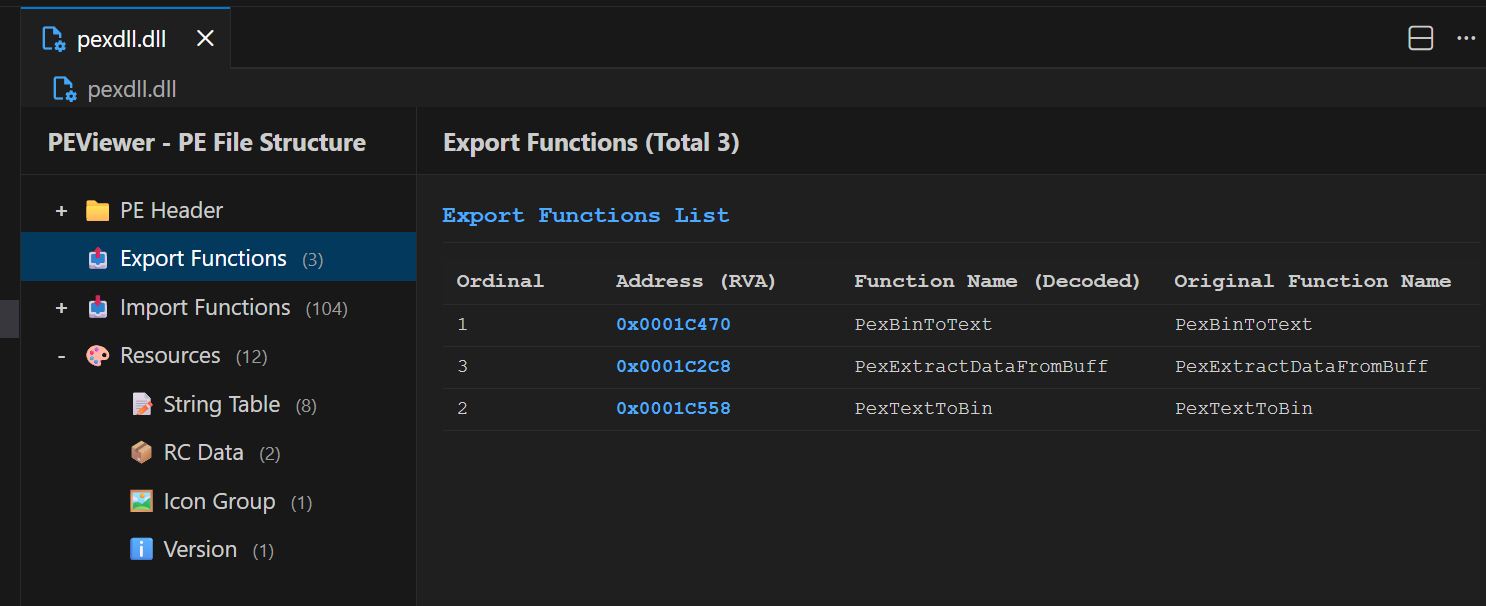
功能特性
- 📁 结构化视图:以树形结构展示PE文件的各个组成部分
- 🔍 详细信息:查看DOS头、NT头、可选头、节表等详细数据
- 📊 多格式显示:同时显示十进制、十六进制和二进制格式
- 📦 导入/导出表:查看DLL导入函数和导出函数列表
- 🎨 资源查看:查看PE文件中的资源节信息和常见资源类型
- 🔧 函数名解码:自动解码MSVC/Itanium/Rust符号名称
- 💻 VS Code集成:完美融入VS Code主题和界面风格
- 📏 支持多种格式:.exe、.dll、.ocx、.sys、.scr、.drv、.cpl等
使用方法
- 安装此扩展
- 在VS Code中打开PE文件(如.exe或.dll)
- 右键点击文件,选择 "Open With" > "code"
- 在左侧树形视图中点击各个节点查看详细信息
支持的文件类型
.exe - 可执行文件.dll - 动态链接库.ocx - ActiveX控件.sys - 系统驱动.scr - 屏幕保护程序.drv - 驱动程序.cpl - 控制面板程序
显示信息
DOS头部
- 魔数 (e_magic): MZ签名
- NT头偏移 (e_lfanew): NT头在文件中的位置
NT头部
- PE签名
- 机器类型:x86、x64等
- 节数量
- 时间戳
- 特性标志
可选头部
- 魔数:PE32或PE32+
- 入口点地址
- 映像基址
- 节对齐/文件对齐
- 映像大小
- 子系统类型
节表
- 节名称(.text, .data, .rdata等)
- 虚拟地址和虚拟大小
- 原始数据指针和大小
- 特性标志
导入/导出表
- 导入的DLL列表
- 导入的函数名称或序号
- 导出的函数列表(如果有)
- 自动解码C++函数名
资源
- 资源节 (.rsrc) 基本信息
- 常见资源类型说明
- 图标 (RT_ICON / RT_GROUP_ICON)
- 位图 (RT_BITMAP)
- 光标 (RT_CURSOR)
- 对话框 (RT_DIALOG)
- 字符串表 (RT_STRING)
- 菜单 (RT_MENU)
- 版本信息 (RT_VERSION)
- 清单文件 (RT_MANIFEST)
技术栈
- TypeScript - 扩展核心代码
- pe-parser - PE文件解析库
- Webpack - 打包工具
开发
# 安装依赖
npm install

# 编译
npm run compile

# 监视模式
npm run watch

# 运行扩展
# 按 F5 启动扩展开发主机
版本历史
0.0.1
- ✨ 初始版本
- 📁 树形结构显示PE文件各部分
- 🔍 详细信息面板
- 📊 支持导入/导出表解析
- 🎨 VS Code主题集成
安装
在VS Code扩展市场中搜索 PEViewer 并安装。
多语言支持
支持中文和英文界面,自动适配VS Code语言设置。
PEViewer - PE File Viewer
A VS Code extension for viewing and analyzing Windows PE (Portable Executable) file structures.
Note: This extension was developed by GitHub Copilot.
Features
- 📁 Structured View: Display PE file components in a tree structure
- 🔍 Detailed Information: View DOS header, NT header, optional header, section table details
- 📊 Multi-format Display: Show decimal, hexadecimal, and binary formats simultaneously
- 📦 Import/Export Tables: View DLL import functions and export function lists
- 🎨 Resource Viewer: View PE file resource section information and common resource types
- 🔧 Function Name Decoding: Automatically decode MSVC/Itanium/Rust symbol names
- 💻 VS Code Integration: Perfectly integrated with VS Code themes and interface style
- 📏 Multiple Format Support: .exe, .dll, .ocx, .sys, .scr, .drv, .cpl, etc.
Usage
- Install this extension
- Open a PE file (like .exe or .dll) in VS Code
- Right-click the file and select "Open With" > "code"
- Click on various nodes in the left tree view to see detailed information
Supported File Types
.exe - Executable files.dll - Dynamic Link Libraries.ocx - ActiveX Controls.sys - System drivers.scr - Screen savers.drv - Driver programs.cpl - Control Panel programs
Installation
Search for PEViewer in the VS Code Extension Marketplace and install.
Multi-language Support
Supports Chinese and English interfaces, automatically adapts to VS Code language settings.
Development
npm install
npm run compile
License
MIT
| |

