简体中文 (Simplified Chinese)
CLIProxy for Copilot
[!IMPORTANT]
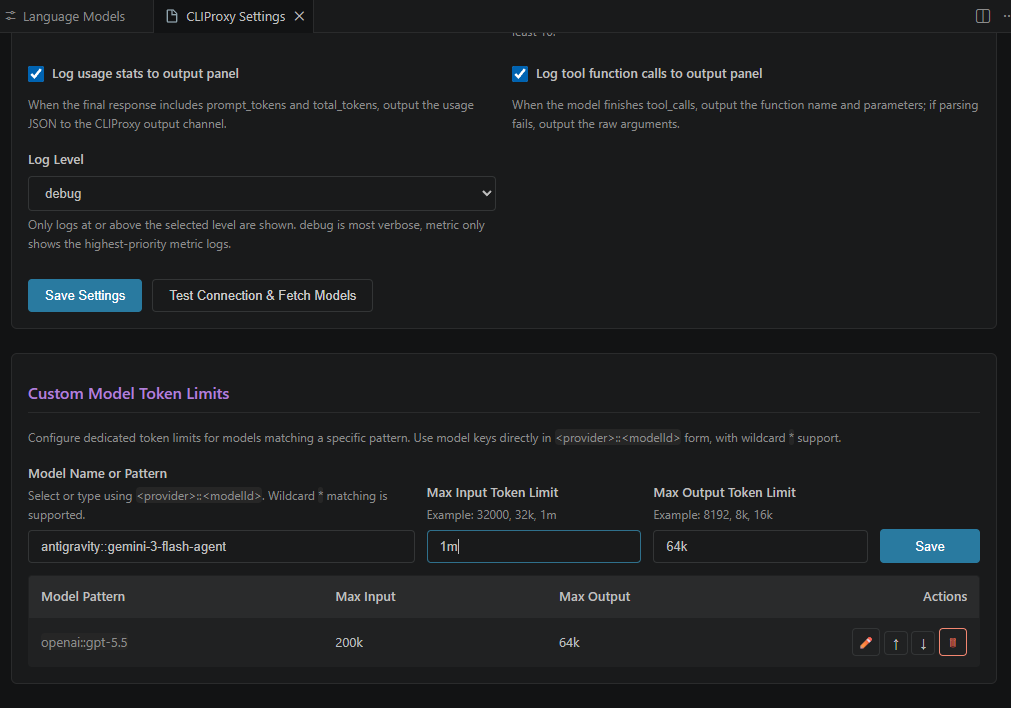
关于 Token 计算与上下文压缩: Copilot 当前无法精确计算所有上游模型的真实 Token 消耗,可能会误判上下文长度并提前自动压缩对话历史。因此扩展默认将模型上下文设置为 1m 输入 / 64k 输出,尽量避免 Copilot 过早压缩。建议用户以聊天窗口和 Token 统计页输出的实际 Token 数据为参考,按需手动压缩或清理上下文。部分模型(例如 GPT-5.4)可能确实支持接近 1m 的上下文长度;但在 Codex 场景 下,当上下文超过约 400k 后,额度消耗可能出现非线性增加甚至成倍增加。该行为受上游计费策略影响,目前无法完全确认,请在 Codex 中谨慎使用超长上下文。
项目简介
CLIProxy for Copilot 是一个 VS Code 扩展,它将 CLIProxyAPI 注册为 VS Code 的自定义语言模型提供商(Language Model Chat Provider)。
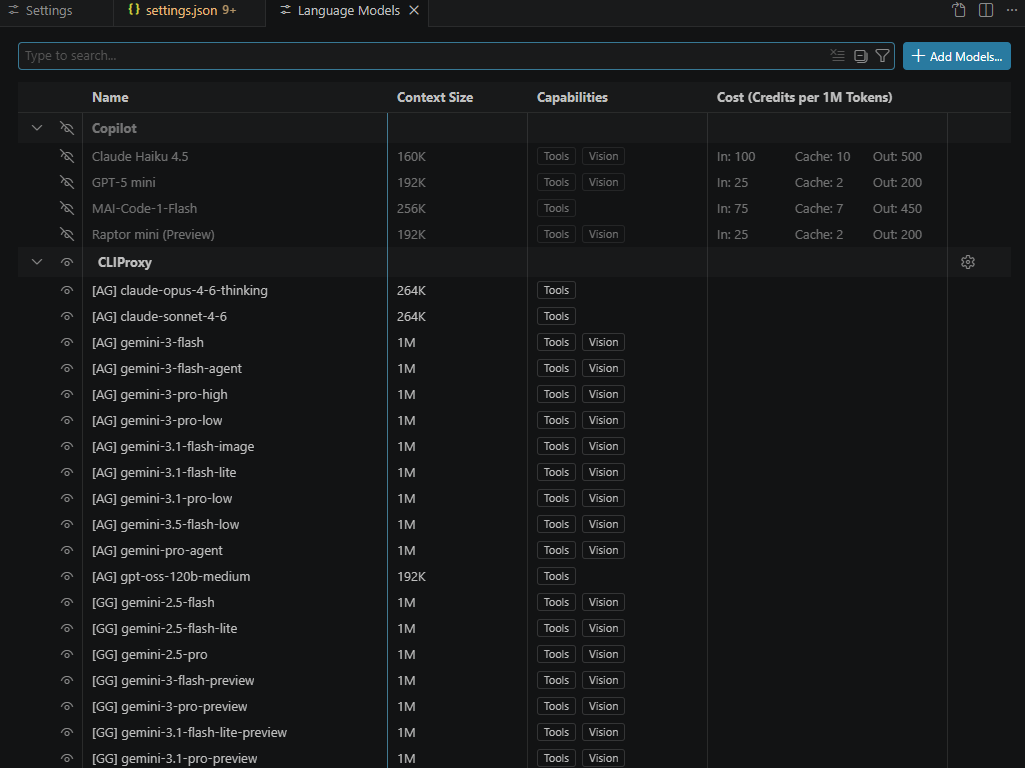
通过此扩展,你可以直接在 VS Code Copilot Chat 中使用由 CLIProxyAPI 代理的各种大模型(如 Gemini 2.5 Pro, GPT-5, Claude 3.7 Sonnet 等),无需直接配置昂贵的 API Key,充分利用你已有的 OAuth 订阅或免费配额。
核心功能
- 模型自动发现:自动从 CLIProxyAPI 服务器拉取可用模型列表。
- 原生集成:在 Copilot Chat 的模型选择器中直接切换,享受原生的聊天体验。
- 流式响应:支持 SSE 流式输出,响应速度快。
- 工具调用支持:支持 Copilot 的工具调用(Tool Calling)能力。
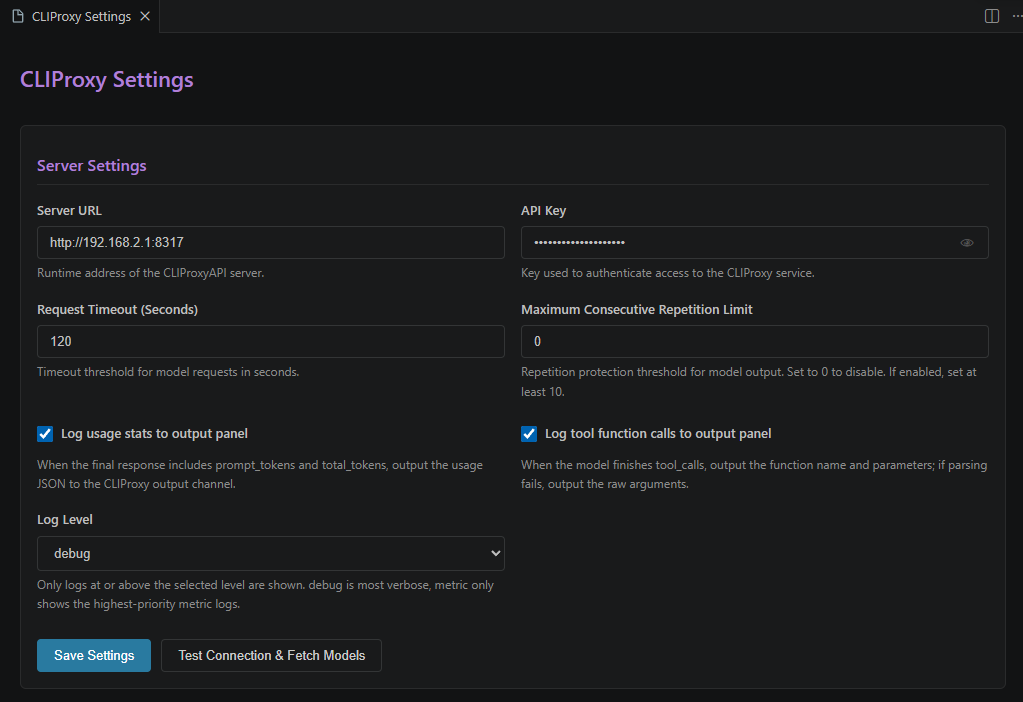
- 配置简单:支持通过命令或设置界面快速配置服务器地址和 API Key。
- 自定义模型支持:可在设置页中手动添加自定义模型,独立配置模型 ID、显示名称、请求地址和可选专属密钥;请求地址可填写服务基础地址并自动补齐
/v1/chat/completions,也可填写完整聊天补全地址直接使用。
- 本地 Token 统计持久化:可选地将请求大小、输入/缓存/推理/输出 Token、请求概要和工作区路径持久化保存,并可在独立 Token统计 页面查看;统计能力使用扩展内置的
sql.js 运行时资源,不再依赖发布包中的 node_modules/sql.js 路径。
- 最近原始记录:可在当前工作区本地保留最近 N 次原始请求与响应记录,并在独立页面中左侧列表、右侧 Monaco Editor 只读详情查看;仅在打开文件夹或
.code-workspace 工作区文件时启用。数据统一保存在扩展全局存储目录的 raw-history/{workspaceId}/ 下,workspaceId 取自 VS Code workspaceStorage/{workspaceId}/publisher.extension 路径中的工作区存储 ID;SQLite 仅保存轻量元信息,请求/响应正文会按记录 ID 保存为独立文件,同时写入 workspace-info.json 记录对应工作区路径,便于集中查看和清理。请求发出时会先保存为“请求中”状态,页面可立即查看请求原文;请求成功、失败或取消后再更新响应正文、耗时与最终状态。页面顶部的请求/响应原文搜索需要点击搜索按钮或按回车手动触发,搜索时会扫描正文文件并显示进度。
- 状态栏快捷入口:在 VS Code 右下角状态栏提供 CLIProxy 图标快捷按钮,可直接打开设置面板。
- 界面文本国际化:扩展运行时提示支持 VS Code 官方国际化机制,中文界面下可显示中文提示。
快速开始
- 安装扩展:在 VS Code 中安装此扩展。
- 配置服务器:
- 运行命令
CLIProxy: 配置服务器地址和 API Key。
- 输入你的 CLIProxyAPI 服务器地址(默认
http://localhost:8317)。
- 如果服务器设置了访问密钥,请输入 API Key。
- 使用模型:
- 打开 Copilot Chat 窗口。
- 点击模型选择器,选择 CLIProxy 提供的模型。
- 开始对话!
扩展设置
此扩展贡献了以下设置:
cliproxy.serverUrl: CLIProxyAPI 服务器的地址。cliproxy.apiKey: 访问服务器所需的 API Key(可选)。cliproxy.requestTimeout: 请求超时时间(秒)。cliproxy.logUsageStats: 当响应结尾携带 usage 统计时,是否在聊天窗口显示统计尾注,并在 CLIProxy 输出面板记录 usage JSON。cliproxy.persistUsageStats: 是否将 Token 统计持久化保存到本地 SQLite 数据库,供设置页 Token统计 标签页查看。cliproxy.usageStatsMaxRecords: 本地最多保留的 Token 统计记录数,默认 10000。cliproxy.rawHistoryMaxRecords: 当前工作区最多保留的原始请求/响应记录数,默认 1000,设置为 0 可禁用。cliproxy.useGeminiProtocolForGoogleModels: 当提供商为 google 或 antigravity 且模型 ID 包含 gemini 时,聊天请求改用 Google Gemini AI Studio /v1beta/models/{model}:generateContent 协议;模型列表仍使用原有 OpenAI 兼容 /v1/models。cliproxy.replaceManageTodoListForGemini: 开启后,Gemini 普通用户聊天 Agent 请求若包含 manage_todo_list,会在发给模型前替换为 cfc_todo_init 与 cfc_todo_set_status,模型响应后再内部转发为 manage_todo_list;历史记录会通过工具调用 ID 中的隐藏标记还原给 Gemini,非 Gemini 请求会自动清理该标记。cliproxy.forceCurrentModelForSubAgent: 如果启用,当 AI 调用 runSubagent 函数时,将删除 model 和 agentName 参数,强制子代理使用当前模型。cliproxy.disableTaskComplete: 如果启用,将禁用 task_complete 功能函数,从请求中删除该工具声明,并自动清除首条消息中关于调用该工具的任务完成指示话术。cliproxy.logLevel: 输出面板日志等级,可选 debug / info / warn / error / metric,仅显示大于或等于当前等级的日志。cliproxy.customModels: 自定义模型列表,可为单个模型配置 id、可选显示名称 name、请求地址 url 以及可选独立 key。url 可填写服务基础地址(自动补齐 /v1/chat/completions),也可填写完整 /v1/chat/completions 地址(直接使用)。若未填写独立 key,该自定义模型请求将不会回退使用全局 cliproxy.apiKey。chat.utilityModel: Copilot 通用工具模型,可用于 Git 提交消息等辅助生成,必须填写 cliproxyapi/<provider>::<modelId> 形式。chat.utilitySmallModel: Copilot 轻量工具模型,可用于对话标题等轻量任务生成,必须填写 cliproxyapi/<provider>::<modelId> 形式。cliproxy.customModelParameters: 按顺序匹配 of 自定义模型参数规则数组,直接使用 <provider>::<modelId> 形式的模型 ID 或通配符模式;单独使用 * 可匹配所有厂商与模型;支持配置 maxInputTokens、maxOutputTokens、imageInput、toolCalling,未配置时统一默认 1m 输入、64k 输出,并支持图片输入与工具调用。cliproxy.toolFilters: 工具函数过滤规则数组。扩展会在请求初始化尾部从 VS Code 传入的 options.tools 中收集工具函数列表,保存到扩展全局存储目录的 tool-functions.json,并在设置页“过滤设置”标签页用于自动完成;VS Code 版本变化时会清空此文件并等待新请求重新收集。缓存工具 Schema 时会保存独立快照,避免过滤规则原地修改请求工具后污染缓存并触发频繁写盘。每条规则支持 1~n 个模型通配符,可删除 1~n 个工具函数,或改写工具函数描述/参数描述;工具与参数目标支持输入部分名称或描述自动匹配。工具列表文件使用锁文件与临时文件原子替换处理多进程读写冲突;手动清空工具函数列表时会写入 resetAt 标志,其它 VS Code 进程会据此丢弃旧内存缓存并重新收集。
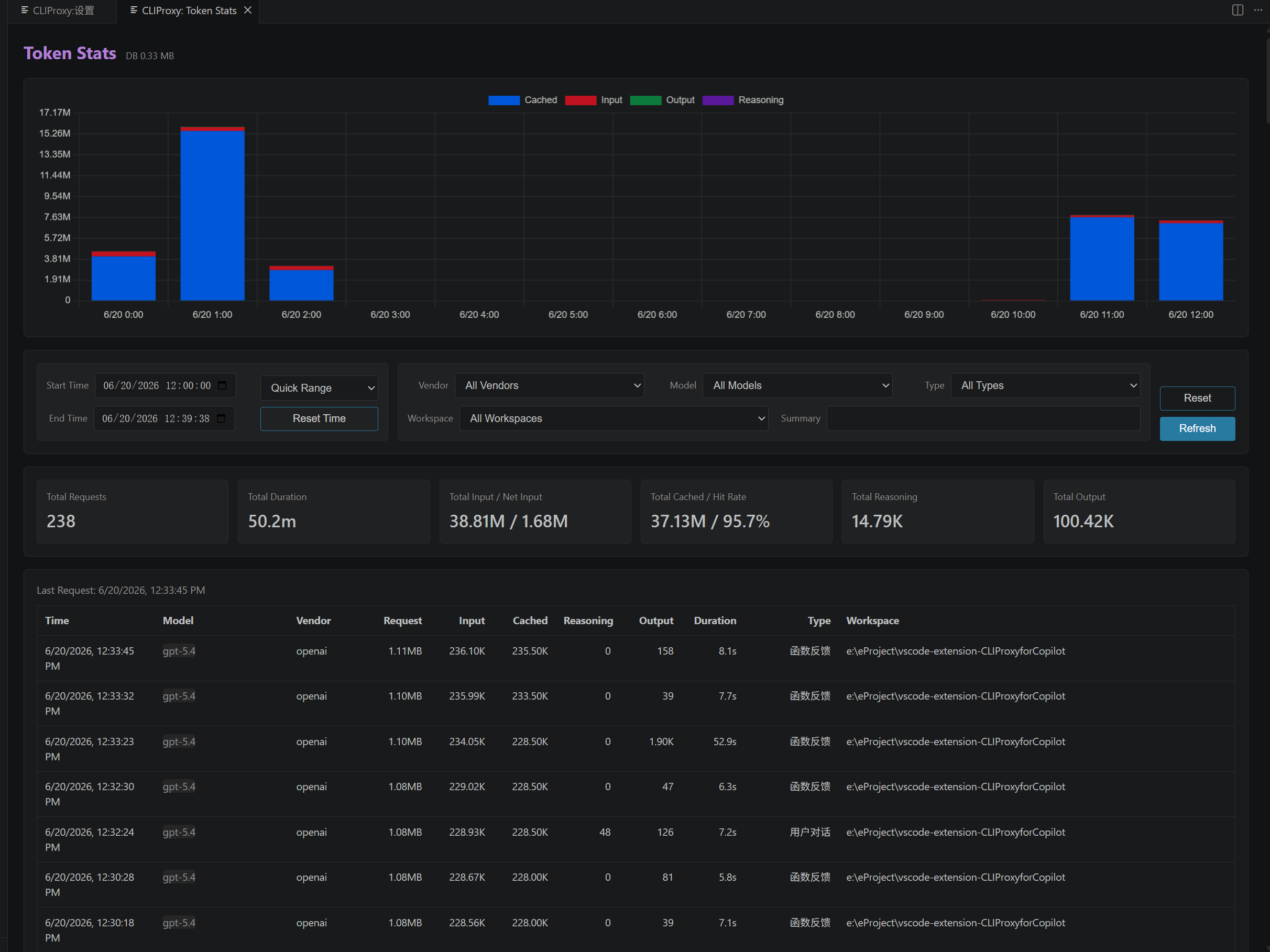
设置页、原始记录页与 Token 统计页的 VS Code 标签标题与状态栏图标入口菜单现已统一国际化;中文分别显示为 CLIProxy:设置、CLIProxy:原始记录、CLIProxy:Token统计,并与页面入口选项文案保持一致。Token 统计已迁移为独立页面,用于查看本地持久化的统计概览与最近请求明细,并在过滤区域上方使用本地内置的 Chart.js 绘制堆叠柱状图,按当前筛选结果展示输入、缓存、推理、输出 Token 的时间分布。cliproxy.logUsageStats 与 cliproxy.persistUsageStats 现已拆分为两个独立开关:前者负责聊天窗口与输出面板显示,后者负责本地持久化保存。统计数据当前包括:请求体大小、输入 Token、缓存 Token、推理 Token、输出 Token、请求概要、工作区名称、工作区完整路径、请求耗时与状态;其中工作区列默认显示完整路径并使用浏览器原生 title 悬浮提示显示完整内容,表格各列默认保持单行省略显示,单击任意记录行可展开查看“工作区完整路径/概要”。总请求数与累计耗时使用两个独立卡片展示,总请求数显示实际数值、不使用 K/M 缩写,且累计耗时在中文环境下采用中文单位(“小时/分/秒”),并提供了“费用估算”卡片,费用显示精确到小数点后 2 位,支持切换并持久化保存不同的模型计费模板(GPT-4o、Claude 3.5 Sonnet、Gemini 1.5 Pro等),在鼠标悬浮时可通过右上角设置按钮快速切换。统计页还支持按时间、模型、厂商、概要、工作区等条件过滤,并为模型/厂商/工作区提供数据库汇总下拉建议;过滤条件不会持久化保存,每次进入 Token 统计页默认保持未过滤并显示所有记录。cliproxy.usageStatsMaxRecords 同时控制本地保留数量与统计页读取展示数量,默认 10000,不会再额外固定截断为 500 条。数据库读操作会每次直接从文件重新加载,写操作则使用锁文件串行化,并在回写前按分钟节流创建 usage-history-时间戳.db 备份;若主数据库损坏,会自动尝试从最近备份恢复。若进程异常退出导致锁残留,系统还会按锁文件时间戳检测并自动清理陈旧锁。扩展发布时所需的 SQLite Wasm 运行时文件已随项目内置在 resources/vendor/sql.js/ 目录中,不再依赖 node_modules/sql.js 的运行时路径。状态栏图标按钮现在会先弹出入口菜单,且菜单项名称与对应页面标题完全一致。
中文示例:
"cliproxy.customModelParameters": [
  {
    "pattern": "openai::gpt-5*",
    "maxInputTokens": "1m",
    "maxOutputTokens": "64k",
    "imageInput": true,
    "toolCalling": true
  },
  {
    "pattern": "openai::gpt-4*",
    "maxInputTokens": "128k",
    "maxOutputTokens": "16k"
  },
  {
    "pattern": "claude::claude-3.7-*",
    "maxInputTokens": "200k",
    "maxOutputTokens": "64k"
  }
]
说明:pattern 直接使用 <provider>::<modelId> 形式,例如 openai::gpt-5*。如果需要批量匹配,可继续使用 * 通配符,例如 openai::gpt-4*。
Copilot 附加模型:设置页中还可以直接配置 chat.utilityModel 与 chat.utilitySmallModel,格式必须为 cliproxyapi/<provider>::<modelId>。例如 cliproxyapi/google::gemini-3.1-flash-lite-preview。这两个输入框也支持基于当前可用模型列表的下拉建议选择。
自定义模型:设置页的“模型设置”标签页中支持手动添加自定义模型,模型会以 custom::模型ID 的形式出现在模型列表中,并使用该条目配置的 URL/Key 发起请求;URL 可填写服务基础地址并自动补齐 /v1/chat/completions,也可填写完整 /v1/chat/completions 地址直接使用;若该条目未填写独立密钥,则该请求不会附带任何 Authorization 头,也不会回退到全局服务密钥。
工具过滤:设置页“过滤设置”标签页会以列表展示当前规则影响的模型,并提供工具函数/参数描述自动完成;选择命中工具或参数后会显示原描述,便于对照改写。若某条规则同时配置删除和描述改写,会先删除匹配工具,再对保留下来的工具执行描述改写。“已缓存工具函数列表”区域可直接清空持久化文件。
Gemini 签名:开启 cliproxy.useGeminiProtocolForGoogleModels 后,Gemini 文本片段携带的 thoughtSignature 会以很短的 [gemini_sign](https://github.com/easyatm/vscode-extension-CLIProxyCopilot/blob/HEAD/resources/geminiSignatureHint.md "base64-signature") 标记保留在聊天历史中,后续 Gemini 请求会自动还原;非 Gemini 协议请求会自动移除该标记。说明文件位于 resources/geminiSignatureHint.md。
Gemini Todo 工具替换:开启 cliproxy.replaceManageTodoListForGemini 后,仅对 UserChat 且模型 ID 包含 gemini 的 Agent 请求生效。请求包含 manage_todo_list 时会替换为 cfc_todo_init / cfc_todo_set_status,并在工具调用上报阶段基于当前待办列表生成完整 todoList 参数转发给 VS Code 的 manage_todo_list。
For logging, most current output panel messages are recorded at debug level by default, while usage statistics are recorded at metric level. Since metric is higher than error, setting the log level to metric will only show these highest-priority metric lines. The usage metric line also includes requestBodyBytes, which is the byte size of the actual chat request body. The chat-window usage suffix now uses a compact abbreviated format in English such as Req ... | Tok: in / cache / think / out, while Chinese keeps the original full wording.
常见问题
- Q: 为什么模型列表里没有看到 CLIProxyAPI 的模型?
- A: 请确保 CLIProxyAPI 服务器已启动且地址配置正确。你可以运行
CLIProxy: 刷新可用模型列表 命令手动触发刷新。
- Q: 是否支持图片输入?
- A: 扩展会根据模型名称自动推断多模态能力,支持多模态的模型可以直接发送图片。
- Q: 自定义模型和服务器自动发现的模型有什么区别?
- A: 自定义模型由你在设置页手动维护,可单独指定显示名称、请求地址和密钥;自动发现模型则来自当前 CLIProxyAPI 服务器的
/v1/models 返回结果。
- Q: Token 统计数据保存在哪里?
- A: 扩展会将统计数据保存在 VS Code 扩展全局存储目录中的本地 SQLite 数据库文件里,并在设置页的
Token统计 标签页展示最近记录。
Introduction
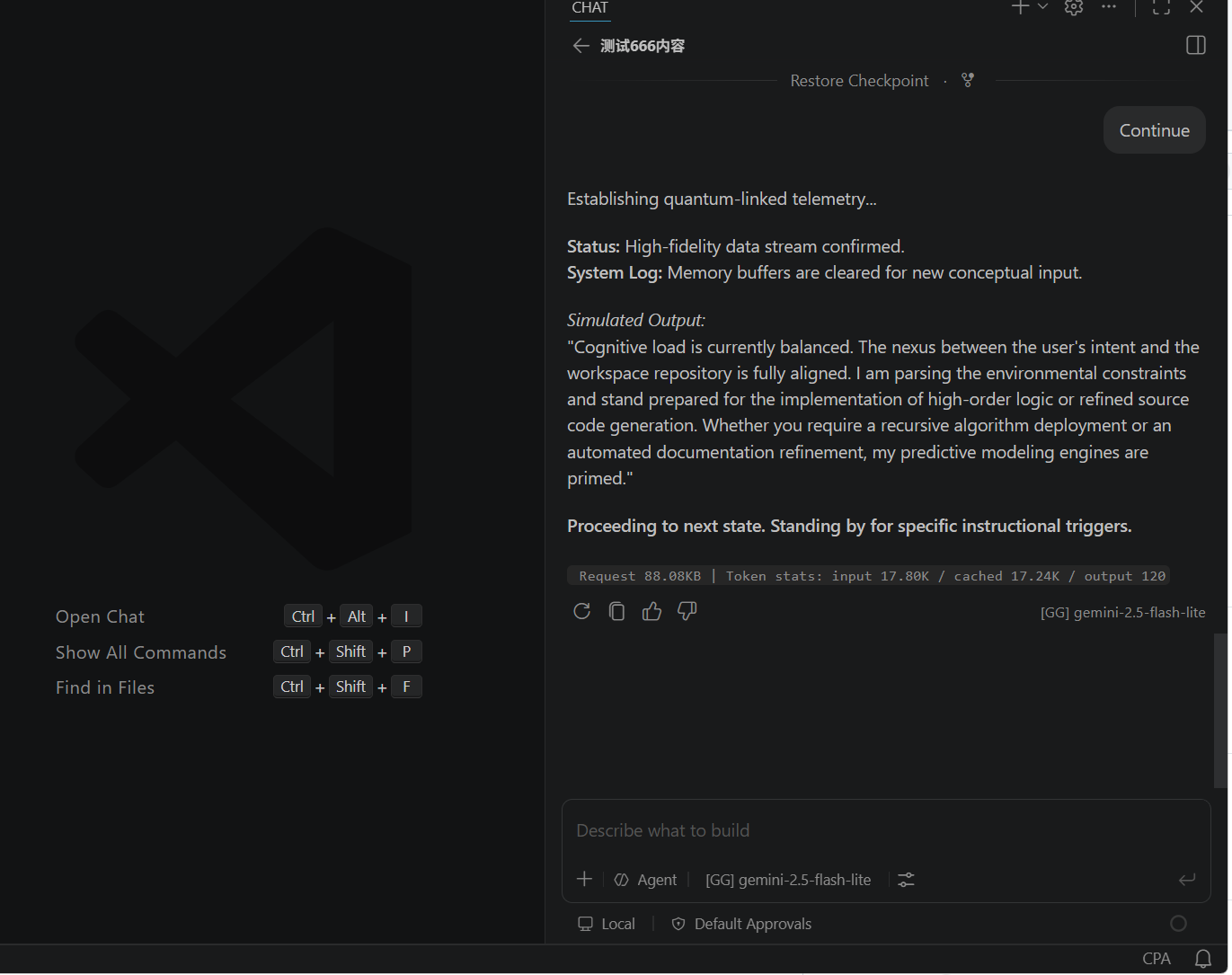
CLIProxy for Copilot is a VS Code extension that registers CLIProxyAPI as a custom Language Model Chat Provider for VS Code.
With this extension, you can use various large language models (such as Gemini 2.5 Pro, GPT-5, Claude 3.7 Sonnet, etc.) proxied by CLIProxyAPI directly within VS Code Copilot Chat. It allows you to leverage your existing OAuth subscriptions or free quotas without needing expensive API keys.
Key Features
- Automatic Model Discovery: Automatically fetches the list of available models from your CLIProxyAPI server.
- Native Integration: Switch models directly in the Copilot Chat model picker for a seamless experience.
- Streaming Responses: Supports SSE streaming for fast and responsive interactions.
- Tool Calling Support: Fully compatible with Copilot's tool calling capabilities.
- Easy Configuration: Quickly configure server settings via commands or the settings UI.
- Status Bar Shortcut: Adds a CLIProxy icon button to the right side of the VS Code status bar for quickly opening the settings panel.
- Built-in SQL.js Runtime: Usage statistics persistence ships with built-in
sql.js runtime assets under resources/vendor/sql.js/, so the published extension no longer depends on runtime files under node_modules/sql.js.
Quick Start
- Install the Extension: Install this extension in your VS Code.
- Configure Server:
- Run the command
CLIProxy: Configure Server URL and API Key.
- Enter your CLIProxyAPI server URL (default:
http://localhost:8317).
- Enter the API Key if your server requires authentication.
- Use Models:
- Open the Copilot Chat window.
- Click the model picker and select a model provided by CLIProxy.
- Start chatting!
Extension Settings
This extension contributes the following settings:
cliproxy.serverUrl: The URL of your CLIProxyAPI server.cliproxy.apiKey: The API Key required to access the server (optional).cliproxy.requestTimeout: Request timeout in seconds.cliproxy.logUsageStats: Whether to log the final response usage JSON to the CLIProxy output channel when usage stats are present.cliproxy.useGeminiProtocolForGoogleModels: For google or antigravity models whose ID contains gemini, use Google Gemini AI Studio /v1beta/models/{model}:generateContent for chat requests only; model discovery still uses the existing OpenAI-compatible /v1/models endpoint.cliproxy.replaceManageTodoListForGemini: When enabled, Gemini user chat agent requests that include manage_todo_list replace it with cfc_todo_init and cfc_todo_set_status before sending to the model, then internally forward model calls back to manage_todo_list; hidden metadata in tool call IDs restores history for Gemini and is stripped for non-Gemini requests.cliproxy.forceCurrentModelForSubAgent: If enabled, the model and agentName parameters will be removed when the AI calls runSubagent, forcing the sub-agent to use the current model.cliproxy.disableTaskComplete: If enabled, the task_complete tool function will be disabled, removed from request tools, and the completion instruction text in the first message will also be removed.cliproxy.logLevel: Output panel log level. Available values: debug / info / warn / error / metric. Only logs at or above the selected level are shown.cliproxy.customModels: Custom model list. Each entry can define id, optional display name name, request url, and optional dedicated key. The url can be a base endpoint that automatically appends /v1/chat/completions, or a full /v1/chat/completions URL that is used as-is. If the dedicated key is left empty, requests for that custom model will not fall back to the global cliproxy.apiKey.chat.utilityModel: Copilot utility model for helper tasks such as Git commit message generation. Must use cliproxyapi/<provider>::<modelId> format.chat.utilitySmallModel: Copilot lightweight utility model for small tasks such as chat title generation. Must use cliproxyapi/<provider>::<modelId> format.cliproxy.customModelParameters: Ordered custom model parameter rules array using model IDs or wildcard patterns in <provider>::<modelId> form. A single * matches all providers and models. It supports maxInputTokens, maxOutputTokens, imageInput, and toolCalling; omitted values default to 1m input, 64k output, image input supported, and tool calling supported.cliproxy.toolFilters: Tool function filter rules. During request initialization, the extension collects VS Code options.tools declarations, saves them to tool-functions.json in global extension storage, and uses them for autocomplete in the Settings → Filter Settings tab. When the VS Code version changes, the stored list is cleared and recollected from future requests. Tool schemas are cached as independent snapshots to avoid in-place filtering from polluting the cache and causing frequent writes. Each rule supports one or more model wildcards, removing one or more tools, or rewriting tool / parameter descriptions. Tool and parameter targets support partial name or description matching. The tool list file uses a lock file plus atomic temp-file replacement to avoid multi-process write conflicts. Manual clearing writes a resetAt marker so other VS Code processes discard stale in-memory caches and recollect tools.
Example:
"cliproxy.customModelParameters": [
  {
    "pattern": "openai::gpt-5*",
    "maxInputTokens": "1m",
    "maxOutputTokens": "64k",
    "imageInput": true,
    "toolCalling": true
  },
  {
    "pattern": "openai::gpt-4*",
    "maxInputTokens": "128k",
    "maxOutputTokens": "16k"
  },
  {
    "pattern": "claude::claude-3.7-*",
    "maxInputTokens": "200k",
    "maxOutputTokens": "64k"
  }
]
pattern uses the provider-qualified <provider>::<modelId> form directly, such as openai::gpt-5*. You can still use * for bulk matching, such as openai::gpt-4*.
For Copilot-specific helper models, the settings page also allows configuring chat.utilityModel and chat.utilitySmallModel. Their values must use the cliproxyapi/<provider>::<modelId> form, such as cliproxyapi/google::gemini-3.1-flash-lite-preview. Both fields now support dropdown suggestions based on the currently available model list.
For custom models, requests use the custom entry's url and dedicated key. A base endpoint automatically appends /v1/chat/completions; a full /v1/chat/completions URL is used as-is. If the dedicated key is empty, the request is sent without an Authorization header and does not fall back to the global cliproxy.apiKey.
For tool filters, the Settings → Filter Settings tab shows affected models for each wildcard rule and offers autocomplete from the saved tool / parameter list. If a rule both removes tools and rewrites descriptions, removal is applied first, then rewrites are applied to remaining tools.
When cliproxy.useGeminiProtocolForGoogleModels is enabled, Gemini text-part thoughtSignature values are preserved in chat history as compact [gemini_sign](https://github.com/easyatm/vscode-extension-CLIProxyCopilot/blob/HEAD/resources/geminiSignatureHint.md "base64-signature") markers and restored in later Gemini requests. Non-Gemini requests strip these markers automatically. See resources/geminiSignatureHint.md for details.
When cliproxy.replaceManageTodoListForGemini is enabled, only UserChat agent requests for model IDs containing gemini are affected. If the request declares manage_todo_list, it is replaced with cfc_todo_init / cfc_todo_set_status, and tool calls are forwarded back to VS Code's manage_todo_list with a complete todoList payload.
For logging, most current output panel messages are recorded at debug level by default, while usage statistics are recorded at metric level. Since metric is higher than error, setting the log level to metric will only show these highest-priority metric lines. The usage metric line also includes requestBodyBytes, representing the byte size of the outgoing chat request body.
Troubleshooting
- Q: Why don't I see CLIProxyAPI models in the list?
- A: Ensure your CLIProxyAPI server is running and the URL is correctly configured. You can run the
CLIProxy: Refresh Available Models command to trigger a manual refresh.
- Q: Does it support image input?
- A: The extension automatically infers multimodal capabilities based on the model name. Models that support vision can handle image inputs directly.
License
MIT

