.NET Pulse
A Visual Studio Code extension that enhances your .NET development workflow with powerful productivity
features including external terminal access, smart project building, and quick navigation to code-behind files.
This extension contains the C# Dev Kit, the Visual Studio keyboard shortcut mapping, the Error Lens and beautiful file explorer icons.
It is no longer necessary to install other extensions or create a tasks.json file:
everything is automatically detected and adapted for .NET projects.
Watch the video
▫️Keyboard Shortcuts
| Command |
Windows/Linux |
Mac |
| Open Explorer panel |
Ctrl+Alt+L |
Ctrl+Alt+L |
| Open the Search panel |
Ctrl+Shift+F |
Ctrl+Shift+F |
| Open Source Control panel |
Ctrl+Alt+P |
Ctrl+Alt+P |
| Open Testing panel |
Ctrl+Alt+T |
Ctrl+Alt+T |
| Build the current .NET Project |
Ctrl+B |
Cmd+B |
| Build the .NET Solution |
Ctrl+Shift+B |
Cmd+Shift+B |
| Start without Debugging |
Ctrl+F5 |
Cmd+F5 |
| Start New Instance (Debug) |
F5 |
F5 |
| Navigate to Code-Behind |
F7 |
F7 |
| Create new file in Explorer |
Shift+F2 |
Shift+F2 |
| Close the current window |
Ctrl+W |
cmd+W |
| Opens current file's directory in external terminal |
Ctrl+Alt+Space |
Ctrl+Alt+Space |
NOTES:
To use Start New Instance (F5 or Ctrl+F5
effectively, we recommend specifying the project to run in .vscode/settings.json. Without this file, the current project associated to the open file will be run.
{
     "dotnetPulse.projectUri": "MySample/MySample.csproj"
}
▫️Default configurations
This extension automatically configures several VS Code settings optimized for .NET development:
Editor Settings:
- Mouse wheel zoom enabled
Cascadia Mono font family- Tab size set to 2 spaces
File Nesting:
- Automatic nesting of related files (code-behind, designer, generated files)
- Organized Explorer view for
.razor, .cs, .xaml, .aspx, and more
- Collapsed nesting by default for cleaner workspace
Icons:
- VS Code Icons theme for better file type visualization
▫️Build Project
Intelligently build .NET project directly from any file in your workspace. The extension automatically
finds the nearest project file (.csproj) and builds it.
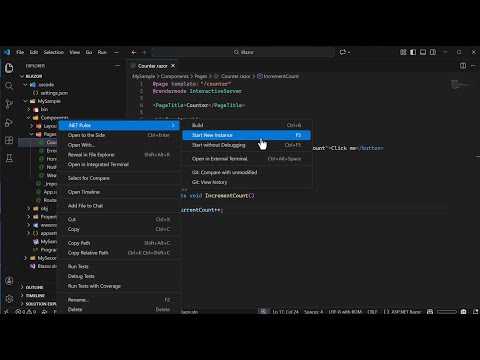
- Right-click on any file in the Explorer and select
.NET Pulse → Build
- Use keyboard shortcut:
Ctrl+B (Windows) or Cmd+B (Mac)
- Works from any file within your project - automatically locates the nearest project file
▫️Start without Debugging
Quickly run your .NET project without attaching a debugger. The extension automatically finds the
nearest project file (.csproj) and executes it using dotnet run.
- Right-click on any file in the Explorer and select
.NET Pulse → Start without Debugging
- Use keyboard shortcut:
Ctrl+F5 (Windows) or Cmd+F5 (Mac)
- Works from any file within your project - automatically locates the nearest project file
▫️Start New Instance (Debug)
Launch and debug your .NET project with VS Code's debugger attached. The extension dynamically
determines the correct DLL path by querying MSBuild properties, supporting all target frameworks
and custom output paths.
- Right-click on any file in the Explorer and select
.NET Pulse → Start New Instance
- Use keyboard shortcut:
F5
Note: Requires the C# Dev Kit extension for debugging support.
▫️Build Solution
Build the entire .NET solution instead of a single project. The solution file is determined from the Solution Explorer panel provided by the C# Dev Kit extension.
- Use keyboard shortcut:
Ctrl+Shift+B (Windows) or Cmd+Shift+B (Mac)
- If no solution is currently defined, a prompt will be displayed to select one
▫️Navigate to Code-Behind File
Seamlessly navigate from markup files to their associated code-behind files with a single keystroke.
- Open any supported markup file (
.cshtml, .razor, .aspx, or .ascx)
- Press
F7 to jump to the corresponding code-behind file
- Automatically opens files like
MyComponent.razor.cs from MyComponent.razor
1. Compare with Unmodified
Quickly view git changes for any modified file by comparing it with its unmodified version (HEAD) in a side-by-side diff view.
- Right-click on any file in the Explorer and select
.NET Pulse → Git: Compare with unmodified
2. View History
View the complete git history for any file using VS Code's built-in Timeline view.
- Right-click on any file in the Explorer and select
.NET Pulse → Git: View history
- Opens the Timeline view showing all commits that affected the selected file
3. Repository User
Quickly configure the Git user name and email for the current repository (local scope), without leaving VS Code.
- Right-click in the Explorer and select
.NET Pulse → Git: Repository User
- The current local value is used as the default. If no local value is set, the global value is used instead.
- Press
Enter to confirm on the local repository.
- Press
Esc to cancel without making changes.
This is useful when you work with multiple Git identities (e.g., personal vs. work accounts) and need a per-repository configuration.
▫️Open in External Terminal
Quickly open any file's directory in your external terminal (Windows Terminal by default) without leaving VS Code.
- Right-click on any file in the Explorer and select
.NET Pulse → Open in External Terminal
- Use keyboard shortcut:
Ctrl+Alt+Space (while focused on editor or explorer)
You can customize the terminal path in your VS Code settings by adding:
"externalTerminal.path": "path/to/your/terminal.exe"
▫️Open Documentation
Quickly access your project's documentation links from the context menu. Configure a list of labeled URLs in your settings, and open them directly in your default browser.
- Right-click on any file in the Explorer and select
.NET Pulse → Open Documentation
- A quick pick menu displays all configured documentation links
- Select a link to open it in your default browser
Configure documentation URLs in your .vscode/settings.json:
{
    "dotnetPulse.documentationUrls": [
        { "label": "API Reference", "url": "https://docs.example.com/api" },
        { "label": "User Guide", "url": "https://docs.example.com/guide" }
    ]
}
Note: The menu item is only visible when at least one documentation URL is configured.
▫️Configuration
You can configure .NET Pulse behavior by adding settings to your workspace's .vscode/settings.json file:
{
    "externalTerminal.path": "wt.exe",
    "dotnetPulse.projectUri": "MySample/MySample.csproj",
    "dotnetPulse.projectArgs": [],
    "dotnetPulse.projectPreLaunchTask": "",
    "dotnetPulse.projectBuildToConsole": "internalConsole",
    "dotnetPulse.startConfiguration": {},
    "dotnetPulse.documentationUrls": [
        { "label": "API Reference", "url": "https://docs.example.com/api" },
        { "label": "User Guide", "url": "https://docs.example.com/guide" }
    ],
    "dotnetPulse.buildSuccessSound": "C:/Windows/Media/Windows Exclamation.wav",
    "dotnetPulse.buildFailureSound": "C:/Windows/Media/Windows Critical Stop.wav"
}
Important: Run and Debug Behavior
dotnetPulse.projectUri: Specifies the project file to use for Run (Ctrl+F5) and Debug (F5) commands. When configured, these commands will always target the specified project, regardless of which file is currently open. This is particularly useful in multi-project solutions where you want to consistently run the same startup project.
Build command (Ctrl+B) always compiles the project associated with the currently selected file, searching for the nearest .csproj file in the directory hierarchy.
Other Configuration Options
externalTerminal.path: Path to your preferred external terminal application (default is wt.exe)dotnetPulse.projectArgs: Array of command-line arguments passed to your application when running or debuggingdotnetPulse.projectPreLaunchTask: Task to execute before launching the applicationdotnetPulse.projectBuildToConsole: Console type for output - "internalConsole" (default), "integratedTerminal", or "externalTerminal"dotnetPulse.startConfiguration: Object that overrides individual fields of the launch configuration used by Run (Ctrl+F5) and Debug (F5). Only the keys type, request, program, args, cwd, stopAtEntry, requireExactSource, and noDebug are honored. Any value set here fully replaces the corresponding default (arrays are not merged); unspecified keys keep their built-in values. See the Customizing Run/Debug Launch Configuration section below.dotnetPulse.documentationUrls: Array of documentation links with label and url properties to display in the Open Documentation commanddotnetPulse.buildSuccessSound: Path to a .wav audio file played when a build succeeds. Leave empty to disable the success sound. Example: C:/Windows/Media/Windows Exclamation.wavdotnetPulse.buildFailureSound: Path to a .wav audio file played when a build fails. Leave empty to disable the failure sound. Example: C:/Windows/Media/Windows Critical Stop.wav
Note: On Windows, only .wav files are supported (playback uses System.Media.SoundPlayer). MP3 and other formats will not play.
▫️Customizing Run/Debug Launch Configuration
You can override individual fields of the launch configuration used by Start without Debugging (Ctrl+F5) and Start New Instance (F5) by setting dotnetPulse.startConfiguration in .vscode/settings.json.
Only the following keys are honored — any other key is ignored:
| Key |
Type |
Description |
type |
string |
Debug adapter type (e.g. coreclr, blazorwasm). |
request |
string |
launch or attach. |
program |
string |
Path to the program to launch (overrides auto DLL). |
args |
string[] |
Command line arguments passed to the program. |
cwd |
string |
Working directory for the launched program. |
stopAtEntry |
boolean |
Stop at the program entry point. |
requireExactSource |
boolean |
Require exact source matching when setting breakpoints. |
noDebug |
boolean |
Launch without attaching the debugger. |
Example — launch a Blazor WebAssembly project with the blazorwasm debug adapter:
{
    "dotnetPulse.startConfiguration": {
        "type": "blazorwasm",
        "args": ["--urls", "https://localhost:7001"]
    }
}
Note: Values set in dotnetPulse.startConfiguration take precedence over dotnetPulse.projectArgs. For example, if both projectArgs and startConfiguration.args are set, only startConfiguration.args is used (no merging).
Recommended Extensions
The extension pack recommends the following optional extensions:
- C# Dev Kit (
ms-dotnettools.csdevkit)
- Visual Studio Keybindings (
ms-vscode.vs-keybindings)
- VSCode Icons (
vscode-icons-team.vscode-icons)
- Error Lens (
usernamehw.errorlens)
Requirements
- Visual Studio Code 1.85.0 or higher
- Windows Terminal (for external terminal feature) or a configured custom terminal
Issues and Contributions
Found a bug or have a feature request? Please visit the GitHub repository to report issues or contribute.
License
This extension is provided as-is for productivity enhancement in .NET development workflows.
Releases
1.0.6
1.0.7
- Added Open Documentation command to quickly access project documentation.
Update your
.vscode/settings.json with the list of URLs (see above).
1.0.8
- Added the recommended Error Lens extension.
- Fix security issues.
- Added build sound notifications via
dotnetPulse.buildSuccessSound and dotnetPulse.buildFailureSound settings.
- Added the
.NET Pulse → Git: Repository User feature.
1.0.9
- Remove the detection of 'blazorwasm' project.
1.0.10
- Added
dotnetPulse.startConfiguration setting to override individual fields of the Run/Debug launch configuration (type, request, program, args, cwd, stopAtEntry, requireExactSource, noDebug).
1.0.11
- Changed bundled extension dependencies to optional recommendations via
extensionPack.

