ACP ProOne ACP Client (GUI) for every AI agent (Claude Code, Codex, Grok Build, Antigravity CLI, OpenCode, Qwen Code, …) with multi-tab sessions, remote control from your phone, tool-call, markdown, diagrams, and LaTeX. Installation Launch VS Code Quick Open ( Ctrl+P), paste the following command, and press enter.Copied to clipboard |

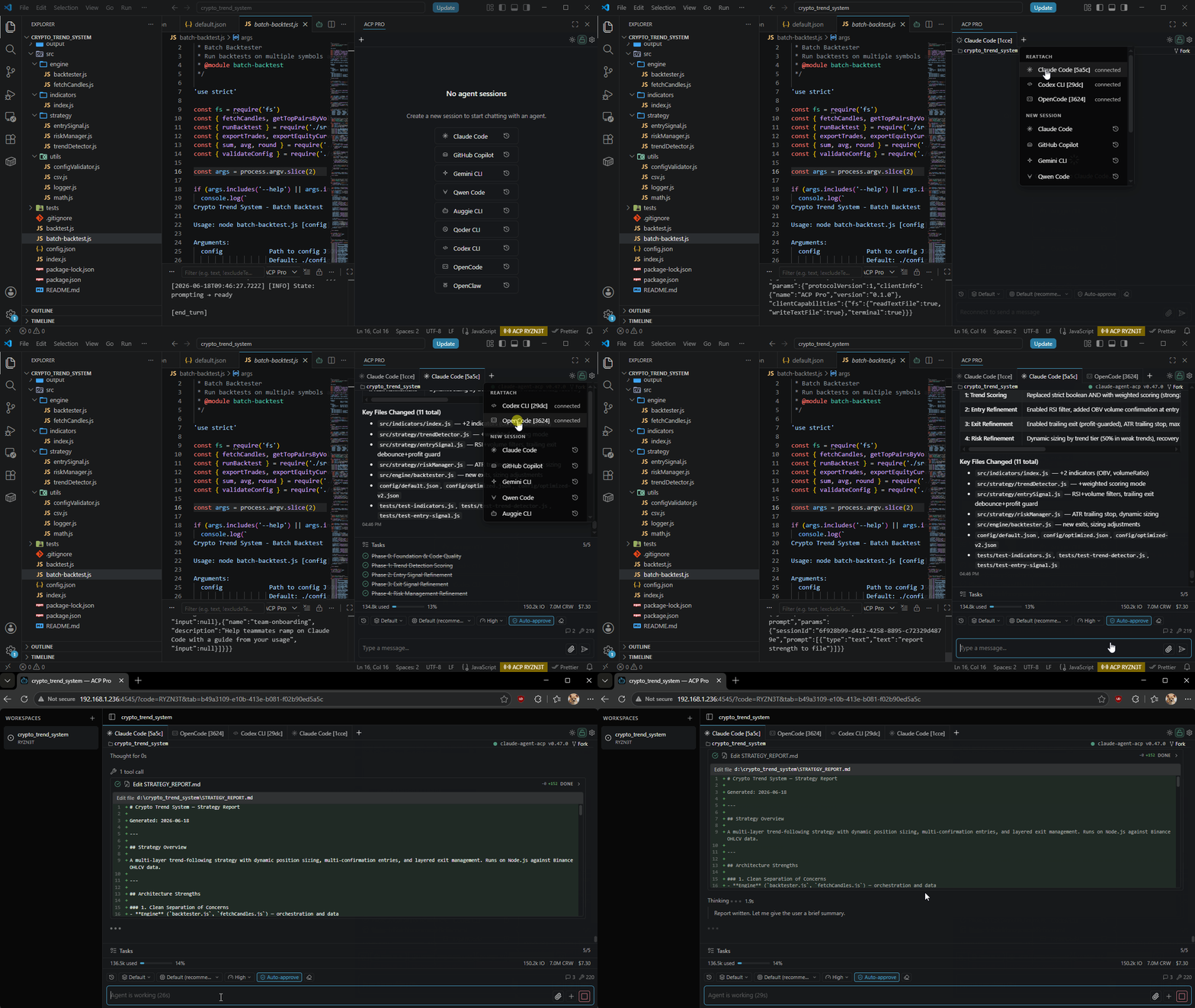
ACP ProUnified GUI interface for AI coding agents in VS Code. Run multiple agent sessions side-by-side in tabs, stream tool calls and inline diffs; you can watch, approve, and steer your agent from your phone or any browser while away from your desk, or just share live sessions with teammates. Drop open files in as @-context, run multiple sessions at once, keep resumable chat history, generate images & video inline. If you’d rather stay in VS Code than a terminal, this brings any AI agent into your sidebar. ACP Pro speaks the Agent Client Protocol (ACP), so it works with any ACP-compatible agent: Claude Code, Codex, Grok Build, Antigravity CLI, GitHub Copilot CLI, Gemini CLI, Qwen Code, Auggie CLI, OpenCode, Qoder CLI, and more. Current release: 0.3.8 — folder-tree working-directory picker, history browsing by directory, and session reliability fixes. See the changelog for release details. Quick Start · Features · Supported Agents · Remote Sharing · Configuration · Troubleshooting
FeaturesExpand a feature to see how it works. Multiple agents and sessions — keep separate conversations in one sidebarChoose an agent when starting a session, then use the Session Switcher to move between Live and Recent conversations. Browse an agent's history by directory and see each session's working directory, reopen earlier work, or close a live session while keeping its restorable history. Nine agents are included in the default catalog. In Settings → Agents, add agents from the registry, configure a custom command, test the connection, or drag agent entries to reorder them. See Supported Agents for the default commands. Files, selections, and attachments — give the agent precise contextType Select code in the editor and press Ctrl+Alt+L on Windows/Linux or Cmd+Alt+L on macOS to add it to the active chat. ACP Pro creates a session if needed. Type Queue, steer, or stop and send — choose when a follow-up reaches the agentSending while a turn is running queues your follow-up in Pending. It waits for the current turn to finish. For an immediate correction, use Steer when available to contribute to the running turn, or Stop & send to cancel the current turn and send the replacement after cancellation finishes. Native steering currently requires the Claude ACP adapter Prompt history and timers — reuse instructions or send them laterAt the beginning of the composer, press ↑ to recall earlier prompts from the current session. Move forward with ↓ at the end of the text; moving past the newest recalled prompt restores your unsent draft and caret. Edit a recalled prompt and submit it normally. Set a delay such as Tool calls and inline diffs — inspect what the agent is doingReads, edits, shell commands, web searches, and other tool calls stream into the conversation with status labels. Expand a tool's details to inspect its text or terminal output; failures remain visible outside the collapsed panel. Edits show changed-line totals and word-level highlights. Click a file path in a diff header to open it in VS Code at the diff's starting line, with relative paths resolved against that session's working directory. Rich answers — code, diagrams, math, and media in the conversationReplies support GitHub-Flavored Markdown, highlighted code blocks, horizontally scrolling tables, and inline or display LaTeX. Completed Mermaid blocks render as diagrams with pan, zoom, copy-source, and SVG export controls; incomplete or invalid diagrams keep their readable source. Image, audio, resource, resource-link, and diff blocks render inline when supplied by the agent. Image attachments open in a preview modal, including when available from restored history. Media generation and accepted attachment types depend on the agent's tools and capabilities. Plans and reasoning — follow progress without crowding the transcriptAgent execution plans appear in a collapsible task panel. Reported reasoning streams into a separate expandable Markdown block, so you can inspect it when useful and keep the main answer in view. Session controls and usage — choose models, permissions, and effortUse the session toolbar to select the model, permission mode, reasoning effort, and additional options exposed by the agent, such as Codex fast mode. Press Shift+Tab to cycle permission modes or Esc to cancel a turn. Compact input, output, cache, context-window, and cost metrics show the usage reported for the session. Hover for exact values. When an agent requests authentication, its supported flow runs locally in VS Code; short-lived credentials are kept out of settings and session history. Working directories and session actions — organize and revisit your workClick the directory in the chat header to browse directories level by level in a compact folder tree. The header also shows connection state, agent name and version, and git branch and working-tree status for that directory. A disconnected session can be refreshed from its state indicator. Open Session actions ( Resumable history and session limits — keep long-running work manageableThe last active session restores on window reload by default. Earlier conversations can reopen through the agent's supported load or resume behavior, retaining their working directory. The default live-session cap is eight. Finished, unattended sessions release their running agent after 60 idle minutes while preserving restorable history. Active work, visible sessions, drafts, attachments, scheduled prompts, pending permissions, and remotely viewed sessions remain protected. Both limits are configurable. Long transcripts use virtualized rendering and batched streaming updates; attachment previews load on demand. Local VS Code chat stays independent of the browser bridge's leader window. Browser sharing — follow sessions from your phone or another computerClick the ACP status-bar indicator to copy a share URL and open the live workspace in a browser. Viewers start with read-only access. Use LAN access or VS Code port forwarding to reach the bridge from another device; the VS Code host must remain running and reachable. Browser sharing can be disabled per workspace in Settings → Bridge Server while local chat continues to work. See Sharing a Session for setup. Optional Pro controls — manage browser ownership and write accessPro adds a persistent, customizable workspace share code, an owner password for claiming browser ownership, and an owner-only toggle between read-only and full-write viewer access. Authorized browser users can send prompts and respond to permission requests. Activate once in Settings → License to share entitlement across local and remote workspace hosts opened by the same VS Code client profile. See Licensing & Pro Features for details. Appearance, settings, and diagnostics — tailor the workspaceChoose System, Dark, or Light in Settings → Appearance, or use the sun/moon toggle. System mode follows VS Code's theme. Narrow layouts keep session and toolbar controls within reach. Settings opens in a reusable VS Code editor with agent management, appearance, licensing, and extension information. Browser settings expose client-local preferences. For connection troubleshooting, run ACP Pro: Toggle Debug Mode to enable live ACP request and response logs in the Output panel. Bridge — Remote Session SharingACP Pro embeds a tiny HTTP + WebSocket server that starts automatically with the extension. The first VS Code window of a user becomes the leader and binds the configured port; subsequent windows join as followers over loopback IPC.
Licensing & Pro FeaturesACP Pro is free. A license unlocks optional remote controls without touching the core experience.
Requirements
Quick Start
Sharing a SessionThe bridge starts automatically when the extension activates. Browser sharing is enabled by default and can be turned off per workspace from Settings -> Bridge Server.
ConfigurationAll settings live under
Example: custom agent over stdioSupported AgentsDefaults shipped in
Other agents implementing the Agent Client Protocol can connect — add them from Settings → Agents when listed in the registry, or configure them manually in CommandsAll commands are available via the Command Palette (Ctrl/Cmd+Shift+P):
Keyboard ShortcutsACP Pro ships one default keybinding:
Inside the chat webview:
Bind any command via Troubleshooting
LicenseACP Pro is proprietary, commercial software — © Duc Lv, All Rights Reserved. It is licensed, not sold, under the End-User License Agreement in LICENSE. The core experience is free to install and use; Pro features require a valid license entitlement, shared by a VS Code client profile and protected by host-bound encrypted Pro keys. You may not copy, redistribute, resell, reverse-engineer, or circumvent the licensing or encryption mechanisms. See LICENSE for the full terms. |