Code Context by dotnetpowerPreviewFast local code search, source reads, and context for AI agents. Native VS Code tools backed by one shared, adaptive cache. Installation Launch VS Code Quick Open ( Ctrl+P), paste the following command, and press enter.Copied to clipboard |

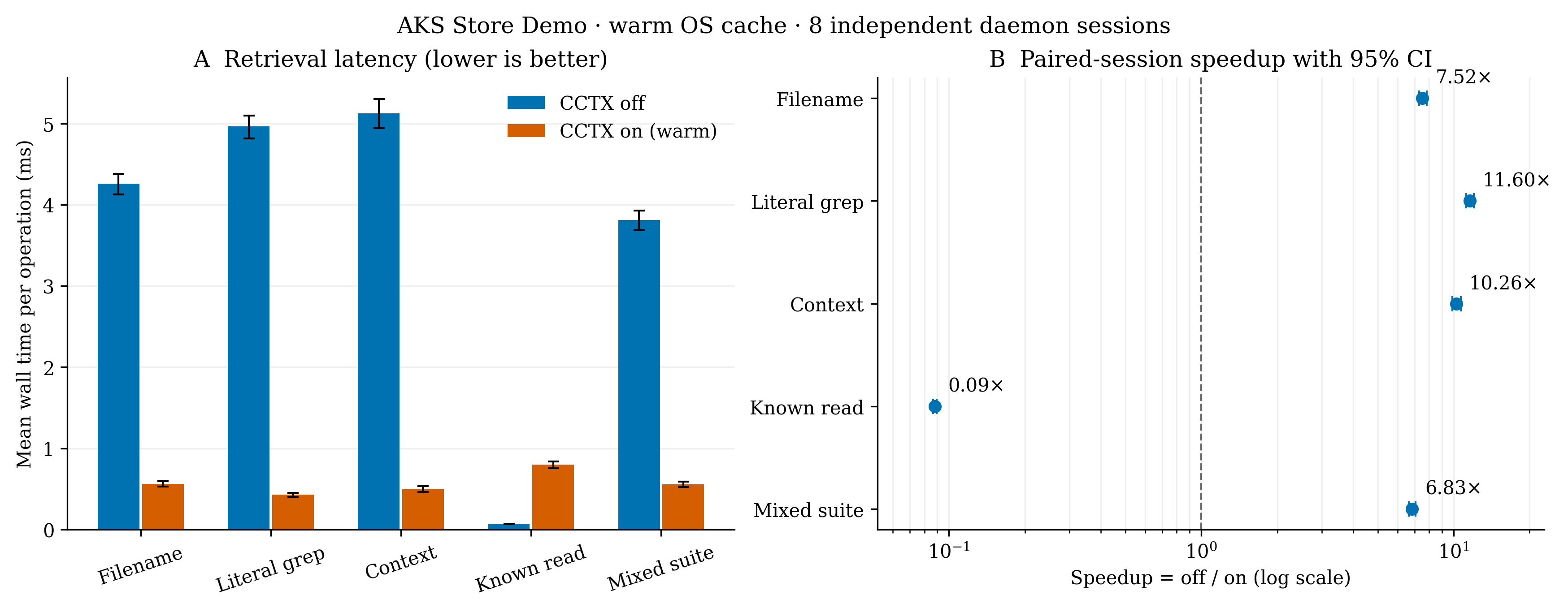
Code Context by dotnetpowerLocal source context for your coding agent. Find files, search source, and read nearby code with seven native tools backed by one shared Rust cache. Publisher: dotnetpower. Previous VSIX users: migration steps. ResourcesRepository · Setup · Tool reference · Benchmark report · Issues · License VS Code's native right-hand Resources panel uses Marketplace metadata. For VSIX-only installations, use the links above instead. PerformanceOn AKS Store Demo, the fixed retrieval mix averaged 6.83× faster with a warm CCTX cache (95% CI 6.65–7.06×): 3.809 → 0.557 ms per operation.
Eight daemon sessions and 8,960 correctness-checked pairs; OS cache warm in both arms. Off bypasses CCTX with ripgrep/direct reads; on uses daemon RPC. Known small reads were slower through CCTX. Cold misses fall back instead of waiting. This is not a measurement of VS Code dispatch, LLM latency, or whole-agent speed. Full method, cold-start chart, raw data, and reproduction Install
1. Install the backend inside the Linux host: 2. Download the VSIX. In VS Code choose Extensions → … → Install from VSIX…. 3. Run Code Context: Getting Started in a trusted workspace. Enable the tools in your agent's tool picker and try:
No proposed API flags are needed. Marketplace publication is separate from the downloadable VSIX. Windows Agents connection settings, manual registration, and troubleshooting are in the setup guide. The cache is optional: |