Veyra
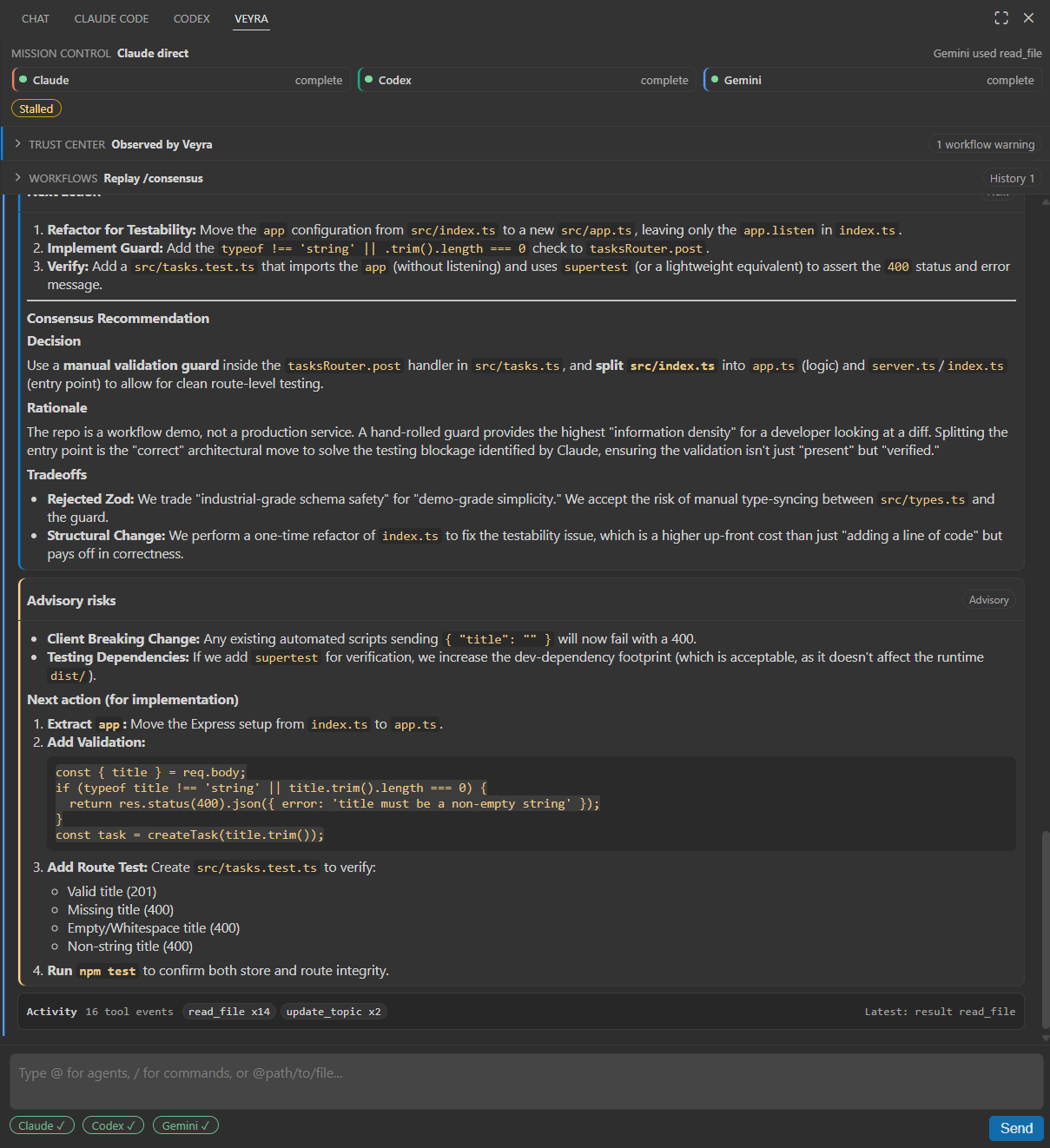
Veyra is a VS Code extension that routes project work across Claude, Codex, and Gemini while keeping the shared conversation, file edits, and handoffs visible.
The working rule is: agents can work together without losing context, stomping each other's edits, or making invisible changes.
What It Adds
- Native VS Code Chat participants:
@veyra routes work through Veyra's facilitator.
@claude, @codex, and @gemini send directly to one agent.
@veyra slash workflows:
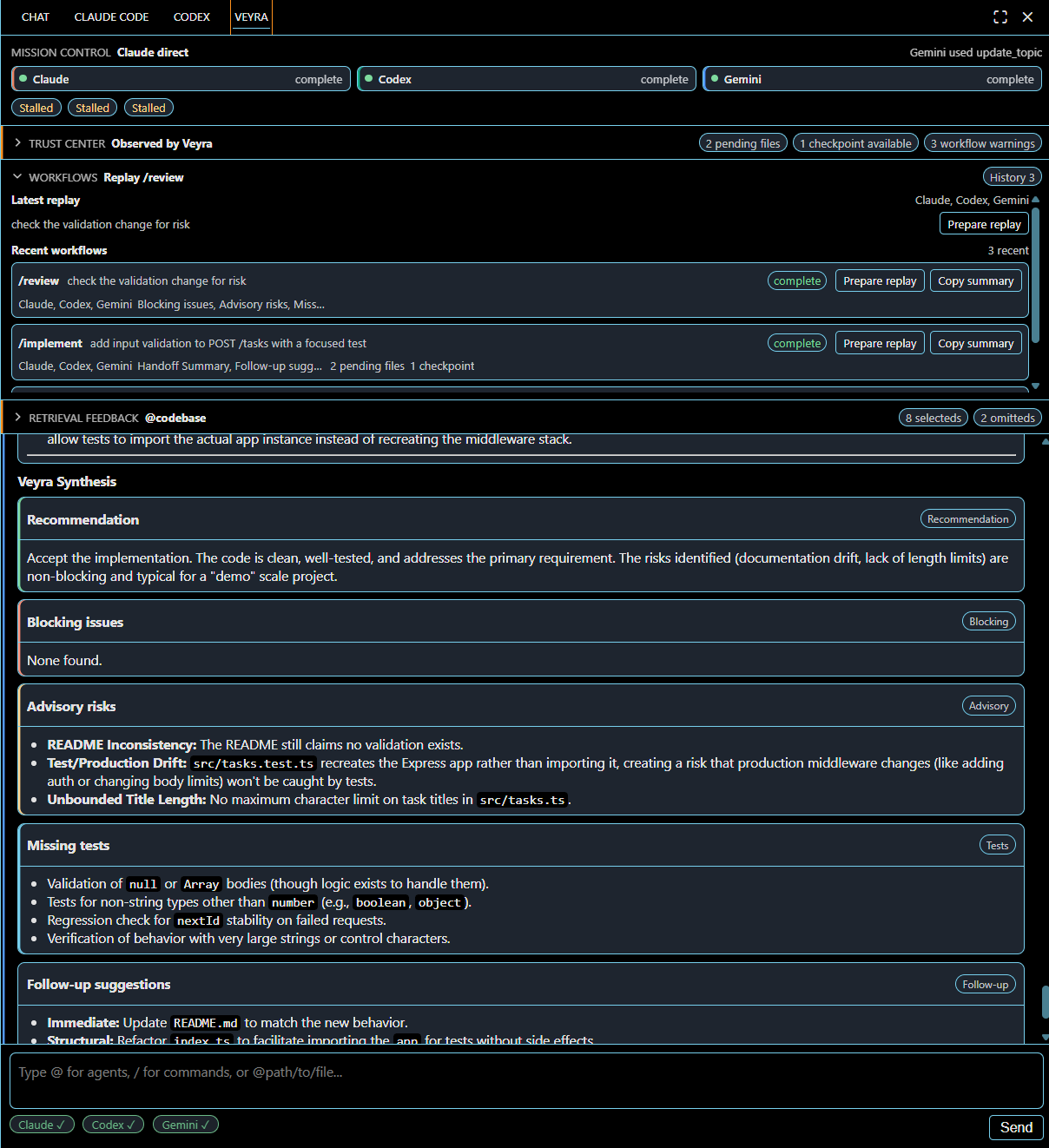
/review asks all three agents to review the request in sequence with role-specific focus.
/debate asks all three agents to compare approaches before implementation from different strengths.
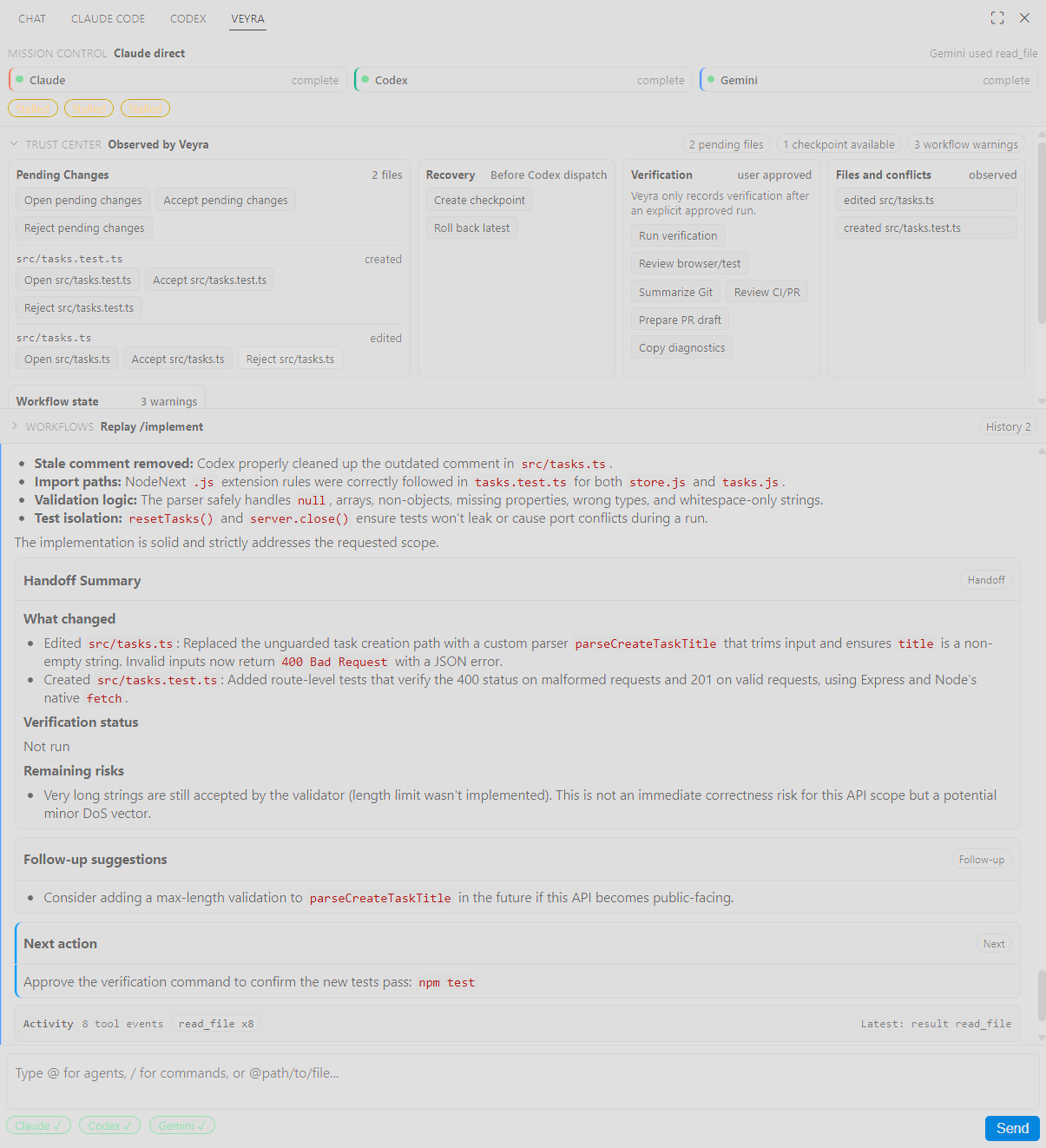
/implement runs a serial all-agent implementation pass: Claude frames approach/risk, Codex changes code/tests, then Gemini reviews.
- A VS Code Language Model provider named
Veyra, with local models for the orchestrator and each direct agent.
- A legacy Veyra panel for the same shared session pipeline.
- Shared context and file mention support across panel, native chat, and language model requests.
- File edit visibility through streamed edit events, file decoration badges, session summaries, and commit attribution.
- Workspace change detection for files modified during an agent turn even when the underlying CLI does not report a write tool.
- Cross-agent edit conflict notices when a later agent touches a file already edited by another agent in the session.
Requirements
Veyra shells out through the local agent CLIs/adapters already configured on your machine:
- Node.js with the
node command on PATH, required when Veyra launches JS bundle paths from the VS Code extension host.
- Claude through
@anthropic-ai/claude-agent-sdk.
- Codex through the local Codex CLI integration (
npm install -g @openai/codex, then codex login).
- Gemini through the local Gemini CLI integration (
npm install -g @google/gemini-cli, then run gemini once to complete OAuth).
Use the account, API key, or subscription setup required by each vendor's CLI. Veyra does not replace those credentials; it coordinates the agents inside VS Code.
Development
npm install
npm run build
Open the folder in VS Code, then press F5 or run the Run Extension launch configuration from .vscode/launch.json. The launch config builds first with npm: build, then starts an Extension Development Host from dist/extension.js. If you package a VSIX with your preferred VS Code extension workflow, build first; .vscodeignore keeps the VSIX focused on the bundled runtime instead of local source, tests, scripts, or node_modules/.
Using Native Chat
Open VS Code Chat and mention a participant:
@veyra /review check this migration plan for risk
@veyra /debate choose the safest way to refactor the auth layer
@veyra /implement add tests for the parser and fix failures
@claude review the architecture in src/server.ts
@codex implement the failing test
@gemini compare these two API designs
When no direct agent is chosen, @veyra asks the facilitator to route the work based on agent availability, prompt content, and recent shared context.
The /review and /debate workflows are read-only: Veyra tells agents not to edit files and suppresses automatic edit approval for those dispatches. /review steers Claude toward architecture/correctness, Codex toward implementation/test risk, and Gemini toward edge cases and invisible-change risk. /debate uses the same split to compare approaches. /implement remains the serial workflow intended for code and test changes.
Workflow prompts tell agents to use their available model and CLI capabilities while still following read-only or edit-permitted instructions. Broad actionable implementation requests should proceed from reasonable assumptions instead of becoming brainstorming or approval checkpoints; agents should stop only for unsafe or impossible next actions.
Run Veyra: Check agent status from the command palette to verify whether Claude, Codex, and Gemini are installed and authenticated before starting an autonomous workflow. If Codex or Gemini is missing, inaccessible, or misconfigured, the status warning offers CLI path configuration directly. On Windows, Veyra: Configure Codex/Gemini CLI paths can detect native CLI executables, PATH npm shims, or npm global CLI bundles and save the needed veyra.codexCliPath / veyra.geminiCliPath workspace settings. If a stale PATH shim points at a missing derived JS bundle, Veyra skips it and falls back to npm root -g; if detection cannot inspect the package tree, the command offers manual JS bundle, native executable, or npm shim path entry.
If a backend reports Node.js missing, install Node.js so the node command is on PATH, or point Codex/Gemini at native executable paths instead of JS bundle paths.
Using Veyra As A Language Model
The extension contributes a veyra language model provider with these local model IDs:
veyra-orchestrator
veyra-review
veyra-debate
veyra-implement
veyra-claude
veyra-codex
veyra-gemini
Other extensions can request these models through VS Code's Language Model Chat API. The workflow models run the same all-agent review, debate, and implementation prompt shapes exposed in native chat. Responses stream back through the same Veyra session service used by native chat and the panel.
Edit Coordination
Veyra keeps a single dispatch pipeline for all surfaces:
- Each agent turn gets the recent shared conversation.
- Later agents in an
@all sequence see prior agent replies and edited-file summaries.
- Prompts include an edit coordination block when another agent has already touched relevant files.
- Tool-reported writes and workspace diff snapshots both become
file-edited events.
- If an agent edits a file previously touched by another agent, Veyra emits an
edit-conflict notice.
- The optional commit hook uses
.vscode/veyra/active-dispatch to add commit attribution.
Install the commit hook from the command palette with Veyra: Install commit hook. Use Veyra: Show commit hook snippet if your repository uses another hook manager.
Settings
veyra.toolCallRenderStyle: verbose, compact, or hidden for raw tool call/result details in the panel, native chat, and Language Model provider. File edit references still stay visible.
veyra.hangDetectionSeconds: seconds without output before a waiting notice appears.
veyra.watchdogMinutes: maximum time an agent may hold the dispatch floor.
veyra.fileEmbedMaxLines: max lines embedded for @file mentions.
veyra.codexCliPath: optional absolute path to the Codex CLI JS bundle, native executable, or Windows npm shim. Paths ending in codex.cmd, codex.bat, or codex.ps1 are resolved to the underlying JS bundle before launch.
veyra.geminiCliPath: optional absolute path to the Gemini CLI JS bundle, native executable, or Windows npm shim. Paths ending in gemini.cmd, gemini.bat, or gemini.ps1 are resolved to the underlying JS bundle before launch.
veyra.sharedContextWindow: number of recent messages sent to later agents.
veyra.fileBadges.enabled: enable file explorer badges for recent agent edits.
veyra.commitSignature.enabled: write the active dispatch sentinel for commit attribution.
veyra.writeApproval: whether agent write requests are automatic or delegated to each CLI.
Verification
npm run verify
To run the non-paid completion gate, including local verification, the automated Extension Development Host smoke test, and live-backend readiness checks:
npm run verify:completion
To run the full goal-completion verifier, including the paid live integration suite, opt in explicitly first:
$env:VEYRA_RUN_LIVE = '1'
npm run verify:goal
Remove-Item Env:\VEYRA_RUN_LIVE -ErrorAction SilentlyContinue
To run only the automated Extension Development Host smoke test against the local VS Code CLI:
npm run test:vscode-smoke
The smoke test uses deterministic no-paid agents. Write-capable smoke requests create harmless files in the isolated .vscode-test workspace and must surface those edits as native chat file references and Language Model provider workspace links.
Live vendor smoke tests are opt-in because they use real local credentials and subscription quota:
Inside VS Code, run Veyra: Show live validation guide from the command palette for the same readiness and live-test commands.
npm run verify:live-ready
$env:VEYRA_RUN_LIVE = '1'
npm run test:integration:live
Remove-Item Env:\VEYRA_RUN_LIVE -ErrorAction SilentlyContinue
The live suite checks each backend individually, runs a read-only all-agent Veyra handoff with shared-context relay through Claude, Codex, and Gemini, and runs a disposable write-capable implementation validation that must surface a visible file edit.
The npm script first refuses to run unless VEYRA_RUN_LIVE=1 is set, then runs verify:live-ready before any paid prompts. The .live.test.ts suites repeat the readiness guard internally so direct Vitest live-test invocations stop before prompt execution when readiness is incomplete.
In PowerShell, $env:VEYRA_RUN_LIVE = '1' stays set for the current terminal session until you remove it or close the shell.
If Windows npm global package paths are inaccessible from the VS Code extension host, Veyra first uses direct native codex.exe or gemini.exe executables found on PATH, then recognized PATH npm shims such as codex.cmd and gemini.ps1. Veyra skips stale PATH shims whose derived JS bundle targets are missing and falls back to npm root -g. If those are not available, point Veyra at explicit JS bundle, native executable, or npm shim paths in settings:
Veyra: Configure Codex/Gemini CLI paths
If auto-detection cannot inspect the package tree, set the paths manually:
Use the underlying JS bundle paths, native executables, or Windows npm shim paths such as codex.cmd and gemini.ps1. Veyra resolves recognized npm shim paths to the underlying JS bundle before readiness and runtime launch, and still rejects malformed override paths instead of treating an arbitrary accessible file as a usable CLI.
{
"veyra.codexCliPath": "C:\\Users\\<you>\\AppData\\Roaming\\npm\\node_modules\\@openai\\codex\\bin\\codex.js",
"veyra.geminiCliPath": "C:\\Users\\<you>\\AppData\\Roaming\\npm\\node_modules\\@google\\gemini-cli\\bundle\\gemini.js"
}
For shell readiness and live-test commands, either keep those workspace settings in .vscode/settings.json or use environment variables:
$env:VEYRA_CODEX_CLI_PATH = 'C:\Users\<you>\AppData\Roaming\npm\node_modules\@openai\codex\bin\codex.js'
$env:VEYRA_GEMINI_CLI_PATH = 'C:\Users\<you>\AppData\Roaming\npm\node_modules\@google\gemini-cli\bundle\gemini.js'
For the real VS Code Extension Development Host checklist, see docs/vscode-smoke-test.md.
For the current prompt-to-artifact completion audit and remaining live-backend gate, see docs/goal-completion-audit.md.