FIM Autocomplete
Inline code completion (fill-in-the-middle) for VS Code, backed by any LLM
provider you point it at. No chat, no agent, no codebase indexing — just
autocomplete.
This is a fork of Continue reduced to
its autocomplete engine. Source and issues:
dkruyt/FIM-Autocomplete.
Setup
Run FIM: Select Model from the command palette, or click the FIM status bar
item and choose Select model…. It walks you through provider → connection →
model, and for providers that support it (Ollama, LM Studio, vLLM, and any
OpenAI-compatible server) it lists the models actually available on the server
rather than making you type a name.
Or set it in Settings → Extensions → FIM Autocomplete: Provider is a
dropdown of every provider the engine ships with, and Model, Api Base and
Api Key are text boxes next to it. In settings.json the same thing reads:
{
  "fim.provider": "ollama",
  "fim.model": "qwen2.5-coder:1.5b",
  "fim.apiBase": "http://localhost:11434",
}
Any provider with a fill-in-the-middle endpoint works well — Ollama, vLLM,
Mistral/Codestral, DeepSeek, LM Studio, or an OpenAI-compatible server:
{
  "fim.provider": "mistral",
  "fim.model": "codestral-latest",
  "fim.apiKey": "...",
}
The picker offers the eleven providers that make sense for autocomplete; the
Provider dropdown lists all 61 the engine ships with.
fim.apiKey is stored in settings.json in plaintext and will sync via
VS Code's Settings Sync. Use a local provider, or an environment-scoped key, if
that matters to you. The setting is machine-scoped, so a checked-in
.vscode/settings.json can't set it for the whole repo.
Upgrading from 0.1.0? The single fim.model object became one setting per
field. Your config is migrated automatically on first start.
The tutorial file
On the first start after installing, a tutorial.py opens: a file that explains
the keybindings, the status bar and the settings, with exercises to try them on.
It's a scratchpad — edit it, it is never run — and it lives at
~/.fim/tutorial.py. FIM: Open Tutorial, or Open tutorial in the status
bar menu, brings it back with whatever you left in it.
Using it
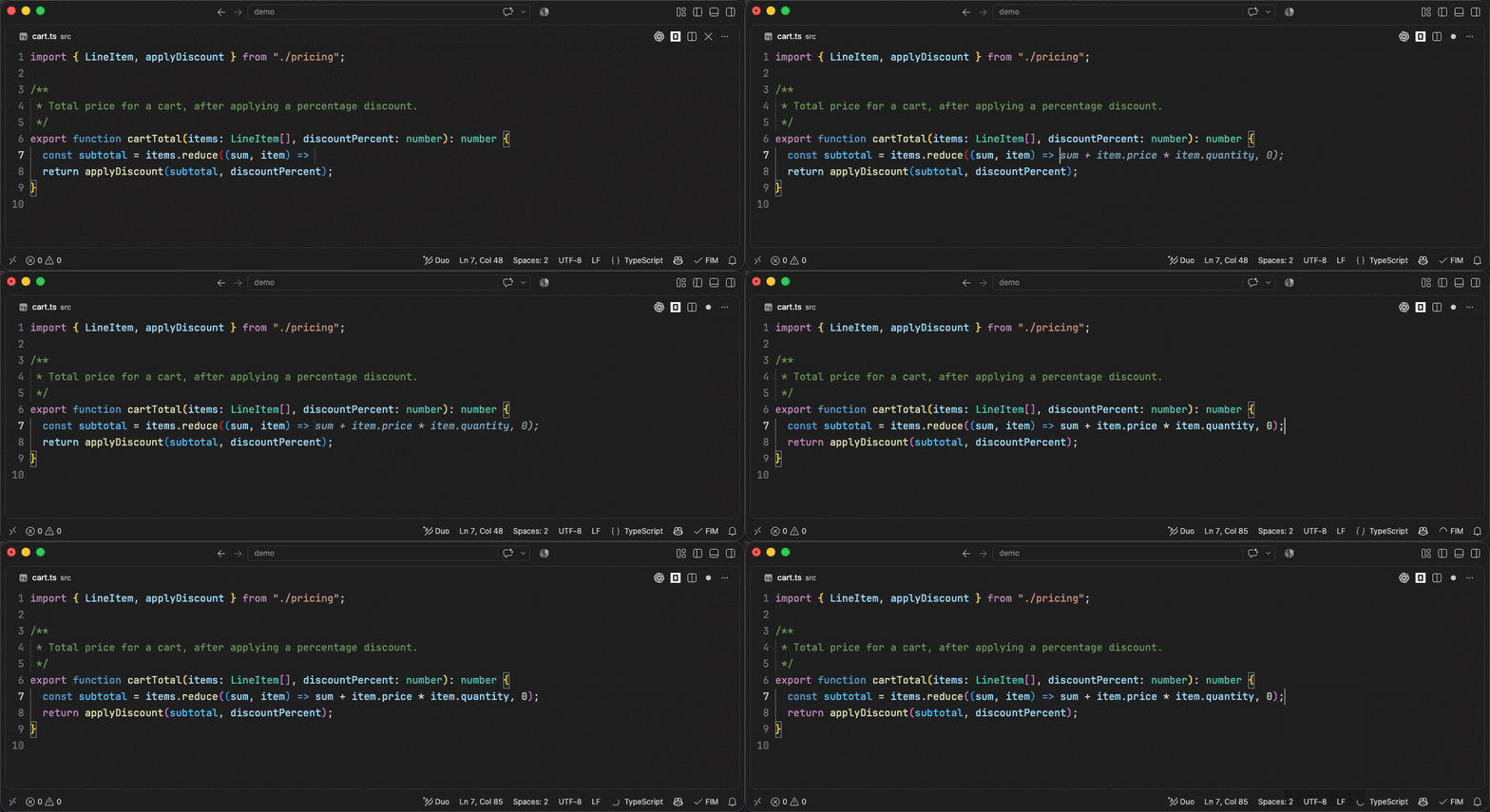
Just type. Once you pause for fim.debounceDelay (350 ms by default), the
suggestion appears inline as grey ghost text after your cursor.
| To do this |
Press |
| Accept the whole suggestion |
Tab |
| Accept just the next word |
cmd+→ / ctrl+→ |
| Dismiss it |
Esc |
| Ask for one right now |
cmd+alt+\ / ctrl+alt+\ |
| Turn autocomplete off and on |
cmd+k cmd+a / ctrl+k ctrl+a |
Accept, dismiss and accept-word are VS Code's own inline-suggestion bindings, so
if you've rebound them they keep working here. Only one suggestion is offered per
position — there's nothing to cycle through with alt+] / alt+[.
cmd+alt+\ is the one to remember: it skips the debounce and asks the model
straight away, which is what you want when a suggestion didn't appear on its own.
The file-exclusion rules below still apply — forcing won't get you a completion in
an ignored file.
The status bar
The FIM item on the right shows what the extension is doing. Click it for a
menu with Select model…, an enable/disable toggle, and a link to all settings.
| Item |
Meaning |
$(check) FIM |
Enabled and idle |
$(loading~spin) FIM |
Waiting on the model |
$(circle-slash) FIM |
Disabled — fim.enabled is false |
$(debug-pause) FIM |
Paused because you're on battery |
It also carries a running tally of the session, FIM 11/9/82%/9%: suggestions
shown, suggestions you took, acceptance rate, and the share answered from cache
without calling the model. Hover for latency and average length; the numbers
appear once the first suggestion has resolved. Set fim.showStatsInStatusBar
to false to leave just the label. Nothing here is sent anywhere — see
Show Completion Stats for the full breakdown.
Commands
All are under the FIM: prefix in the command palette.
| Command |
Default keybinding |
| Select Model |
— |
| Toggle Autocomplete |
cmd+k cmd+a / ctrl+k ctrl+a |
| Force Autocomplete |
cmd+alt+\ / ctrl+alt+\ |
| Open Autocomplete Menu |
click the FIM status bar item |
When nothing appears
In rough order of likelihood:
- The model isn't a code model. A general chat model gets sent raw
<fim_prefix>-style tokens it has never been trained on, and whatever it
replies gets discarded by the output filters. Use a fill-in-the-middle code
model — qwen2.5-coder, codestral, deepseek-coder, starcoder2,
codegemma. FIM: Select Model warns you when a name doesn't look like one.
- The server isn't reachable. Errors surface as a notification, with a
"Start Ollama" button when that's the problem. Check
fim.apiBase.
- VS Code's inline suggestions are off.
editor.inlineSuggest.enabled must
be true (it is by default) or providers never get called.
- The file is excluded. Check
fim.disableInFiles, plus .fimignore in the
workspace root and ~/.fim/.fimignore (gitignore syntax). *.prompt files are
always skipped, as are empty untitled files.
- The file looks like it holds secrets. Paths matching
.env*, *.key,
*.pem, *.p12, certificates and keystores are refused outright — and so are
settings.json, config.json and config.yaml, which surprises people. This
isn't configurable.
Suggestions arriving truncated is a different problem: fim.modelTimeout
(150 ms) caps how long output keeps streaming after the first non-empty line,
so a slow local model gets its multi-line completions cut short. Raise it to
500–1000 for local models on modest hardware.
For anything else, Help → Toggle Developer Tools → Console shows the errors.
How it builds a prompt
Beyond the text around your cursor, completions get context from:
- definitions of imported symbols (tree-sitter + LSP)
- the enclosing class/function signature and the types it references
- recently edited and recently visited ranges
- recently opened files
- optionally the clipboard
Most of these can be toggled under the fim.* settings, and each is raced
against its own timeout so a slow one can't stall a keystroke.
Settings
See all options under Settings → Extensions → FIM Autocomplete, or search
fim. in settings.json. Useful ones:
fim.enabled — master switchfim.debounceDelay — ms to wait after a keystroke (default 350)fim.maxPromptTokens — prompt budget (default 1024)fim.multilineCompletions — always / never / autofim.disableInFiles — glob patterns to skip
A global ~/.fim/.fimignore and per-workspace .fimignore files also suppress
completions, using gitignore syntax.
What gets sent where
Every keystroke that triggers a completion sends a prompt to the provider you
configured in fim.provider — and to nowhere else. That prompt contains the code
around your cursor plus the context sources listed above, so assume anything in
your open files can reach that endpoint. Point it at a local Ollama or vLLM if
that's not acceptable.
There is no telemetry, no analytics, and no account. The only requests that
don't go to your configured provider are ones you explicitly ask for: clicking
Install Model on an error notification looks the model up in the Ollama
registry first.
License
Apache-2.0 — see LICENSE.txt. Original work © 2023-2026 Continue Dev, Inc.;
see the NOTICE file in the
source repository for what changed.

