
Universal Code Cleaner
  
A powerful, highly modular, and safe Visual Studio Code extension to sanitize, clean, and optimize your codebase. Instantly remove comments, excessive empty lines, trailing whitespaces, debug/dump statements & logs, and empty structural elements either from your current active file or across the workspace.
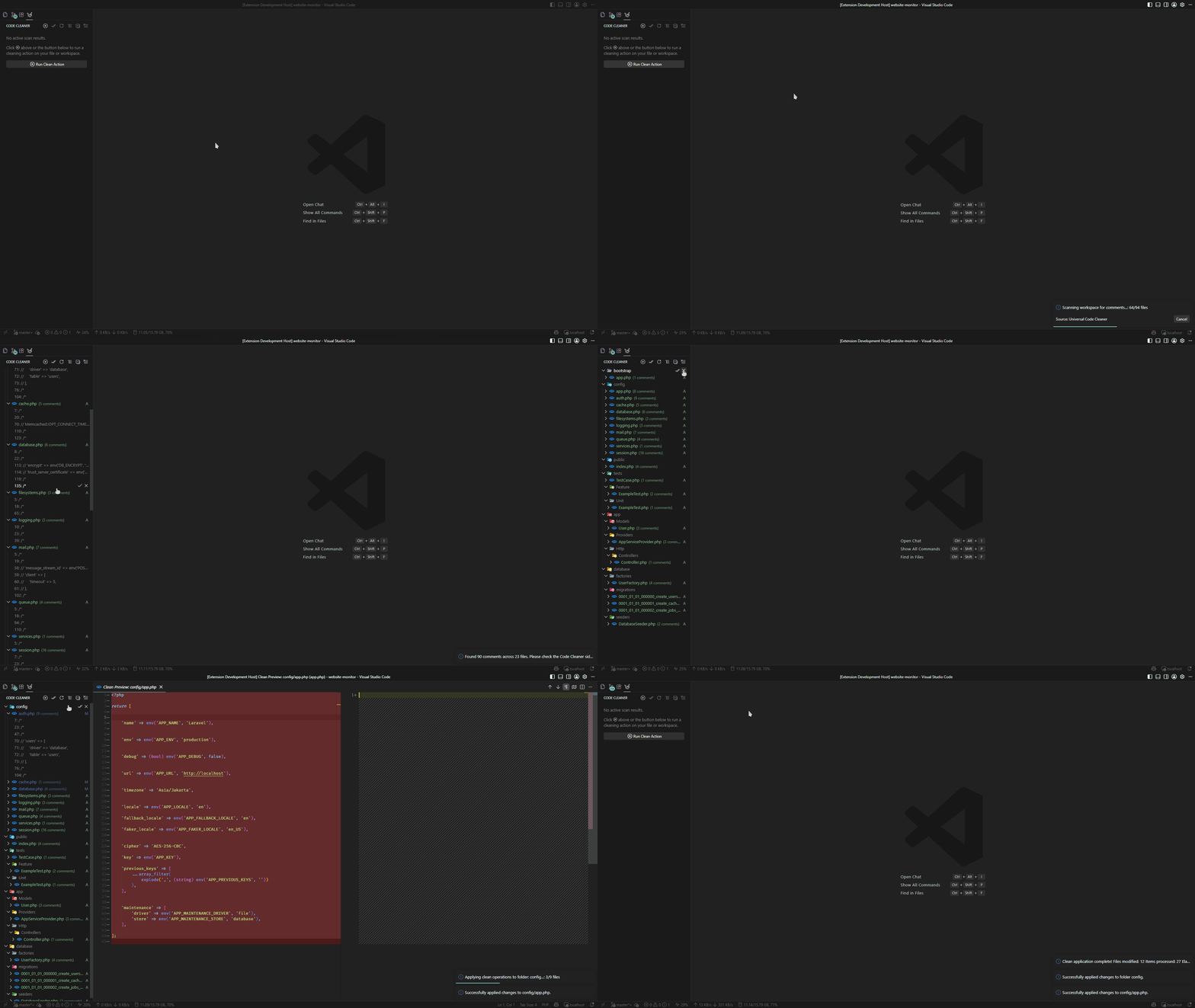
Features
Identify and strip single-line and multi-line comments across C/C++/JavaScript/TypeScript, Python, HTML, and CSS files.
- Keep Directives: Respects important statements like
eslint-disable, ts-ignore, prettier-ignore, and standard software licenses.
- Configure Keywords: Easily add custom ignore keywords via extension settings.
2. Smart Empty Line Removal
Reduces consecutive blank lines to standard code formatting rules.
- Keeps at most 1 empty line to maintain readability.
- Block Aware: Automatically deletes any empty lines immediately adjacent to block openers (
{, [, (, :) and block closers (}, ], ), :).
3. Remove Trailing Spaces
Instantly deletes whitespaces, tabs, and trailing indentations lingering at the end of code lines.
4. Remove Debug & Logs
Universal cleanup of debuggers, dumps, and logging calls across multiple languages:
- Debuggers & Breakpoints:
debugger;, breakpoint().
- Dump Statements: PHP (
dd(...), dump(...), var_dump(...), print_r(...)), Python (pdb.set_trace(...), ipdb.set_trace(...)), Rust (dbg!(...)).
- Console Logs:
console.log, console.debug, console.info, console.trace, console.dir, plus configurable console.warn / console.error.
5. Sort Imports
Organizes and sorts your imports alphabetically, removing duplicates and cleaning empty lines inside the import block.
- Universal Language Support: Detects and sorts imports across JavaScript, TypeScript, Python (
import & from), Go (import), Rust (use), PHP (use), CSS/SCSS (@import), and C/C++ (#include).
6. Workspace Directory Sanitization
- Remove Empty Files: Safely deletes 0-byte or whitespace-only files.
- Remove Empty Folders: Recursively traverses directory structures and removes empty folders from the deepest subdirectory upward, ensuring nested empty structures are fully cleared.
7. Convert Indentation
Converts leading line indentation between tabs and spaces.
- Tab-Centered Defaults: Standardizes tabs as the default target style.
- Customizable Sizes: Allows mapping custom space-equivalent counts when converting to/from tabs.
Configuration Settings
You can customize the extension behavior in your settings.json:
| Setting |
Type |
Default |
Description |
codeCleaner.ignore |
array |
["**/node_modules/**", "**/dist/**", "**/vendor/**", "**/build/**", "**/.git/**"] |
Glob patterns to ignore during workspace cleanup tasks. (Supports Settings UI) |
codeCleaner.keep |
array |
["license", "ts-ignore", "eslint-disable", "prettier-ignore"] |
Case-insensitive keywords inside comments to preserve. (Supports Settings UI) |
codeCleaner.preview |
boolean |
true |
Show a confirmation dialog detailing the number of files and edits before applying changes. |
codeCleaner.autoSave |
boolean |
true |
Automatically save files after performing cleanup actions. |
codeCleaner.debugStatements.keepConsoleError |
boolean |
true |
Preserve console.error statements when cleaning debug & log statements. |
codeCleaner.debugStatements.keepConsoleWarn |
boolean |
false |
Preserve console.warn statements when cleaning debug & log statements. |
codeCleaner.emptyLines.maxConsecutive |
integer |
1 |
Maximum consecutive empty lines allowed in a document. |
codeCleaner.indent.style |
string |
"tab" |
Target indentation style ("tab" or "space"). |
codeCleaner.indent.size |
integer |
4 |
Number of spaces equivalent to one tab for conversion. |
Available Commands
Open the Command Palette (Ctrl+Shift+P on Windows/Linux or Cmd+Shift+P on macOS) and search for the following commands:
Clean Code: Remove Comments - Cleans single-line and multi-line comments.Clean Code: Remove Empty Lines - Cleans consecutive or invalid empty lines.Clean Code: Remove Trailing Spaces - Cleans trailing whitespaces at the end of lines.Clean Code: Remove Debug & Logs - Cleans debug statements, dump calls (dd, var_dump, breakpoint), and console logs.Clean Code: Sort Imports - Alphabetizes and optimizes block imports.Clean Code: Convert Indentation - Standardizes line indentations between tabs and spaces.Clean Code: Remove Empty Files - Removes 0-byte or empty files from the workspace.Clean Code: Remove Empty Folders - Recursively cleans empty directory structures.
Note: For the content cleaning commands, a selection prompt will ask whether you want to apply the operation to the Current File or across the Workspace.
Extension Architecture
Universal Code Cleaner employs the Strategy Pattern to ensure high extensibility and robust operation:
src/core/: Central driver engine (engine.ts), language registry (registry.ts), AST/comment parser (parser.ts), workspace file scanner (scanner.ts), and configuration loader (config.ts).src/processors/: Modular cleaning task implementations (comment.ts, debugStatements.ts, emptyLines.ts, etc.) conforming to the CodeCleanerProcessor interface.src/ui/: Safe Preview System panel and virtual diff provider (sidebar.ts, provider.ts, manager.ts) allowing side-by-side review before applying edits.
License
Created by Dimar Tarmizi. Released under the MIT License.
| |

