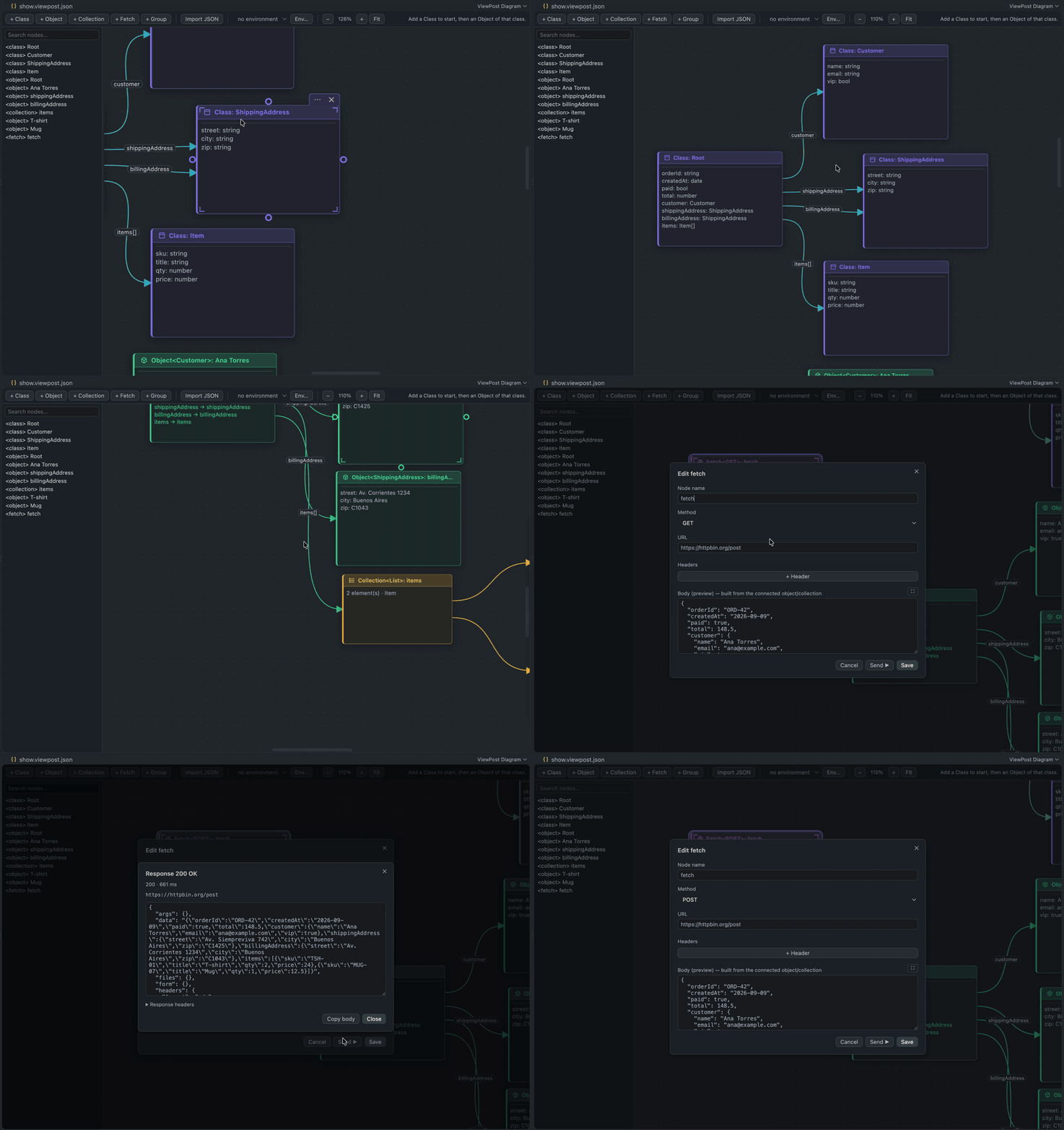
ViewPostDraw classes and objects on a canvas and the graph becomes the JSON body you send. An API client where the model is the payload. Installation Launch VS Code Quick Open ( Ctrl+P), paste the following command, and press enter.Copied to clipboard |

ViewPostDraw the model. Send the request.
ViewPost is an API client for VS Code where the model is the payload. You draw classes and objects on a canvas and the graph becomes the JSON body — no hand-written braces, no twenty copies of the same shape to keep in sync. WhyTesting an API that takes nested objects means writing JSON by hand. Forty lines of braces where one stray comma breaks everything, and the model is nowhere to be seen — what fields a customer has, what type each one is, how an order relates to its items. It is implicit, repeated in every request, and when the backend changes a field you go and edit twenty bodies by hand. ViewPost turns that around. Define the shape once — classes, attributes, inheritance — then create objects by filling in a form the class generates for itself. Attributes that point at another class are not typed, they are connected with an arrow. The JSON is never stored: it is rebuilt by walking the graph. Which gets you three things for free:
And because the request runs in the extension host — Node, not a browser — there is no CORS. Nothing to install, nothing to proxy. Getting started
Drag from the dots on the edge of a node to connect things. Double-click a node to edit it. The right mouse button pans; Ctrl/Cmd + wheel zooms. Ctrl/Cmd+C and Ctrl/Cmd+V copy and paste a selection — across diagrams and across windows. The arrows carry the meaning
Your diagram is a fileA diagram is a EnvironmentsWrite Mark a variable as secret and its value moves to your OS keychain, per environment. The file keeps only the declaration — so the diagram goes into git and the token stays on your machine. Variables are resolved in the extension host, right before sending; the webview never sees a secret. Settings
Known limits
DevelopmentNo build step and no dependencies — the extension ships the source it runs. Press F5 in VS Code to launch an Extension Development Host with ViewPost loaded.
License and creditMIT. Use it, fork it, ship it in something commercial — all fine. The one binding condition is the usual MIT one: keep the copyright notice and the licence text with any copy or substantial portion of the code. And one request on top of that. If you build something on this — a fork, a derived extension, a product that reuses parts of it — credit ViewPost as the original and link back to https://github.com/JuanseGZZ/viewpost somewhere a person will actually see it: your README, your about page, your Marketplace listing. That is a request, not a licence term. It is not enforced and it takes nothing away from what MIT grants you. It is asked because attribution is how a small project gets found at all. See NOTICE. Any product or company names anywhere in this repository belong to their owners and are used, where they appear at all, only to describe what this software does. ViewPost is not affiliated with, endorsed by or sponsored by any of them. |