Reed–Kellogg Markdown Diagrams
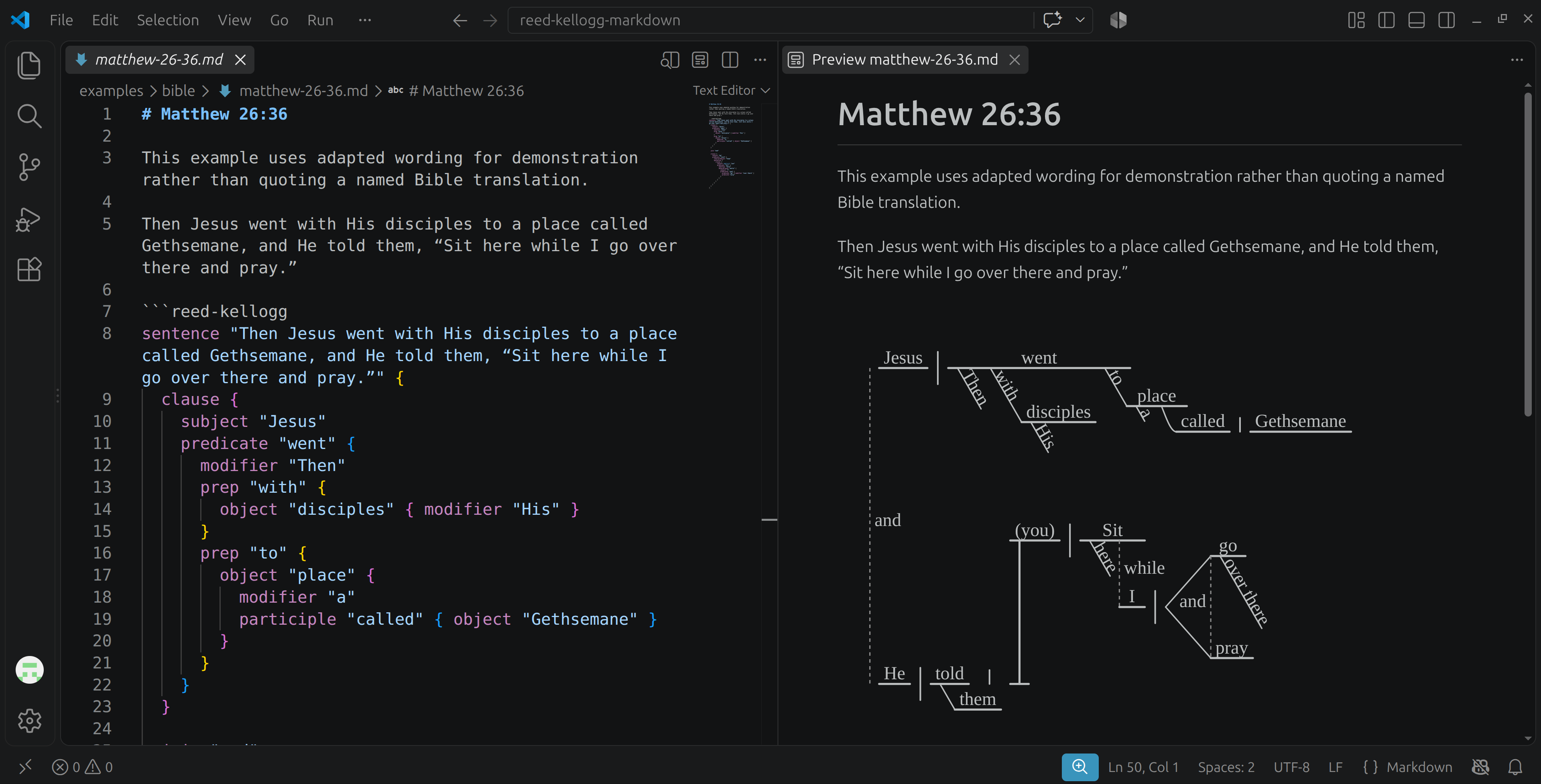
Render classical Reed–Kellogg sentence diagrams directly in VS Code’s Markdown preview. Write grammatical relationships in an explicit, layout-free DSL; the extension turns them into theme-aware, selectable SVG diagrams as you edit.
Quick start
- Install Reed–Kellogg Markdown Diagrams from the VS Code Extensions view.
- Add a
reed-kellogg fenced block to a Markdown document.
- Run Markdown: Open Preview to the Side.
sentence "Birds sing." {
  clause {
    subject "Birds"
    predicate "sing"
  }
}
The diagram updates with the Markdown preview. Long diagrams retain readable typography and scroll horizontally instead of being reduced to illegible text.
Features
- Classical Reed–Kellogg baselines, dividers, modifiers, clause stands, compounds, and dotted connectors.
- A grammatical DSL that describes relationships rather than drawing coordinates.
- Syntax highlighting in
reed-kellogg Markdown fences and standalone .rkdiag files.
- Clear syntax and semantic diagnostics with line, column, explanation, and source excerpt.
- Theme-aware, accessible SVG output with selectable text.
- Deterministic bundled typography for consistent rendering across platforms.
Syntax overview
A sentence preserves the exact source sentence and contains one or more clauses. Braces attach grammatical children, strings use JSON-style double quotes, %% begins a line comment, and semicolons are optional.
Supported constructs include:
- Simple, compound, and implicit subjects.
- Simple and compound predicates and objects.
- Modifiers, prepositional phrases, participial phrases, and adverb clauses.
- Indirect objects, predicate nouns, and predicate adjectives.
- Infinitive predicate complements in explicit
infinitive "to" { ... } and bare infinitive { ... } forms, each with one nested predicate.
- Compound predicate adjectives, including modifiers attached to an individual adjective rather than the whole compound.
- Direct quotations represented as noun clauses.
For example:
predicate "began" {
  infinitive "to" {
    predicate "be" {
      predicateAdjectives "and" {
        predicateAdjective "sorrowful"
        predicateAdjective "distressed" { modifier "deeply" }
      }
    }
  }
}
Predicate complements share one slot, so an infinitive or predicateAdjectives block cannot be combined with another complement on the same predicate. Labels remain explicit: the extension does not infer modifiers or compounds from text such as predicateAdjective "very loud".
The parser checks that every non-punctuation word in the source sentence is represented exactly once, except words explicitly marked as implicit.
Browse the complete examples, including the Matthew 26:36 diagram shown above and the Matthew 26:37 infinitive example.
Scope and requirements
- Requires VS Code 1.121 or newer.
- Targets desktop VS Code’s built-in Markdown preview.
- Uses an explicit diagram description; it does not automatically parse English prose.
- Uses its own
reed-kellogg fence and does not alter or depend on Mermaid.
Privacy and workspace trust
Rendering happens entirely inside VS Code. The extension parses fenced text and produces local SVG; it performs no network requests, file operations, telemetry, or dynamic-code execution. It supports untrusted workspaces.
Attribution and license
The diagram engine includes portions adapted from the MIT-licensed lex00/sentences project. The bundled Tinos font is licensed under the SIL Open Font License 1.1. See the license and third-party notices included with the extension.
The extension is distributed under the MIT License. Source, issue tracking, and contribution history are available in the GitHub repository.


