─── YAML Agentic Dashboard ───
A Visual Studio Code extension for visually browsing, editing, and querying YAML configuration files — powered by an agentic LM assistant.
Designed for ML experiment configs, but works with any YAML.
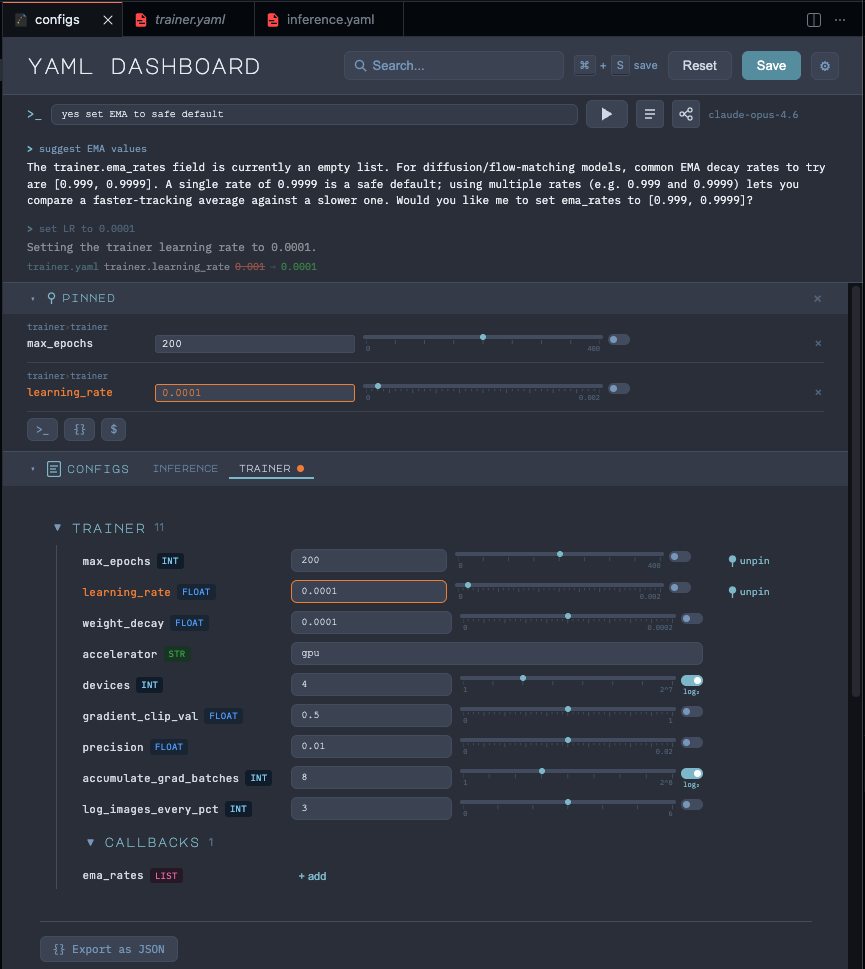
Agentic CLI
- Natural-language editing — type an instruction in the prompt bar (e.g. "reduce learning rate by half", "lock all data fields") and the agent patches, locks, pins, or reclassifies fields across all loaded files.
- Q&A mode — ask questions about your configs and get answers directly in the dashboard.
- Streaming chat log — answers type out with a blinking cursor; up to 5 previous exchanges shown with an opacity gradient.
- Multi-model support — works with any VS Code LM extension (GitHub Copilot, OpenAI Codex, etc.). Pick your model from the dropdown.
- Auto-scaling context — the amount of YAML data sent to the agent scales based on the selected model's context window.
- Customizable system prompt — add extra instructions via the "Additional Instructions" panel; the built-in prompt stays hidden.
Smart File Handling
- Auto-classification — YAML files are automatically classified as config or data using the LM on startup.
- Three-panel layout — separate collapsible panels for Pinned fields, Configs, and Data files.
- Lock/unlock — per-field lock buttons; data files are auto-locked by default. The agent can also lock/unlock via natural language.
Visual Editor
- Multi-file tabs with modification indicators
- Collapsible sections with expansion state preserved across re-renders
- Type-aware controls — text inputs, toggles, null badges, scalar lists, object arrays
- Numeric sliders with linear, log, and log2 scales
- Inline pinning — pin fields to a dedicated bar for quick access
- Search/filter across all keys and values
- Export as CLI args, flat JSON, or env vars — for the full file or just pinned fields
- 7 themes — Midnight, Slate, Nord, Forest, Light, Desert, Sunset
- Customizable fonts, colors, density, and layout options
Usage
| Method |
How |
| Command Palette |
Ctrl+Shift+P → YAML Config Dashboard |
| Keyboard shortcut |
Ctrl+Shift+Y (Cmd+Shift+Y on macOS) |
| Explorer context menu |
Right-click any folder → YAML Config Dashboard |
Requirements
- VS Code 1.85.0+
- YAML files with
.yaml or .yml extension
- Agentic features require a language model extension (e.g. GitHub Copilot)
Release Notes
See CHANGELOG.md.
License
MIT
| |

