HexScope
A VS Code custom editor for Intel HEX (.hex) and Motorola SREC (.srec, .mot, .s19, .s28, .s37) files. Open any embedded firmware image and inspect its memory layout, analyze byte values, search the address space, patch bytes in-place, and annotate address ranges — all without leaving the editor.
Opening a file
Right-click a .hex, .srec, .mot, .s19, .s28, or .s37 file in the Explorer and choose Open with HexScope Viewer, or click the button that appears in the editor title bar when a supported file is open.
Views
Switch views using the toolbar tabs at the top of the editor.
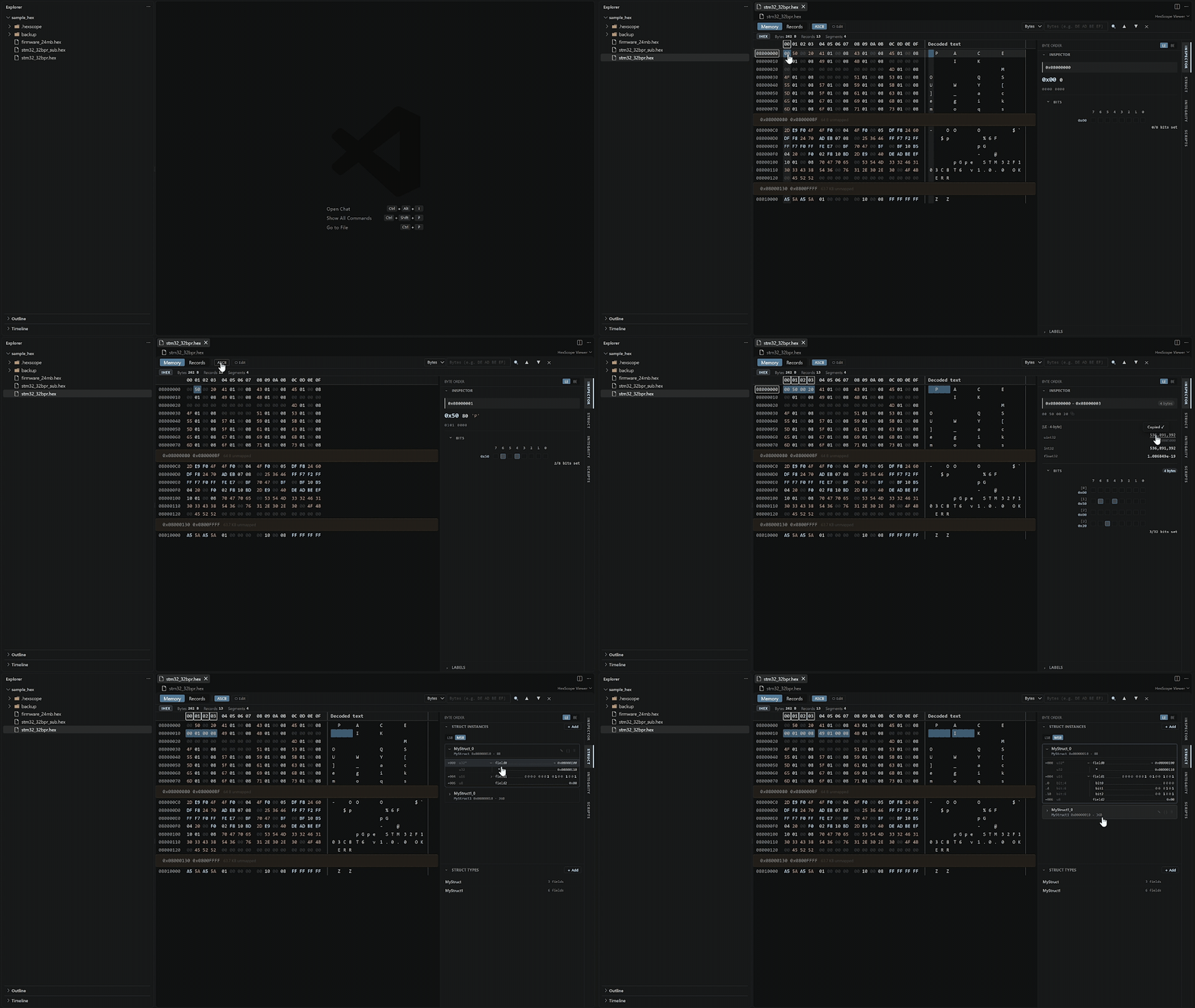
Memory
The default view. Shows firmware data as a 16-byte hex grid with:
- Address column — 32-bit base address for each row
- Hex cells — two-digit uppercase hex; color-coded by byte class (zero, printable ASCII, high byte, control)
- Decoded text column — printable ASCII characters; non-printable bytes shown as
·
- Column hover — hovering any cell highlights the full column and the column header
- Gap rows — non-contiguous address ranges are collapsed into a single separator row showing the skip size
- Segment label banners — named address-range annotations appear inline above the first row of each range
Records
A table of every record parsed from the raw file, showing line number, record type badge, the address field, the resolved 32-bit address, byte count, raw data bytes, checksum byte, and whether the checksum is valid.
For Intel HEX files the badge labels are: Data, EOF, Extended Linear Address, etc. For SREC files: Header (S0), Data S1/S2/S3, Record Count (S5/S6), and End S7/S8/S9. A format badge in the stats bar (IHEX or SREC) identifies which parser was used.
Raw
The original source file with syntax highlighting. Separate TextMate grammars cover Intel HEX and Motorola SREC — both assign distinct colors to the start code, byte count, address field, record type, data bytes, and checksum.
Click any byte in the memory grid to populate the sidebar panels.
Single byte selected
- Large hex chip (
0xHH), decimal value, and ASCII character (if printable) — click any chip to copy it
- Nibble-grouped binary string (e.g.
0100 0001) — click to copy
- Bit view — 8-column grid, lit squares for set bits; bit index header (7→0); column hover
Multiple bytes selected
- Raw hex byte dump (first 8 bytes,
… if longer) — click to copy
- Multi-byte interpreter — reads the selection as the smallest fitting type:
| Selection | Types shown |
|-----------|-------------|
| 2 bytes |
uint16, int16 |
| 4 bytes | uint32, int32, float32 |
| 8 bytes | float64 |
- Little-endian / Big-endian toggle; click any value to copy
- Bit view — one row per byte, up to 8 bytes; total set-bit count shown
Search
Press Ctrl+F (Cmd+F on macOS) to focus the search bar.
| Mode |
Input |
| Hex |
Space-separated hex bytes, e.g. DE AD BE EF |
| ASCII |
Plain text string, e.g. HELLO |
| Addr |
Hex or decimal address, e.g. 0x08001000 |
Navigate matches with the ‹ / › buttons or Enter / Shift+Enter. The active match is scrolled into view automatically.
Edit mode
Click Edit in the toolbar to enter edit mode.
- Right-click → Patch on a single byte to zero it, fill with
0xFF (erased flash), or enter a custom hex value
- Right-click → Fill/Patch on a multi-byte selection applies the same operation to all selected bytes
- Edited bytes are highlighted in amber with an underline in the memory grid
- The toolbar shows the pending change count and a Save button
- Save rebuilds the data records with updated bytes, recomputes per-record checksums, and writes the file to disk. Intel HEX files are serialized as
: records; SREC files are serialized preserving the original record type (S1/S2/S3) and address width
- ✕ Cancel discards all pending edits and restores the original values
- Ctrl+Z undoes the last edit operation
Single byte
| Submenu |
Actions |
| Copy |
Hex, Decimal, Binary, ASCII (if printable) |
| Patch (edit mode only) |
Zero, Erased flash (0xFF), Custom hex value |
Multiple bytes selected
| Submenu |
Actions |
| Copy |
Hex (spaces), Hex (compact), Binary, ASCII, Decimal array, Hex array, C array, Base64 — each with a value preview |
| Analyze |
Sum, XOR, CRC-8 (poly 0x07), CRC-16 (IBM/USB), CRC-32 (zlib/Ethernet) — computed inline, click to copy |
| Fill/Patch (edit mode only) |
Zero, Erased flash (0xFF), Custom hex value |
Segment labels
Label address ranges with a name and color to annotate firmware regions (e.g., interrupt vectors, application code, configuration data).
- Add a label from the sidebar form or via the HexScope: Add Segment Label command
- Labels appear as colored banners in the memory grid at the start of each annotated range
- Labels can be reordered, hidden, edited, or deleted from the sidebar
- Labels are persisted per workspace per file
Commands
| Command |
Description |
Open with HexScope Viewer |
Open the selected or active .hex / .srec / .mot / .s19 file in HexScope |
HexScope: Add Segment Label |
Open the segment label creation form |
HexScope: Copy Selection as Hex String |
Copy selected bytes as a hex string |
HexScope: Copy Selection as C Array |
Copy selected bytes as a C byte array literal |
HexScope: Copy Selection as ASCII |
Copy selected bytes as ASCII text |
HexScope: Copy Raw HEX Record |
Copy the raw Intel HEX record line(s) for the selection |
Supported record types
Intel HEX
| Type |
Name |
00 |
Data |
01 |
End of File |
02 |
Extended Segment Address |
03 |
Start Segment Address |
04 |
Extended Linear Address |
05 |
Start Linear Address |
Both Extended Linear Address (type 04) and Extended Segment Address (type 02) are fully supported for 32-bit address resolution.
Motorola SREC
| Type |
Name |
Address width |
S0 |
Header |
2 bytes |
S1 |
Data |
2 bytes |
S2 |
Data |
3 bytes |
S3 |
Data |
4 bytes |
S5 |
Record Count |
2 bytes |
S6 |
Record Count |
3 bytes |
S7 |
End of File |
4 bytes |
S8 |
End of File |
3 bytes |
S9 |
End of File |
2 bytes |
S1, S2, and S3 records may be mixed within the same file. The execution start address is read from the S7, S8, or S9 end record.
Limitations
- Edit mode modifies data record bytes only; address extension records (IHEX type 02/04) and start-address records (IHEX type 03/05 and SREC S7/S8/S9) are preserved unchanged
- Raw Binary (
.bin) import is not supported