Skip to content
| Marketplace
Sign in
Visual Studio Code>Visualization>DeveloperHub PreviewNew to Visual Studio Code? Get it now.
DeveloperHub Preview

DeveloperHub Preview

DeveloperHub

|
2 installs
| (0) | Free
Live preview of DeveloperHub Markdoc pages in a Git Sync docs repository, rendered the way your docs show them.
Installation
Launch VS Code Quick Open (Ctrl+P), paste the following command, and press enter.
Copied to clipboard
More Info

DeveloperHub Preview

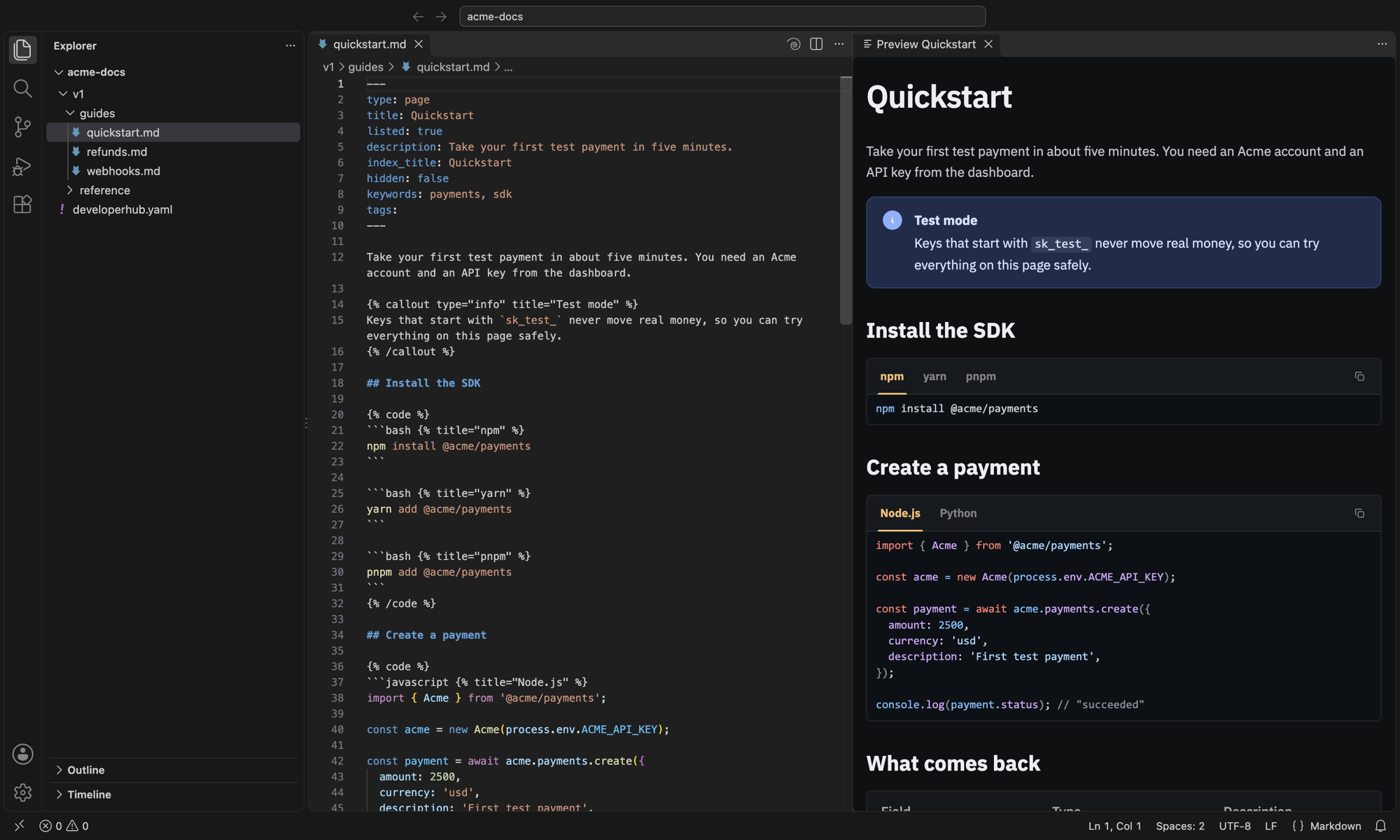
See a DeveloperHub page the way your readers will, right next to the file you are editing.

A DeveloperHub page in VS Code, with the preview beside it

If your documentation is synced to Git with DeveloperHub Git Sync, your pages are Markdoc files in the repository. This extension renders them live as you type, with DeveloperHub's own reader: callouts, code tabs with syntax highlighting, tabs, accordions, cards, tables, code steps and images.

Use it

  1. Open the folder of your docs repository (the one with developerhub.yaml).
  2. Open a page, then click the DeveloperHub spiral (Open DeveloperHub Preview to the Side) in the editor title bar, or run Open DeveloperHub Preview to the Side from the Command Palette.

The preview follows whichever page you open and updates as you type, before you save. Click a link in the preview to open the page it points to.

Problems in your Markdoc

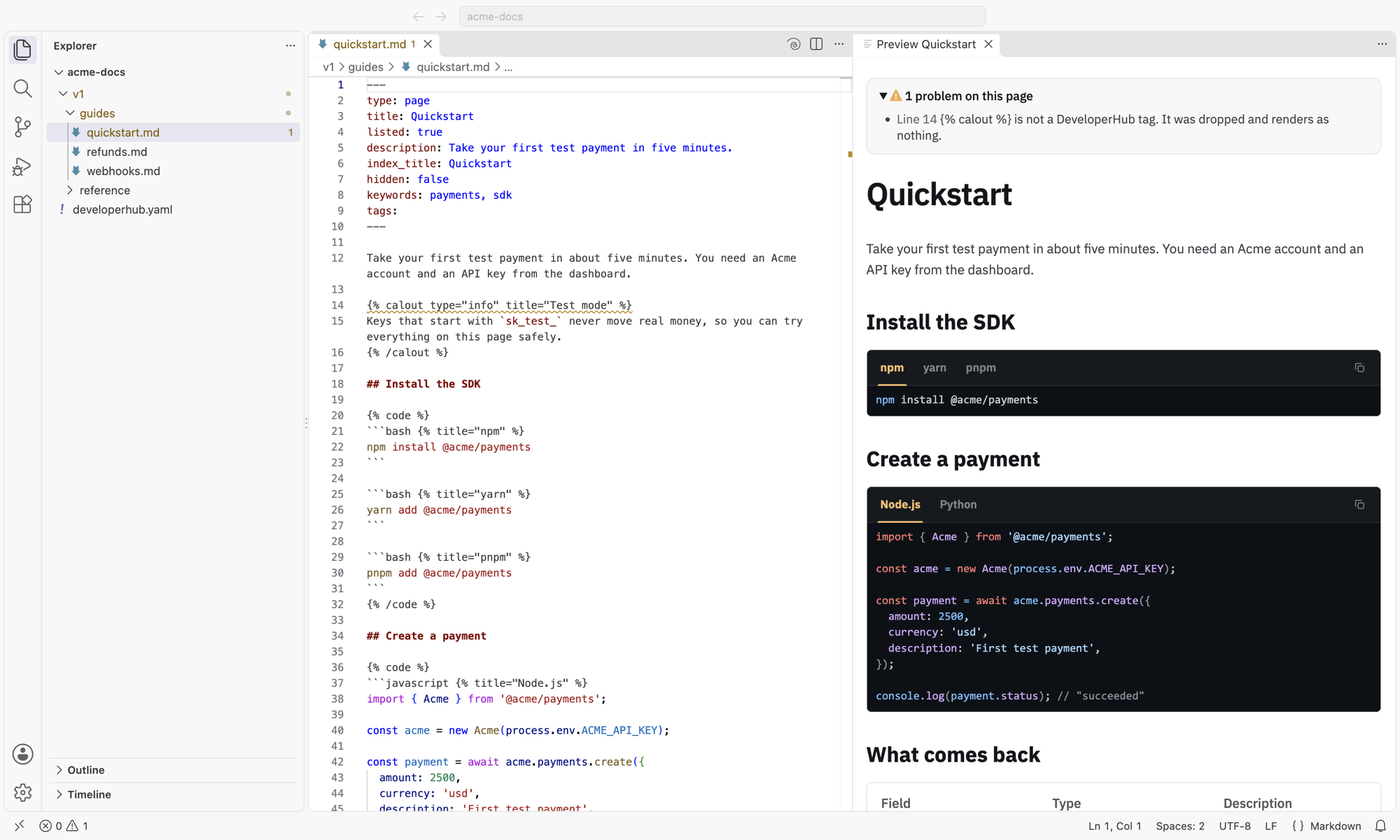
When a tag would not show up the way you meant it, for example an unknown tag, a tag that is never closed, or a boolean written in quotes, the preview lists it above the page, underlines the line, and adds it to the Problems panel.

A misspelled tag, listed above the preview and underlined in the editor

What the preview leaves out

The preview shows your page on its own, without your project's settings:

  • Variables show their name, for example {{PRODUCT}}, instead of their value.
  • Synced blocks show the block's ID instead of its content.
  • Audience-only content shows for everyone, inside a dashed box.
  • GitHub code embeds show a link to the file instead of its code.
  • Scripts in custom HTML blocks don't run, so anything a script would draw is missing. The rest of the block shows.
  • Fonts and colours are those of a new DeveloperHub project, not your project's theme.

Requirements

  • A documentation repository synced with DeveloperHub Git Sync: a folder with developerhub.yaml at its root.
  • A trusted folder: VS Code turns the preview off in Restricted Mode.
  • VS Code 1.90 or later.
  • An internet connection: the preview loads DeveloperHub's reader each time it opens.

Good to know

  • On DeveloperHub pages, VS Code's own Markdown preview button is hidden, because it shows Markdoc tags as plain text. Markdown: Open Preview still works from the Command Palette.
  • Your page is not uploaded or stored anywhere. The extension passes its text, and the images it uses, to DeveloperHub's reader, which runs inside VS Code from preview.developerhub.io. The reader loads its fonts and icons from Google Fonts and cdnjs.

Support

Questions or problems? Email support@developerhub.io.

  • Contact us
  • Jobs
  • Privacy
  • Manage cookies
  • Terms of use
  • Trademarks
  • Your Privacy Choices
  • Consumer Health Privacy
© 2026 Microsoft