FSD Guard for VS Code
Catch Feature-Sliced Design import-rule
violations right in your editor — as you type, before they ever reach a pull request.
FSD Guard checks your imports against the Feature-Sliced Design methodology and
surfaces problems inline: a squiggle on the offending import, a hover that
explains why it's a problem and how to fix it, and quick fixes where a
safe correction exists. No ESLint config, no CI setup — install and go.
This is the editor companion to the FSD Guard browser extension,
which checks the same rules inside GitHub & GitLab Pull/Merge Requests. Both
share the same analysis engine, so results are consistent everywhere.
Using Cursor, Windsurf, Antigravity or VSCodium? Get it from
Open VSX.
Features
- Inline diagnostics — violating imports are underlined in
.ts, .tsx,
.js, .jsx files, live as you edit.
- Dedicated sidebar panel — an FSD Guard icon in the Activity Bar opens a
Violations view grouped by file. Expand a finding to read why it's a
problem, how to fix it, open the FSD docs, or jump to the line; filter by
rule, and a badge on the icon shows the total count.
- Explain, don't just flag — hover any finding for why it's a problem,
how to fix it, and a link to the exact FSD docs section.
- Quick fixes — trim a public-API-bypassing deep import down to its index
(
⌘. / Ctrl+.), or jump straight to the docs.
- Scan the whole workspace — one command audits every source file into the
Problems panel.
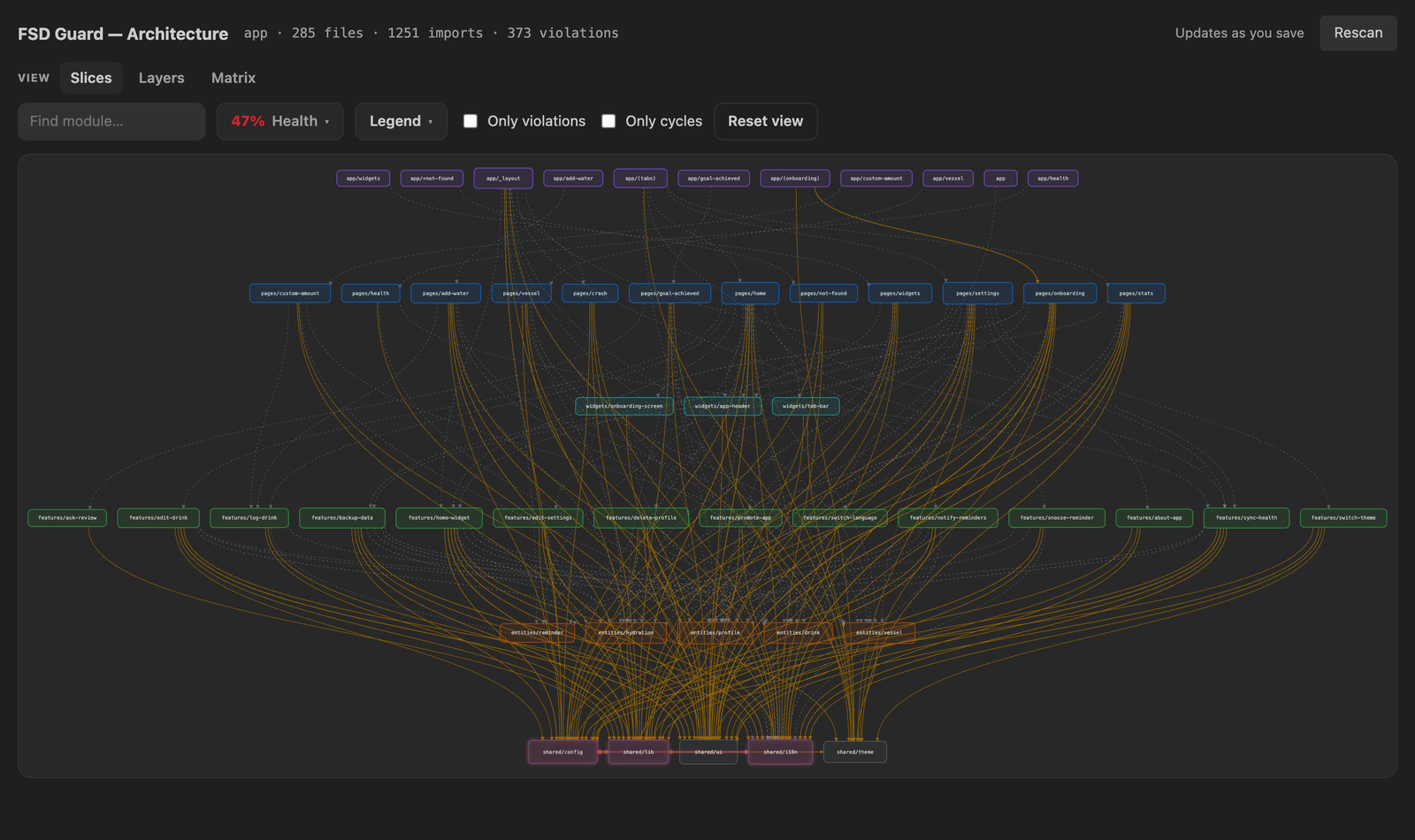
- Architecture graph — see the whole workspace as a dependency graph of FSD
slices, laid out by layer from
app down to shared. Violating imports light
up, circular dependencies are highlighted, and a Health popover shows the
share of clean edges, violations by type and layer, hubs and orphans. Switch to
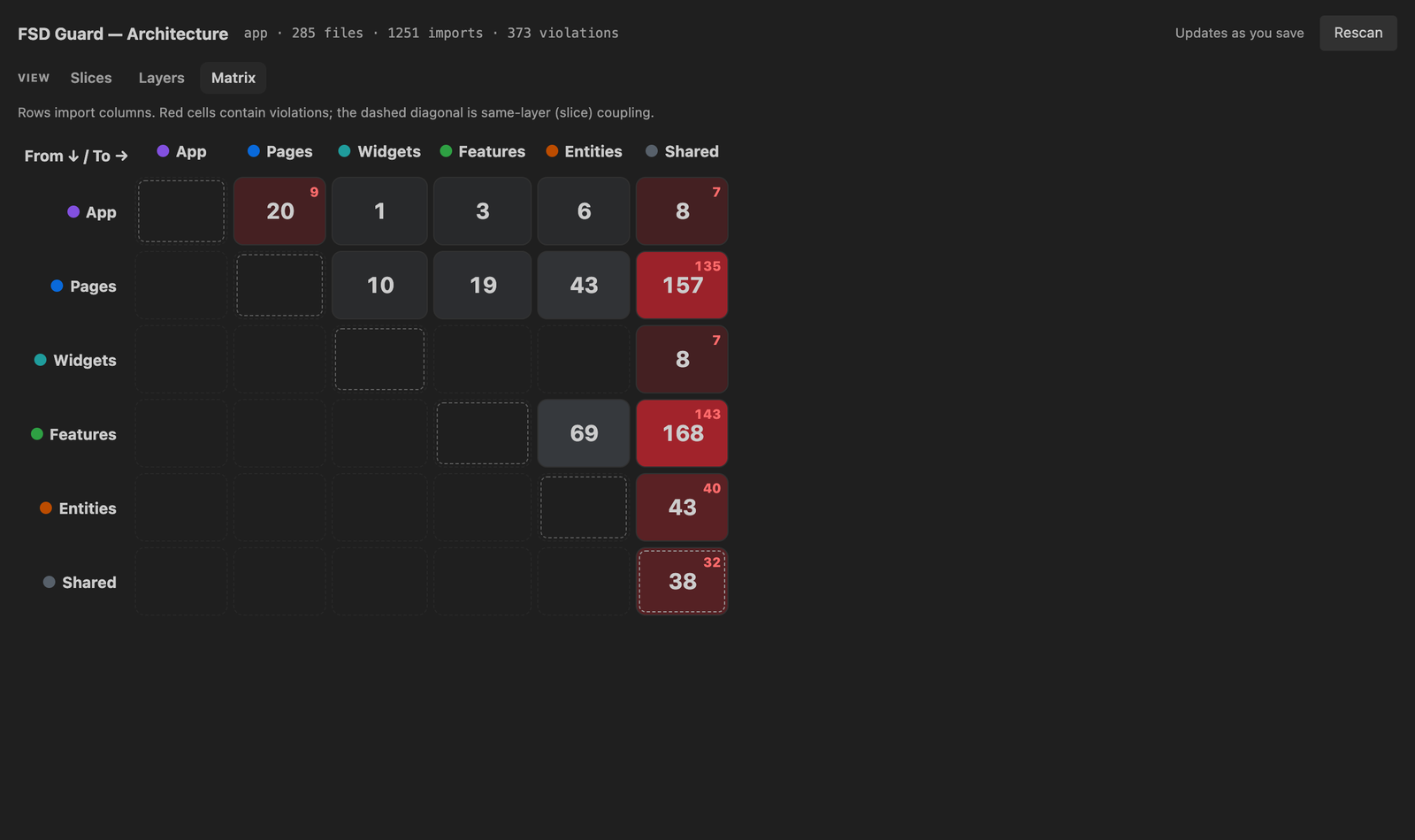
a Layers graph or a layer-to-layer Matrix; click any edge or module to
list the imports behind it and jump straight to the line. The graph updates as
you save.
- Zero-config — import aliases are auto-detected from
tsconfig.json /
jsconfig.json; sensible FSD defaults out of the box.
- Six languages — messages in English, Russian, Ukrainian, German, French
and Italian (follows your VS Code display language).
Architecture graph
FSD Guard: Show architecture graph (or the graph icon in the FSD Guard
panel) maps the whole workspace: every slice laid out by layer from app down
to shared. Violating imports are coloured by rule and clean ones dashed; edge
thickness is the number of imports, node size how much a module is depended on.
It follows your VS Code theme and updates as you save.
 |
 |
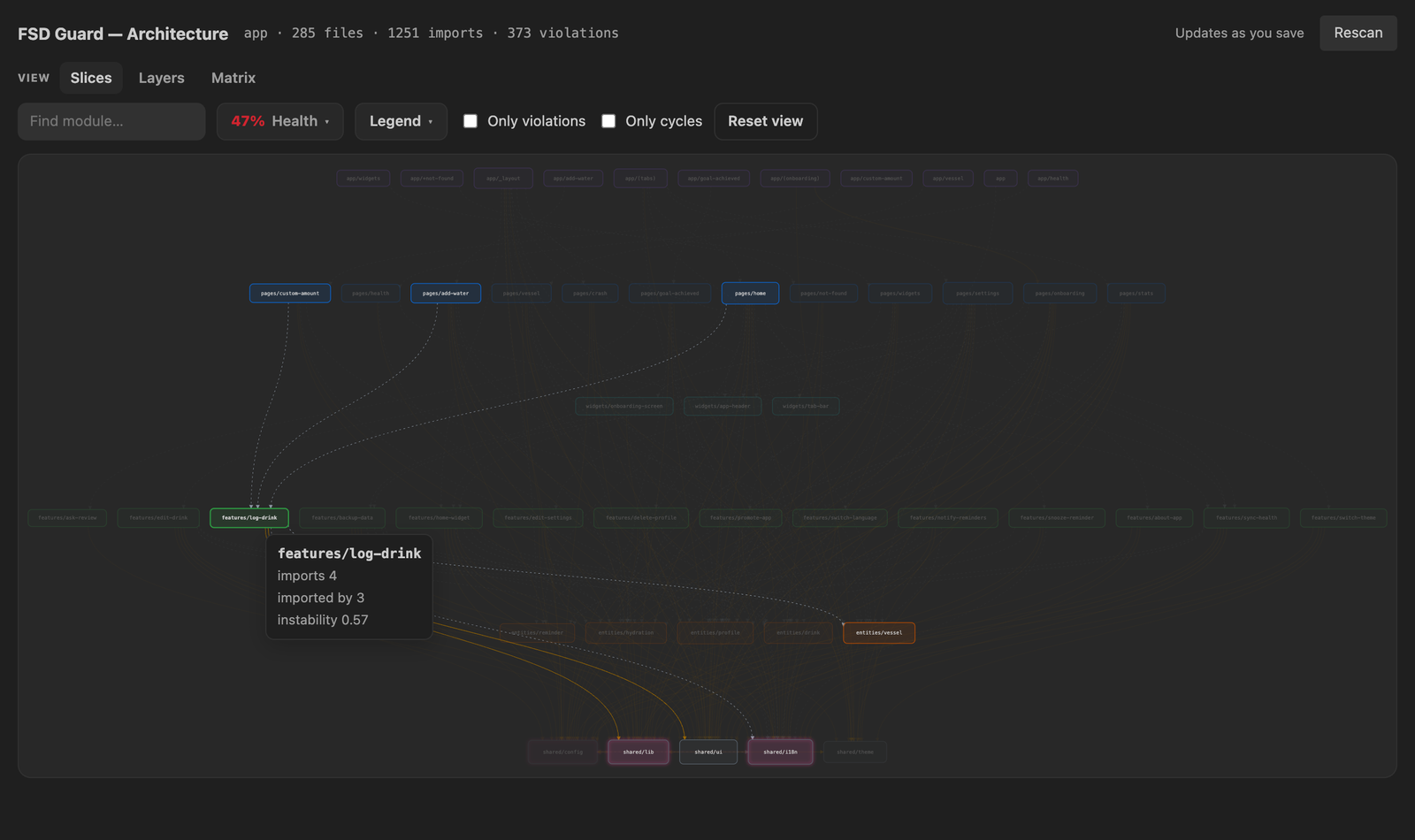
Trace a module
imports, importers and instability on hover |
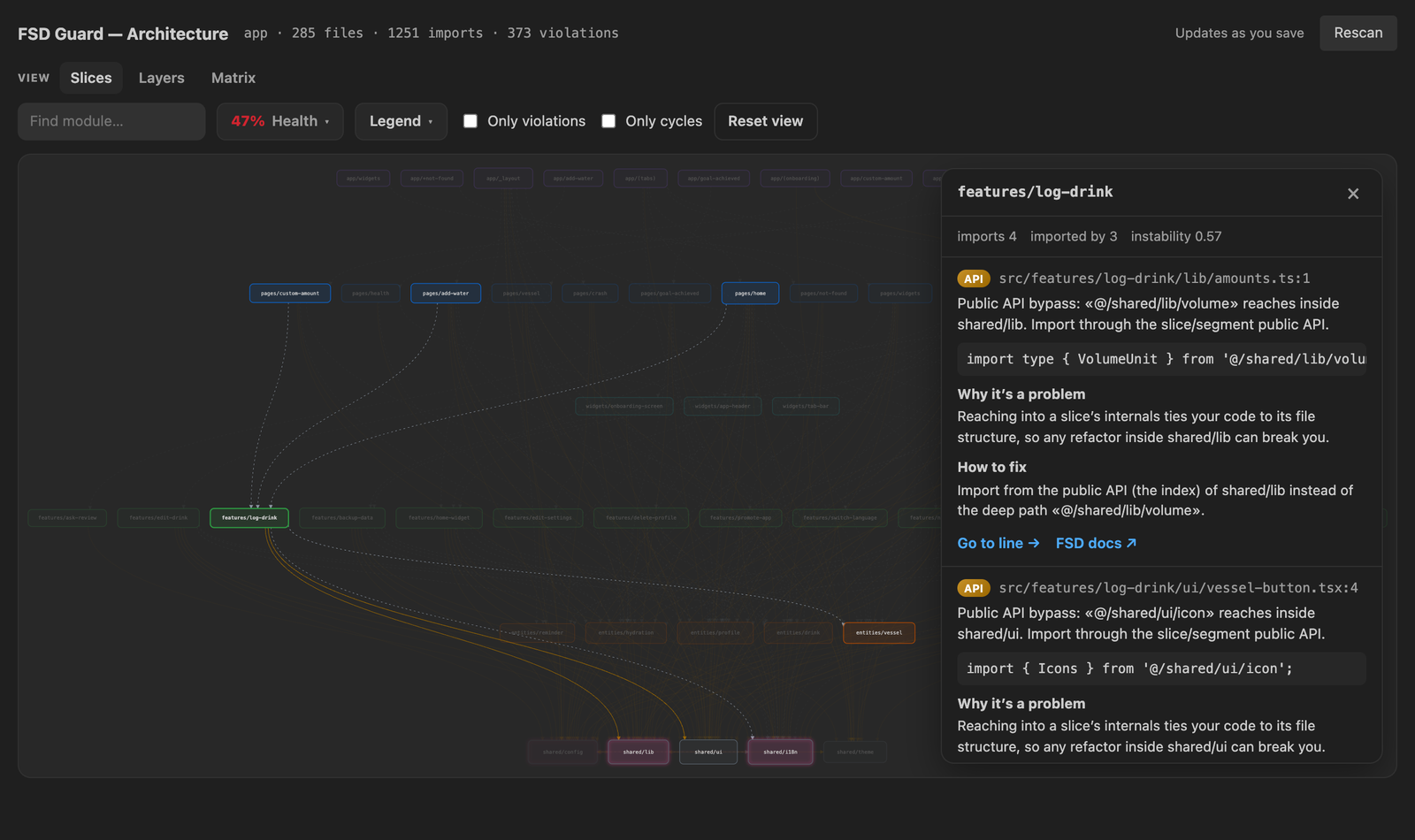
Drill down
click an edge or module, then Go to line |
 |
 |
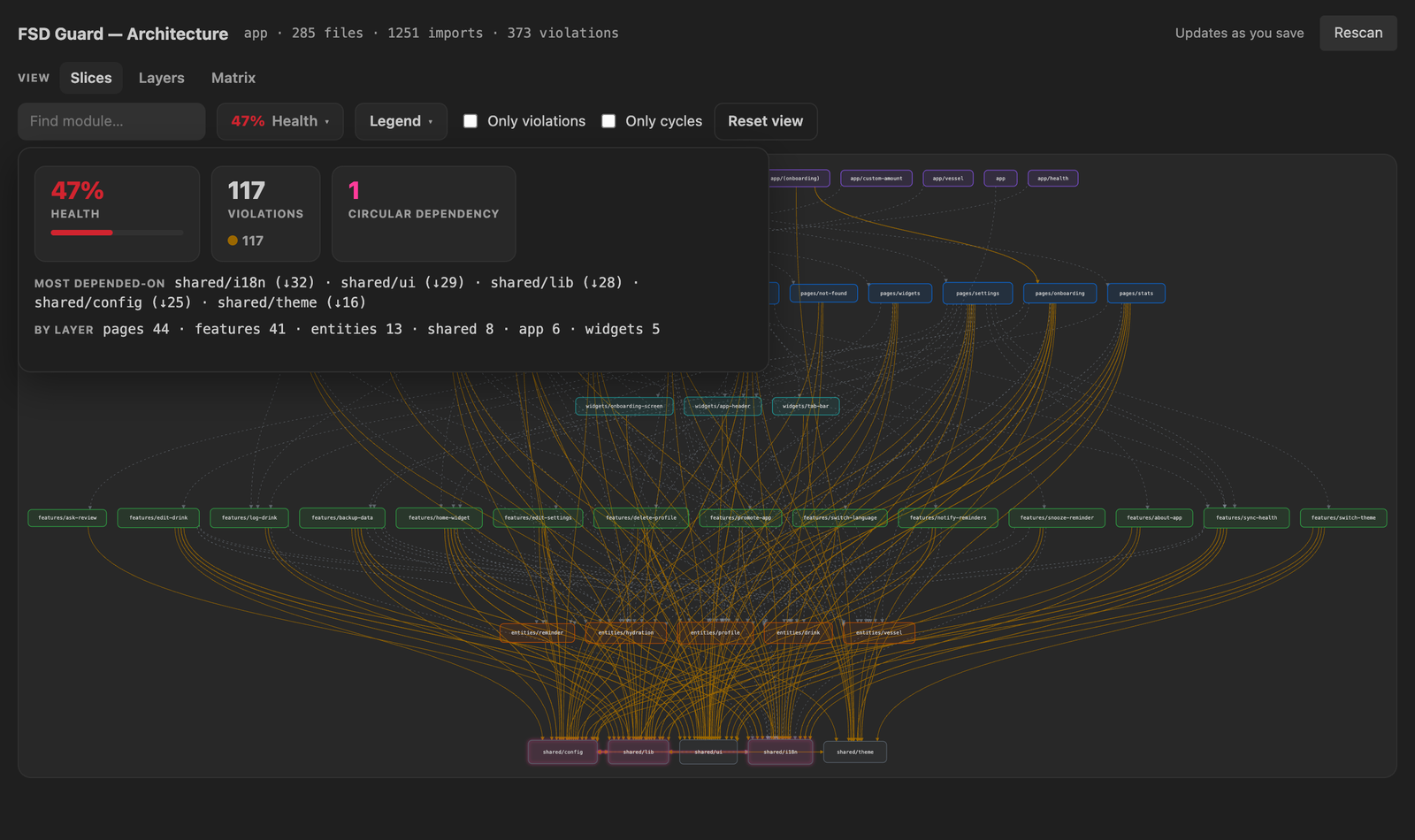
Health, cycles & hotspots
clean-edge score, violations by type and layer |
Layers & Matrix
the big picture: six layers, or a heatmap |
Rules
| Rule |
What it catches |
| Layer hierarchy |
Importing from a higher layer (entities → features). |
| Slice isolation |
Cross-slice imports within the same layer (auth → cart). |
| Public API |
Deep imports that bypass a slice/segment index. |
@x cross-import |
Misuse of the @x cross-import notation. |
| Import locality (opt-in) |
Absolute aliases used inside your own slice instead of relative paths. |
| Deprecated layers |
Use of the deprecated processes layer. |
Usage
- Open a project that follows Feature-Sliced Design.
- Violations appear automatically in open files and in the Problems panel.
- Hover a squiggle to understand it; press
⌘. / Ctrl+. for quick fixes.
- Run “FSD Guard: Scan whole workspace” from the Command Palette
(
⌘⇧P) to audit the entire project at once.
- Click the graph icon in the FSD Guard panel (or run “FSD Guard: Show
architecture graph”) to map the project's architecture.
Commands
| Command |
Description |
FSD Guard: Scan whole workspace |
Audit every source file into the panel. |
FSD Guard: Show architecture graph |
Open the dependency graph (Slices / Layers / Matrix, health, cycles). |
FSD Guard: Filter by rule |
Show only selected rule types in the panel. |
FSD Guard: Refresh |
Re-lint all open files. |
FSD Guard: Clear all diagnostics |
Remove all reported violations. |
FSD Guard: Enable / disable |
Toggle the extension for the workspace. |
Settings
All settings live under fsdGuard.* (Settings → Extensions → FSD Guard):
| Setting |
Default |
Description |
fsdGuard.enable |
true |
Turn checking on/off. |
fsdGuard.root |
"src" |
Folder that holds the layers (empty = repo root). |
fsdGuard.aliases |
{ "@": "src", "~": "src" } |
Import aliases → path (merged over tsconfig). |
fsdGuard.useTsconfigPaths |
true |
Auto-detect aliases from tsconfig/jsconfig. |
fsdGuard.layers |
(7 FSD layers) |
Layer definitions { name, rank, sliced }. |
fsdGuard.severity |
"warning" |
error | warning | information | hint. |
fsdGuard.language |
"auto" |
Message language. |
fsdGuard.rules.layerImports |
true |
Layer hierarchy rule. |
fsdGuard.rules.sliceIsolation |
true |
Slice isolation rule (understands @x). |
fsdGuard.rules.publicApi |
true |
Public-API rule. |
fsdGuard.rules.importLocality |
false |
Import-locality rule (opt-in). |
fsdGuard.rules.noDeprecatedLayers |
true |
Warn about processes. |
Example (.vscode/settings.json)
{
  "fsdGuard.root": "src",
  "fsdGuard.aliases": { "@": "src" },
  "fsdGuard.rules.importLocality": true,
  "fsdGuard.severity": "warning"
}
How it works
FSD Guard performs fast, static, per-line analysis of import statements — it
never executes your code and sends nothing anywhere. Everything runs locally in
the extension host. It is a heuristic aid, not a substitute for code review.
Support
FSD Guard is free and open-source. If it saves you time, you can support its
development: ☕ Support me.
License
MIT © developer.living
| |

