Type Decorations
Show the top-level type of a source file as a badge in the VS Code Explorer.
Supports Java, C#, PHP and Swift.
한국어 문서는 README.ko.md를 참고하세요.
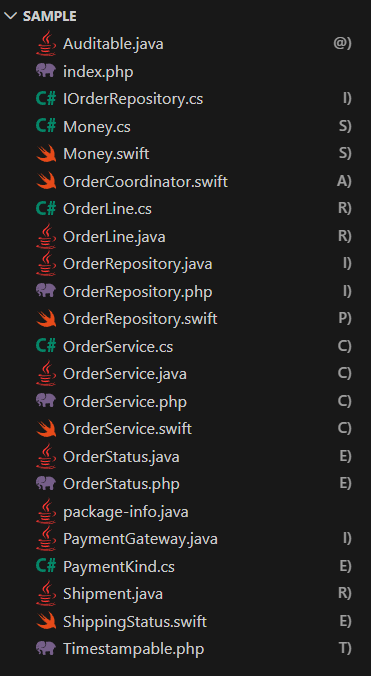
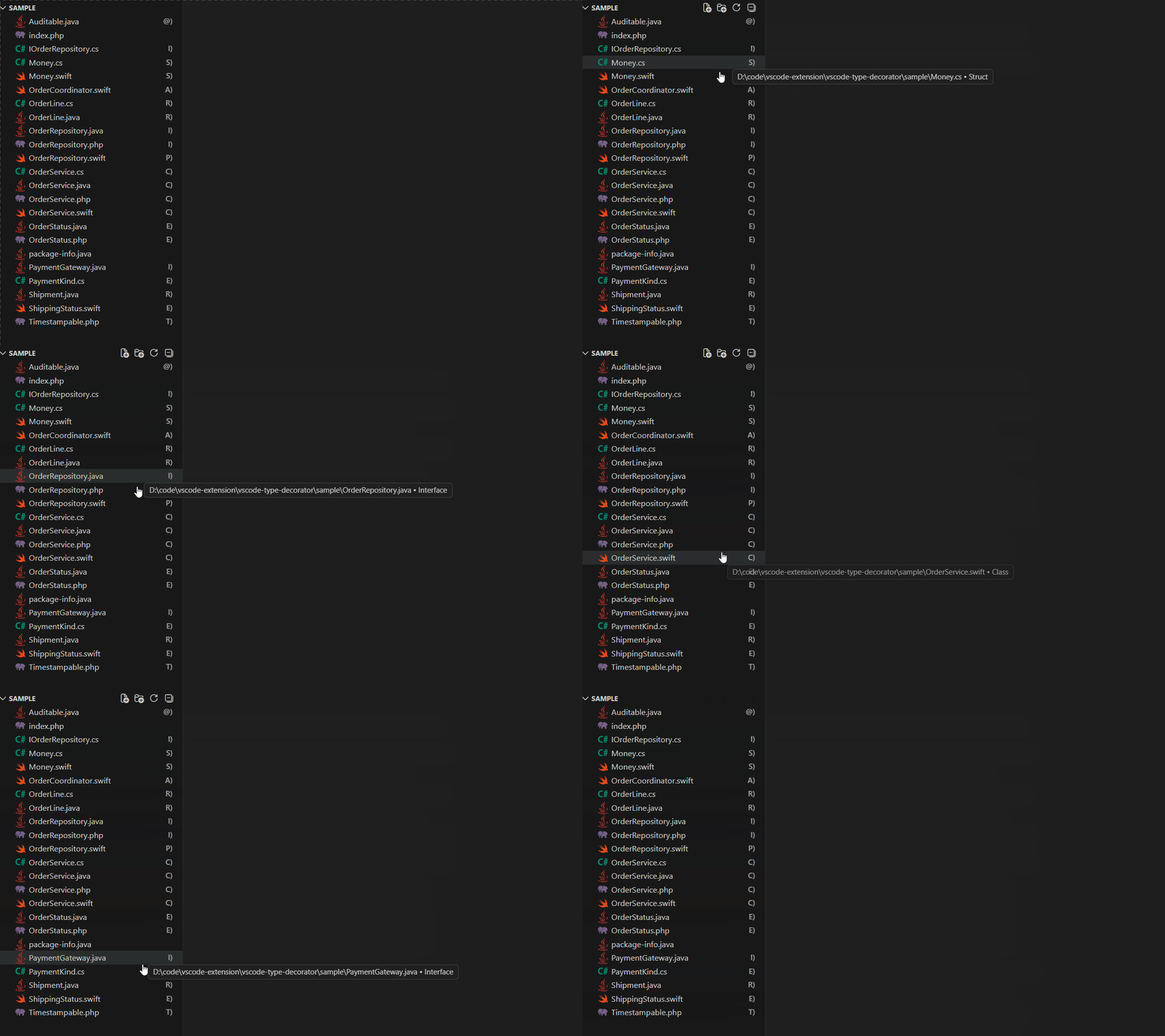
Hovering a badge shows what the type is — Class, Interface, Enum, …
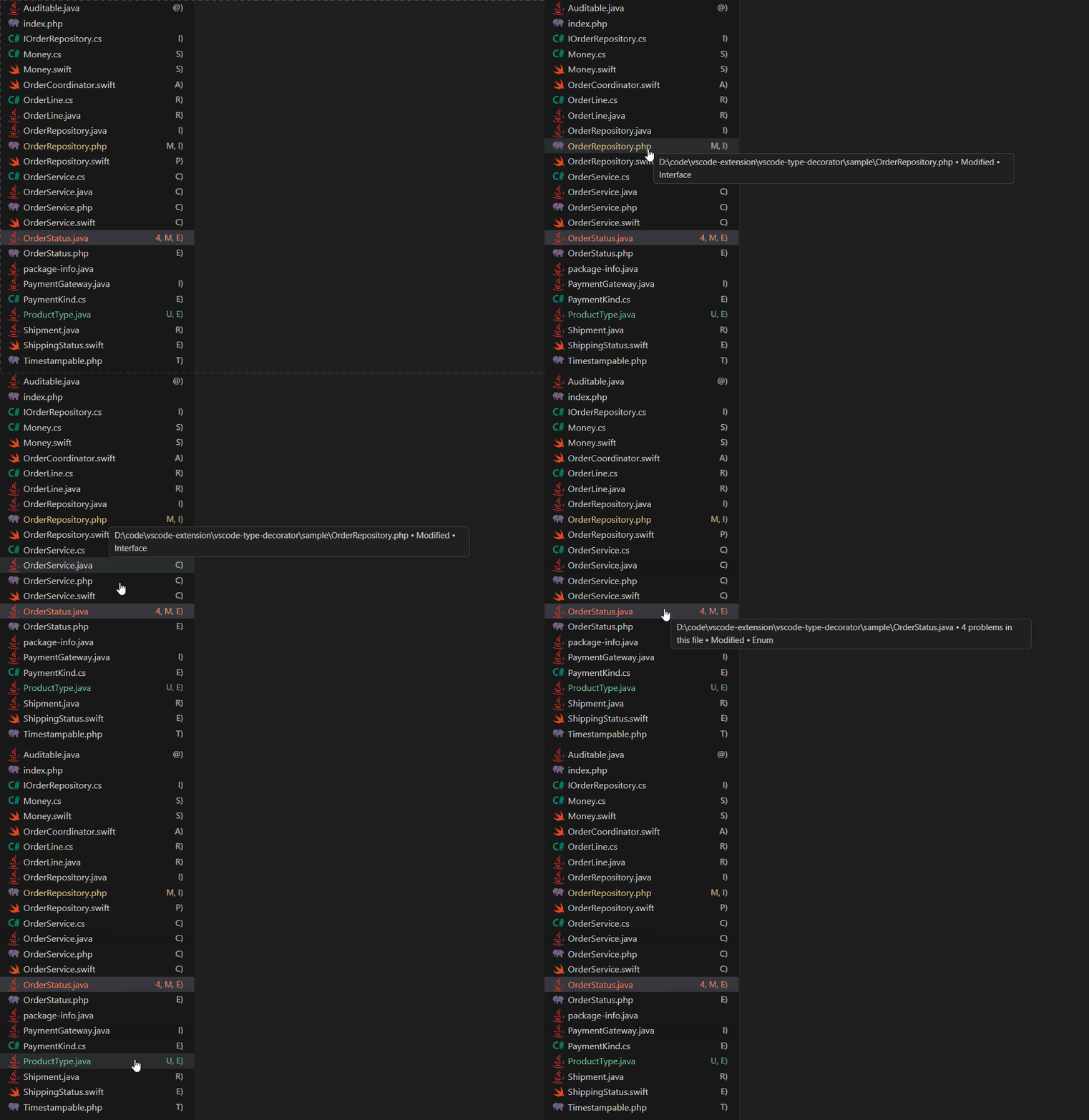
Badges from other providers are not replaced. Git status and problem markers keep
showing, joined with , — a modified class file with an error reads M, C).
See Coexisting with git decorations.
| Type |
Badge |
Java |
C# |
PHP |
Swift |
class |
C) |
✓ |
✓ |
✓ |
✓ |
interface |
I) |
✓ |
✓ |
✓ |
|
enum |
E) |
✓ |
✓ |
✓ |
✓ |
struct |
S) |
|
✓ |
|
✓ |
record |
R) |
✓ |
✓ |
|
|
protocol |
P) |
|
|
|
✓ |
actor |
A) |
|
|
|
✓ |
trait |
T) |
|
|
✓ |
|
@interface (annotation) |
@) |
✓ |
|
|
|
Files without a type declaration — package-info.java, PHP templates, .cs files
containing only using directives — get no badge.
Customizing badges
Set a badge per language and per type, from the Settings UI or settings.json:
"typeDeco.java.class": "C",
"typeDeco.csharp.struct": "St",
"typeDeco.swift.actor": "A",
"typeDeco.php.enum": ""
- At most 2 characters are rendered. VS Code throws when building a decoration
with a longer badge, so anything longer in your settings is truncated to 2.
- An empty value hides the badge for that type, as with PHP
enum above.
- Changes apply immediately. Detection results do not depend on settings, so files
are not re-read.
The language segment of a setting key is the language name, not the file extension —
.cs files use typeDeco.csharp.*.
Coexisting with git decorations
A file's final color is decided once across every decoration provider. If this
extension set a color, it would compete with git decorations for that single slot and
you would lose the ability to read a file's change state by color. So this extension
contributes badges only, never colors.
Badge letters, unlike colors, do not compete — they are joined with , . A modified
class file shows git's M and this extension's C) together as M, C).
How it works
Detection is regex-based. It does not depend on a language server (Extension Pack for
Java, C# Dev Kit, Intelephense, …), so badges appear regardless of whether a language
extension is installed or the project has finished indexing.
Every language goes through the same three steps:
- Blank out everything that is not code, preserving length so later index arithmetic
still lines up with the original.
- Collect only type declarations at brace depth 0. Nested types are excluded.
- Prefer the declaration whose name matches the file name; otherwise take the first
top-level declaration.
What differs per language is what step 1 removes, and which keywords are contextual.
Java (src/parsers/java.ts)
Removes comments, string and character literals, and text blocks (""").
record is a contextual keyword, so it counts as a declaration only when the name is
followed by a component list ( or a generic argument <.
C# (src/parsers/csharp.ts)
C# has several string forms with different escaping rules, so the prefix is read first
and handled accordingly:
@"…" verbatim — backslash is not an escape, "" is a quote, newlines allowed$"…" interpolated, and the combinations $@"…" / @$"…""""…""" raw strings — closed by the same number of quotes that opened them
Also handled:
record class / record struct (C# 10) are captured as one unit and classified as
record.- In generic constraints such as
where T : class where U : IFoo, the trailing
where is not mistaken for a type name.
- Escaped identifiers like
@class are not treated as declarations.
- Block-form
namespace Foo { … } has its braces neutralized so the types inside still
count as top level. File-scoped namespaces (namespace Foo;) work as-is.
PHP (src/parsers/php.ts)
PHP has the widest non-code surface:
- Template text outside
<?php / <?= tags
//, /* */, and # comments — but #[ is a PHP 8 attribute and stays as code- Single- and double-quoted strings (PHP strings may span newlines, so they are not
terminated at end of line)
- heredoc / nowdoc — the terminating identifier chosen at the opening is tracked
Also handled:
- Keywords are case-insensitive (
Class Foo is recognized).
enum is a PHP 8.1 contextual keyword, so it counts only when followed by a body
{, a backing type :, or implements.- In anonymous classes such as
new class extends Base {}, extends / implements
are not mistaken for names.
namespace Foo { … } is handled the same way as in C#.
Two Swift-specific things drive the implementation:
- Block comments nest. Stopping at the first terminator leaves the rest as code and
produces false positives, so the pairs are counted.
- Raw strings have a variable hash count —
#"…"#, ##"…"## must be closed with
as many # as opened them, and this combines with multiline (""").
Also handled:
- Compiler directives such as
#if and #selector are not mistaken for string starts.
- When
class is a member modifier (class func, class var), the following keyword
is not read as a name.
actor is a contextual keyword.- Nested types are common in Swift; the depth-0 rule excludes them naturally, as it does
types inside an
extension.
The Explorer calls provideFileDecoration every time a file is rendered, so results are
cached per URI. The cache is invalidated per file by a FileSystemWatcher on create,
change and delete. Files currently open are read from the text buffer, so unsaved edits
are reflected.
Cache bound — at most 2000 files are retained; beyond that the least recently used
entries are dropped (src/lruCache.ts), so the cache cannot grow without limit in a
repository with tens of thousands of files.
Partial reads — type declarations are almost always near the top of a file, so only
the first 64KB is read for detection. The whole file is re-read only when nothing was
found there and more remains. workspace.fs has no partial read, so this uses Node fs
directly and only for local files (file scheme); remote and virtual file systems fall
back to reading the whole file.
If the cut lands in the middle of a comment or string, the parser simply treats it as
unterminated and blanks the rest — declarations already found before that point are
unaffected. The same holds when a UTF-8 multi-byte character is split at the boundary.
These properties are pinned down in src/parsers/truncated.test.ts.
Known limitations
- Detection is regex-based, so in syntactically broken files (unbalanced braces, for
example) depth tracking drifts and a badge may be wrong or missing. Saving the file
triggers re-detection.
- One file, one type is assumed. Only Java enforces this; elsewhere it is convention.
When a file has several top-level types, the one matching the file name is used — or
the first one if none matches.
- C#
delegate is not supported. Its name follows a return type, which makes it a
separate parsing case, and a file consisting of a single delegate is rare.
- Swift
extension is not supported. Extension-only files such as Foo+Bar.swift
are common, but an extension is not a type declaration, so no badge is shown.
- Conditional declarations (PHP's
if (!class_exists('X')) { class X {} }) are not at
depth 0 and are not picked up.
Development
npm install
npm test        # compile + parser unit tests
Press F5 (Run Extension) to launch an Extension Development Host with the sample/
folder opened. It contains one file per supported type, including files that deliberately
embed tricky constructs — verbatim strings, heredocs, nested comments, anonymous classes.
To see how the badges sit alongside git decorations, run git init inside sample/ and
give a few files different states (modified, untracked, staged).
src/
├─ extension.ts        # FileDecorationProvider, cache, watcher — language agnostic
├─ badges.ts           # default badge table, settings normalization (2-char limit)
├─ lruCache.ts         # detection result cache (bound 2000)
└─ parsers/
   ├─ types.ts         # TypeKind shared across languages
   ├─ index.ts         # extension → parser mapping, watch glob
   ├─ braces.ts        # namespace block brace neutralization (C# and PHP)
   ├─ java.ts
   ├─ csharp.ts
   ├─ php.ts
   └─ swift.ts
To add a language, write a parser under parsers/, register it in BY_EXTENSION in
index.ts, then mirror it in DEFAULT_BADGES (badges.ts), the settings in
package.json, and both package.nls*.json files. The watch glob is derived from the
mapping, so extension.ts needs no changes. badges.test.ts fails if the settings
defaults or the nls keys drift out of sync.
For a new kind of type, add it to TypeKind (types.ts) and TOOLTIPS (badges.ts).
Publishing
package.json ships with placeholders that must be replaced before publishing:
publisher — your Marketplace publisher IDrepository, bugs, homepage — your repository URLs- the copyright holder in
LICENSE
npx @vscode/vsce package     # build a .vsix locally
npx @vscode/vsce publish     # publish to the Marketplace

License
MIT

