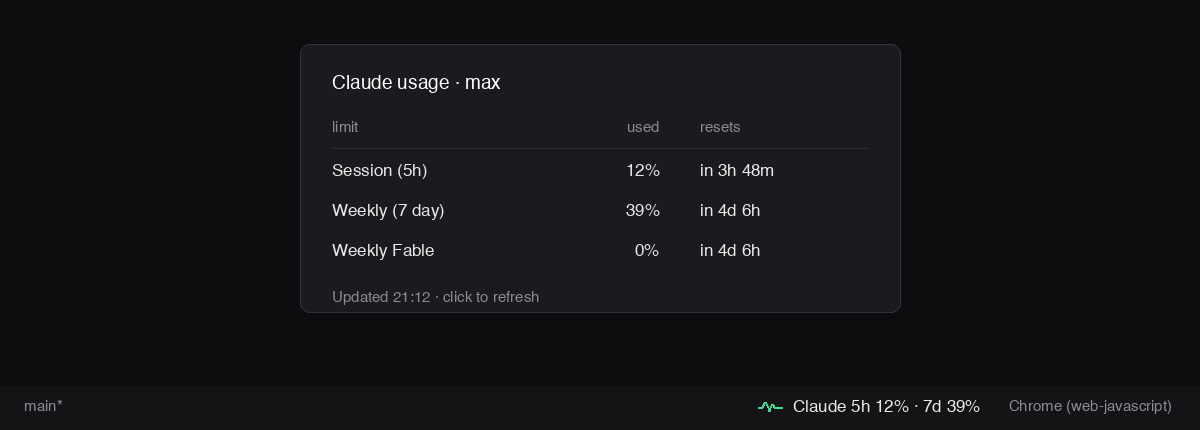
Claude Usage Limits — Status BarYour Claude Code session and weekly limits in the status bar, with every reset time on hover. One request shared by every window, and it backs off the moment the server says wait. Installation Launch VS Code Quick Open ( Ctrl+P), paste the following command, and press enter.Copied to clipboard |

Claude Usage Limits — Status Bards_usage puts your Claude usage limits in the VS Code status bar, so you can see how close you are without opening the usage panel. devshakib.jumyn.com · github.com/devShakib015
What it touchesWorth reading before you install it, because it uses your Claude Code login.
It needs Claude Code installed and signed in. Without that, the item says so and does nothing else. Where the numbers come fromThe same endpoint Claude Code's own usage panel reads, authorised with the
login Claude Code already keeps — the macOS Keychain entry
The extension only reads that login. It never refreshes the token or writes anything back, so it cannot sign Claude Code out. If the stored token has expired, the item says so; use Claude Code once and it renews itself. The first time, macOS may ask whether to allow access to that Keychain entry. A failed check is normal — Claude Code rewrites that entry when it renews its login. The extension keeps the last numbers on screen, retries after 20, 60 and 120 seconds, and only shows a warning after three failures in a row. The tooltip always names the last failure. It asks rarely on purpose. The endpoint answers 429 if asked too often, so
every VS Code window shares one result through a file in global storage — only
the window that finds it stale fetches — and a 429 sets a wait (the server's
own This is not a published API. It is what Claude Code uses internally, so a Claude Code update could change or remove it, and this extension would then show a warning instead of numbers. Settings
BydevShakib — devshakib.jumyn.com · github.com/devShakib015 LicenceMIT. |