Skip to content
| Marketplace
Sign in
Visual Studio Code>Programming Languages>Firestore Rules Linter — Security ChecksNew to Visual Studio Code? Get it now.
Firestore Rules Linter — Security Checks

Firestore Rules Linter — Security Checks

devShakib

|
1 install
| (0) | Free
Catches the Firestore and Storage rules mistakes that leak data — open writes, test mode left on, anyone-can-edit, unchecked uploads — as you type. Plus highlighting and snippets.
Installation
Launch VS Code Quick Open (Ctrl+P), paste the following command, and press enter.
Copied to clipboard
More Info

Firestore Rules Linter

ds_rules — the Firestore and Storage rules mistakes that leak data, flagged while you type them rather than after someone finds them.

devshakib.jumyn.com · github.com/devShakib015

Firestore Rules Linter

Security rules fail quietly. A rule that lets anyone write looks exactly like one that doesn't, the deploy succeeds, and the app works — better than before, in fact, because nothing is refused. The emulator and unit tests only catch what you thought to test. This reads the rules themselves and says, in plain words, who can do what.

It also stays quiet when it should. A public read of your published posts is not a mistake, and neither is an admin writing without field checks; those get a faint hint in the editor, not a line in the Problems panel. Every check is tested against Google's own documented examples, which must produce nothing louder than a hint.

What it catches

open-write

Error. A write with no condition, if true, or || true anywhere in it.

allow write: if true;                       // anyone, signed in or not
allow create;                               // no condition means yes
allow update: if isOwner(id) || true;       // the || true wins

open-read-recursive

Error. Anyone can read every document in the database, or every file in the bucket — including collections nobody has created yet.

match /{document=**} { allow read: if true; }

A recursive public read inside a folder, such as Storage's /public/{allPaths=**}, is how public files are served, and gets a hint instead.

public-read

Hint. A public read of one path. Usually published content and entirely intended — the hint is there so it is a decision, not an accident.

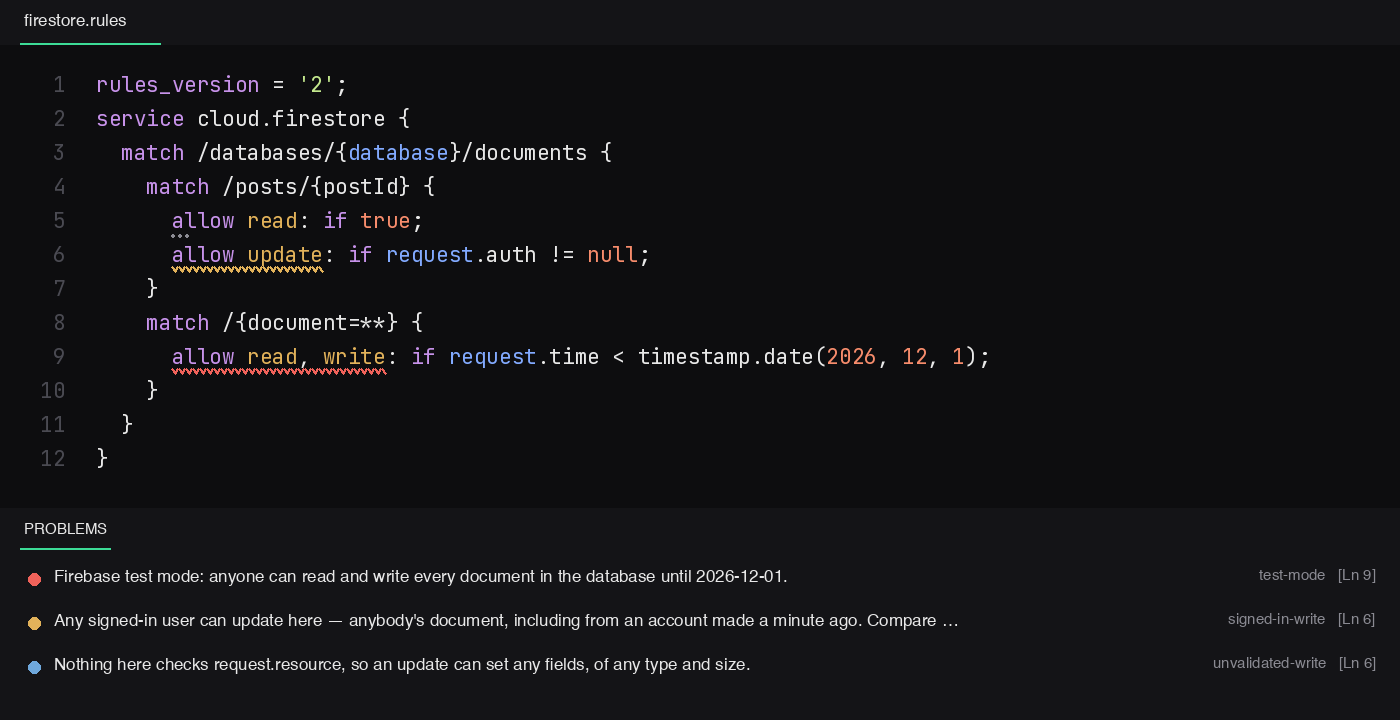
test-mode

Error. The rule Firebase generates for "Start in test mode" is still there:

allow read, write: if request.time < timestamp.date(2026, 10, 24);

Until that date, anyone can read and write everything.

test-mode-expired

Warning. The same rule after its date. Nothing leaks, but every request is now refused, which is usually the moment an app "suddenly" stops working.

root-recursive-grant

Warning. Any grant on match /{document=**} at the root. Rules are OR'ed: if one match allows a request, no other rule can refuse it. A grant here overrides every narrower rule in the file, however carefully those were written.

signed-in-write

Warning. update, delete or write for anyone who is signed in:

allow update: if request.auth != null;

That is anybody's document, from any account — including one made a minute ago. Compare request.auth.uid with the document's owner instead. A create alone is not flagged here; creating is often the point (a comment, a post), so a create is judged by what it lets you store.

unvalidated-write

Information, or a hint when only an owner or admin can write. Nothing in the condition looks at request.resource, so the write can set any field, of any type and size:

allow create: if request.auth != null;      // any field, including user_id = someone else's

From a stranger that is a real problem — they can post as someone else. From the owner it is usually trust, but an owner who can write any field can also write role: 'admin', so it is still said, quietly.

storage-unchecked-upload

Warning. A Storage write that doesn't limit both request.resource.size and request.resource.contentType:

allow write: if request.auth.uid == userId
  && request.resource.size < 5 * 1024 * 1024
  && request.resource.contentType.matches('image/.*');

Without them, anyone allowed to write can store any file, as large as Storage lets them — and you pay for it.

email-unverified

Information. A rule trusts request.auth.token.email without request.auth.token.email_verified == true. Harmless while email and password is your only sign-in method; some identity providers hand over an email the user never proved they own, so add the check before enabling another. Reported once, on the function that does the check, not on every rule that calls it.

too-many-lookups

Warning. More than ten get(), exists(), getAfter() or existsAfter() calls in one condition, counting the functions it calls. A single-document request allows ten; past that it is denied.

rules-version

Warning. No rules_version = '2';. Version 1 matches recursive wildcards differently and cannot allow collection-group queries at all.

syntax

Error. An unclosed {, ( or [, a stray closing one, or an unterminated string or comment. Full syntax checking is Firebase's job when you deploy; these are the ones that make everything after them mean something else.

How it reads your rules

Conditions are read through the functions they call, so if isSignedIn() is judged by what isSignedIn() returns. A role looked up on the caller's own document — get(/databases/$(database)/documents/users/$(request.auth.uid)) — is recognised as tied to that caller, however many helper functions the path went through.

Turning a check off

For one line, put a comment on the line above:

// rules-lint-ignore: public-read
allow read: if true;

// rules-lint-ignore with no ids silences everything on that line. To turn a check off everywhere:

"firestoreRulesLinter.disabledChecks": ["unvalidated-write"]

firestoreRulesLinter.enable turns the whole thing off.

Also

Highlighting for .rules files, firestore.rules and storage.rules — wildcards, recursive =**, $( ) paths, and a misspelled method like allow lsit shown as invalid. If another rules extension owns the file's language, the checks still run.

Snippets: firestore (a file that starts closed), owner, public, isadmin (with email_verified) and upload (owner only, size cap, content type).

What it doesn't do

  • It doesn't run your rules. It reads their shape. Use the emulator and unit tests for what a rule actually does with real data.
  • It doesn't know your intent. A public collection you meant to make public gets a hint, not silence — decide, then ignore it.
  • Function parameters aren't substituted. Checks are about request.* and built-ins, which a parameter can't stand in for, so this has not mattered yet.

Why

Written alongside Firestore Security Rules: Deny by Default, Then Open the Narrowest Hole, which is the argument; this is the tool it argues for.

By

devShakib — devshakib.jumyn.com · github.com/devShakib015 · pub.dev/publishers/jumyn.com

Licence

MIT.

  • Contact us
  • Jobs
  • Privacy
  • Manage cookies
  • Terms of use
  • Trademarks
  • Your Privacy Choices
  • Consumer Health Privacy
© 2026 Microsoft