Pubspec Health
Your pubspec.yaml knows which packages you asked for. It doesn't tell you
which of them pub.dev has marked discontinued, whether the version you're
locked to was retracted, or which plugins deep in your tree still need
CocoaPods — whose registry goes read-only on 2 December 2026 — or still
apply the Kotlin Gradle Plugin, which AGP 9's built-in Kotlin rejects.
Pubspec Health puts each of those on the dependency line you can change.
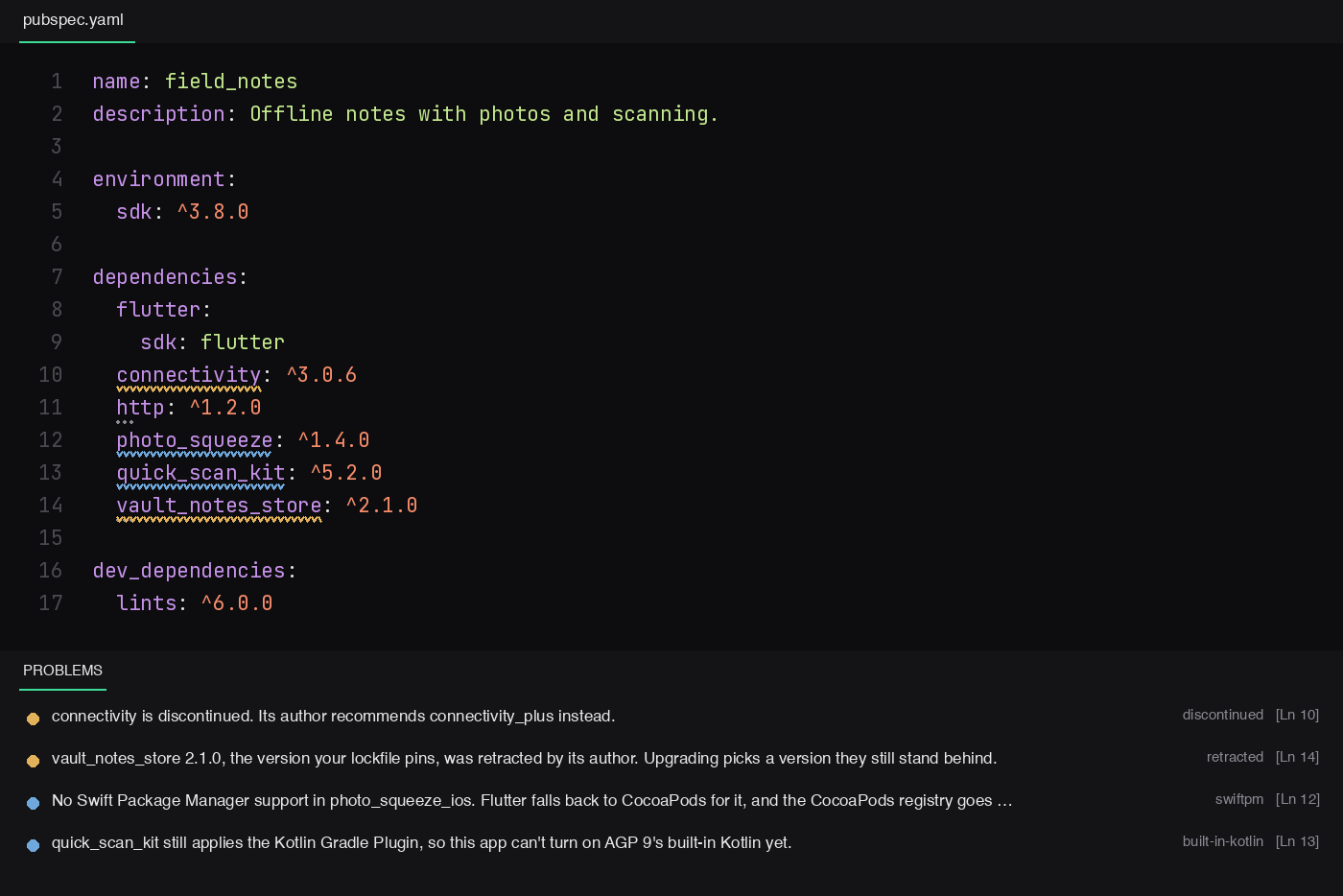
What it checks
discontinued
The author has discontinued the package on pub.dev. When they named a
successor, the quick fix swaps it in at its latest version (connectivity →
connectivity_plus).
retracted
The version in your pubspec.lock was retracted by its author — pub.dev keeps
it downloadable, but the author no longer stands behind it. The quick fix runs
flutter pub upgrade <package> (dart pub upgrade in a Dart-only package).
swiftpm
A plugin your app builds for iOS or macOS ships a podspec but no
Package.swift in the version you're locked to. Flutter now uses Swift
Package Manager by default and falls back to CocoaPods for plugins like this;
the CocoaPods registry becomes read-only on 2 December 2026.
The check reads the locked version from your pub cache, not pub.dev's tag
(which only describes the latest release), and follows the dependency tree: a
federated plugin's iOS code lives in a package you never wrote down
(url_launcher → url_launcher_ios), so the finding lands on the line you
can change. When a newer release has a Swift package, it says which; when
none does, the quick fix opens a pre-filled issue for the maintainers, which you
read and submit yourself.
Web-only plugins that ship stub podspecs, Dart-only plugins, and apps without
an ios/ or macos/ folder are left alone.
built-in-kotlin
A plugin your Android app builds still applies the Kotlin Gradle Plugin
(kotlin-android / org.jetbrains.kotlin.android). Flutter keeps
android.builtInKotlin=false for now, so this is information — until your
android/gradle.properties says android.builtInKotlin=true, at which point
it's an error, because the build fails.
outdated
A newer release is out. Shown as a faint hint, not a squiggle — being behind is
normal; being discontinued isn't.
not-resolved
There's no pubspec.lock yet, so nothing locked can be checked. Run
flutter pub get.
How it reads your project
- Locked versions, not constraints.
^3.0.0 says what you'd accept;
pubspec.lock says what you got, and that's what gets checked, read from your
local pub cache.
- Per platform. An app with only
ios/ is never told about a plugin's
macOS code, and a plugin with a Swift package for iOS but a podspec for macOS
only matters to apps that build for macOS.
- Pub workspaces. A member with
resolution: workspace is checked against
the root's pubspec.lock. Sibling members (ds_ui: any) are never looked up
on pub.dev, where an unrelated package may share the name, and plugins that
reach an app through them are still found.
- Once per plugin. A plugin you list yourself is reported on its own line,
not again on every other dependency that also pulls it in.
- Overrides. An override pins a version on purpose, so it's never called
outdated, and a package that's also a regular dependency is reported there.
Also
- Hover a dependency for its locked and latest versions, pub points, likes
and 30-day downloads.
- Status bar: a count of what needs attention across the workspace; click
it for the list.
- Run full health check (fhc) — runs the free
flutter_health_check CLI over
the project: Google Play and App Store rules (
targetSdk, restricted
permissions, purpose strings), leaked secrets, Firebase rules, vulnerable
packages, analyzer results, tests and CI, written to health-report.html.
Settings
| Setting |
Default |
|
pubspecHealth.enable |
true |
Turn the checks off. |
pubspecHealth.disabledChecks |
[] |
Any of discontinued, retracted, outdated, swiftpm, built-in-kotlin. |
pubspecHealth.cacheHours |
12 |
How long pub.dev answers are reused. pub.dev rate-limits bursts. |
Privacy
It reads pubspec.yaml, pubspec.lock and your local pub cache, and asks
pub.dev about the packages you depend on. Nothing else leaves your machine.
Development
node --test test/          # no dependencies to install
node tool/try.js ../app    # run the analyzer on a real project
npx --yes @vscode/vsce package --no-dependencies
MIT © K M Shahriar Hossain

