


Provides a sidebar for managing @deltabox/toolchain across projects.
All-in-one, config-driven dev toolchain: scaffold projects, generate and manage configs, tsconfigs, syncing, changelogs and CI, run Vite+, and migrate other tools onto Oxc.
- Save and use templates (local/remote) so you never have to scaffold the same projects over and over again.
- Generate config types, env variables, cli flags, markdown and JSON schemas, so your codebase stays consistent, validated and well-documented.
- Simply extend or setup CI for your changelogs, releases, issues etc.
- Sync your entire project so workspaces, docs and CI are always up-to-date.
- Plug it into Vite / Vite+ and streamline your DX for your existing Vite setup.
See the list of features.
See all the commands below.
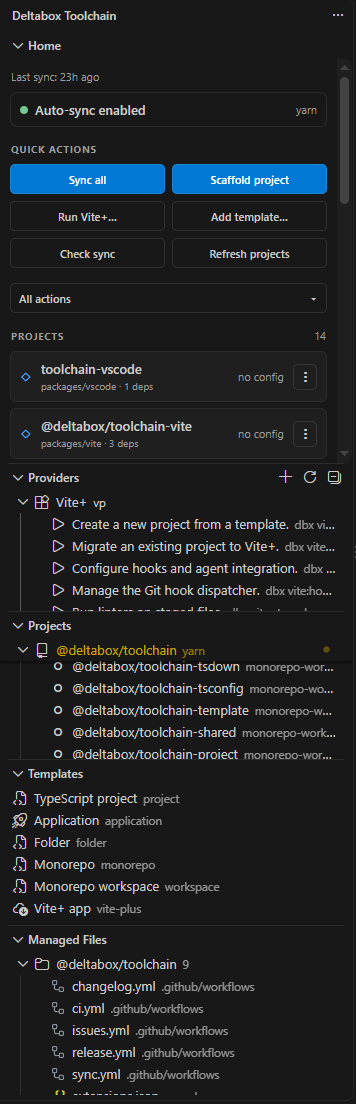
Commands
| Command |
What it does |
| Sync all / active / selected |
Run dbx sync (--recursive / per project). |
| Check sync |
sync --check across the workspace. |
| Scaffold project |
Single project, monorepo root, workspace, or From template…. |
| Add template… |
template:init --add on a folder you pick (any kind). |
| Remove template… |
template:list --registry then template:remove. |
| Generate configs |
project:config for projects missing a config. |
| Run workflow |
Trigger generated GitHub workflows. |
| Run Vite+ command… |
QuickPick over the Vite+ provider commands, run in a terminal. |
| Create Vite+ project… |
vp create in a terminal. |
| Add provider... |
Register a custom provider in .dbx/toolchain/providers.json. |
| Run command... |
Run a provider command (dbx <command>) in a terminal. |
| Create from template... |
dbx create --template <id> (terminal for online templates). |
| Reset tooling |
Remove generated files / manifest / config. |
| Toggle auto-sync |
Enable/disable sync-on-change. |
Interactive commands (the dev server, vp create, online scaffolding) run in an
integrated terminal at the project root; everything else runs in the output
channel.
Every project card (and every project in the Projects tree) exposes the same
actions, scoped to that project:
- Sync / Check sync — regenerate / verify the project's managed files.
- Generate config — write a
dbx.config.ts.
- Run workflow… — trigger one of the project's generated GitHub workflows.
- Run Vite+ command… — run a
vp command in that project.
- Reset tooling… — remove the generated files + manifest, or everything
including the config.
- Go to project — reveal the project in the Explorer.
Providers, templates and Vite+ in the editor
The Providers and Templates views read dbx providers --json and dbx template:list --json, so adding one surfaces it in the UI automatically.
Add provider... writes a custom provider to .dbx/toolchain/providers.json, which toolchainProviders() merges with the built-ins, so a registered provider's commands also become dbx commands (dbx <command>), runnable from the view.
Add template... runs template:init --add.
Remove template source... runs template:list --registry + template:remove.
Auto-sync
Auto-sync watches input files only: dbx.config.*, tsconfig.default.json, and tsconfig.monorepo.json.
Generated outputs are never watched. The scheduler debounces bursts, allows one sync at a time, queues at most one follow-up, and suppresses events briefly after a run.
Settings
| Setting |
Default |
Description |
deltabox.toolchain.enabled |
true |
Auto sync on watched changes. |
deltabox.toolchain.debounce |
300 |
Debounce (ms) before a sync. |
deltabox.toolchain.command |
sync |
The command to run on change. |
deltabox.toolchain.watch |
config + tsconfig globs |
Inputs that trigger a sync. |
Command palette
Search for deltabox: to find:
- Sync active project
- Sync selected projects
- Sync all projects
- Check sync
- Scaffold project…
- Add template…
- Remove template…
- Add provider...
- Refresh providers
- Add template...
- Remove template source...
- Refresh templates
- Generate configs…
- Run workflow…
- Run Vite+ command…
- Create Vite+ project…
- Reset tooling…
- Refresh projects
- Toggle auto-sync

