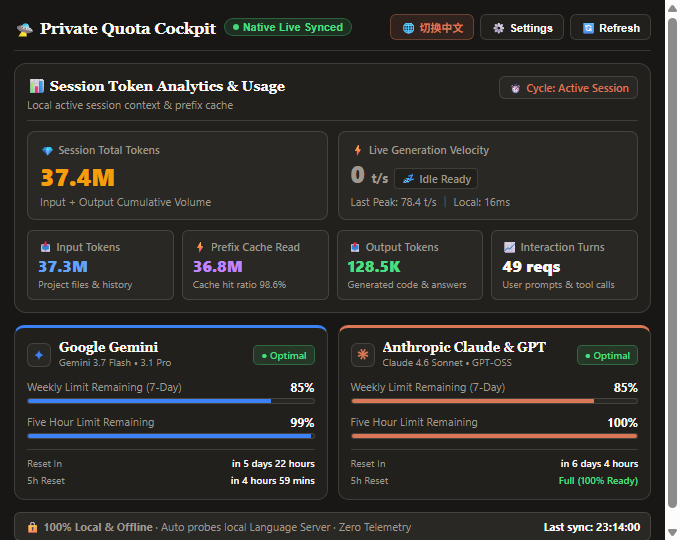
🔒 100% Offline & Private AI Quota Monitor for Antigravity IDE. Zero telemetry, zero external network requests, zero token leaks. Real-time Gemini & Claude quota tracker with a gorgeous bilingual dashboard.
Installation
Launch VS Code Quick Open (Ctrl+P), paste the following command, and press enter.
🔒 100% Pure Local & Offline AI Quota, Physical Token Audit, Multi-Model Context Quota Governance, and Real-time Velocity Telemetry Cockpit.
Zero external network requests, zero telemetry tracking, zero token leakage risk, zero synthetic weighting, and 100% ad-free. Connects directly to your local Antigravity Language Server daemon with Netstat-PID instantaneous handshake and physical SQLite-WAL differential velocity measurement.
💼 Monorepo Mode (projects/): Automatically detects active subprojects and isolates archives to projects/<subprojectName>/docs/snapshots/;
📁 Standard Workspace Mode (workspace/): For standard single-repo workspaces without projects/, snapshots seamlessly save to <workspaceRoot>/docs/snapshots/;
💡 Zero-Config Auto-Creation: Automatically creates docs/snapshots/ directories on the fly if not already present;
Dynamic Pointer Sync in memory.md: Automatically updates the active snapshot pointer in memory.md for seamless cross-session continuity;
Non-Intrusive Workflow: Single click to archive without popping open editor tabs or interrupting flow.
4. ⚡ Netstat-PID Instant Port Handshake Engine
PID-Exact Network Table Mapping: Captures real LISTENING ports of the Language Server daemon using netstat -ano;
Zero Offset Failure: Immune to large port offsets (+70), guaranteeing 100% instant sync in 30ms;
Local In-Memory Cache: Caches verified ports for sub-10ms subsequent polling.
5. 🎯 Active Session Isolation & Global Separation
Single-Session Pure Audit: Automatically targets the active session by filesystem timestamp;
Global Aggregate Separation: Independently displays machine-wide cumulative totals without mixing scopes;
Adaptive Scrolling List: Elegant max-height: 220px list with dynamic session counting;
Real-time Deletion Sync: Deleting session files instantly updates local counts;
One-Click Precision Toggle: Switch between compact mode (25.6M) and exact integer format (25,563,472).
Byte Differential Scanning: Listens to SQLite-WAL byte differentials every 1.5 seconds;
Live Velocity Waveform: Captures burst generation speeds (150 ~ 180 t/s) and records peak speeds (218.6 t/s);
Idle State Detection: Smoothly resets to 0 t/s (💤 Standby Ready) after 6.0s idle while preserving historical peak.
7. ✨ Authentic Vector Brand Geometry
Google Gemini Astroid: Exact 4-quadrant symmetric 3rd-order Bezier astroid geometry with native DeepMind gradient;
Anthropic Claude 16-Ray Sparkle: Authentic Terracotta high-fidelity vector rendering;
🎨 Independent Digit-Only Coloring: Status bar icons stay in neutral theme tones while digits shift through green, yellow, and red.
💡 Why Active Context Refinement is Critical for Pro Developers
Many developers ask: "Since Antigravity automatically truncates and inserts summary checkpoints when the context window fills up, why should I ever manually refine context?"
Feature / Dimension
🤖 Backend Passive Truncation
⚡ Cockpit Active Snapshot Refinement (Pro)
Trigger Timing
Critical Deadline: Forced only when context hits 95%–100% capacity
Milestone Point: Proactively triggered at ~70% saturation after completing tasks
Distillation Quality
Mechanical Truncation: Blindly slices early context, risking loss of architecture rules
High-Density Distillation: Strips tens of thousands of noisy tool logs while keeping core facts
Model Attention
Severe Attention Decay: Model struggles under 500K+ noisy tokens ("Lost in the Middle")
Ephemeral: Summaries stay in memory only; lost if session is reset or corrupted
Versioned on Disk: Physically archived to docs/snapshots/ and indexed in memory.md
🧠 Deep Dive: The 3 Hidden Traps of Long Context Windows
Breaking Free from the "Lost in the Middle" Trap:
Even with a 1M or 2M token window, stacking 50–100 turns of raw git log, terminal outputs, and debug stack traces clutters the model's focus. Proactively refining at ~70% strips out raw noise so the AI remains laser-focused on your architecture.
Guarding Against Catastrophic Forgetting:
Passive truncation drops early messages indiscriminately when limits are reached, often erasing your top-level project rules and active constraints. Manual refinement lets you choose the exact milestone to lock in decisions.
Transforming Ephemeral Chat into Permanent Project Assets:
Active refinement physically saves a timestamped snapshot (docs/snapshots/snapshot_YYYYMMDD_HHMMSS.md) and updates memory.md, allowing new sessions or other collaborating agents to pick up work seamlessly.
🛠️ Configuration
Customize the extension in VS Code / Antigravity IDE Settings (agPrivateCockpit):