Claude Stats
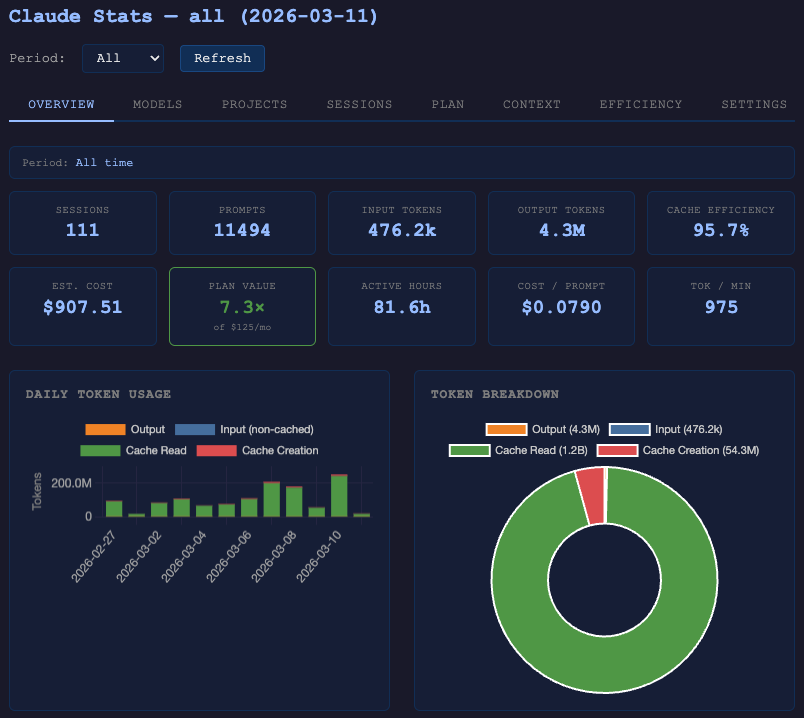
View your Claude Code usage statistics directly inside VS Code. Local by default — no API key, no account, no network access. Optional end-to-end-encrypted backup & sync to a cloud folder you already control.
Features
- Dashboard webview in the activity bar with tokens, cost, sessions, cache efficiency, and streaks
- Per-project breakdown showing where your tokens and dollars are going
- Spending view with model, session, tool, and MCP-server cost attribution
- Environmental context translating token usage into energy, CO₂, and comparable everyday figures
- Work profile — distribution of the nature of your work across projects
- Auto-registers a local MCP server so your AI agent can query stats directly ("how many tokens did I use this week?")
- Daily-recap digests with on-device semantic clustering — bundled MiniLM-L6-v2 model runs locally, no data leaves your machine
- Cost per successful task — outcome-cost per model (dollars per shipped/confirmed task, not per token), with per-task
success/partial/fail labelling right in the dashboard
- Optional backup & cross-device sync — end-to-end encrypted, via a cloud folder you already use (Dropbox, iCloud Drive, Google Drive, OneDrive); set up from the dashboard's Settings tab or the command palette, no new account and no claude-stats server
- Optional team sync (aggregate-only) — for teams running a shared Claude Stats backend: share minimized per-day usage totals so a team dashboard can compare across members. Set up entirely from the command palette (Connect to Team Sync → Link Accounts → Sync Now); structurally incapable of sending per-session, prompt, or transcript data. Distinct from personal backup above — see Team sync
Requirements
- Node.js 22.5+ on your PATH (uses the built-in
node:sqlite module)
- Claude Code installed and used at least once — the extension reads from
~/.claude/projects/
Getting started
- Install the extension
- Click the Claude Stats icon in the activity bar, or run Claude Stats: Open Dashboard from the command palette
- Restart Claude Code so it picks up the MCP server the extension auto-registers in
~/.claude.json
That's it. The extension reads Claude Code's local JSONL session files, aggregates them into a local SQLite database at ~/.claude-stats/stats.db, and renders the dashboard on demand.
Once installed, ask your AI agent things like:
- "How many tokens have I used this week?"
- "What were my most expensive sessions today?"
- "Which projects am I spending the most on?"
- "How much CO₂ did my Claude usage cause last week?"
Most tools accept an optional account filter (UUID, full or prefix-matched) to narrow queries to a specific account.
| Tool |
Purpose |
get_stats |
Usage summary — tokens, cost, sessions, cache efficiency, streaks |
list_sessions |
Recent sessions with token counts and estimated cost |
get_session_detail |
Messages and token usage for a specific session |
list_projects |
Per-project usage breakdown |
get_status |
Database health, session count, last collection time |
search_history |
Search prompt history by keyword |
get_cost_per_task |
Cost per successful task — outcome-cost overall and per model (read-only) |
summarize_day |
Structured daily-recap digest with semantic clustering — "what did I get done today?" |
get_cost_per_ticket |
Cost attributed to work-item ticket keys (e.g. PROJ-123) from local evidence — branch names, commit subjects, prompt mentions — with a coverage denominator and confidence tier. No tracker API is called |
get_calibration |
Whether those confidence tiers have ever been checked against your own corrections — an agreement rate, never "accuracy" |
get_efficiency_hints |
Self-audit of your own wasted spend across six local patterns; nothing here ranks developers or leaves the machine |
get_constraint_impact |
What a declared policy change (budget cap, model-tier removal) measurably cost or saved, per task class |
generate_justification_pack |
Write a self-contained HTML + CSV bundle for one month to local disk — the artifact you hand to someone who doesn't run claude-stats |
get_account_info |
Current login's seat tier, billing type, and the accounts known on this machine |
get_plan_mechanics_reference |
Dated snapshot of Team/Enterprise seat ranges and pricing, with a staleness warning |
size_seats |
Seat-sizing scenario table from headcount + technical fraction (never picks a plan) |
All 16 tools are described in
doc/user-doc/commands.md.
Settings
| Setting |
Default |
Description |
claude-stats.port |
9120 |
Port for the standalone web dashboard (CLI serve command) |
claude-stats.autoRefreshSeconds |
30 |
Auto-refresh interval for the dashboard panel. 0 disables. |
claude-stats.recap.embeddings |
auto |
Semantic clustering for daily-recap. auto uses the bundled local embedding model; off falls back to lexical clustering. All inference runs on-device. |
claude-stats.backendUrl |
"" |
Base URL of your team's Claude Stats backend. Set automatically when you Connect to Team Sync. |
claude-stats.autoSync |
false |
Push minimized daily aggregates to your team backend automatically after each collection. Requires linked accounts and an active connection. |
Team sync
Separate from the personal backup & sync above, team sync is for
teams that run a shared Claude Stats backend. It shares aggregate-only data —
minimized per-day totals (sessions, prompts, tokens, cost) for the accounts you
choose — so a team dashboard can compare usage across members. It is
structurally incapable of sending per-session, prompt, file-path, or transcript
data: the only thing the client can build is the minimized daily aggregate.
Set it up entirely from the Command Palette — no CLI required:
- Claude Stats: Connect to Team Sync… — enter your team's backend URL and
email, then complete the passwordless sign-in link in your browser.
- Pick which accounts to share — a multi-select appears right after sign-in
(re-run anytime with Claude Stats: Link Accounts to Share…). Only accounts
you pick are ever included; each is sent under a one-way, salted handle — your
raw account IDs never leave the machine.
- Claude Stats: Sync Now — pushes the aggregates. A cloud item in the status
bar shows connection state and is click-to-sync. Enable
claude-stats.autoSync to push after each collection automatically.
Other commands: Disconnect from Team Sync (clears tokens and config) and
Open Team Dashboard (opens your backend's dashboard in the browser).
See the team-sync guide
for the full flow, the privacy model, and the equivalent CLI (claude-stats setup
/ link / sync).
Privacy
- Local by default. All data stays under
~/.claude-stats/; nothing leaves your machine unless you explicitly enable one of two opt-in paths: backup & sync (end-to-end encrypted, so your cloud provider only ever stores opaque ciphertext) or team sync (aggregate-only per-day totals for the accounts you pick — never per-session or prompt data).
- Incremental. Only new JSONL lines are read on each refresh.
- Non-destructive. The extension never modifies Claude Code's own files.
- No API scraping. Reads only the local JSONL files Claude Code already writes to disk.
- Embedding model bundled, not downloaded. The
MiniLM-L6-v2 int8 ONNX model used by daily-recap ships inside this extension (Apache-2.0; see media/embed-model/LICENSE and MODEL-CARD.md). It is SHA-256-verified against a pinned hash on every activation; a mismatch falls back to lexical clustering and surfaces a warning.
Issues and source
License
MIT
| |

