Skill Bridge VS Code Extension
Skill Bridge is the VS Code extension for browsing, reviewing, and moving AI agent skills between the current Workspace and a configured Central skill library.
Use it when a good skill should become reusable, but the user still needs a clear checkpoint before files move.
- Find: browse Workspace skills, Central skills, groups, and Project Presets together.
- Review: inspect changed files, risk hints, and diffs before overwriting anything.
- Apply: bring selected skills, groups, or presets into the current project.
- Update with agents: install the bundled Skill Manager skill so an AI agent can help find, import, and refresh the right skills from the Central library.
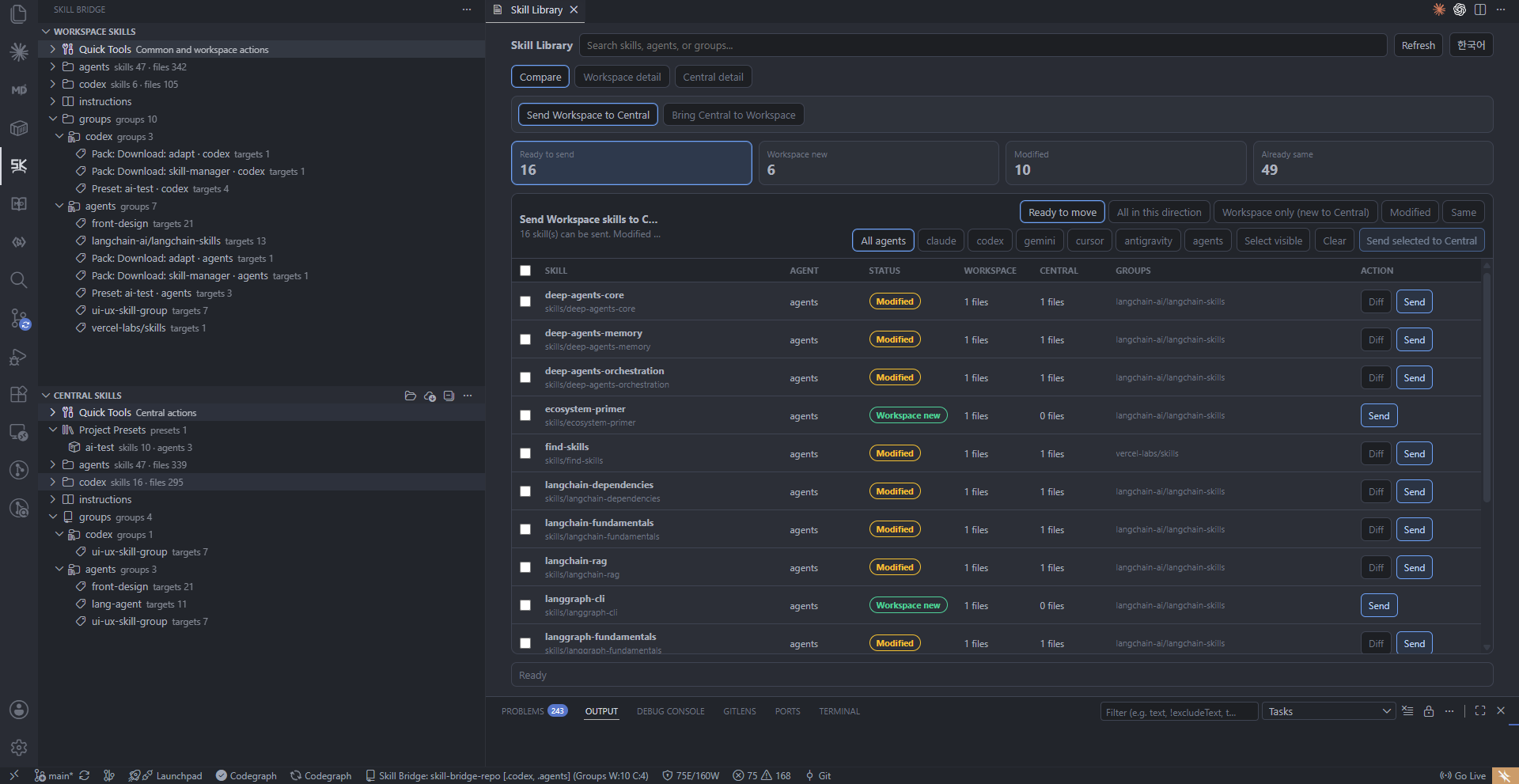
The Skill Library keeps Workspace and Central state side by side, so users can choose what should move.
Skill Bridge gives users a visible review point before skill files move. Changed files are marked, reusable groups and NPX library workflows stay close at hand, and Project Presets make repeated project setup easier without turning the extension into a Git GUI or skill runner.
The extension also includes a bundled Skill Manager skill. After installing it into a workspace, users can ask their AI agent to search the Central library, choose the skills they need, bring them into .agents, .codex, .claude, .gemini, .cursor, or .antigravity, and update those skills later through the same reviewed Skill Bridge workflow.
Library, Groups, And Presets
Reusable skills can come from downloaded packs, curated groups, or project-ready presets. All three resolve back to the same Central library, so users can refresh a project later without remembering which folders were copied by hand.
Downloadable Libraries
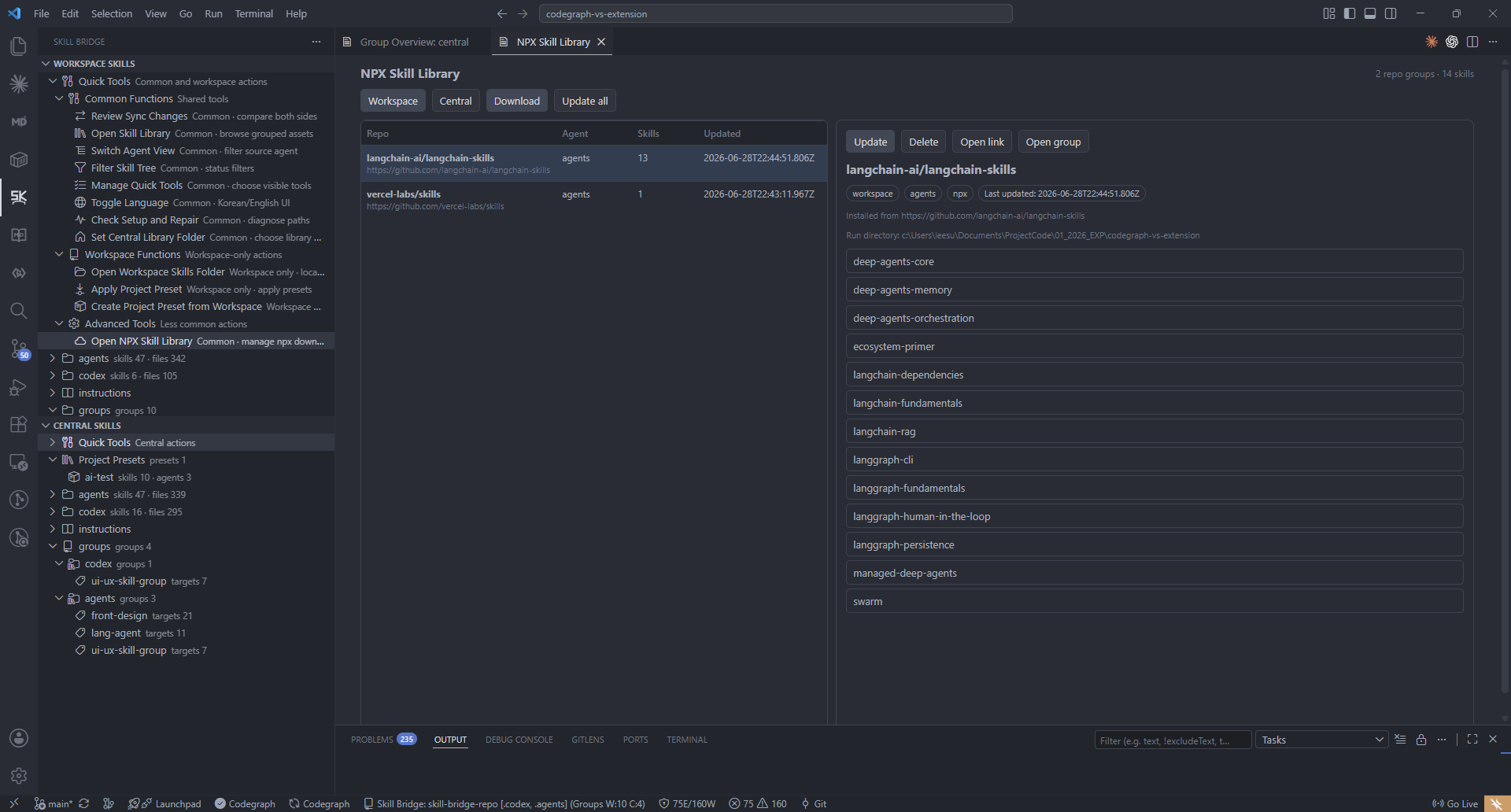
The NPX Skill Library view lists installed external skill packs and lets users download or update reusable skills before bringing them into a workspace.
Reusable Groups
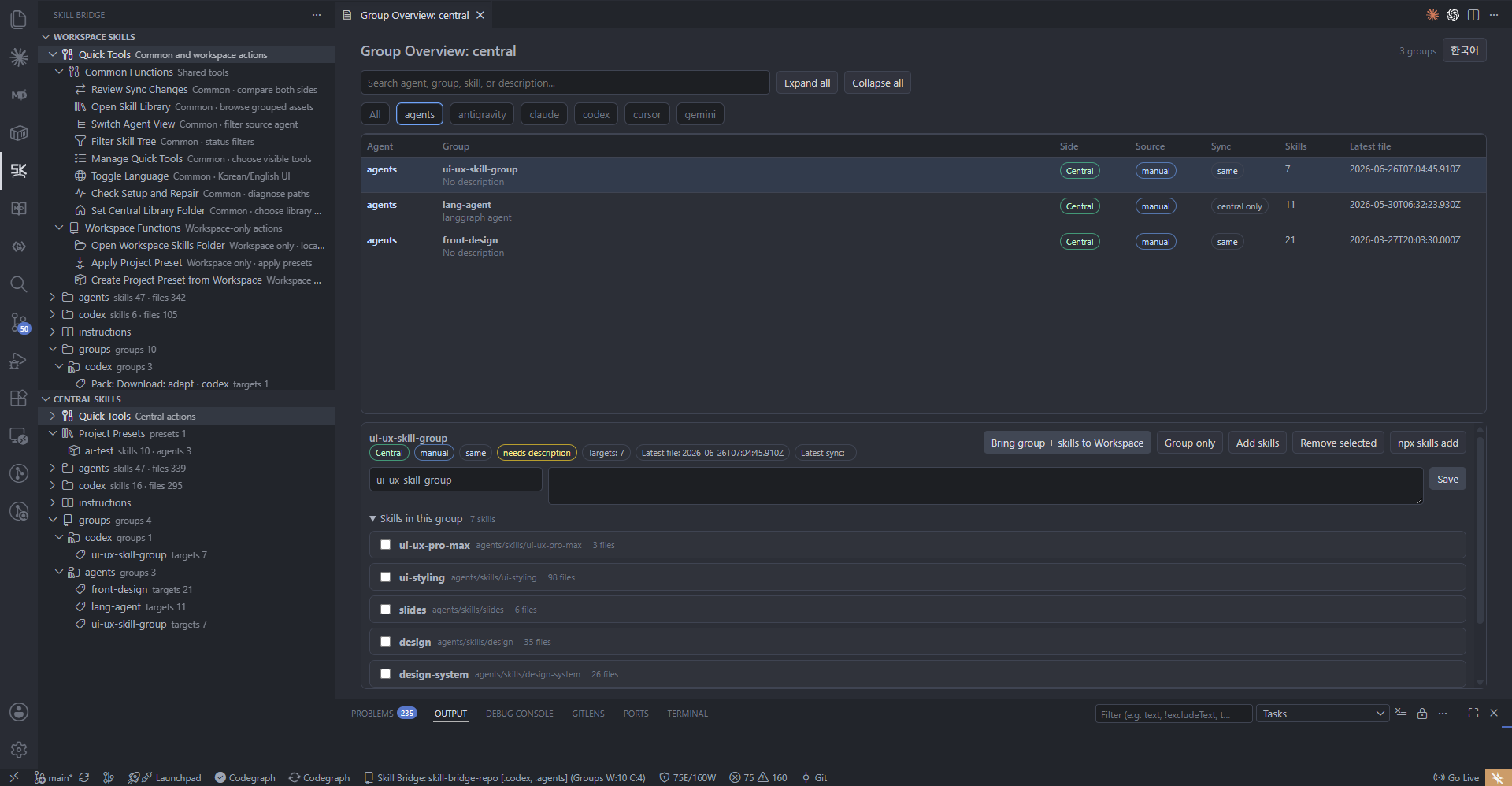
Groups collect related skills across agents, making repeat transfers easier to inspect and apply.
Project Presets
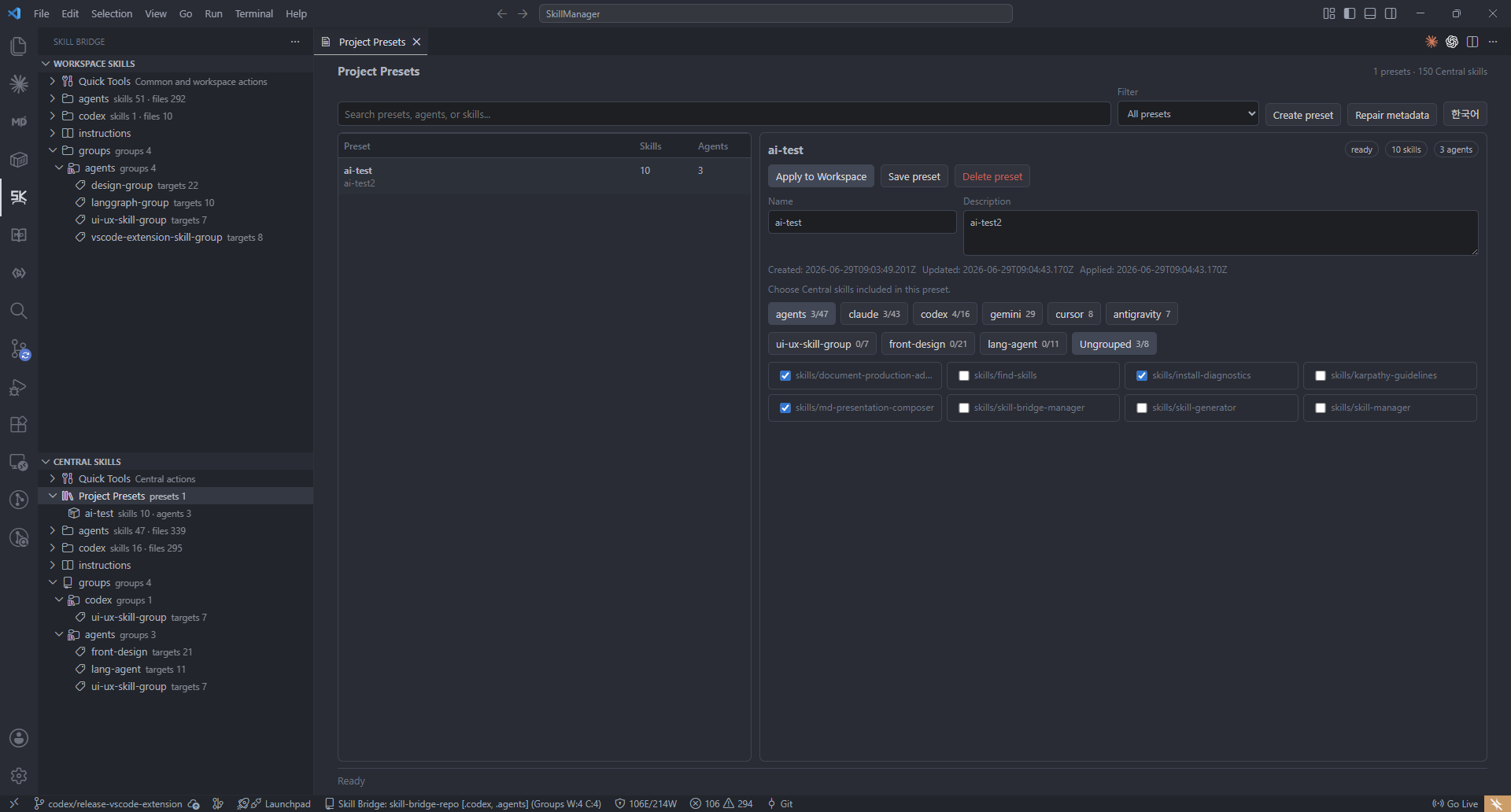
Project Presets turn a known-good skill set into a reusable setup template for new workspaces.
Review Before Transfer
Transfer Review is the safety checkpoint for promote and import flows. It separates new, changed, same, deleted, and conflict-like rows; shows sensitive-content and script hints; and keeps apply actions explicit.
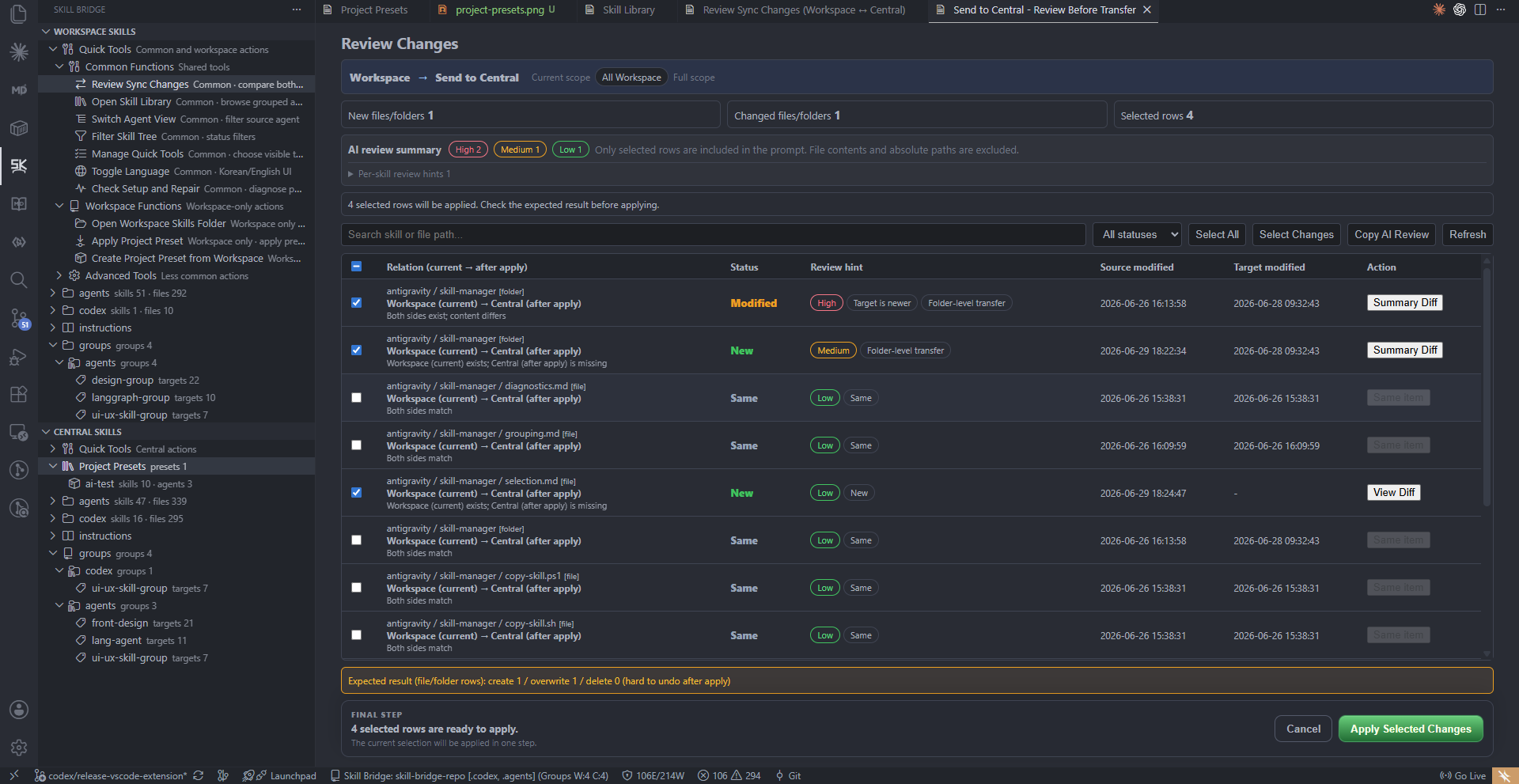
Users see the expected result before applying selected rows.
Core Concepts
- Workspace Skills: skills under local agent roots such as
.codex/skills/<name>/SKILL.md.
- Central Skills: reusable skills under central roots such as
codex/skills/<name>/SKILL.md.
- Transfer Review: review screen used before copying changed files between Workspace and Central.
- Groups: named skill selections saved for repeated transfer or organization.
- Project Presets: Central-only project setup templates saved in
.skillbridge/project-presets.json.
- Bundled Skill Manager: an included
skill-manager skill that helps AI agents find, import, organize, and update skills through Skill Bridge.
- Quick Tools: configurable command shortcuts shown at the top of the tree.
Tree Views
The extension contributes two views:
Workspace SkillsCentral Skills
Both views support multi-select, tree filtering, warnings, skill counts, and agent filtering.
Quick Tools shows common commands directly in the tree.
By default, only the basic tool set is shown. Use Manage Quick Tools to choose which commands should appear. The selection is saved in skillBridge.visibleQuickTools.
Advanced commands can still be enabled and will appear under Advanced Tools.
Agent View
Switch Agent View lets the user show one or more agents at the same time.
- Selecting one agent shows only that agent.
- Selecting multiple agents shows those agents together.
- Selecting all agents or none shows all agents.
- The selected agents are saved in
skillBridge.visibleAgents.
Agent Instructions
- Workspace tree shows root instruction files such as
AGENTS.md, CLAUDE.md, CODEX.md, GEMINI.md, CURSOR.md, and supported rule files such as .cursor/rules/*.mdc.
- Central tree shows matching profile files from
instructions/<workspace-folder-name>/.
- Instruction files are displayed and opened separately from skill transfer targets, so skill transfer stays scoped to
skills/<skill>/....
Project Presets
Project Presets are reusable Central templates for project setup.
Main actions:
Apply Project PresetCreate Project Preset from CentralCreate Project Preset from WorkspaceExport Group as Project PresetOpen Project PresetsRename Project PresetEdit Project Preset DescriptionDelete Project Preset
Applying a preset imports its Central skills into the current Workspace through Transfer Review and creates or updates a Workspace group named Preset: <name>.
Creating a preset from Workspace first sends missing or changed Workspace skills through Transfer Review, then saves only Central-backed targets.
Transfer Review
Transfer Review protects changed files before copying.
It shows:
- new, changed, deleted, unchanged, and conflict-like rows
- risk hints such as sensitive-looking content or scripts
- diff review for changed existing files
- apply, inspect, and skip recommendations
Skill Bridge does not auto-merge conflicts and does not auto-push Git remotes.
Skill Add And Move
The extension supports:
- creating new
skills/<name>/SKILL.md folders
- sending Workspace skills to Central
- bringing Central skills to Workspace
- copying skills between agent folders
- installing skills with the NPX skill flow
- downloading or updating Central skills from a source
- installing the bundled Skill Manager skill so an AI agent can help pull selected skills from Central and refresh them later
Workspace Quality Gate
Skill Bridge maps actionable warnings into VS Code Problems.
Examples:
- missing
SKILL.md
- sensitive-looking content
- workspace-specific absolute paths
- script files
- broken markdown references
- Central target newer than Workspace
The quality gate checks skill asset structure and metadata. It is not a code linter or an auto-fixer.
Central Library
skillBridge.centralRepoPath defines the Central skill library path.
The setting supports:
${userHome}${workspaceFolder}${workspaceRoot}${env:NAME}
The Central path must be reachable from the same host that runs the extension. Remote, WSL, or SSH sessions cannot reuse a path from a different host.
Central groups are stored in .skillbridge/skill-workspace.json in the Central folder.
Project Presets are stored in .skillbridge/project-presets.json in the Central folder.
Settings
The UI follows the VS Code display language. English and Korean are supported; other locales fall back to English.
skillBridge.centralRepoPathskillBridge.defaultAgentsskillBridge.visibleAgentsskillBridge.visibleQuickToolsskillBridge.autoSyncWorkspaceAgents
Useful Commands
Skill Bridge: RefreshSkill Bridge: Review Sync ChangesSkill Bridge: Send to CentralSkill Bridge: Bring to WorkspaceSkill Bridge: Open Skill LibrarySkill Bridge: Open Group OverviewSkill Bridge: Open Project PresetsSkill Bridge: Apply Project PresetSkill Bridge: Create Project Preset from WorkspaceSkill Bridge: Switch Agent ViewSkill Bridge: Manage Quick ToolsSkill Bridge: Filter Skill TreeSkill Bridge: Check Setup and Repair
Build And Package
From the repository root:
npm run typecheck
npm --workspace apps/vscode run package:vsix
Install the generated VSIX:
code --install-extension apps/vscode/skill-bridge-vscode-<version>.vsix --force
After installing, run Developer: Reload Window.

