DataNest — free database client and SQL editor for VS Code




DataNest is a free, open-source database client for VS Code and its forks (VSCodium, Cursor,
Windsurf, Antigravity). Browse and edit data, write SQL, design tables and see an ER diagram
for MySQL, MariaDB, PostgreSQL, SQLite, Microsoft SQL Server, Oracle, ClickHouse, MongoDB,
Redis and Elasticsearch — with no account, no limits and no telemetry.
Install: search for DataNest in the Extensions view, or open it on
Open VSX. A .vsix is attached to every
release.
Quick start
- Open the DataNest view in the activity bar and press New Connection.
- Pick your database (or paste a
postgres://… / mysql://… URL), then Test connection and Save.
- Expand the connection and double-click a table to see its data — or press New Query and write SQL.
In your language
The extension itself is in English and Russian and follows the editor's display language. This
page is in English; the short summaries below are for everyone else.
- English — Free, open-source database client and SQL editor for VS Code.
- Русский — Бесплатный клиент баз данных и SQL-редактор для VS Code с открытым кодом.
- O‘zbekcha — VS Code uchun bepul, ochiq kodli ma’lumotlar bazasi mijozi va SQL muharriri.
- 中文 — 适用于 VS Code 的免费开源数据库客户端和 SQL 编辑器。
- Español — Cliente de bases de datos y editor SQL gratuito y de código abierto para VS Code.
- Türkçe — VS Code için ücretsiz, açık kaynaklı veritabanı istemcisi ve SQL düzenleyici.
- Deutsch — Kostenloser Open-Source-Datenbankclient und SQL-Editor für VS Code.
- Français — Client de base de données et éditeur SQL gratuits et open source pour VS Code.
- Português — Cliente de banco de dados e editor SQL gratuito e de código aberto para VS Code.
- العربية — عميل قواعد بيانات ومحرر SQL مجاني ومفتوح المصدر لـ VS Code.
Screenshots
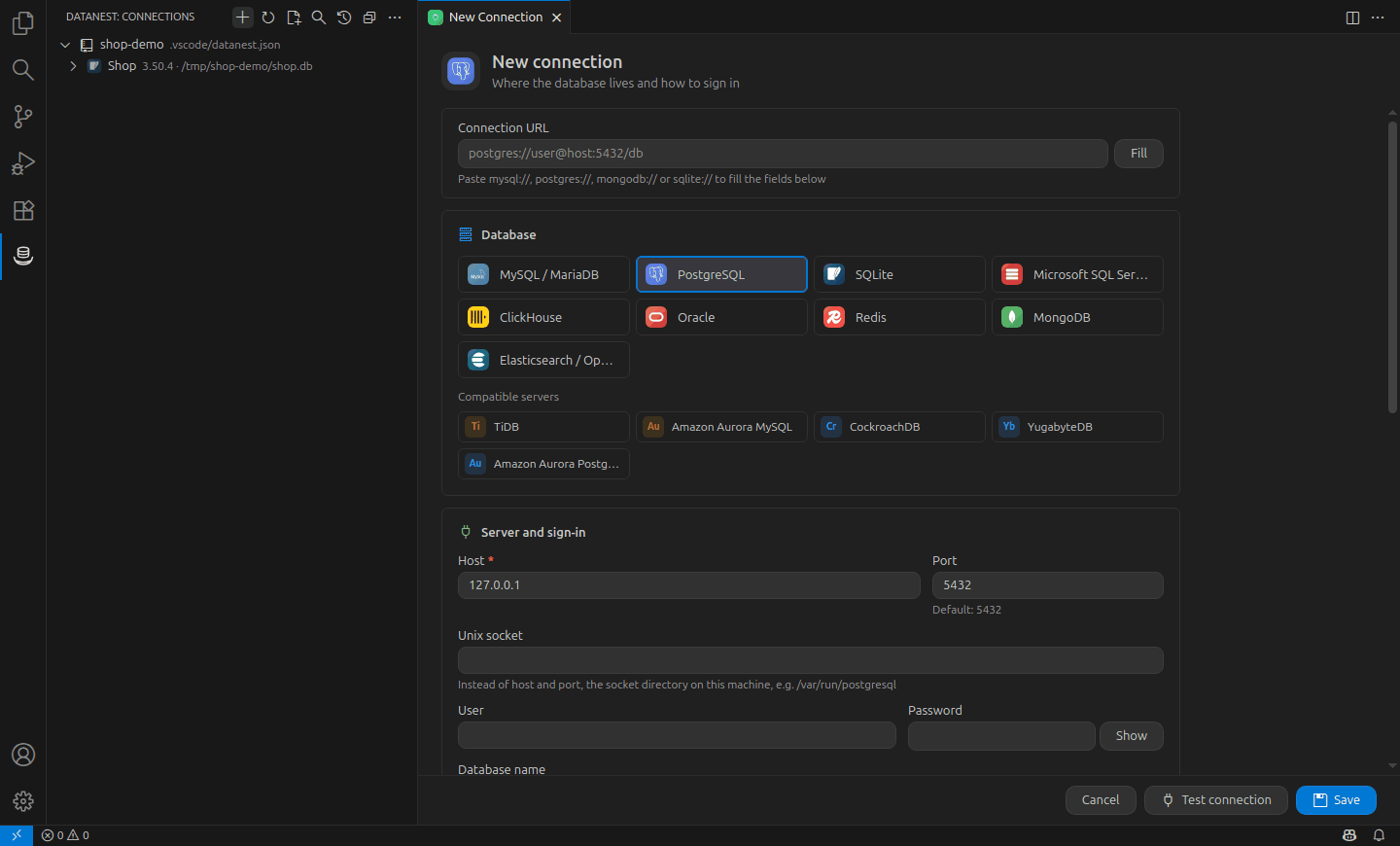
EN Connect to any database · RU Подключение к любой базе данных · UZ Istalgan ma’lumotlar bazasiga ulanish · ZH 连接任意数据库 · ES Conéctate a cualquier base de datos · TR Herhangi bir veritabanına bağlanın · DE Mit jeder Datenbank verbinden · FR Connectez-vous à n’importe quelle base · PT Conecte-se a qualquer banco de dados · AR اتصل بأي قاعدة بيانات
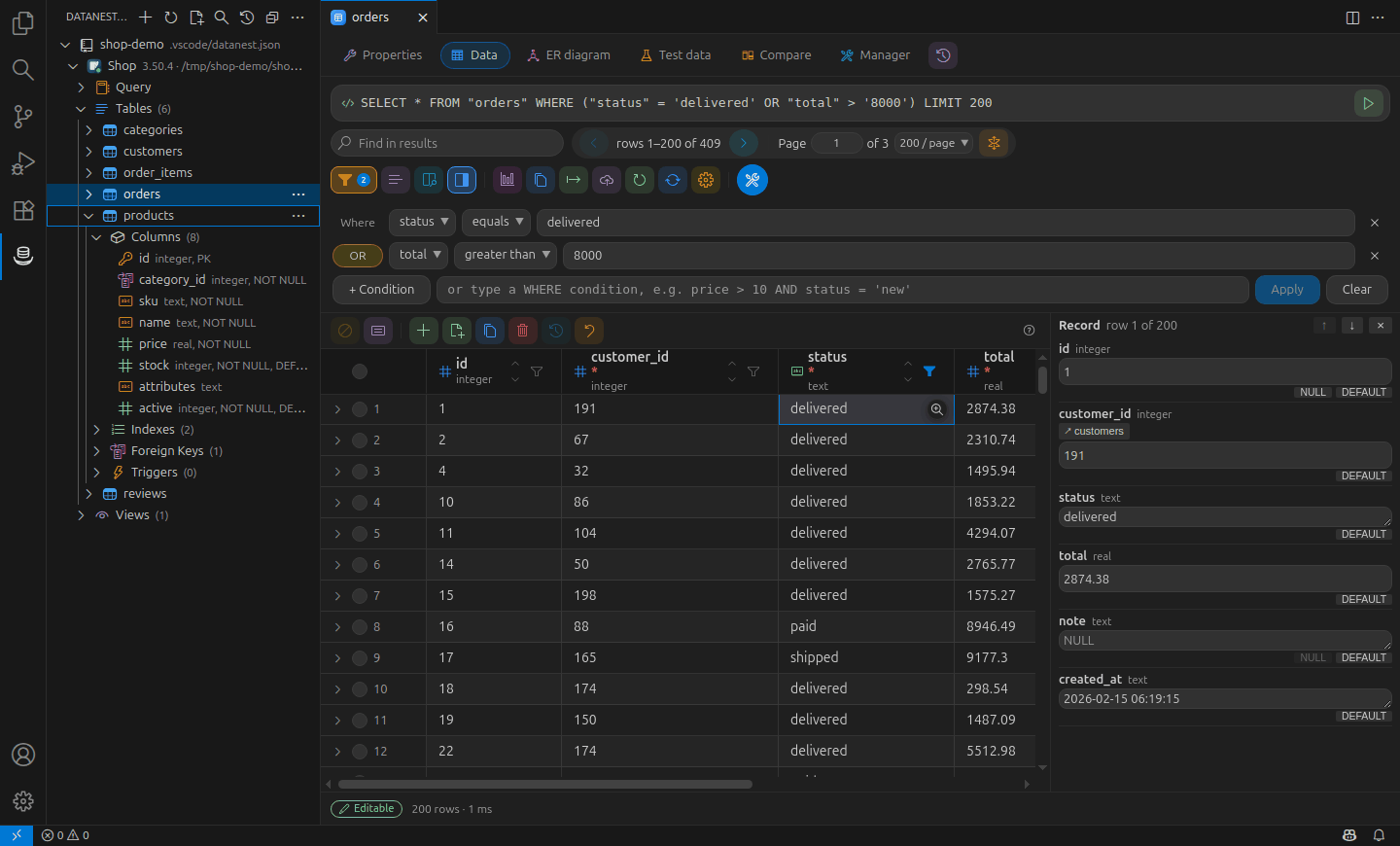
EN Browse tables, filter, edit data · RU Таблицы, фильтры, правка данных · UZ Jadvallar, filtrlar, ma’lumotlarni tahrirlash · ZH 浏览表、筛选并编辑数据 · ES Explora tablas, filtra y edita datos · TR Tabloları gezin, filtreleyin, düzenleyin · DE Tabellen durchsuchen, filtern, bearbeiten · FR Parcourir, filtrer et modifier les données · PT Navegue, filtre e edite os dados · AR تصفح الجداول وصفِّ البيانات وعدّلها
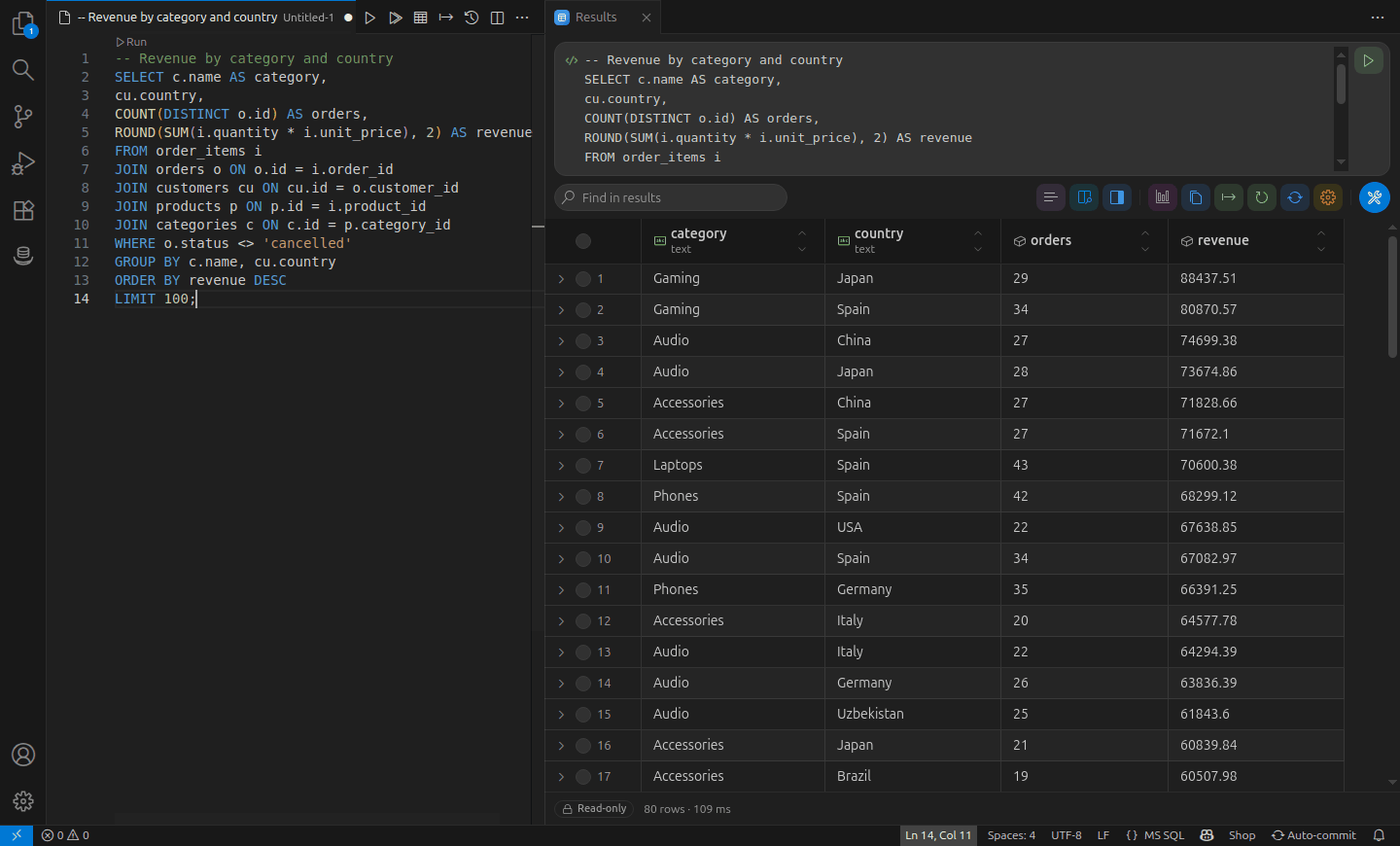
EN SQL editor with results · RU SQL-редактор и результаты · UZ SQL muharriri va natijalar · ZH SQL 编辑器与结果 · ES Editor SQL con resultados · TR SQL düzenleyici ve sonuçlar · DE SQL-Editor mit Ergebnissen · FR Éditeur SQL et résultats · PT Editor SQL com resultados · AR محرر SQL مع النتائج
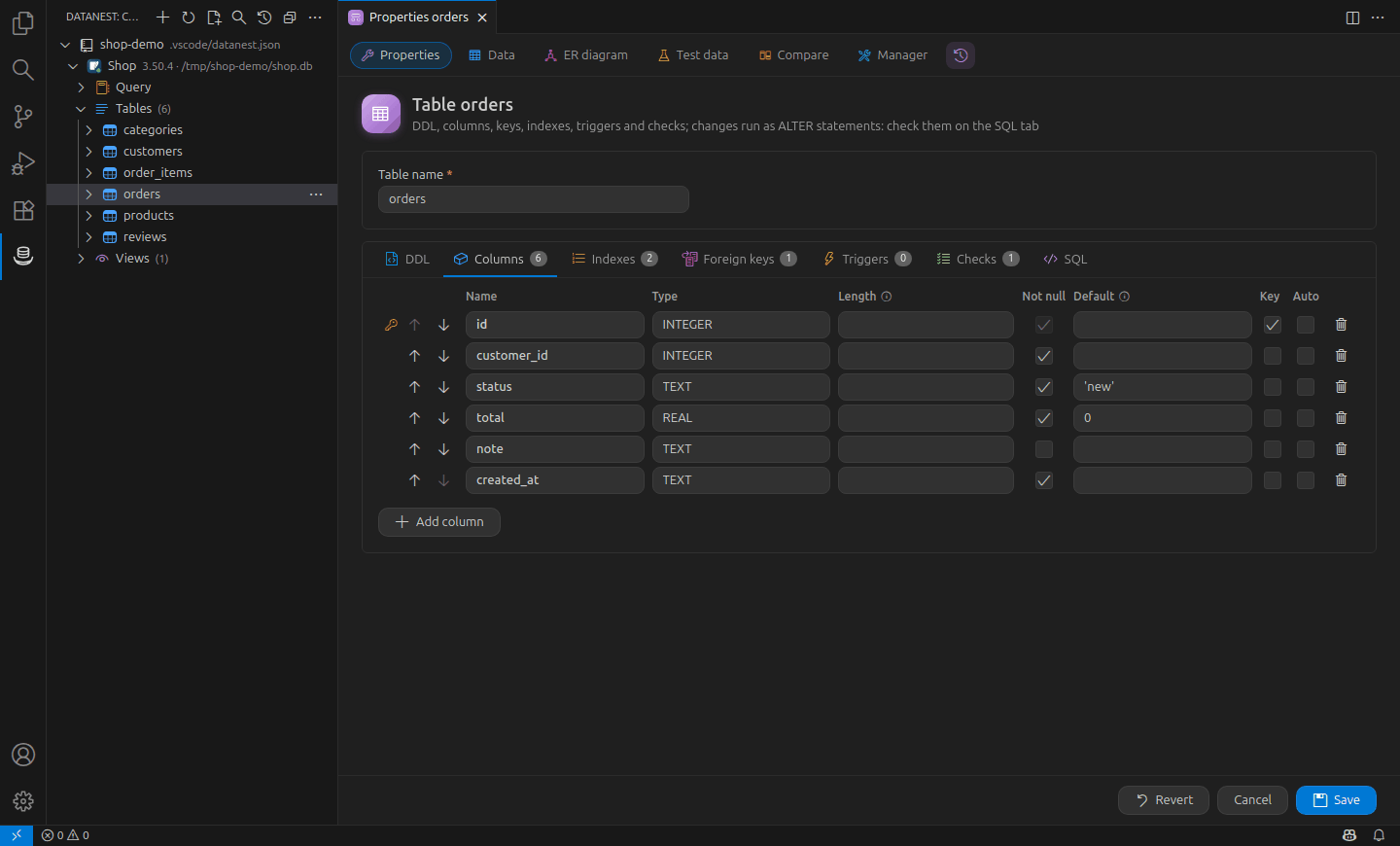
EN Table designer: columns, indexes, keys · RU Конструктор таблиц: колонки, индексы, ключи · UZ Jadval dizayneri: ustunlar, indekslar, kalitlar · ZH 表设计器:列、索引、键 · ES Diseñador de tablas: columnas, índices, claves · TR Tablo tasarımcısı: sütun, dizin, anahtar · DE Tabellen-Designer: Spalten, Indizes, Schlüssel · FR Concepteur de tables : colonnes, index, clés · PT Designer de tabelas: colunas, índices, chaves · AR مصمم الجداول: الأعمدة والفهارس والمفاتيح
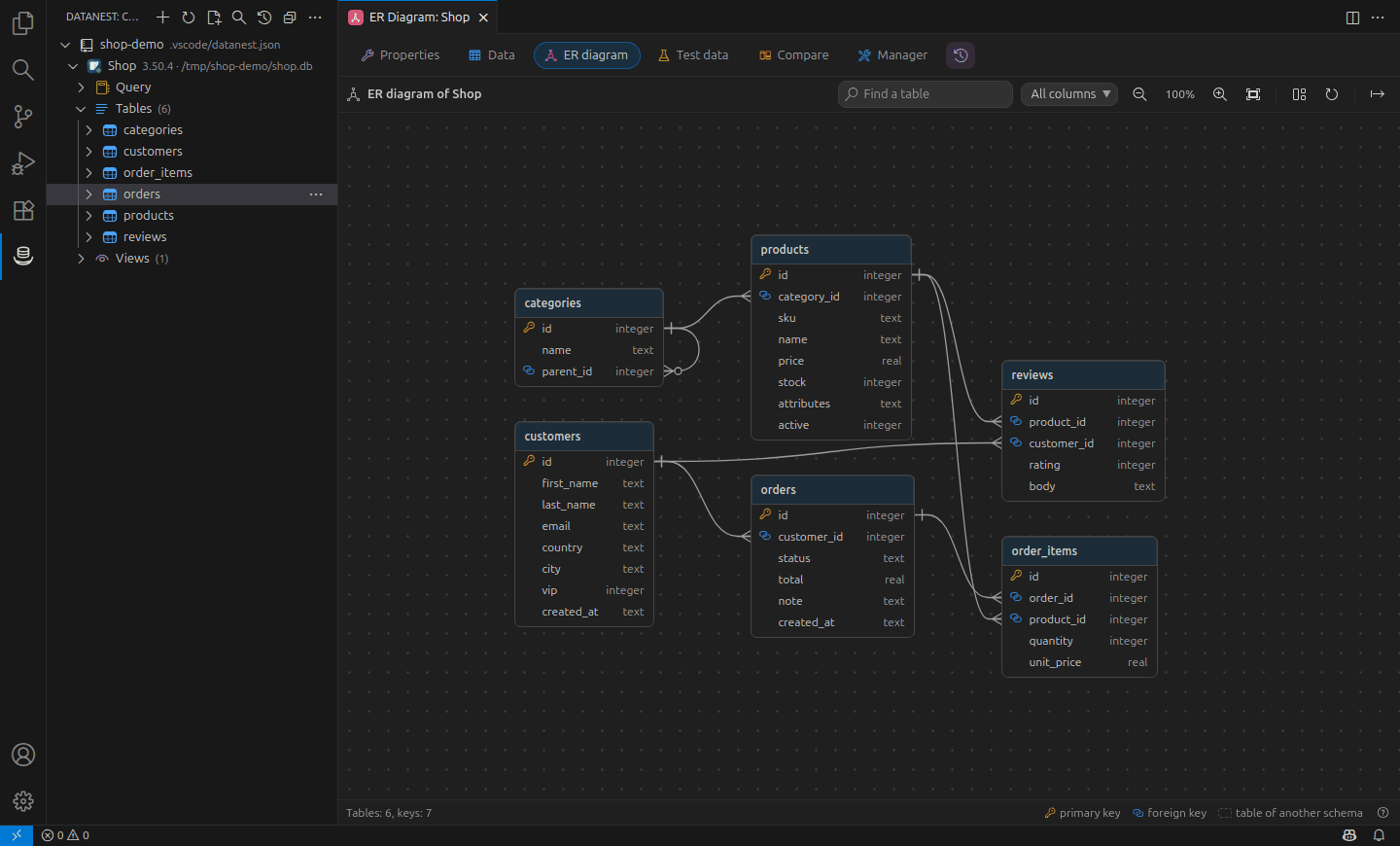
EN ER diagram of the database · RU ER-диаграмма базы данных · UZ Ma’lumotlar bazasi ER diagrammasi · ZH 数据库 ER 图 · ES Diagrama ER de la base de datos · TR Veritabanı ER diyagramı · DE ER-Diagramm der Datenbank · FR Diagramme ER de la base · PT Diagrama ER do banco de dados · AR مخطط ER لقاعدة البيانات
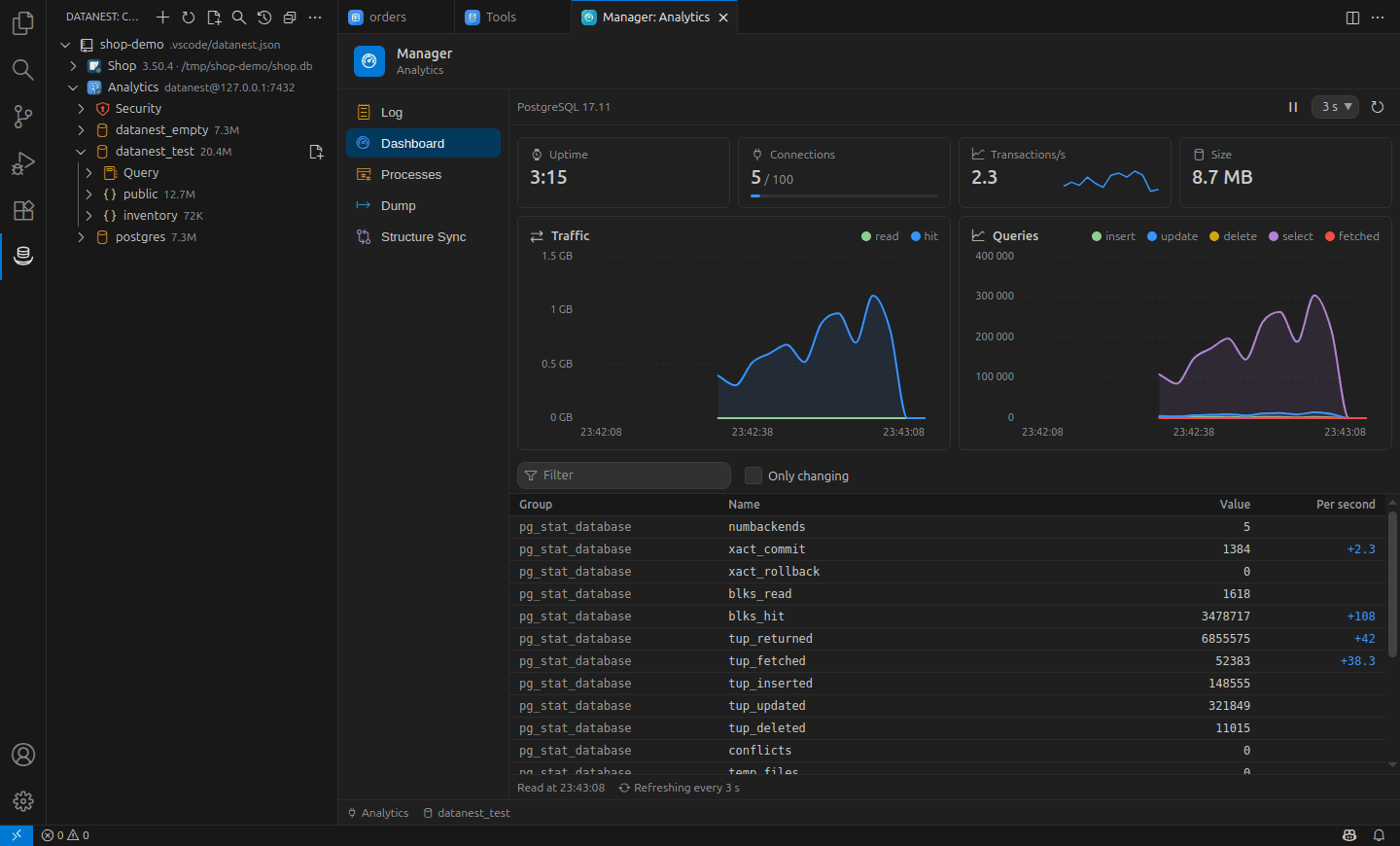
EN Live server dashboard · RU Мониторинг сервера в реальном времени · UZ Server monitoringi real vaqtda · ZH 实时服务器监控 · ES Panel del servidor en tiempo real · TR Canlı sunucu panosu · DE Live-Serverüberwachung · FR Tableau de bord du serveur en direct · PT Painel do servidor em tempo real · AR لوحة مراقبة الخادم المباشرة
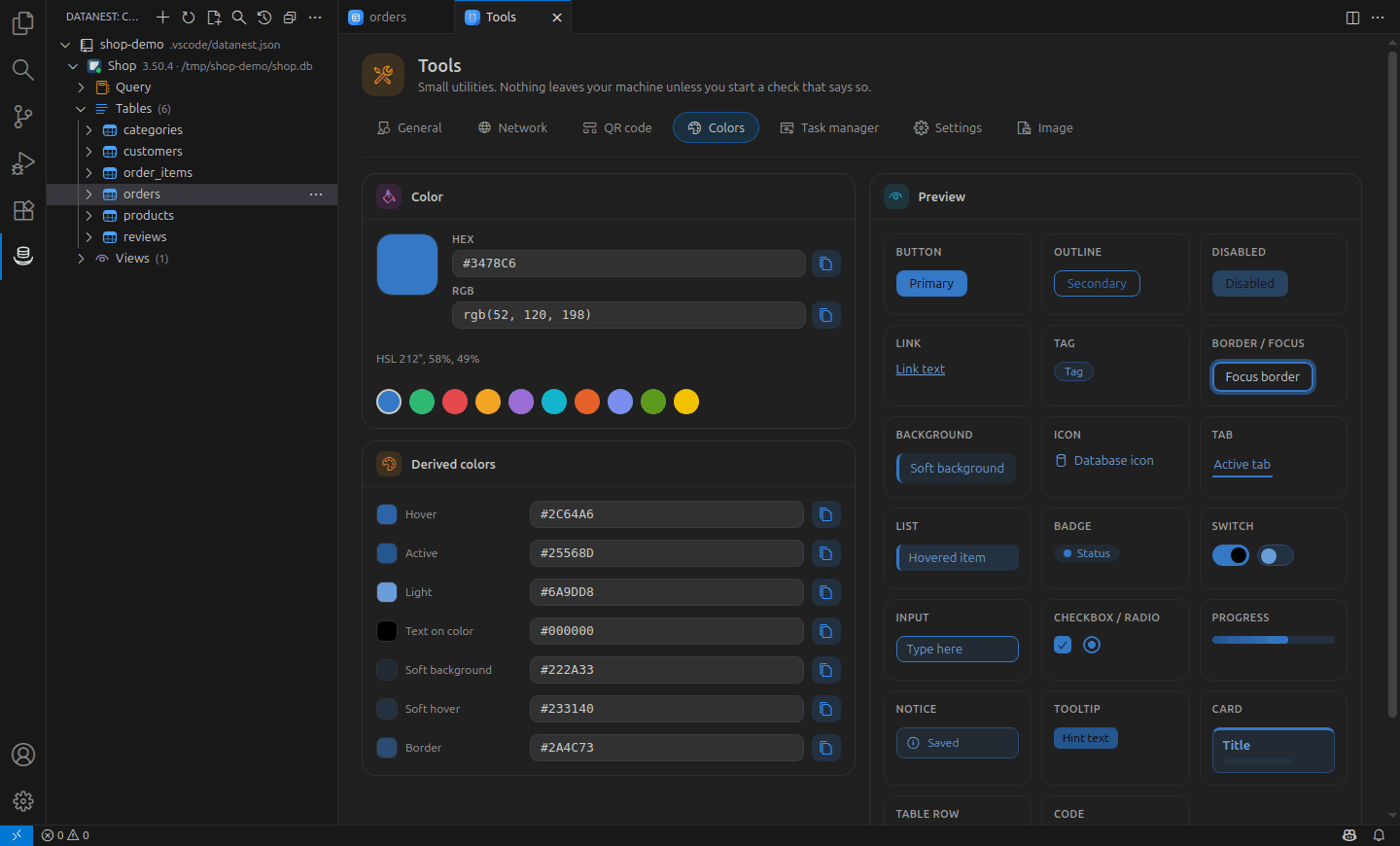
EN Built-in tools: colors, QR, images · RU Встроенные инструменты: цвета, QR, изображения · UZ Ichki vositalar: ranglar, QR, rasmlar · ZH 内置工具:颜色、二维码、图片 · ES Herramientas: colores, QR, imágenes · TR Yerleşik araçlar: renk, QR, görsel · DE Werkzeuge: Farben, QR, Bilder · FR Outils : couleurs, QR, images · PT Ferramentas: cores, QR, imagens · AR أدوات مدمجة: الألوان ورمز QR والصور
Supported databases
| Database |
Notes |
| MySQL, MariaDB |
Tables, designer, SQL, import and export, users and privileges |
| PostgreSQL |
Schemas, roles and privileges, visual query plans, sequences and triggers |
| SQLite |
Opens .db files from the Explorer; no server needed |
| Microsoft SQL Server |
2016 and newer, Azure SQL |
| Oracle |
12.2 and newer, no Instant Client needed |
| ClickHouse |
Over HTTP, streaming results |
| MongoDB |
Replica sets, mongodb+srv://, documents as a table or as text |
| Redis |
One server, Sentinel, cluster; Valkey too |
| Elasticsearch, OpenSearch |
Console-style requests, hits as a table |
| TiDB, CockroachDB, YugabyteDB, Amazon Aurora |
Through the MySQL and PostgreSQL drivers, with presets |
All of them work through SSH tunnels, SOCKS5 and HTTP proxies and TLS where the server supports it.
What it does
Connections
- MySQL, MariaDB, PostgreSQL, SQLite, Microsoft SQL Server (2016 and newer, Azure SQL),
ClickHouse and Oracle (12.2 and newer, no Instant Client needed), each driver loaded only
when you first use it. TiDB, CockroachDB, YugabyteDB and Amazon Aurora work through the
MySQL and PostgreSQL drivers, with presets in the connection form.
- Redis (one server, Sentinel, cluster; Valkey too), MongoDB (one server, replica set,
mongodb+srv://, X.509) and Elasticsearch or OpenSearch (user and password or an API
key), with the same connections, folders, SSH, TLS, production and read-only marks.
- A form with “Test connection”, editing, duplicating and deleting; fill it from a
postgres://, mysql://, sqlserver://, clickhouse://, oracle://, redis://,
mongodb:// or elasticsearch:// URL (or a JDBC oracle:thin:@… one), or import
connections from the workspace's .env files.
- SOCKS5 and HTTP proxies, Unix sockets for MySQL, PostgreSQL and Redis on this machine.
- The connection list can travel with the editor's Settings Sync — never the passwords.
- SSH tunnels with a password, a key or an SSH agent, through up to five jump hosts,
with the server key checked like OpenSSH does.
- SSL/TLS with a choice of checks, your own CA and client certificates (not yet for
Oracle: connect to it directly or through SSH).
- Folders, drag and drop and color labels in the tree.
- Production connections stand out in red and confirm every change; read-only
connections refuse changes, and the server session is read-only too (SQL Server has
no such session, so there DataNest alone refuses).
- Project connections in
.vscode/datanest.json, committed for the team without passwords.
- Per connection: timeouts, keep-alive, time zone, character set, init SQL, and which
databases and schemas to show.
- Export the connection list and import it elsewhere — never with passwords.
- Passwords live in the editor's SecretStorage, never in settings or a file.
Browsing
- A tree from the connection down to the columns, with type, primary key and
NOT NULL.
- Structure is cached, so expanding a node twice does not ask the server twice.
- The server's own databases and schemas are hidden until you ask for them.
- “Open Table” shows a table page by page with the total row count.
- Estimated rows of each table in the tree, size and comment in its tooltip; a filter for
long lists of tables; “Duplicate Table…”; SQLite files open from the Explorer.
Database structure
- Functions, procedures, triggers, indexes, foreign keys, sequences and events in the tree.
- Show the DDL of any object; edit views, routines and triggers as SQL and apply them safely.
- A table designer for new and existing tables — columns, keys, indexes and foreign keys —
that turns your changes into
CREATE or ALTER TABLE and shows the SQL before it runs.
- Create, rename, empty and drop tables; create and drop databases and schemas.
- Find any table, view or routine across all connected connections.
Writing SQL
- Queries run in a normal editor tab, so your keybindings, themes and extensions work.
Ctrl+Enter runs the statement under the cursor or the selection,
Ctrl+Shift+Enter runs the whole file, and a “▶ Run” lens sits above every statement.- The statement splitter understands strings, comments,
$$ … $$, MySQL's DELIMITER
and SQL Server's GO, procedure bodies and variables of a batch.
- Completion knows aliases, the columns of every joined table, CTEs and subqueries,
dialect functions and statement snippets.
- Hover over a table or column for its type, keys and comment; F12 opens its DDL.
- Format Document in the dialect of the connection, with style settings.
- Errors from the server are underlined right where they happened.
- Variables:
:name or ${name} in a statement asks for the value when it runs.
- A saved
.sql file remembers its connection; the statement under the cursor is
highlighted, and statements fold.
- Generate
SELECT, INSERT, UPDATE and DELETE templates for a table.
- A running query shows its elapsed time and can be cancelled.
- Auto-commit or manual commit per editor: the status bar shows an open transaction,
as the server reports it, with Commit and Rollback.
Results
- A virtualized grid: a hundred thousand rows cost the same as a hundred.
- Sorting by clicking a header, and a search that looks through the whole result.
- Select cells with the mouse or the keyboard and copy them as TSV, ready for a spreadsheet.
- “Copy as” CSV, JSON, Markdown, SQL
INSERT/UPDATE or an IN (…) list, and export
the whole result to CSV, JSON, SQL, Markdown or Excel.
- Hide and pin columns, fit widths to the content, and look at long text, JSON,
hex dumps and BLOB images in a value panel.
- Values keep their precision: a
BIGINT or a DECIMAL is never rounded on the way
to the screen, to the clipboard or into a file.
Editing data
- Edit cells in place with editors that know the column type, set
NULL or DEFAULT,
add, duplicate and delete rows.
- Changes wait in a queue: preview the SQL, undo, and save them in one transaction.
- Tables without a key are edited by the values of the whole row; a cell loads from a file.
- Totals of the selected cells: count, sum, average, minimum and maximum.
- A record card shows one row as a form; a foreign key cell opens the row it points at.
- Tables filter, sort and page on the server, with a fast estimated row count.
Import, export and transfer
- Run SQL files of any size — dumps included — statement by statement as they are read,
with progress, cancel, and a choice to stop at the first error or go on.
- Dump tables, a whole database or a schema to a
.sql script — structure, data or
both — read in one consistent snapshot and ordered to load into an empty database.
- Import CSV and JSON files into a table: column mapping, a preview with the values as
they will be stored, batches, and a report of every row that did not fit.
- Export a whole table to CSV, JSON, SQL, Markdown or Excel straight from the server,
however large it is — not just the rows on screen.
- Find a text in every table of a database, document a database as Markdown, and open the
database's own command-line client in a terminal.
- Generate test data that fits each column: names, emails, cities, prices, dates, keys of
the referenced table, with a seed that makes it repeatable.
- Copy tables to another connection, even another database system: types, defaults and
keys are translated, and the report says what could not be.
Redis, MongoDB and Elasticsearch
- Redis: keys in folders by
:, loaded with SCAN so the server never blocks; a page per
key for strings (text, JSON, hex), hashes, lists, sets, sorted sets and streams, with
editing and TTL; a console with suggestions from the server's own command docs; server
information.
- MongoDB: databases, collections, views and indexes in the tree; a page per collection
with a filter, a sort and a projection, as a table or as text, and editing that never
overwrites someone else's change; queries in an editor (
find, aggregate, counts,
writes) run with Ctrl+Enter. Exact BSON types and field order are kept.
- MongoDB collections export to and import from Extended JSON files; Elasticsearch requests
copy as cURL, and a new query to an index starts with templates.
- Elasticsearch: indices and their mapping fields in the tree; requests written as in a
console (
GET /products/_search and a JSON body) sent with Ctrl+Enter, the hits as a
table and the whole answer as text, 64-bit numbers exact.
Tools
- An ER diagram of a database, schema or chosen tables, laid out automatically, with pan,
zoom, search and export to SVG or PNG.
- Visual query plans: the plan of the statement under the cursor as a tree with the
costly nodes marked and warnings for full scans, sorts, spills and bad estimates;
EXPLAIN ANALYZE for statements that read.
- Compare two schemas and get a migration script; compare the rows of two tables — even
in two kinds of database — and get a sync script. Scripts only open in an editor.
- A server monitor: sessions with what they run and wait for, cancel a statement or end a
session; variables and status counters with their change per second.
- Users and privileges: accounts and roles, grant and revoke on the server, a database, a
schema or a table, passwords and locking — every change previewed as SQL first.
- Charts of a query result — lines, bars or a pie — saved as SVG or PNG.
- A Manager page per connection: a log of your statements, a live server dashboard, the process list, dump to SQL and structure sync.
- A Tools page: hashes and encodings, random values, network checks (ping, DNS, ports), colours, QR codes (read and create), image crop, resize and compress, an SVG editor and designer, a task manager.
Safety and history
- Safe mode asks before
DELETE or UPDATE without WHERE, DROP and TRUNCATE — and
before FLUSHALL, a MongoDB drop or deleteMany({}), an Elasticsearch index delete.
Production connections ask before every change, read-only ones refuse it, in every
database family.
- Every statement goes to a searchable history, with passwords masked, ready to rerun.
Language and accessibility
- English and Russian, following the editor's display language — the messages of every
driver included.
- Every page works from the keyboard and follows the editor's theme, high contrast
included. The result grid is one tab stop that screen readers walk cell by cell:
arrows move,
Shift+Alt+↑ sorts by the column, Shift+Alt+←/→ change its width,
F4 shows the whole value. The ER diagram walks its tables with ] and [, a chart
reads its values with the arrow keys.
Getting started
- Open the DataNest view in the activity bar.
- Press New Connection, fill in the form and press Test connection.
- Save it, expand the connection, and open a table — or press New Query and write SQL.
The documentation has a guide to every feature, the
keyboard shortcuts, a FAQ and a guide to
adding a database driver.
Settings
| Setting |
Default |
What it does |
datanest.rowLimit |
1000 |
Rows one statement may bring back. |
datanest.pageSize |
200 |
Rows on one page when a table is opened from the tree. |
datanest.queryTimeout |
0 |
Seconds before a statement is cancelled; 0 means no limit. |
datanest.showSystemObjects |
false |
Show the server's own databases and schemas. |
datanest.historyLimit |
500 |
Statements kept in the query history; 0 turns it off. |
datanest.safeMode |
confirm |
Before a destructive statement: confirm, block or off. |
datanest.transactionMode |
auto |
How a new SQL editor commits: auto, or manual (Commit/Rollback). |
datanest.format.keywordCase |
upper |
Keyword case when formatting; also dataTypeCase, functionCase. |
datanest.format.indentStyle |
standard |
standard, tabularLeft or tabularRight. |
datanest.format.logicalOperatorNewline |
before |
Put AND/OR at the start or the end of a line. |
datanest.format.expressionWidth |
50 |
Shorter parenthesized expressions stay on one line. |
datanest.format.denseOperators |
false |
Write a+b instead of a + b. |
datanest.redis.keySeparator |
: |
What splits Redis key names into folders in the tree. |
datanest.redis.keysPerLoad |
5000 |
Redis keys loaded at a time with SCAN. |
datanest.logLevel |
info |
How much goes to the DataNest output channel. |
Every setting is described in Settings.
Privacy
DataNest has no telemetry and no account: the extension talks only to the databases you
configure. The one exception is a check you start yourself on the Tools page — your public
address, DNS over HTTPS, or compressing an image with TinyPNG — and each of them says which
server the request goes to before you press the button. Passwords are kept in the editor's
SecretStorage, and the log masks anything that looks like a password or a token.
Requirements
VS Code 1.105 or newer, or a fork based on it (VSCodium, Cursor, Windsurf,
Antigravity, …). No native modules are used, so the same build works on Linux,
Windows and macOS.
Development
Requirements: Node.js 22+, npm, Docker (for integration tests).
npm install
npm run build          # build the extension
npm test               # unit tests
npm run db:up          # start the core test databases (ports 7000–7999)
npm run db:up -- all   # …or every group; `-- <group>` for one
npm run test:integration  # core, plus every group that is running
npm run test:e2e       # smoke tests in a real VS Code
npm run test:perf      # the performance budget (bundle sizes, a million rows)
Press F5 in VS Code to launch the Extension Development Host.
How to contribute: CONTRIBUTING.md. Architecture and rules:
ARCHITECTURE.md.
Plan and progress: ROADMAP.md.
License
MIT
Database names and logos shown next to connections are trademarks of their owners, used only to identify the database; DataNest is not affiliated with them (see resources/licenses/brands.txt).
| |

