Colorful tmpl — highlighting for Go templates
Colorful syntax highlighting for Go templates — in pure template files, or mixed into the language they generate.
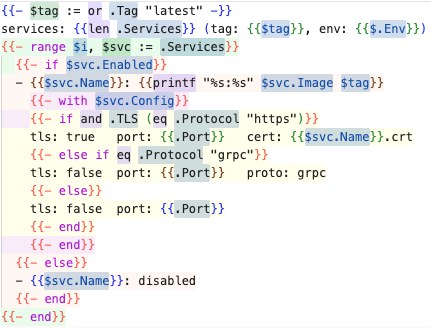
What it does
- Background colors — each nesting level (
if / range / with / define) gets its own background color, rotating through 6 levels.
- Variable spotting —
$x := definitions glow green, $x = assignments glow orange, $x uses glow blue.
- Diff & peek views — the same highlighting shows up there too.
- Theme-friendly — your theme styles definitions, assignments, and uses differently.
- Works in any file —
{{ }} actions get highlighted inside YAML, SQL, or another language, without losing that language's own colors.
Choosing a language mode
Most templates need a one-time config change — tell VS Code which language mode
to use for each template file:
| File type |
Language mode to set |
Why |
Pure Go template (.gotmpl, .gohtml, …) |
Colorful Go Template |
The file IS the template; no base syntax to preserve. |
| Template wrapping CMake, SQL, YAML, … |
Keep the base language (cmake, sql, yaml, …) |
The injection grammar adds {{ }} scopes on top; the decorator runs automatically. |
For mixed templates, add patterns to files.associations — more specific globs win:
// .vscode/settings.json or user settings
"files.associations": {
  // pure templates → colorful-tmpl
  "*.gotmpl": "colorful-tmpl",
  "*.gohtml": "colorful-tmpl",
  // mixed templates → base language (more specific patterns take priority)
  "CMakeLists.*.tmpl": "cmake",
  "*.cmake.tmpl": "cmake",
  "*.yaml.tmpl": "yaml",
  "*.sql.tmpl": "sql",
  "*.sh.tmpl": "shellscript",
  "*.py.tmpl": "python",
  "*.java.tmpl": "java",
  // fallback for any remaining .tmpl
  "*.tmpl": "colorful-tmpl"
}
Host-language errors
Mixed templates keep their base language, so that language's tooling (Java's language server, pyright, ESLint, …) will flag the {{ }} lines as errors — the delimiters are not valid in the host language. That's expected and harmless. To silence it, exclude *.tmpl from that tool's project, e.g. Java: java.project.resourceFilters in .vscode/settings.json.
Palettes in 30 seconds
- Open any template — a
.gotmpl/.gohtml file, or a .tmpl file kept in its base language (see above).
- Command Palette (
⇧⌘P on macOS, Ctrl+Shift+P elsewhere) → Colorful tmpl: Switch Palette.
- Choose one:
- Default — soft pastels (theme-aware light/dark).
- High Contrast — bolder, more opaque backgrounds.
- Custom — your own colors.
Nested blocks re-decorate immediately.
Prefer Settings? Search Colorful tmpl → Palette: Preset dropdown. Note that VS Code Settings can't render color swatches — values appear as rgba()/hex text there; the actual colors show in the editor on nested template blocks. For a custom palette, set the preset to custom and list the colors (they rotate through nesting levels):
"colorful-tmpl.palette.preset": "custom",
"colorful-tmpl.palette.custom": [
  "rgba(178, 218, 232, 0.18)", // level 1
  "rgba(160, 235, 178, 0.18)", // level 2
  "rgba(255, 222, 192, 0.20)", // level 3
  "rgba(236, 190, 238, 0.18)", // level 4
  "rgba(255, 252, 180, 0.18)", // level 5
  "rgba(255, 198, 208, 0.18)"  // level 6 — then wraps back to level 1
]
Any rgba() or hex works.
Settings
| Key |
Default |
Description |
colorful-tmpl.highlight.enabled |
true |
Master switch: every background this extension paints — nesting bands and variable/function/pipe/comment highlights. |
colorful-tmpl.highlight.variables |
true |
Variable definitions, assignments and uses ($x :=, $x =, $x, .Field). Off keeps bands, functions and pipes. |
colorful-tmpl.highlight.functions |
true |
Function calls (print, index, coll.Slice, …). Off keeps bands, variables and pipes. |
colorful-tmpl.palette.preset |
default |
Named palette: default, highContrast, or custom (rendered as a dropdown in Settings). |
colorful-tmpl.palette.custom |
6 rgba colors |
Custom nesting-level colors, used when preset is custom. |
colorful-tmpl.palette.variableDefColor |
theme green |
Background color for $x := definitions. |
colorful-tmpl.palette.variableAssignColor |
theme orange |
Background color for $x = assignments. |
colorful-tmpl.palette.variableUseColor |
theme blue |
Background color for $x uses. |
Before 0.1.4 the switches were named colorful-tmpl.palette.enabled, ...variableHighlight and ...functionHighlight. Those keys still work (and are marked deprecated in Settings), but new settings belong under colorful-tmpl.highlight.*.
Switch palettes without opening Settings via the Colorful tmpl: Switch Palette command in the Command Palette. The default and highContrast palettes are theme-aware (light vs. dark); highContrast uses stronger, more opaque backgrounds and also boosts the variable/function/pipe/comment highlights.
If highlighting ever looks wrong, Colorful tmpl: Diagnose Highlighting prints the running version, the resolved switches and what it paints for the open file (also in the Colorful tmpl output channel).
Installation
Install from the VS Code Marketplace: ext install d-led.colorful-tmpl.
License
MPL-2.0

