AgenticKanbasutra
A preview VS Code extension for planning, queueing, running, and reviewing coding-agent tasks across local Git repositories.




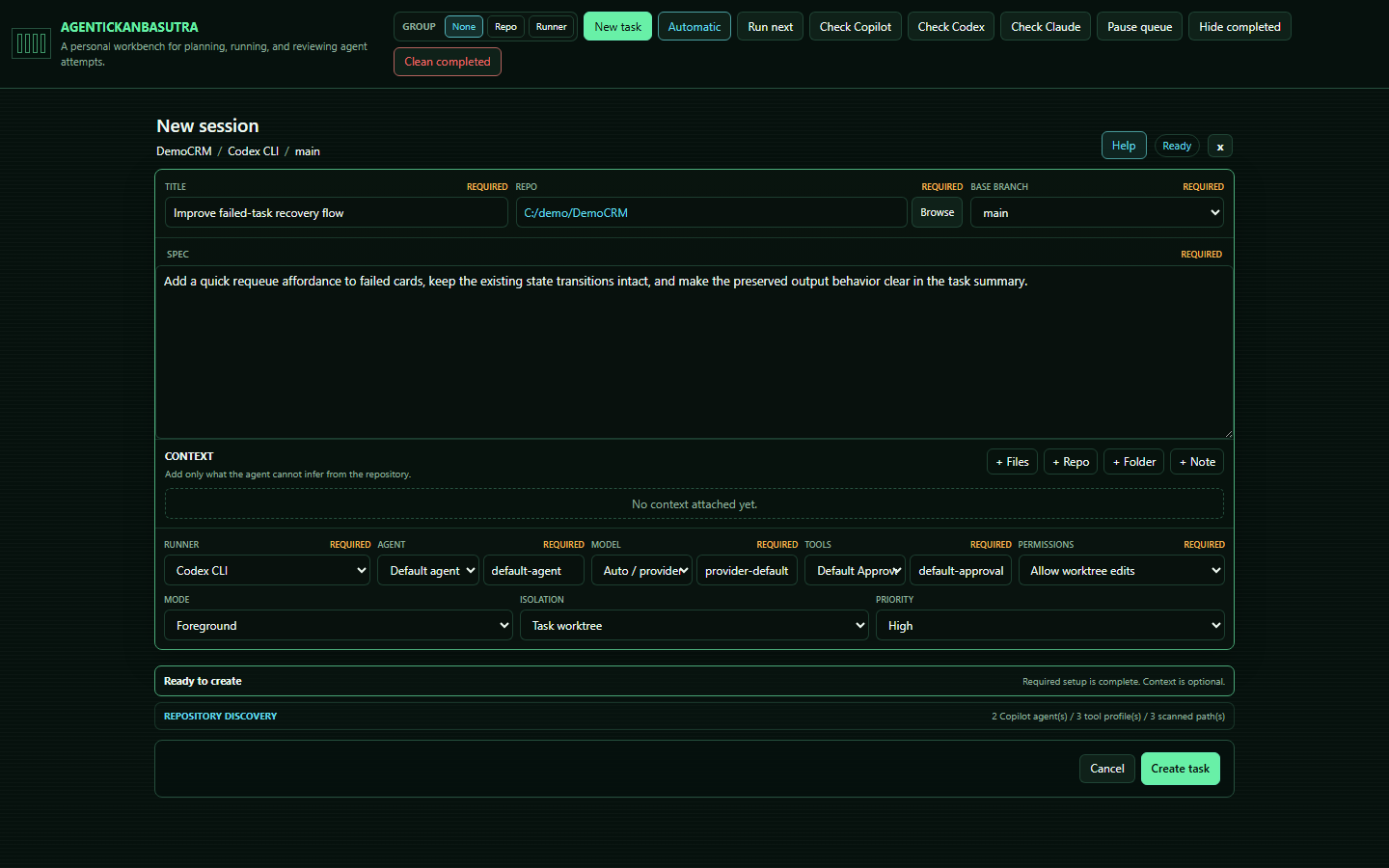
AgenticKanbasutra turns agent work into visible, repeatable tasks. Create a task with a repository, prompt, runner, model, permissions, branch, priority, and attached context; then move it through a focused Kanban workflow.
Project site: https://cperezsx.github.io/AgenticKanbasutra/
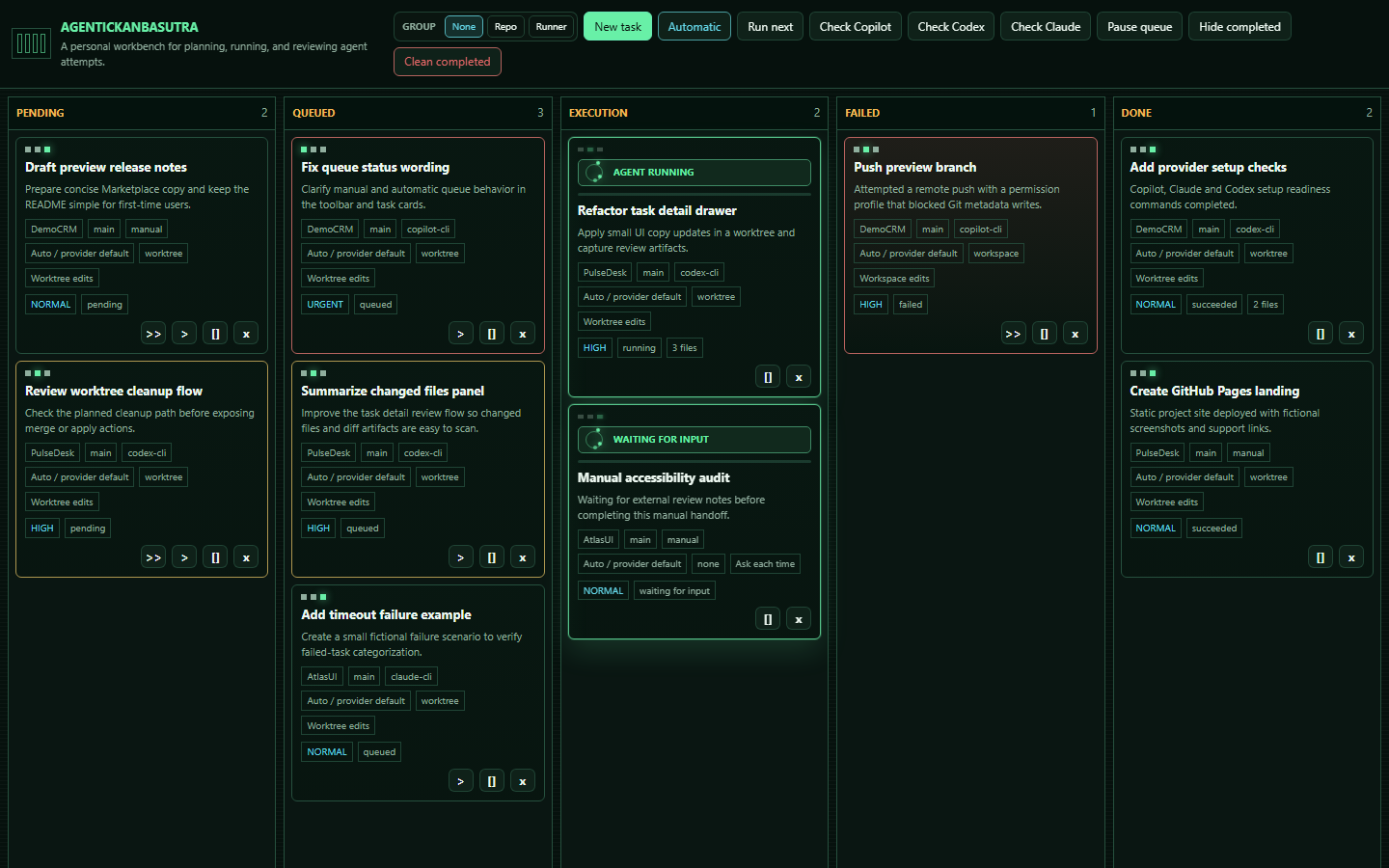
PENDING -> QUEUED -> EXECUTION -> FAILED / DONE
It is designed for individual developers who want a safer command center for Copilot, Codex, Claude, manual handoffs, and custom local automation.
Contents
Why Use It
- Keep agent tasks organized instead of losing prompts in chat history.
- Run tasks manually or automatically from a queue.
- Open the full board as an editor webview when the sidebar is too tight.
- Choose the right runner, model, permissions, and repository per task.
- Open a task repository or nearby
.code-workspace directly in a new VS Code window.
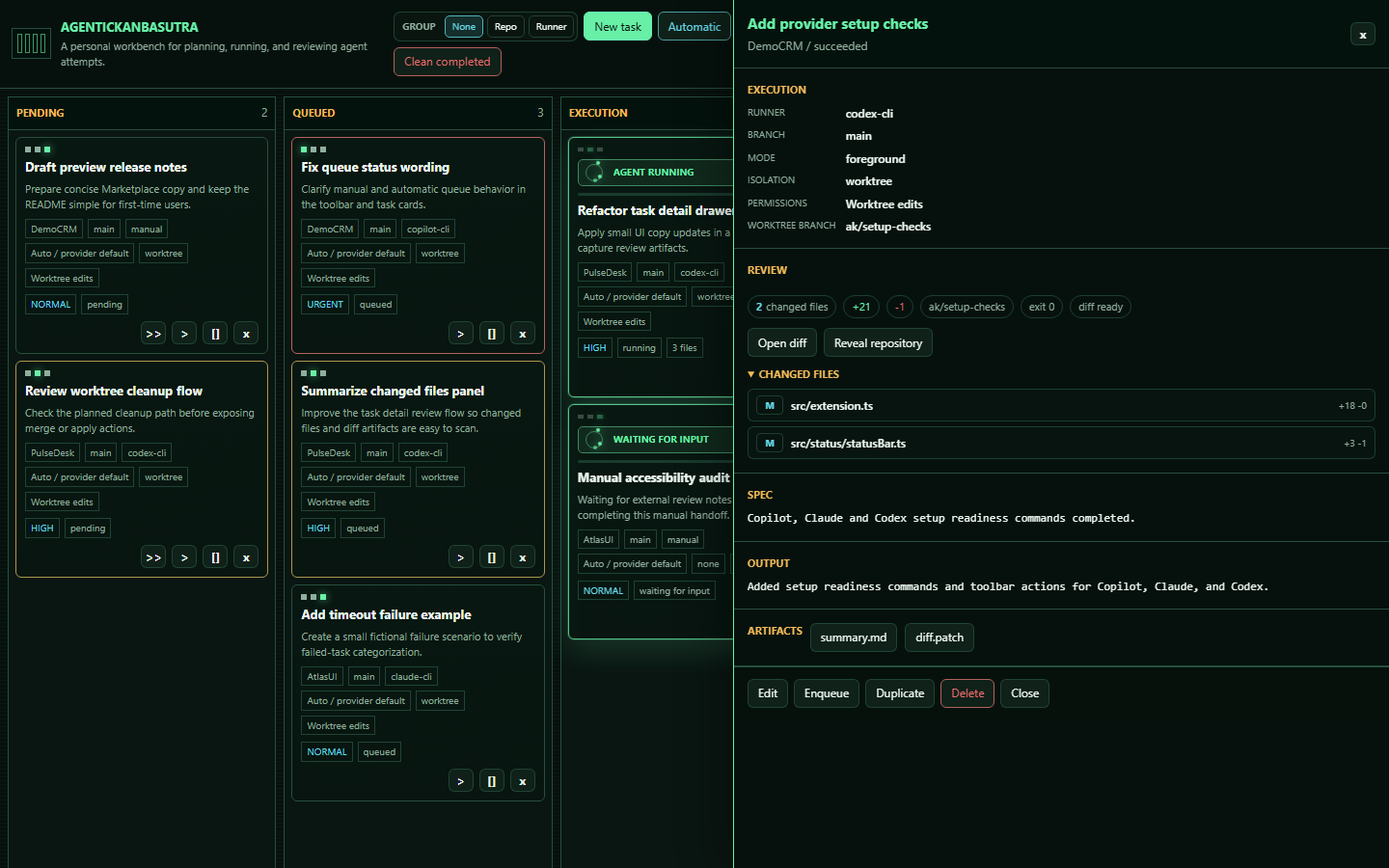
- Capture prompts, logs, summaries, diffs, changed files, and failure details.
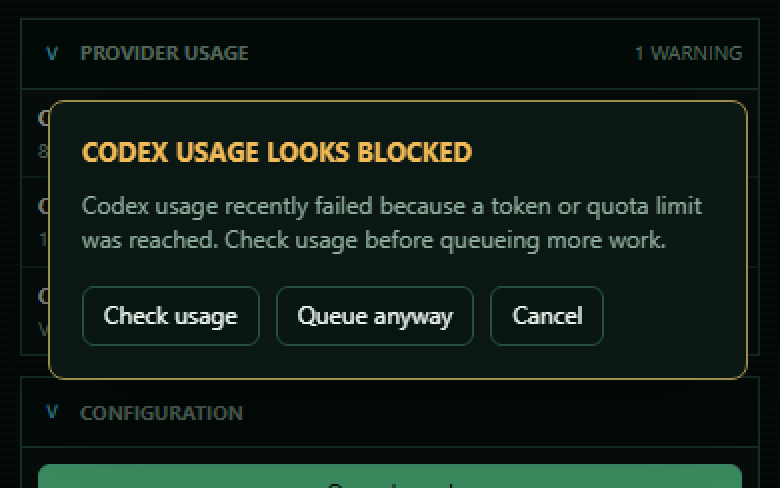
- Run best-effort provider health preflights for Codex and Claude before queueing work, with Copilot linked to web review.
- Requeue failed tasks after fixing authentication, quota, permissions, or configuration.
- Review generated work before accepting, merging, or publishing anything.
AgenticKanbasutra is not a replacement for code review, Git discipline, or human judgment. It orchestrates tools; you decide what is safe to run and what is safe to keep.
Screenshots
Workflow
- Open VS Code in or near a Git repository.
- Open the AgenticKanbasutra Activity Bar view.
- Click
New task.
- Select repository, branch, runner, model, tools, permissions, isolation mode, and priority.
- Write the task SPEC and attach only the context that matters.
- Save it to
PENDING, move it to QUEUED, or run it directly.
- Review the task in
DONE or inspect and requeue it from FAILED.
Task Board
The board has five columns:
| Column |
Purpose |
PENDING |
Saved tasks that are not queued yet. |
QUEUED |
Tasks waiting for execution. |
EXECUTION |
Tasks currently running or waiting for manual output. |
FAILED |
Failed attempts that need review or requeue. |
DONE |
Completed, cancelled, or expired tasks. |
Drag and drop is intentionally limited:
- Move tasks between
PENDING and QUEUED.
- Move
FAILED tasks back to PENDING or QUEUED.
EXECUTION and DONE are locked to avoid accidental state changes.
The board can also group tasks by repository or runner, which makes busy queues easier to scan without changing task status or execution order. Group headers can be collapsed when you want a compact view of a busy board.
Runners
| Runner |
Use It For |
Notes |
manual |
Safe testing, external agents, interactive workflows. |
Creates a prompt package and waits for you to paste the result. |
generic-cli |
Custom local automation. |
Runs a configurable command template. |
copilot-cli |
Local GitHub Copilot CLI execution. |
Captures output and maps configured permission arguments. |
copilot-cloud |
GitHub-hosted dispatch preview. |
Dispatches work and waits for follow-up. Final sync is not implemented yet. |
claude-cli |
Local Claude Code CLI execution. |
Runs claude -p in non-interactive mode with configurable permission arguments and Claude Code alias/model choices. |
codex-cli |
Local Codex CLI execution. |
Runs codex exec --json and maps permission profiles to Codex sandbox modes. |
codex-cloud |
Codex Cloud dispatch preview. |
Dispatches work through configured cloud settings. |
codex-manual |
Interactive Codex handoff. |
Opens/copies a structured prompt and waits for manual completion. |
Recommended validation order:
manualgeneric-cli with a harmless commandcopilot-cliclaude-clicodex-cli- Cloud runners after authentication and repository access are confirmed
Queue Modes
Manual queue mode keeps queued tasks idle until you start them:
"agenticKanbasutra.queue.executionMode": "manual"
Automatic queue mode starts queued tasks up to the configured concurrency limit:
"agenticKanbasutra.queue.executionMode": "automatic",
"agenticKanbasutra.queue.maxConcurrent": 2
Queue order uses priority, manual rank, and enqueue time.
Permissions And Isolation
Permission profiles:
| Profile |
Meaning |
read_only |
Inspect and explain without writing files. |
ask |
Interactive approval workflows. Non-interactive runners reject it. |
allow_workspace |
Allow edits in the selected repository path. |
allow_worktree |
Allow edits in a task-specific Git worktree. |
bypass |
Explicit unrestricted mode for tasks that need Git metadata writes or broader tool access. |
Isolation modes:
| Mode |
Meaning |
none |
No special isolation. |
workspace |
Execute directly in the selected repository. |
worktree |
Execute in a task-specific Git worktree when supported. |
Use worktree for write-capable agent runs when practical. Use bypass only when safer profiles cannot perform the required operation, such as branch, commit, or push tasks.
Setup Checks
The extension includes setup reports for provider-backed runners:
AgenticKanbasutra: Check Copilot SetupAgenticKanbasutra: Check Claude SetupAgenticKanbasutra: Check Codex Setup
These reports help confirm executable resolution, authentication signals, and local configuration before you run real tasks.
Provider Usage Health
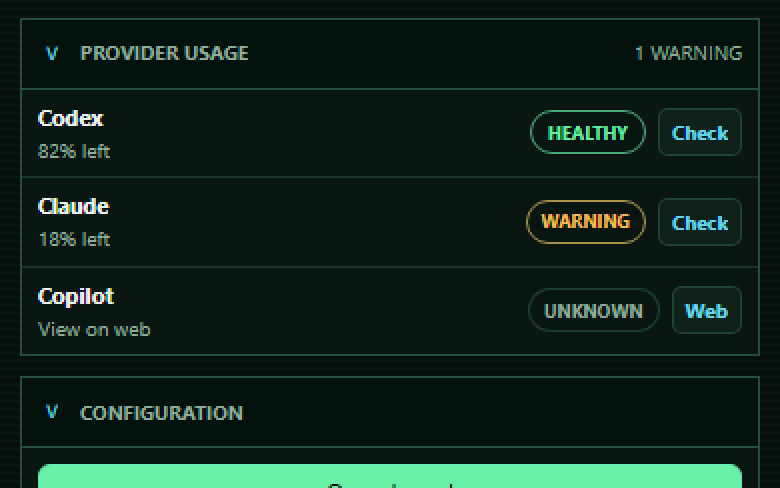
The sidebar includes a collapsible Provider Usage section, and the board header repeats the same signal as compact chips so provider health is visible while you work. Codex uses codex doctor, Claude uses claude -p "/usage" --output-format json --no-session-persistence for local usage windows when available, and Copilot opens the relevant GitHub usage page for manual review.
Task cards also show a compact provider health chip when the runner maps to Codex, Claude, or Copilot, so the board keeps the signal visible without adding another panel.
Before queueing or running a Codex or Claude task, AgenticKanbasutra uses a fresh cached health snapshot when possible; if the snapshot is missing or stale, it tries a short CLI preflight first. If the provider appears blocked by auth, connectivity, quota, tokens, or a recent resource-limit failure, it warns before adding more work. If health cannot be confirmed, the task can still be queued and the sidebar shows the provider as unknown.
Use Update Health to force a fresh best-effort read for locally checkable providers. Copilot remains a web/manual review in this preview.
Usage badges show source, confidence, timestamp, and parsed readiness or quota details when the provider output includes them. For Codex, AgenticKanbasutra also tries to enrich codex doctor with the latest local codex.rate_limits event when available, showing primary and secondary window percentages and reset timing similar to /status. Claude reads the local /usage command first, which can report current-session and weekly usage percentages with reset times; if that is unavailable, it falls back to claude auth status as a readiness-only signal. Reset countdowns are calculated from the absolute resetAt timestamp when available, so cached Claude or Codex snapshots do not keep showing stale resetAfterSeconds values after time has passed. Non-blocking local diagnostics, such as an old Git warning from codex doctor, are kept in the tooltip without marking Codex usage as blocked or warning. This is not an exact token counter; it is a preview health signal designed to avoid obvious blocked runs.
From the board header you can also open the full board in an editor tab or ask VS Code to move that board editor into a separate window when your VS Code version supports auxiliary editor windows.
Configuration
Common settings:
| Setting |
Purpose |
agenticKanbasutra.queue.executionMode |
Manual or automatic queue execution. |
agenticKanbasutra.queue.maxConcurrent |
Maximum concurrent automatic tasks. |
agenticKanbasutra.completed.visible |
Show or hide completed tasks. |
agenticKanbasutra.completed.autoDelete.enabled |
Enable cleanup for completed tasks. |
agenticKanbasutra.artifacts.maxLogBytes |
Maximum captured log size before truncation. |
agenticKanbasutra.runners.genericCli.commandTemplate |
Command template for generic-cli. |
agenticKanbasutra.runners.copilotCli.* |
Copilot CLI executable and permission arguments. |
agenticKanbasutra.runners.claudeCli.* |
Claude CLI executable and permission arguments. |
agenticKanbasutra.runners.claude.defaultModel |
Claude CLI model default. Use auto for Claude Code /model default, or set an explicit model id. |
agenticKanbasutra.runners.claude.modelOptions |
Additional Claude model IDs or aliases shown in the task editor. |
agenticKanbasutra.runners.codexCli.* |
Codex CLI executable and base arguments. |
agenticKanbasutra.runners.toolsProfileOptions |
Shared tools/profile selector values. |
Provider CLIs must be installed and authenticated separately. AgenticKanbasutra does not install Copilot, Claude, Codex, GitHub CLI, MCP servers, or provider tools.
For Claude Code, prefer Auto / Claude default or the CLI aliases fable, sonnet, opus, and haiku when available. Full model IDs can still be added through agenticKanbasutra.runners.claude.modelOptions when your installed Claude Code build or organization exposes them.
Safety
AgenticKanbasutra can launch local commands and coding agents that may edit files, create branches, commit, push, or consume paid provider resources depending on your settings.
Task records and run artifacts are stored locally in VS Code extension storage. They can include repository paths, prompts, notes, attached context, stdout/stderr, summaries, changed-file lists, and diffs.
Use it carefully:
- Review prompts, summaries, logs, and diffs.
- Keep secrets out of task specs, notes, and attached context.
- Sanitize local artifacts before sharing them in public issues.
- Treat runner command templates as trusted code.
- Prefer isolated test repositories while validating setup.
- Keep destructive actions explicit.
- Do not run broad write-capable tasks without understanding the selected permissions.
You are responsible for the tasks you create, the runners you select, the permissions you grant, the changes produced, and any external provider usage. See DISCLAIMER.md and SECURITY.md.
Support
- Report bugs and reproducible runner failures through GitHub Issues.
- Use feature requests for workflow, runner, UI, and Marketplace improvements.
- Do not open public issues for vulnerabilities or sensitive provider-token problems. Follow SECURITY.md.
- Include the runner, repository mode, permission profile, queue mode, relevant logs, and expected behavior when reporting a problem.
- Visit the project site at https://cperezsx.github.io/AgenticKanbasutra/.
Preview Status
AgenticKanbasutra is an early preview.
Current limitations:
- Cloud runners dispatch work but do not yet poll or sync final results automatically.
- Worktree cleanup, merge/apply, and PR actions are not finished.
- Attempt history exists in storage, but the UI focuses on the latest run.
- Automated test coverage needs to grow before a stable release.
- Claude support currently targets the local
claude-cli preview runner.
Author
Carlos Perez
GitHub: @cperezsx
LinkedIn: cperezsx
Development
Install dependencies:
npm install
Compile and validate:
npm run check
npm run test:time-display
npm run test:claude-queue
npm run package
Publish from CI after a validated release PR is merged:
- Add the repository secret
VSCE_PAT with a Visual Studio Marketplace token that has Marketplace Manage scope.
- Open GitHub Actions.
- Run
Publish Marketplace from main, optionally entering the expected version.
Launch an Extension Development Host from VS Code with F5.
License
MIT. See LICENSE.

