covdbg for VS Code
Native Windows C++ coverage, directly in VS Code.
Run your executables with coverage, inspect covered and uncovered lines in the editor, open a detailed report, and rerun discovered test binaries from the Testing view. The extension bundles the covdbg runtime for a smoother setup on Windows.
Get started with covdbg | Product docs and guides
AI Features
covdbg can also expose native coverage data to chat-capable tooling in VS Code.
covdbg_run runs one or more real test executables with coverage, produces a merged workspace result when multiple executables are used, reloads that result into the extension, and returns structured status plus next-step guidance.
covdbg_explore is the workspace-environment discovery entry point for LLMs. It reports where discovered test binaries are, where .covdbg.yaml is configured or resolved, where coverage databases are located, and which runtime and runner paths are active.
covdbg_files lists currently uncovered files from the active loaded workspace coverage result, sorted to help an LLM choose the next file to inspect.
covdbg_code returns grouped uncovered code segments for a source file, including code snippets, nearby context, file metadata, coverage summary, truncation metadata, and workflow guidance for follow-up actions.
These tools are designed for iterative workflows where an LLM proposes a fix, you rebuild real test binaries, rerun coverage, and then query the updated uncovered regions again.
AI Workflow Rules
- Pass real built test executable paths to
covdbg_run. Do not invent a synthetic aggregate executable such as all_tests unless that executable actually exists in the workspace.
- Do not pass
.covdb paths back into the LLM workflow. The extension generates, merges, loads, and switches the active coverage result automatically.
- After coverage is loaded, inspect candidate files with
covdbg_files, then pass only a source file path to covdbg_code. The extension resolves that query against the currently loaded workspace coverage result, including the merged batch result when applicable.
Run one or more real test executables and let the extension merge coverage automatically:
{
"tool": "covdbg_run",
"input": {
"executablePaths": [
"build/tests-suite1.exe",
"build/tests-suite2.exe"
]
}
}
Ask the extension where covdbg resources are located in the current workspace:
{
"tool": "covdbg_explore",
"input": {
"workspaceRoot": "D:/repo",
"limit": 10
}
}
Ask the extension which files are still uncovered in the active merged workspace result:
{
"tool": "covdbg_files",
"input": {
"limit": 10,
"maxCoveragePercent": 80
}
}
Inspect a specific source file from that active workspace result:
{
"tool": "covdbg_code",
"input": {
"filePath": "src/widget.cpp"
}
}
The intended loop is: build real test executables, run coverage, let the extension load the merged workspace result, inspect uncovered files, fix code, rebuild, and rerun coverage.
See Coverage In VS Code
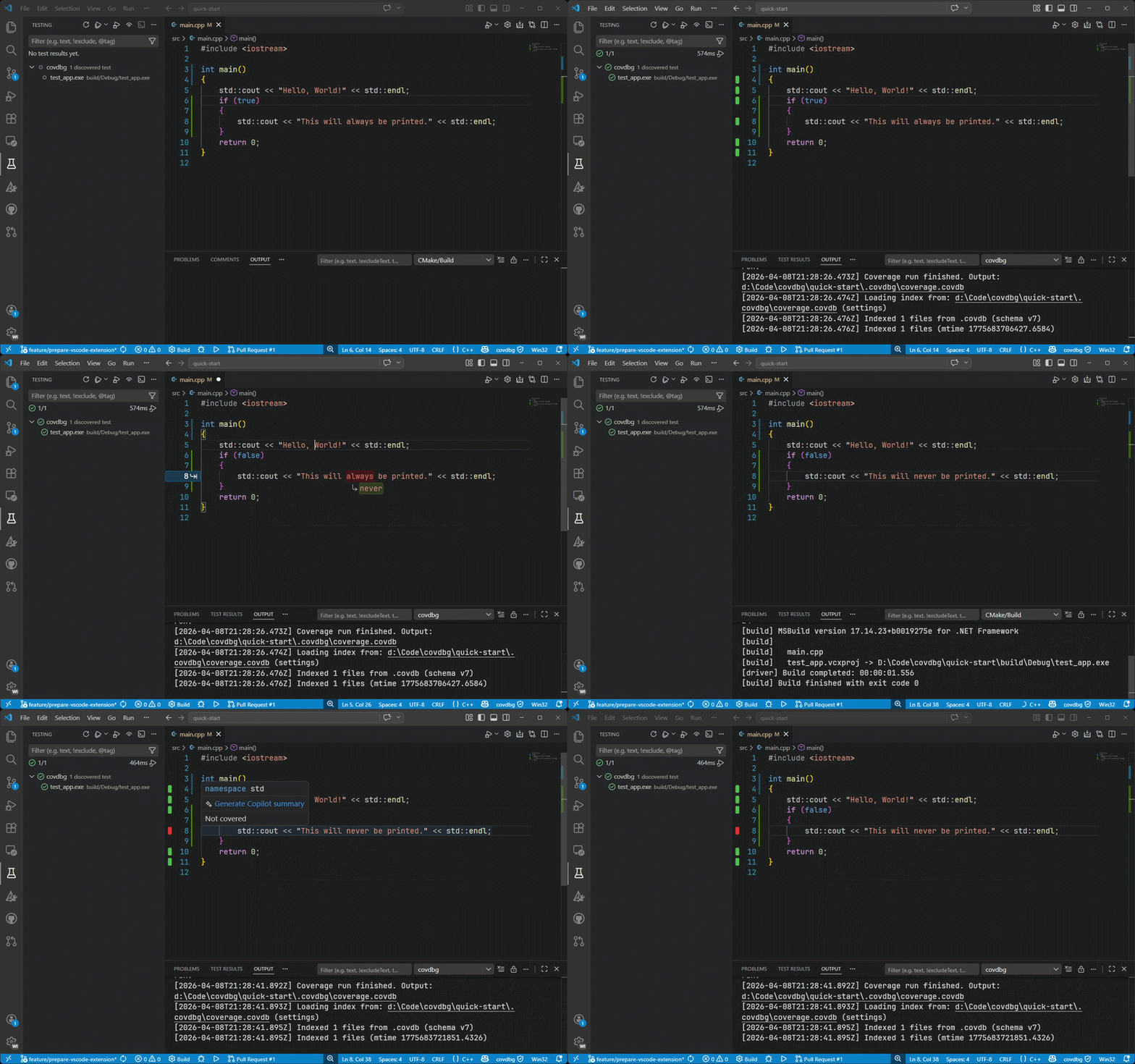
covdbg brings the full coverage workflow into the editor: launch a target, reload results automatically, review inline highlights, and drill into file, folder, and function details without bouncing between separate tools.
Scope coverage with .covdbg.yaml
Choose the test executable from covdbg's discovered binaries, then use .covdbg.yaml to decide what should actually count in the report. This config is where you include or exclude files and functions for that run and where you keep third-party code, SDKs, vendored dependencies, and helper-only test code out of your numbers.
version: 1
source_root: "."
coverage:
default:
files:
include:
- "**/*.cpp"
- "**/*.h"
exclude:
- "tests/helpers/**"
- "third_party/**"
- "external/**"
- "vendor/**"
- "**/Windows Kits/**"
- "**/VC/Tools/MSVC/**"
functions:
include:
- "*"
exclude:
- "__scrt_*"
- "_RTC_*"
- "__security_*"
Use covdbg: Create .covdbg.yaml to generate a starter config in the workspace and tailor it to your binaries, test layout, and dependency boundaries.
Why covdbg
Getting useful coverage for native Windows C++ is usually more work than it should be. covdbg is built to make that workflow practical:
- Use your existing Windows binaries and debug symbols.
- Avoid compiler-specific instrumentation workflows and extra build-system churn.
- Review coverage where you already edit and debug.
- Move from a single run to actionable file and function detail quickly.
- Keep coverage local to your machine and workspace.
What You Get In The Extension
Run coverage without leaving the editor
Choose a target executable, start a coverage run from VS Code, and let the extension reload the latest result automatically.
Inline coverage that stays close to the code
Show covered and uncovered lines with gutter markers, line highlights, or both, so gaps are visible while you work.
Interactive report for deeper inspection
Open a report with file and folder summaries, per-file statistics, and function-level detail when you want more than a line overlay.
Testing UI integration
Discover likely test binaries in your workspace and rerun them with coverage from the built-in Testing view.
AI-assisted coverage workflows
Use the chat tools to ask for uncovered code in a file, apply a fix, rebuild, run the target again with coverage, and inspect the refreshed gaps without leaving VS Code.
Open the covdbg activity bar item to get a live onboarding and status dashboard for the current workspace: license state, runtime resolution, discovered tests, loaded coverage, config health, and the next actions to take.
Flexible result loading
Point covdbg at an existing coverage result or let it discover results in your workspace automatically.
Quick Start
- Install the extension on Windows.
- Open your C++ workspace in VS Code.
- Open the covdbg sidebar to verify runtime, license, config, and target status.
- Add or generate
.covdbg.yaml so the report includes the right project files and excludes SDK or third-party noise.
- Run
covdbg: Run Coverage and choose from the discovered test binaries.
- Review coverage inline or open
covdbg: Show Coverage Report.
If you already have a coverage result, use covdbg: Select .covdb File... and start browsing immediately.
The covdbg status bar entry is always available after startup. If no .covdbg.yaml is present yet, the extension can offer to create one for you.
Typical Workflows
Run a native test binary with coverage
Run covdbg: Run Coverage, choose a discovered test executable, and optionally use covdbg.runner.targetArgs for extra arguments.
Rerun discovered tests from the Testing view
Use covdbg: Refresh Test Binaries to discover likely test executables and run them with coverage from the Test Explorer.
Open and inspect an existing result
Use covdbg: Select .covdb File... or set covdbg.covdbPath to load an existing result for inline review and reporting.
Commands
| Command |
Description |
covdbg: Open Menu |
Open the main covdbg action menu. |
covdbg: Toggle Coverage Display |
Show or hide inline coverage decorations. |
covdbg: Show Coverage Report |
Open the interactive HTML coverage report. |
covdbg: Browse Covered Files |
Jump to files that have coverage data. |
covdbg: Set Render Mode |
Switch between line, gutter, or combined rendering. |
covdbg: Select .covdb File... |
Load a specific coverage result manually. |
covdbg: Run Coverage |
Run a discovered test executable with coverage. |
covdbg: Create .covdbg.yaml |
Create a starter .covdbg.yaml in a workspace folder. |
covdbg: Clear Last Run Result |
Clear the last generated run result from the current workflow. |
covdbg: Refresh Test Binaries |
Refresh executable discovery for the Testing UI. |
Key Settings
| Setting |
Purpose |
covdbg.runner.targetArgs |
Arguments passed to the target executable. |
covdbg.runner.workingDirectory |
Working directory for coverage runs. |
covdbg.runner.outputPath |
Output path for results generated from VS Code. |
covdbg.runner.binaryDiscoveryPattern |
Pattern used to discover test binaries for the Testing UI. |
covdbg.covdbPath |
Load a specific existing coverage result. |
covdbg.discoveryPattern |
Pattern used to discover coverage results automatically. |
covdbg.renderMode |
Choose line, gutter, or both. |
covdbg.showExternalFiles |
Include files outside the workspace in results. |
Learn More