
Skip to content
| Marketplace
Sign in
Visual Studio Code>Testing>Cosmonic: Sandbox AI-Generated Code, MCP, and FunctionsNew to Visual Studio Code? Get it now.
Cosmonic: Sandbox AI-Generated Code, MCP, and Functions

Cosmonic: Sandbox AI-Generated Code, MCP, and Functions

Cosmonic Sandbox

|
2 installs
| (0) | Free
Sandbox for Claude Code, Claude Desktop, Codex, OpenCode, Hermes, and Kiro. Sandbox AI-written code securely: build MCP servers, functions, triggers, HTTP, NATS, Kafka, and more. Works with local AI models, Qwen, Gemma, DeepSeek, Mistral, GPT-OSS, and more, all with zero ambient authority.
Installation
Launch VS Code Quick Open (Ctrl+P), paste the following command, and press enter.
Copied to clipboard
More Info

Cosmonic for VS Code

Run AI generated code safely. Cosmonic gives your coding agent a capability driven WebAssembly sandbox inside VS Code, so the apps it writes can build, deploy, and run locally with no file access, no network, and no keys unless you grant them.
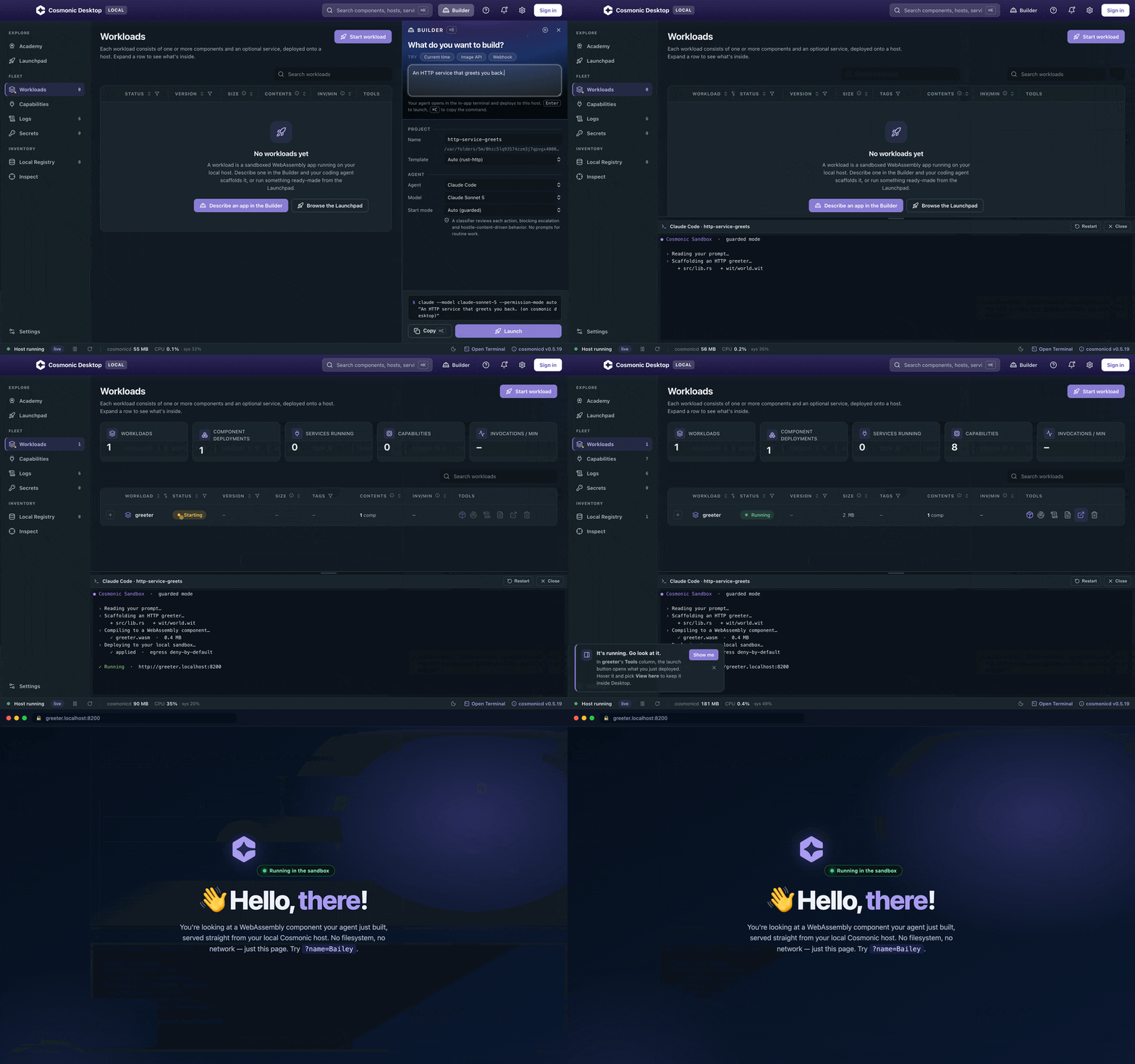
Cosmonic: from prompt to a running sandboxed WebAssembly app

Your agent wrote the code, but can you trust it? Cosmonic starts every workload from zero authority. Containers and seccomp begin with ambient authority and take privileges away; WebAssembly components begin with nothing and receive capabilities only through explicit host grants. This extension brings Cosmonic Desktop into your editor so you can scaffold, deploy, inspect, and watch those workloads without leaving VS Code.

Features

  • Workloads view: every Cosmonic sandbox workload with live status, exports, and granted capabilities, plus start, stop, restart, manifest, logs, and delete.
  • One click deploy: start the Cosmonic dev loop for the current project from the editor title bar. Build, run, and watch, with every save hot swapping the running component.
  • MCP for agent mode: registers Cosmonic Desktop's MCP server with VS Code automatically, so agents get cosmonic_* tools for deploy, logs, inspect, and scaffold with no manual config.
  • Agent terminals: launch Claude Code, Claude Desktop, Codex, Gemini, Kiro CLI, OpenShell, Hermes, opencode, Goose, Aider, Amp, or OpenClaw with the Cosmonic sandbox as the execution substrate.
  • MCP Inspector: open the bundled MCP Inspector on any MCP workload, already connected to that server's endpoint, localhost only with a session token.
  • Workload detail: an editor tab per workload with live invocation sparklines, streaming logs with level filter and search, and point in time stats.
  • Templates: scaffold Rust, Go, and TypeScript HTTP or MCP components from the Cosmonic template catalog, with a local cache so it works offline.
  • Tasks and status bar: a cosmonic task type per project, and a status bar indicator showing how many workloads are running.

Prompt to a sandboxed app, instantly

Cosmonic Desktop includes an integrated MCP server that gives your coding agent the skills to compile your apps and deploy them into your local sandbox. Describe the app you want, hand it to Claude Code, Codex, or any agent on the Agents page, and watch it reach Running.

Capabilities you can see, and revoke

Because a Cosmonic component holds no ambient authority, the Inspect view is the whole truth about what a workload can reach. Every grant is explicit and visible.
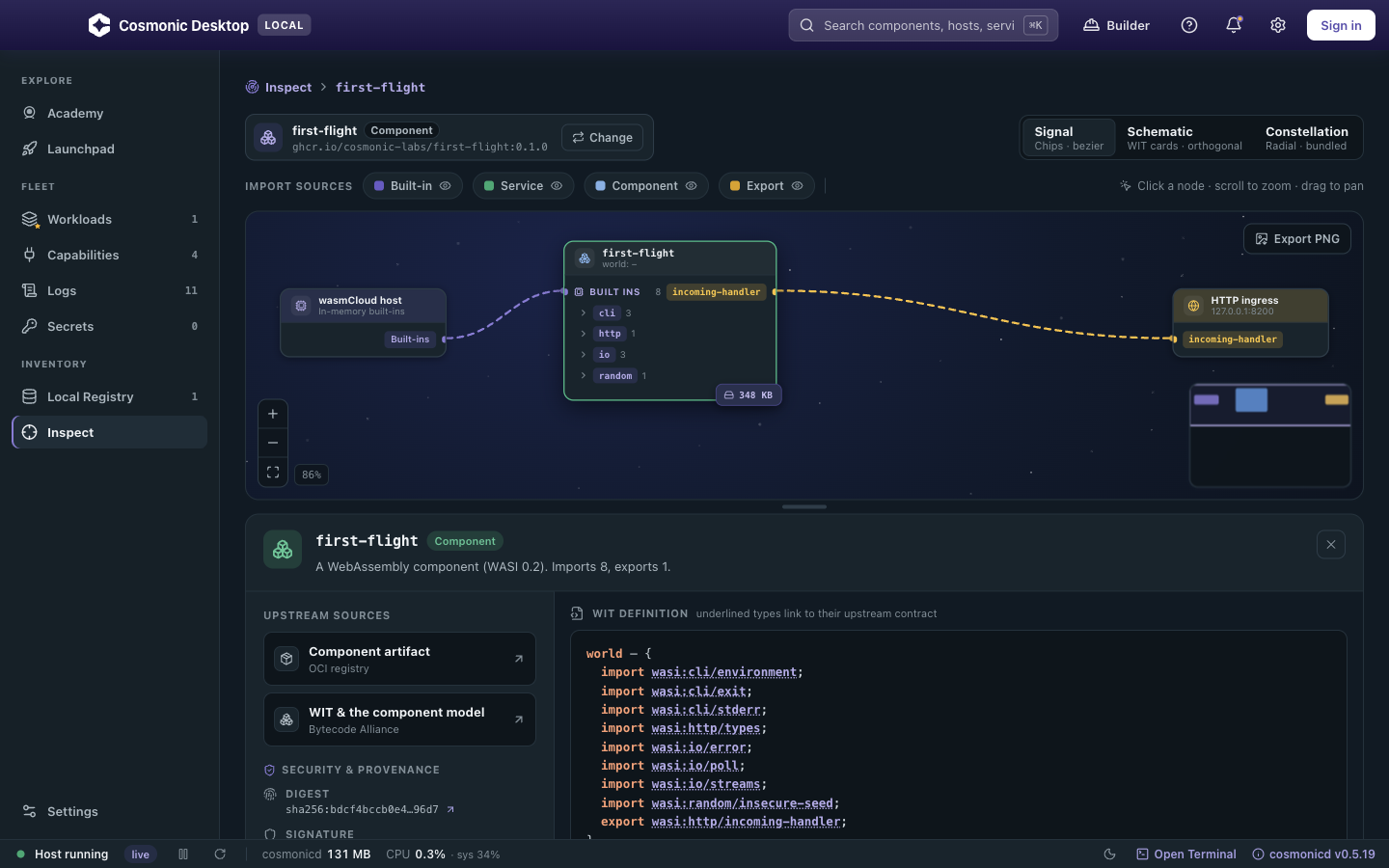
Cosmonic Inspect view showing component capabilities and imported access grants

Open standards, no lock in

Components ship as standard OCI artifacts through Kubernetes style declarative manifests, running on CNCF incubating wasmCloud. The boundaries you develop against are the ones you run in production, with no proprietary packaging in between.

Requirements

Install Cosmonic Desktop, free for macOS, Windows, and Linux. The extension talks to its local daemon over a local socket, so there is no cloud account, no token, and no telemetry.

Settings

Setting Default Purpose
cosmonic.stateDir (platform default) Override the daemon state directory.
cosmonic.deploy.openDetail true Open the workload detail tab after deploy.
cosmonic.agents.additionalClis [] Extra agent CLI names to offer in agent terminals.

Learn more about Cosmonic

  • cosmonic.com: the sandbox for your agent's code.
  • Cosmonic documentation
  • Cosmonic Desktop
  • Cosmonic blog
  • wasmCloud, the CNCF incubating runtime underneath

License

Copyright (c) 2026 Cosmonic Corp. All rights reserved.

  • Contact us
  • Jobs
  • Privacy
  • Manage cookies
  • Terms of use
  • Trademarks
  • Your Privacy Choices
  • Consumer Health Privacy
© 2026 Microsoft