AL Schema for BC MCP
Give your AI coding assistant deep knowledge of your Business Central AL codebase — without sending a single line of code to any external server.
AL Schema builds a complete semantic index of your AL source files and your dependency packages (.app symbols), then exposes that knowledge as an AI-ready MCP server running entirely on your machine.
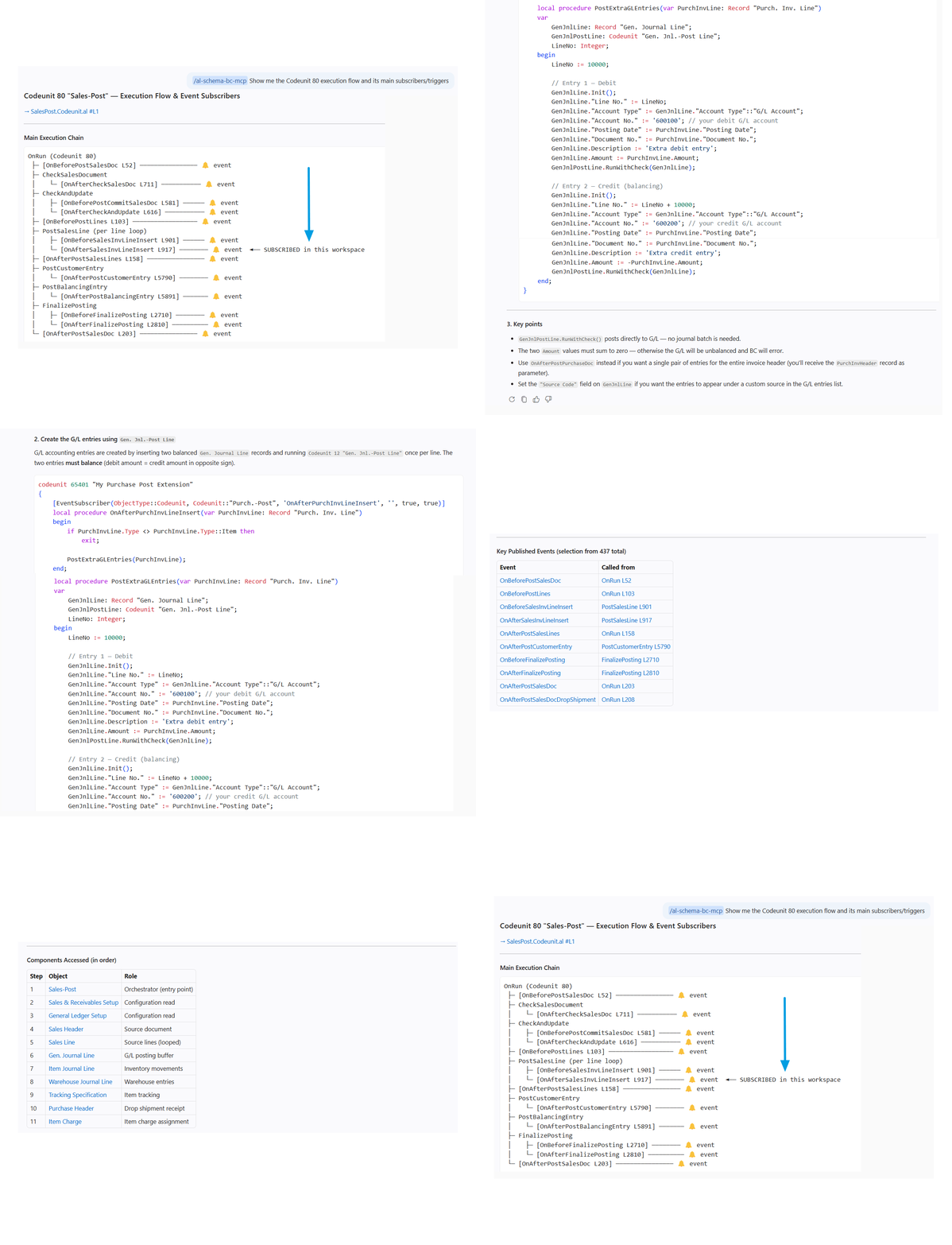
What it does
When you open a Business Central project, AL Schema automatically:
- Indexes your AL sources — every object, procedure, trigger, field, and event in your own code
- Indexes your dependency packages — the
.app files downloaded via Download Symbols, giving the AI full visibility into what Base App and any other dependency exposes
- Starts a local MCP server — wires everything into your AI assistant as a set of semantic tools they can query in real time
The result: your AI assistant can reason about your specific codebase, not just the AL language in general.
What your AI can do
Once active, your AI assistant gains 17 purpose-built tools:
| Tool |
What it answers |
| Find object |
Where is object X? What type is it? |
| Describe object |
Full structure: fields, procedures, triggers, events |
| List events |
All event publishers of an object with exact call-site links |
| Get dependencies |
What does X depend on directly and transitively? |
| Get impact |
If I change X, what else breaks? |
| Explain execution flow |
Trace the full call chain from a procedure |
| Explain event chain |
Follow a published event to all its subscribers |
| Where is field used |
Every place that reads or writes a specific field (optionally scoped to one table) |
| Get table fields |
List all fields of a table with data type and source link |
| Find table extensions |
List every TableExtension that adds fields or triggers to a table |
| Find callers / callees |
Who calls this procedure? What does it call? |
| Find / list procedures |
Search procedures by name across the whole codebase |
Every result includes navigable links that open the exact source line in VS Code.
Security and privacy
Your code stays on your machine. Always.
- No external servers — the index lives entirely in VS Code's private extension storage on your local disk
- No cloud sync — nothing is uploaded, transmitted, or shared
- No API keys needed — the index is protected by a key derived automatically from your machine identity; no passwords or secrets to manage
- Encrypted at rest — the index is cryptographically protected; it cannot be read by other applications
This architecture is a deliberate design choice: AL code often contains business logic, customer data structures, and proprietary customizations that must never leave your control.
Telemetry and version validation
AL Schema contacts bc-schema-api.vercel.app periodically for two purposes:
Version validation (non-optional) — the MCP server checks whether its version is still supported. The data sent is a pseudonymous machine identifier (a one-way hash of your Windows MachineGuid — not reversible to any personal information), the server version, and your approximate region (country/city derived from your IP by Vercel; the raw IP is never stored).
Anonymous usage statistics (opt-out available) — the OS platform, OS version, and number of indexed AL objects. You can disable this in VS Code settings:
"alSchema.telemetry.enabled": false
Grace window: if bc-schema-api.vercel.app is unreachable (e.g. blocked by a corporate firewall), all 17 tools remain available for 96 hours. After that, only the status tool is available until connectivity is restored. Contact your IT team to allow outbound HTTPS to bc-schema-api.vercel.app.
No source code, file paths, field names, procedure names, or any business data is ever transmitted.
Requirements
- VS Code 1.120+
- A workspace containing AL source files (
.al)
- .NET 8 Runtime (or use the self-contained build — no .NET required)
AL Schema is actively evolving and your feedback genuinely shapes what gets built next.
Found a bug, have a feature request, or just want to share how you're using it? Reach out at info@context-foundation.com — all messages are read and appreciated.
Getting Started
- Install the extension from the Marketplace
- Open your Business Central AL project folder in VS Code
- AL Schema indexes your code automatically — a progress notification appears during first-time indexing (typically 1–5 minutes depending on project size)
- Once ready, ask your AI assistant anything about your AL code
Example prompts:
- "Which codeunits subscribe to the OnAfterPostSalesInvoice event?"
- "Show me everything that reads the Customer.Credit Limit field"
- "Trace the full execution flow of PostSalesDocument"
- "What would be impacted if I change the Item table?"
Commands
| Command |
Description |
AL Schema: Reindex Project |
Forces a full reindex of the workspace |
AL Schema: Clear Index |
Stops the MCP server and removes all indexed data |
AL Schema: Create AL Schema Skill |
Creates .github/skills/al-schema-bc-mcp/SKILL.md — a reusable AI assistant skill for AL analysis |
Using the AL Schema Skill
After running AL Schema: Create AL Schema Skill, a skill file is placed at .github/skills/al-schema-bc-mcp/SKILL.md.
To activate it in a conversation, mention it by name in your AI assistant chat:
/al-schema-bc-mcp Where is the OnAfterPostSalesInvoice event subscribed?
The skill tells the AI exactly which MCP tools to use, how to format results (tables, source links, object IDs), and when to proactively query the graph. You only need to create it once per project; it lives alongside your source code and can be committed to your repository.
Extension Settings
| Setting |
Description |
alSchema.sourcePaths |
Folders containing .al source files. Auto-detected if empty. |
alSchema.symbolsPaths |
Folders containing .app dependency packages. Auto-detected if empty. |
alSchema.telemetry.enabled |
Send anonymous usage statistics (OS, object count). Default: true. |
alSchema.dev.verbose |
Show file paths and process details in the AL Schema output channel. Default: false. Enable for troubleshooting. |
If both sourcePaths and symbolsPaths are empty when the extension activates, AL Schema scans your workspace automatically.
Status Bar
The AL Schema item in the VS Code status bar reflects the current state:
| State |
Color |
Meaning |
AL Schema: ready |
Normal |
Server online and indexed |
AL Schema: indexing... |
Normal |
Indexing in progress |
AL Schema: offline (Xh) |
Yellow |
Cannot reach bc-schema-api.vercel.app. Tools still available for up to 96 hours. Hover for the URL to whitelist. |
AL Schema: no connection |
Red |
Grace window expired. Tools unavailable until connection is restored. |
AL Schema: update available |
Yellow |
A newer version is available. |
AL Schema: update required |
Red |
This version is no longer supported. Update from the Marketplace. |
Release Notes
0.0.2
- No Node.js required — works out of the box with VS Code
- Zero-configuration setup with automatic source detection
- Portable workspace settings across machines
- Smarter index commands: fast incremental reindex and full reset with auto-restart
0.0.1
Initial release.
License
Proprietary — Copyright © 2025 Context Foundation. All rights reserved.

