
CodingTestKit for VS Code
An all-in-one VS Code extension to fetch, test, and submit algorithm problems — all without leaving your editor.
Programmers · SWEA · LeetCode · Codeforces
English | 한국어
English
Why?
Preparing for coding tests has always been cumbersome — read the problem in a browser, write code in the editor, switch back to the browser to submit, and repeat.
CodingTestKit was built to replicate the real exam environment inside VS Code:
- Exam Mode: Disable autocomplete & syntax highlighting, block external paste, detect focus loss — practice under real test conditions
- Performance Metrics: Show execution time (ms) and memory usage per test case
- Timer: Stopwatch, circular dial countdown timer, progress bar, digital clock — visible in the status bar and Problem tab while you work
- All-in-One: Fetch, code, test, and submit without leaving the editor
- Problem Translation: One-click Korean ↔ English translation with caching and rate limit protection
- GitHub Push: Auto-push accepted solutions to GitHub
| Platform |
Fetch |
Test |
Submit |
Search |
Random |
My Solved |
| Programmers |
O |
O |
O |
O |
O |
- |
| SWEA |
O |
O |
O |
O |
O |
- |
| LeetCode |
O |
O |
O |
O |
O |
O |
| Codeforces |
O |
O |
O |
O |
O |
O |
Supported Languages
| Language |
Programmers |
SWEA |
LeetCode |
Codeforces |
| Java |
O |
O |
O |
O |
| Python |
O |
O |
O |
O |
| C++ |
O |
O |
O |
O |
| Kotlin |
O |
X |
O |
O |
| JavaScript |
- |
- |
O |
O |
| Rust |
X |
X |
O |
O |
| Go |
O |
X |
O |
O |
| Ruby |
O |
X |
O |
O |
Local test execution works for all languages on all platforms — the table above marks online submission support only.
Features
Click any feature below to jump to the detailed section.
| # |
Feature |
Description |
| 1 |
Fetch Problems |
Fetch problem description & test cases from 4 platforms |
| 2 |
Problem View & Translation |
View problems in-editor with one-click KR↔EN translation, LaTeX math, and a maximize mode |
| 3 |
Local Test Execution |
Run all or single test cases with time & memory metrics, stress-input generator, special judge, and debugger launch |
| 4 |
Login & Submit |
Submit code directly via built-in browser with auto language selection |
| 5 |
Problem Search |
Search problems on LeetCode, Codeforces, SWEA, Programmers |
| 6 |
Random Problem Picker |
Pick random problems with tier/difficulty/tag filters |
| 7 |
Code Editor |
Auto-generated boilerplate code per platform & language |
| 8 |
Code Templates |
Save & reuse code snippets, and set per-platform default templates for new problems |
| 9 |
Timer |
Stopwatch with laps + countdown with circular dial — mirrored to the status bar & Problem tab |
| 10 |
Settings & Exam Mode |
One-click exam mode: block paste, disable autocomplete & syntax highlighting, focus alert |
| 11 |
GitHub Integration |
Auto-push accepted solutions to GitHub |
| 12 |
Internationalization |
Full Korean / English UI support |
Fetch Problems
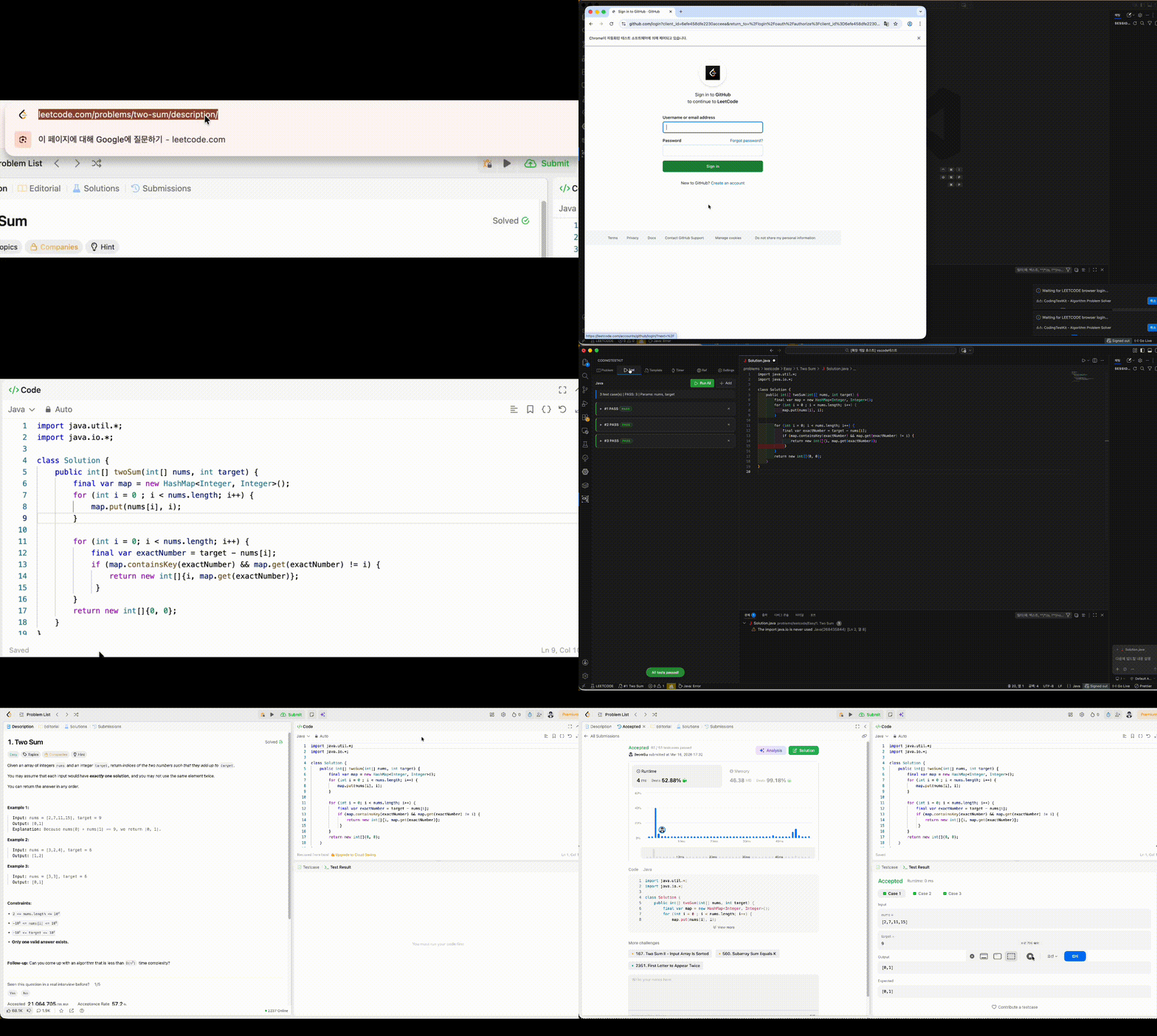
Select the platform and language, enter a problem number, and the problem description and test cases are automatically extracted.
- Programmers: Number after
/lessons/ in URL (e.g., 12947)
- SWEA: Enter problem number or paste URL
- LeetCode: Enter number, slug, or URL (e.g.,
1, two-sum, full URL)
- Codeforces: Enter contest + problem (e.g.,
1A, 1000B, or URL)
When a problem is fetched, a folder is automatically created with a code file and README.md (problem description).
Codeforces & Cloudflare: When direct fetching is blocked by Cloudflare, the extension briefly opens your own Chrome/Edge/Brave offscreen to pass the challenge and fetch the full problem — statement, sample tests, and limits included. The clearance cookie is saved and reused, so subsequent fetches go straight over HTTP without a browser until it expires. SWEA (an AngularJS site) is rendered through your browser the same way.
Back to Features
Problem View & Translation
View the problem description, I/O format, and examples directly in the sidebar panel. Mathematical formulas (LaTeX) are rendered natively using KaTeX.
Maximize Mode
Click the Max button to hide the tab bar and toolbars so the statement fills the whole plugin window — a floating toolbar restores the layout with one click, or opens the statement in a full editor tab (also available as the CodingTestKit: Maximize Problem View command). The editor-tab view follows your theme and stays in sync with fetches and translation.
Problem Translation (KR ↔ EN)
- Toggle Translation: Click the Translate button to switch between original and translated text
- Auto Language Detection: Automatically detects Korean/English and translates to the other language
- Translation Caching: Translated results are cached — no repeated API calls for the same problem
- Rate Limit Protection: Built-in request throttling and exponential backoff retry
- Markup-Safe: Math formulas (KaTeX/MathML), code blocks, and styled tags are shielded from the translator, so translated problems keep their formatting and formulas intact
Back to Features
Local Test Execution
Write your code and click Run All to execute all test cases and see PASS/FAIL results instantly. Each test case shows execution time (ms) and memory usage (KB/MB).
Failed cases are highlighted in red and auto-expanded. Programmers and LeetCode solution functions are automatically wrapped for testing.
- Run a Single Case (▶): Each test card has its own run button, so debugging one failing input doesn't re-run the whole suite.
- Debug a Case (🐞): Launch the solution under the IDE debugger with that case's input. Python/JavaScript get stdin wired automatically; C++ recompiles with
-g and redirects input.txt; Java/Go start in the integrated terminal with the input on your clipboard.
- Neutral Runs: Leave the expected output empty and the case runs without a verdict — runtime, memory, and errors only. Perfect for stress inputs with unknown answers.
- Test Case Generator: Generate large stress inputs (up to N = 1,000,000) — random / sorted / constant arrays, shuffled permutations, plus adversarial patterns: Java
hashCode collision strings, unordered_map bucket-collision prime multiples, sawtooth ramps, and few-unique sort killers.
- Special Judge: For problems with multiple valid answers, write a JS validator (
input, expected, actual → return true to pass) that replaces output comparison. It is saved into problem.json and restored with the problem.
- Build Output Channel: Compiler warnings and build messages go to the dedicated CodingTestKit Build output channel, keeping test results focused on program output.
Back to Features
Login & Submit
Log in to each platform via the built-in browser and submit your code directly. The language dropdown is automatically selected to match your code.
For LeetCode and Codeforces, the problem page opens in your default browser.
Back to Features
Problem Search
LeetCode
- Keyword Search: Search by title or keyword
- Difficulty Filter: Filter by Easy, Medium, Hard
- Tag Filter: Filter by algorithm tags (Array, DP, Graph, etc.)
Codeforces
- Tag Filter: Filter by algorithm tags with Korean translation
- Rating Range: Filter by problem rating
- Solved Count: Filter by minimum solved count
Programmers & SWEA
- Level/Difficulty Filter: Filter by level or difficulty tier
- Language Filter: Filter by programming language
- Category Filter: Filter by exam collection or category
Back to Features
Random Problem Picker
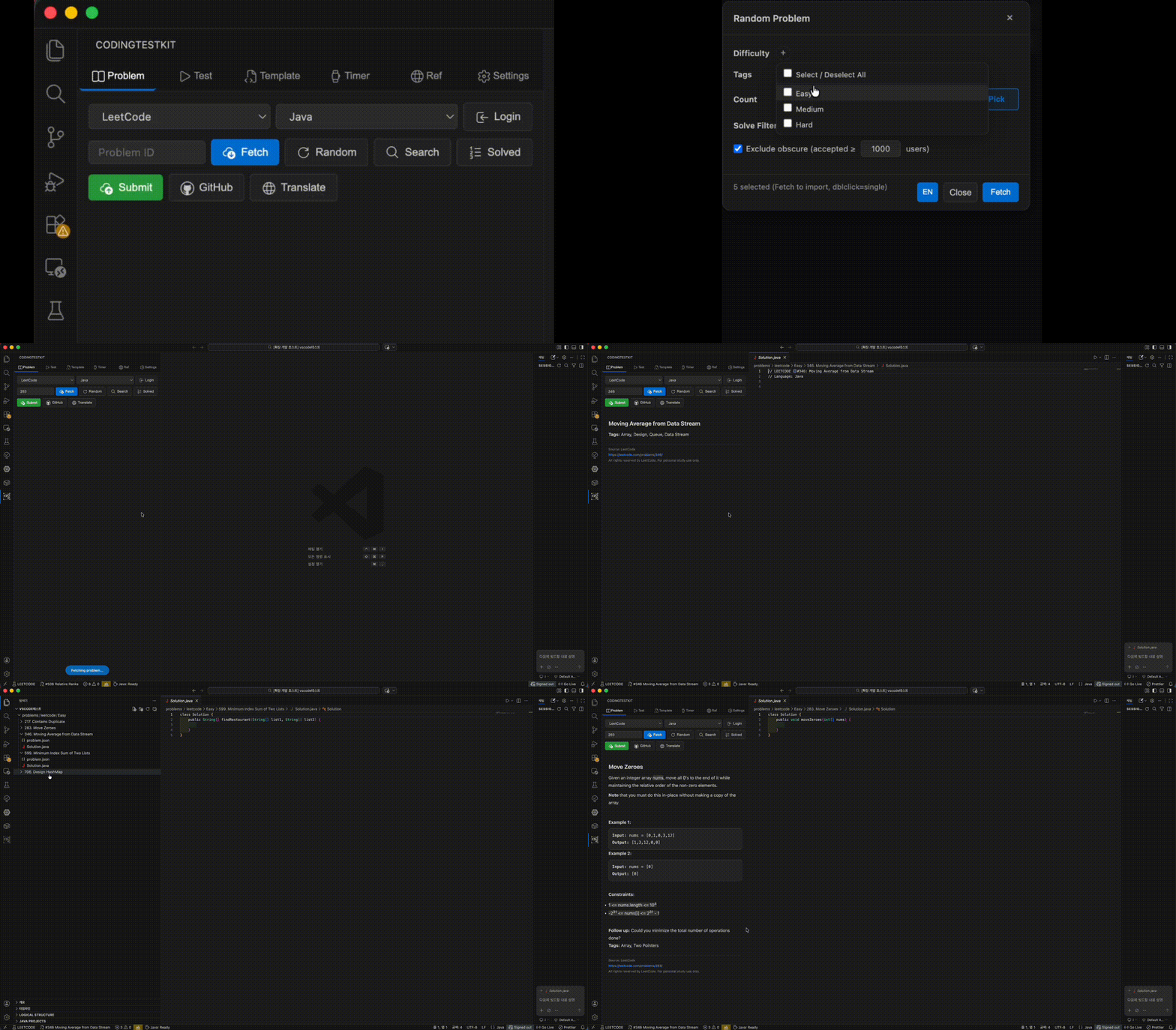
LeetCode
- Difficulty Checkboxes: Select multiple difficulties (Easy, Medium, Hard)
- Tag Chips: Select/remove tags as chips (Array, DP, Graph, etc.)
- Accepted Filter: Exclude obscure problems by minimum accepted count (e.g., ≥1000)
- Solved Filter: All / Exclude my solved / Only my solved
Codeforces
- Rating Range: Filter by min/max problem rating
- Tag Chips: Algorithm tags with Korean translation
- Solved Count Filter: Exclude problems with few solvers
SWEA
- Difficulty Filter: D1–D8 tier selection
- Language Filter: Filter by C/C++, Java, Python
- Status Filter: All / Unsolved / Solved only
Programmers
- Category Filter: Filter by exam collection (PCCE, PCCP, Kakao, etc.)
- Level Filter: Lv. 0–5 selection
- Language & Status Filters
Back to Features
Code Editor
When a problem is fetched, boilerplate code is auto-generated so you can start coding immediately.
Back to Features
Code Templates
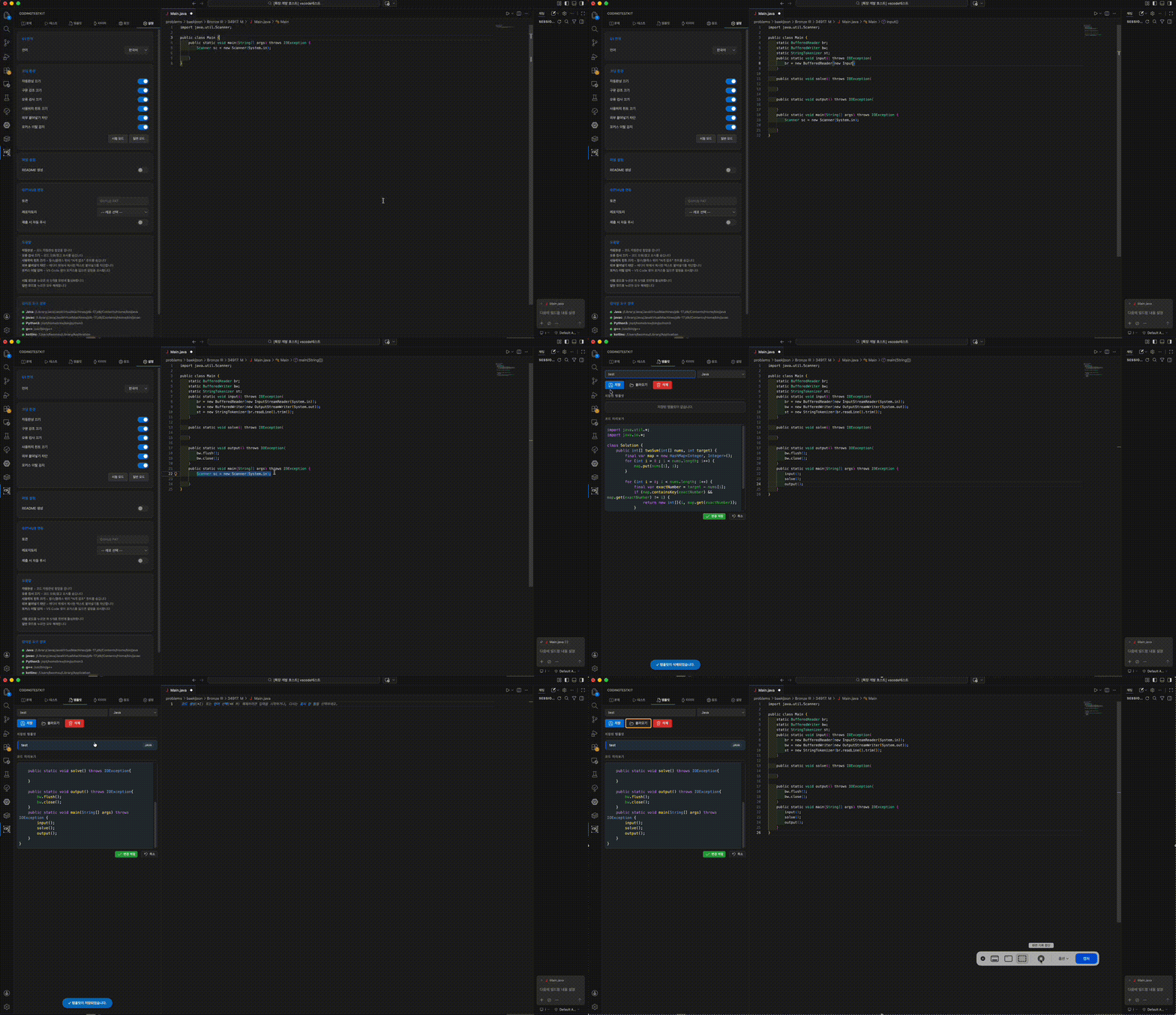
Save frequently used boilerplate as templates for quick access. Syntax-highlighted preview with CodeMirror editor included.
- Platform Default Templates: Designate a template as the default for any platform (per language) — new solution files start from it instead of the built-in boilerplate. Templates without a
Solution class automatically keep LeetCode/Programmers' required skeleton appended, so submissions stay compatible.
- Safe Loading: Loading a template into a non-empty file asks before overwriting and offers Insert at Cursor, so an in-progress solution can't be silently replaced.
Back to Features
Timer
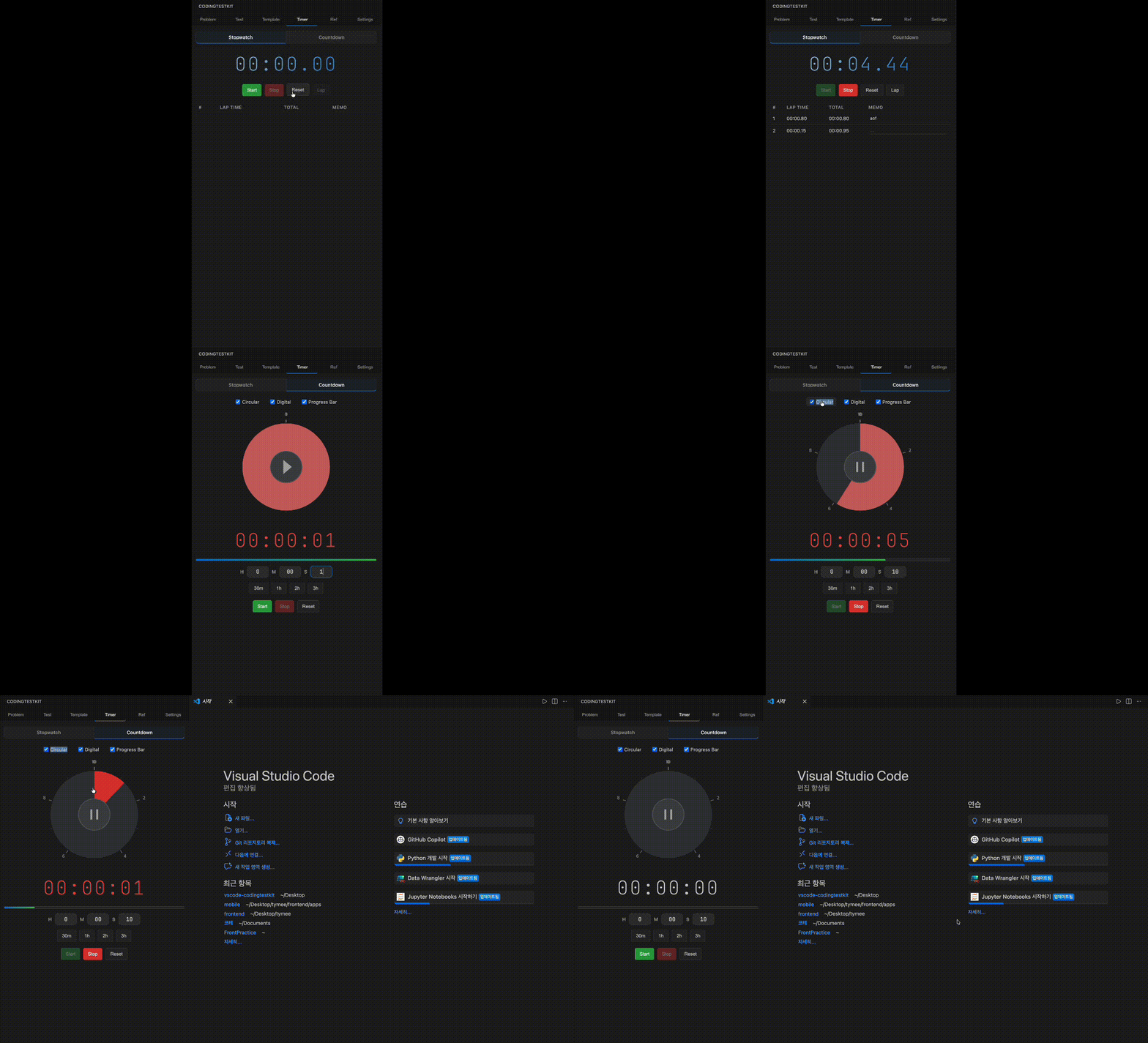
Provides a Stopwatch and a Countdown Timer.
- Stopwatch: Lap records with memo
- Countdown: 3 display modes selectable via checkboxes
- Circular Dial Timer: Remaining time shown as a colored arc, with urgency color changes
- Digital Clock: Large numerical time display
- Progress Bar: Linear progress indicator
- Preset buttons for 30min, 1hr, 2hr, 3hr
- Notification when time's up
- Visible everywhere: active timers mirror to the status bar (click to jump to the Timer tab) and to a mini bar at the bottom of the Problem tab with start/pause buttons and a countdown progress strip — read the problem and watch the clock at the same time
Back to Features
Settings & Exam Mode
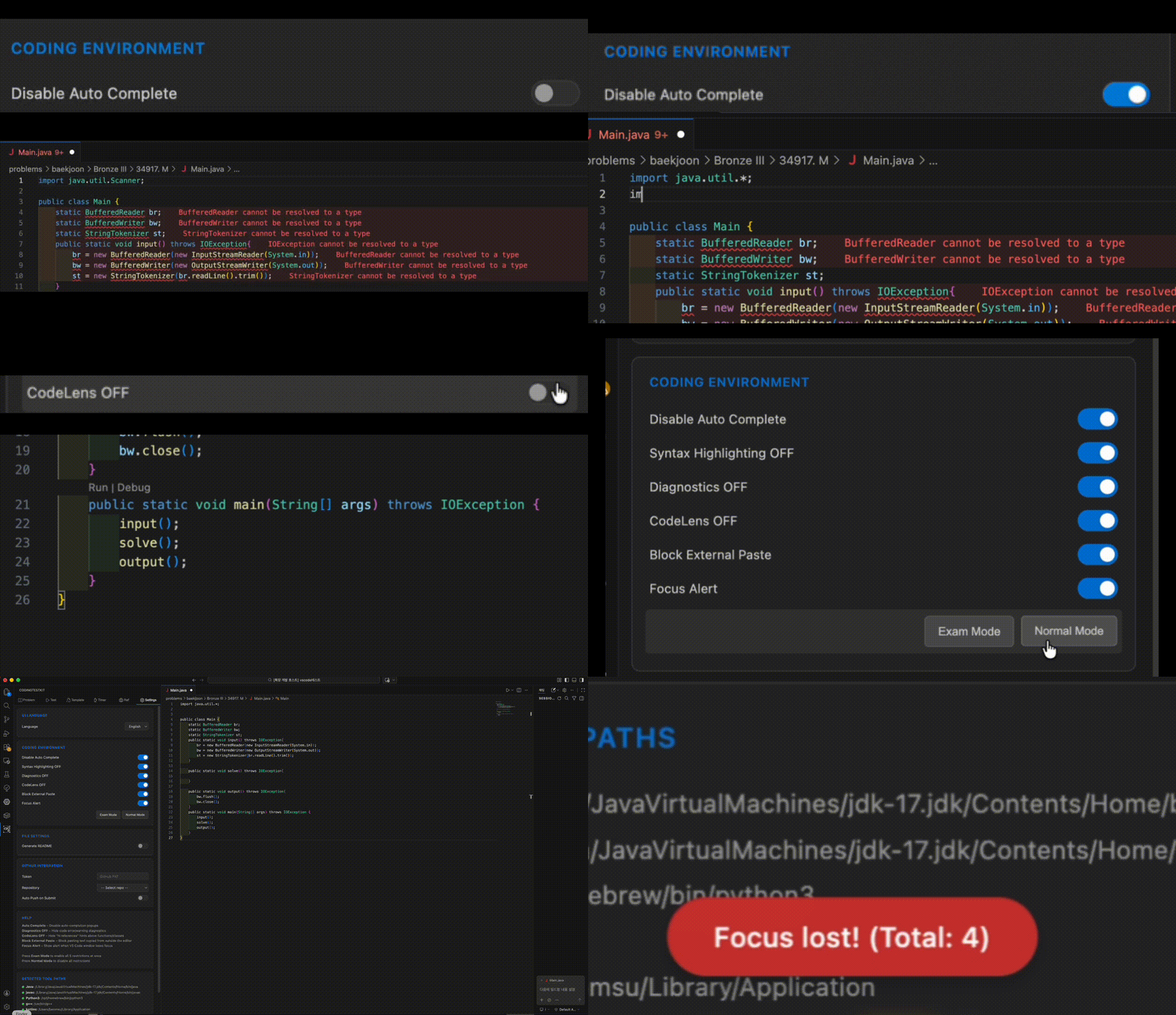
- Auto Complete ON/OFF: Toggle code auto-completion, snippets, parameter hints, and inline suggestions
- Syntax Highlighting ON/OFF: Disable all token colors and semantic highlighting
- Diagnostics OFF: Hide code error/warning squiggles
- CodeLens OFF: Hide "N references" hints above functions
- Block External Paste: Block pasting text copied from outside VS Code
- Focus Alert: Notify when VS Code window loses focus
- Language: Switch between Korean / English
One-click Exam Mode enables all restrictions; Normal Mode disables them all.
Back to Features
GitHub Integration
Push your accepted solutions to GitHub automatically.
- One-Click Login: Log in to GitHub via built-in browser — token is auto-generated and saved
- Repo Selector: Choose from your repositories via dropdown after login
- Auto Push: Automatically push code to GitHub when your submission is accepted
- Manual Push: Click the GitHub button to push anytime
- Smart Detection: Only pushes on "Accepted" — wrong answers are never pushed
- All Platforms: Works with Programmers, SWEA, LeetCode, and Codeforces
- Structured Commits:
[Platform #ID] Problem Title (Language) format with README
Setup: Settings > GitHub Integration > Click "GitHub Login" and select your repository.
Back to Features
Internationalization (i18n)
Switch between Korean / English in settings. All UI text — buttons, labels, placeholders, toast messages, settings help text, and error messages — is displayed in the selected language.
Back to Features
Installation
VS Code Marketplace
- Open VS Code > Extensions (
Ctrl+Shift+X)
- Search "CodingTestKit" and install
Cursor / VSCodium / code-server (Open VSX)
Available on Open VSX Registry — open the Extensions panel in Cursor, VSCodium, code-server, or Gitpod, search "CodingTestKit", and install.
Manual Install
- Download
.vsix from Releases
- VS Code > Extensions >
... menu > Install from VSIX
Quick Start
- Click the CodingTestKit icon in the Activity Bar (left sidebar)
- Select platform and language
- Enter problem ID and click Fetch
- Write code, click Run All
- Click Submit to submit via built-in browser
Requirements
VS Code 1.85.0+
Language compilers/interpreters for test execution:
- Java: JDK 11+
- Python: Python 3.8+
- C++: g++ or clang++
- Kotlin: kotlinc
- JavaScript: Node.js
- Rust: rustc (rustup)
- Go: go
- Ruby: ruby
Only install what you use — each language is detected independently, and codingtestkit.toolPath.* settings let you point at a compiler manually when auto-detection misses it.
Build from Source
npm install
npm run compile
To create VSIX package:
npx @vscode/vsce package
Feedback
Found a bug or have a feature suggestion? I'd love to hear from you!
You can also access the feedback form directly from the Settings tab inside the extension.
한국어
왜 만들었나?
코딩테스트를 준비하면서 항상 불편했습니다. 문제를 풀려면 브라우저에서 문제를 읽고, 에디터에서 코드를 작성하고, 다시 브라우저로 돌아가 제출하고... 이 과정을 반복해야 했습니다.
CodingTestKit은 실제 시험 환경을 VS Code 안에서 그대로 재현하기 위해 만들었습니다:
- 시험 모드: 자동완성과 구문 강조를 끄고, 외부 붙여넣기 차단과 포커스 이탈 감지까지 실전과 동일한 환경에서 연습
- 실행 시간 & 메모리 측정: 테스트 케이스별 실행 시간(ms)과 메모리 사용량(KB/MB)을 표시
- 타이머: 스톱워치, 원형 다이얼 카운트다운 타이머, 프로그레스 바, 디지털 시계 — 작업 중에도 상태바와 문제 탭에서 확인
- 올인원: 문제 읽기, 코드 작성, 테스트, 제출까지 에디터를 벗어나지 않고 전부 해결
- 문제 번역: 한 클릭으로 한국어 ↔ 영어 번역 (캐싱 및 rate limit 보호 내장)
- GitHub 연동: 채점 통과 시 자동으로 GitHub에 푸시
지원 플랫폼
| 플랫폼 |
문제 가져오기 |
로컬 테스트 |
코드 제출 |
검색 |
랜덤 |
내 풀이 |
| 프로그래머스 |
O |
O |
O |
O |
O |
- |
| SWEA |
O |
O |
O |
O |
O |
- |
| LeetCode |
O |
O |
O |
O |
O |
O |
| Codeforces |
O |
O |
O |
O |
O |
O |
지원 언어
| 언어 |
프로그래머스 |
SWEA |
LeetCode |
Codeforces |
| Java |
O |
O |
O |
O |
| Python |
O |
O |
O |
O |
| C++ |
O |
O |
O |
O |
| Kotlin |
O |
X |
O |
O |
| JavaScript |
- |
- |
O |
O |
| Rust |
X |
X |
O |
O |
| Go |
O |
X |
O |
O |
| Ruby |
O |
X |
O |
O |
로컬 테스트 실행은 모든 언어 × 모든 플랫폼에서 가능합니다 — 위 표는 온라인 제출 지원 여부입니다.
주요 기능
아래 기능을 클릭하면 해당 섹션으로 이동합니다.
| # |
기능 |
설명 |
| 1 |
문제 가져오기 |
4개 플랫폼에서 문제 설명 & 테스트 케이스 자동 추출 |
| 2 |
문제 보기 & 번역 |
에디터 내에서 문제 확인 + 한/영 원클릭 번역 + LaTeX 수식 + 최대화 모드 |
| 3 |
로컬 테스트 실행 |
전체/개별 실행 + 시간 & 메모리 측정 + 테스트 생성기 + 스페셜 저지 + 디버그 실행 |
| 4 |
로그인 & 제출 |
내장 브라우저로 코드 제출 + 언어 자동 선택 |
| 5 |
문제 검색 |
LeetCode, Codeforces, SWEA, 프로그래머스 문제 검색 |
| 6 |
랜덤 문제 뽑기 |
티어/난이도/태그 필터로 랜덤 문제 추천 |
| 7 |
코드 에디터 |
플랫폼 & 언어별 보일러플레이트 코드 자동 생성 |
| 8 |
코드 템플릿 |
코드 스니펫 저장 & 재사용 + 플랫폼별 기본 템플릿 지정 |
| 9 |
타이머 |
스톱워치 + 원형 다이얼 카운트다운 — 상태바·문제 탭에도 함께 표시 |
| 10 |
설정 & 시험 모드 |
원클릭 시험 모드: 붙여넣기 차단, 자동완성 & 구문 강조 끄기, 포커스 감지 |
| 11 |
GitHub 연동 |
맞은 문제 자동 GitHub 푸시 |
| 12 |
다국어 지원 |
한국어 / English UI 완전 지원 |
문제 가져오기
플랫폼과 언어를 선택하고 문제 번호만 입력하면 문제 설명, 테스트 케이스가 자동으로 추출됩니다.
- 프로그래머스: URL의
/lessons/ 뒤 숫자 (예: 12947)
- SWEA: 문제 번호 또는 URL 붙여넣기
- LeetCode: 문제 번호, slug, 또는 URL 입력 (예:
1, two-sum, URL)
- Codeforces: 대회번호 + 문제 (예:
1A, 1000B, 또는 URL)
문제를 가져오면 프로젝트 내에 폴더가 자동 생성되고, 코드 파일과 README.md(문제 설명)가 만들어집니다.
Codeforces와 Cloudflare: 직접 크롤링이 Cloudflare에 차단되면 사용자의 Chrome/Edge/Brave를 화면 밖에서 잠깐 열어 챌린지를 통과한 뒤 본문·예제·제한까지 전체 문제를 가져옵니다. 통과 시 발급된 쿠키를 저장해 재사용하므로, 만료 전까지 다음 문제부터는 브라우저 없이 바로 HTTP로 빠르게 가져옵니다. AngularJS 기반인 SWEA도 같은 방식으로 브라우저 렌더링을 거칩니다.
기능 목록으로
문제 보기 & 번역
사이드바 패널에서 문제 설명, 입출력 형식, 예제를 바로 확인할 수 있습니다. 수학 공식(LaTeX)은 KaTeX로 자동 렌더링됩니다.
최대화 모드
크게 버튼을 누르면 탭 바와 툴바가 숨겨지고 문제 본문이 플러그인 창 전체를 차지합니다. 우측 상단의 플로팅 버튼으로 한 번에 원래 레이아웃으로 돌아오거나, 문제를 에디터 탭으로 크게 열 수 있습니다 (CodingTestKit: Maximize Problem View 커맨드로도 가능). 에디터 탭 보기는 테마를 따라가며, 새 문제 가져오기와 번역 토글에도 자동으로 동기화됩니다.
문제 번역 (한 ↔ 영)
- 토글 번역: 번역 버튼 클릭으로 원문/번역 전환
- 자동 언어 감지: 한국어/영어를 자동 감지하여 반대 언어로 번역
- 번역 캐싱: 번역 결과를 캐시하여 같은 문제를 다시 번역하지 않음
- Rate Limit 보호: 요청 간 딜레이 및 exponential backoff 재시도로 IP 차단 방지
- 마크업 보호: 수식(KaTeX/MathML)·코드 블록·스타일 태그는 번역기에 노출되지 않아, 번역 후에도 서식과 수식이 그대로 유지됩니다
기능 목록으로
로컬 테스트 실행
코드를 작성하고 전체 실행을 누르면 모든 테스트 케이스가 실행되어 PASS/FAIL 결과를 바로 확인할 수 있습니다. 각 테스트 케이스별로 **실행 시간(ms)**과 **메모리 사용량(KB/MB)**이 함께 표시됩니다.
FAIL인 케이스는 빨간색으로 표시됩니다. 프로그래머스와 LeetCode의 solution 함수도 자동으로 래핑하여 테스트합니다.
- 개별 실행 (▶): 케이스마다 실행 버튼이 있어 실패한 입력 하나만 빠르게 다시 돌릴 수 있습니다.
- 디버그 실행 (🐞): 해당 케이스의 입력으로 IDE 디버거를 바로 시작합니다. Python/JavaScript는 stdin이 자동 연결되고, C++은
-g로 재컴파일 후 input.txt가 리다이렉트되며, Java/Go는 통합 터미널에서 시작되고 입력이 클립보드에 복사됩니다.
- 중립 실행: 예상 출력을 비워두면 PASS/FAIL 판정 없이 실행 시간·메모리·에러만 확인합니다. 정답을 모르는 스트레스 입력에 유용합니다.
- 테스트 생성기: 최대 N = 1,000,000의 대량 입력을 생성합니다 — 랜덤/정렬/상수 배열, 랜덤 순열에 더해 적대적 패턴(Java
hashCode 충돌 문자열, unordered_map 버킷 충돌 소수 배수, 톱니, 적은 종류 값)도 지원합니다.
- 스페셜 저지: 복수 정답 문제는 JS 검증 함수(
input, expected, actual을 받아 true 반환 시 통과)로 출력 비교를 대체할 수 있습니다. problem.json에 저장되어 문제와 함께 복원됩니다.
- 빌드 출력 채널: 컴파일 경고·빌드 메시지는 전용 CodingTestKit Build 출력 채널로 분리되어, 테스트 결과에는 프로그램 출력만 남습니다.
기능 목록으로
로그인 & 제출
내장 브라우저를 통해 각 플랫폼에 로그인하고, 코드를 직접 제출할 수 있습니다. 제출 시 코드 작성 언어에 맞춰 언어 드롭다운이 자동 선택됩니다.
LeetCode와 Codeforces는 기본 브라우저에서 문제 페이지가 열립니다.
기능 목록으로
문제 검색
LeetCode
- 키워드 검색: 문제 제목이나 키워드로 검색
- 난이도 필터: Easy, Medium, Hard 필터링
- 태그 필터: Array, DP, Graph 등 알고리즘 태그로 필터링
Codeforces
- 태그 필터: 알고리즘 태그 (한국어 번역 지원)
- 레이팅 범위: 문제 레이팅으로 필터링
- 맞은 사람 수: 최소 정답자 수 필터
프로그래머스 & SWEA
- 레벨/난이도 필터: 레벨 또는 난이도 티어로 필터
- 언어 필터: 프로그래밍 언어로 필터
- 분류 필터: 기출문제 모음, 카테고리로 필터
기능 목록으로
랜덤 문제 뽑기
LeetCode
- 난이도 체크박스: Easy, Medium, Hard 중 원하는 난이도 복수 선택
- 태그 칩 선택: Array, DP, Graph 등 태그를 칩으로 선택/제거
- 정답자 수 필터: 정답자 N명 이상인 문제만 표시
- 풀이 필터: 전체 / 내가 푼 문제 제외 / 내가 푼 문제에서만
Codeforces
- 레이팅 범위: 최소/최대 레이팅 필터
- 알고리즘 태그 칩: 한국어 번역 지원
- 맞은 사람 수 필터
SWEA
- 난이도 필터: D1~D8 티어 선택
- 언어 필터: C/C++, Java, Python
- 풀이 상태 필터: 전체 / 안 푼 문제 / 푼 문제만
프로그래머스
- 분류 필터: 기출문제 모음 (PCCE, PCCP, 카카오 등)
- 레벨 필터: Lv. 0~5 선택
- 언어 & 풀이 상태 필터
기능 목록으로
코드 에디터
문제를 가져오면 기본 코드가 자동 생성되어 에디터에서 바로 작성할 수 있습니다.
기능 목록으로
코드 템플릿
자주 쓰는 코드를 템플릿으로 저장해두면 빠르게 불러올 수 있습니다. CodeMirror 에디터로 구문 강조가 적용된 미리보기를 제공합니다.
- 플랫폼 기본 템플릿: 템플릿을 플랫폼별(언어 단위) 기본으로 지정하면, 문제를 가져올 때 내장 보일러플레이트 대신 그 템플릿으로 코드 파일이 생성됩니다. 템플릿에
Solution 클래스가 없으면 LeetCode/프로그래머스의 필수 스켈레톤이 아래에 자동으로 붙어 제출 호환성이 유지됩니다.
- 안전한 불러오기: 작성 중인 파일에 템플릿을 불러오면 덮어쓰기 전에 확인하며, 커서 위치 삽입도 선택할 수 있어 작업 중인 코드를 실수로 잃지 않습니다.
기능 목록으로
타이머
스톱워치와 카운트다운 타이머를 제공합니다.
- 스톱워치: 랩 기록과 메모 기능
- 카운트다운: 3가지 표시 모드를 체크박스로 선택 가능
- 원형 다이얼 타이머: 남은 시간이 색상 아크로 표시, 시간 경과에 따라 색상 변화
- 디지털 시계: 큰 숫자로 남은 시간 표시
- 프로그레스 바: 막대형 진행률 표시
- 30분, 1시간, 2시간, 3시간 프리셋 버튼
- 시간 종료 시 알림
- 어디서든 보이는 타이머: 실행 중인 타이머가 상태바(클릭 시 타이머 탭 이동)와 문제 탭 하단 미니 바(시작/정지 버튼 + 카운트다운 진행바)에 함께 표시 — 문제를 읽으면서 남은 시간을 확인할 수 있습니다
기능 목록으로
설정 & 시험 모드
- 자동완성 ON/OFF: 코드 자동완성, 스니펫, 파라미터 힌트, 인라인 제안 제어
- 구문 강조 ON/OFF: 토큰 색상 및 시맨틱 하이라이팅 비활성화
- 오류 검사 OFF: 코드 오류/경고 밑줄 숨기기
- 사용위치 힌트 OFF: 함수 위 "N개 참조" 힌트 숨기기
- 외부 붙여넣기 차단: 외부 프로그램에서 복사한 텍스트의 붙여넣기를 차단
- 포커스 이탈 감지: 에디터 창에서 포커스가 벗어나면 경고 표시
- 언어 설정: 한국어 / English 전환 가능
시험 모드 버튼으로 전체 제한 적용, 일반 모드 버튼으로 전체 해제.
기능 목록으로
GitHub 연동
맞은 문제를 자동으로 GitHub에 푸시합니다.
- 원클릭 로그인: 내장 브라우저에서 GitHub에 로그인하면 토큰이 자동 생성 및 저장
- 레포 선택: 로그인 후 드롭다운에서 레포 선택
- 자동 푸시: 채점 결과가 "맞았습니다"일 때만 자동으로 GitHub에 커밋
- 수동 푸시: GitHub 버튼을 눌러서 원할 때 직접 푸시
- 스마트 감지: 틀린 코드는 절대 푸시하지 않음 — "Accepted"일 때만 동작
- 전 플랫폼 지원: 프로그래머스, SWEA, LeetCode, Codeforces 모두 지원
- 구조화된 커밋:
[플랫폼 #번호] 문제 제목 (언어) 형식 + README 자동 생성
설정: 설정 > GitHub 연동 > "GitHub 로그인" 클릭 후 레포 선택.
기능 목록으로
다국어 지원 (i18n)
설정에서 한국어 / English 전환이 가능합니다. 모든 UI 텍스트 — 버튼, 라벨, 플레이스홀더, 토스트 메시지, 설정 도움말, 에러 메시지 — 가 선택한 언어로 표시됩니다.
기능 목록으로
설치 방법
VS Code Marketplace
- VS Code > 확장 (
Ctrl+Shift+X)
- "CodingTestKit" 검색 후 설치
Cursor / VSCodium / code-server (Open VSX)
Open VSX Registry에 등록되어 있어 Cursor, VSCodium, code-server, Gitpod 등에서도 확장 패널을 열고 "CodingTestKit" 을 검색해 바로 설치할 수 있습니다.
수동 설치
- Releases에서
.vsix 파일 다운로드
- VS Code > 확장 >
... 메뉴 > VSIX에서 설치
빠른 시작
- 좌측 Activity Bar에서 CodingTestKit 아이콘 클릭
- 플랫폼과 언어 선택
- 문제 번호 입력 후 가져오기 클릭
- 코드 작성 후 전체 실행 클릭
- 제출 버튼 클릭, 내장 브라우저에서 확인
요구 사항
VS Code 1.85.0 이상
각 언어 컴파일러/인터프리터 (테스트 실행 시):
- Java: JDK 11 이상
- Python: Python 3.8 이상
- C++: g++ 또는 clang++
- Kotlin: kotlinc
- JavaScript: Node.js
- Rust: rustc (rustup)
- Go: go
- Ruby: ruby
사용하는 언어만 설치하면 됩니다 — 언어별로 독립적으로 감지되며, 자동 감지가 실패하면 codingtestkit.toolPath.* 설정으로 직접 경로를 지정할 수 있습니다.
소스에서 빌드
npm install
npm run compile
VSIX 패키지 생성:
npx @vscode/vsce package
피드백
오류, 버그, 새로운 기능 제안이 있다면 알려주세요!
확장 프로그램의 설정 (Settings) 탭에서도 피드백 폼에 바로 접근할 수 있습니다.
면책 조항
모든 문제의 저작권은 해당 플랫폼에 있습니다. 이 확장은 개인 학습 목적으로만 사용해 주세요. 가져온 문제를 재배포, 상업적 이용, 외부 게시하지 마세요.
License
MIT License — dj258255 (GitHub)

