
Color Picker by Codigrate
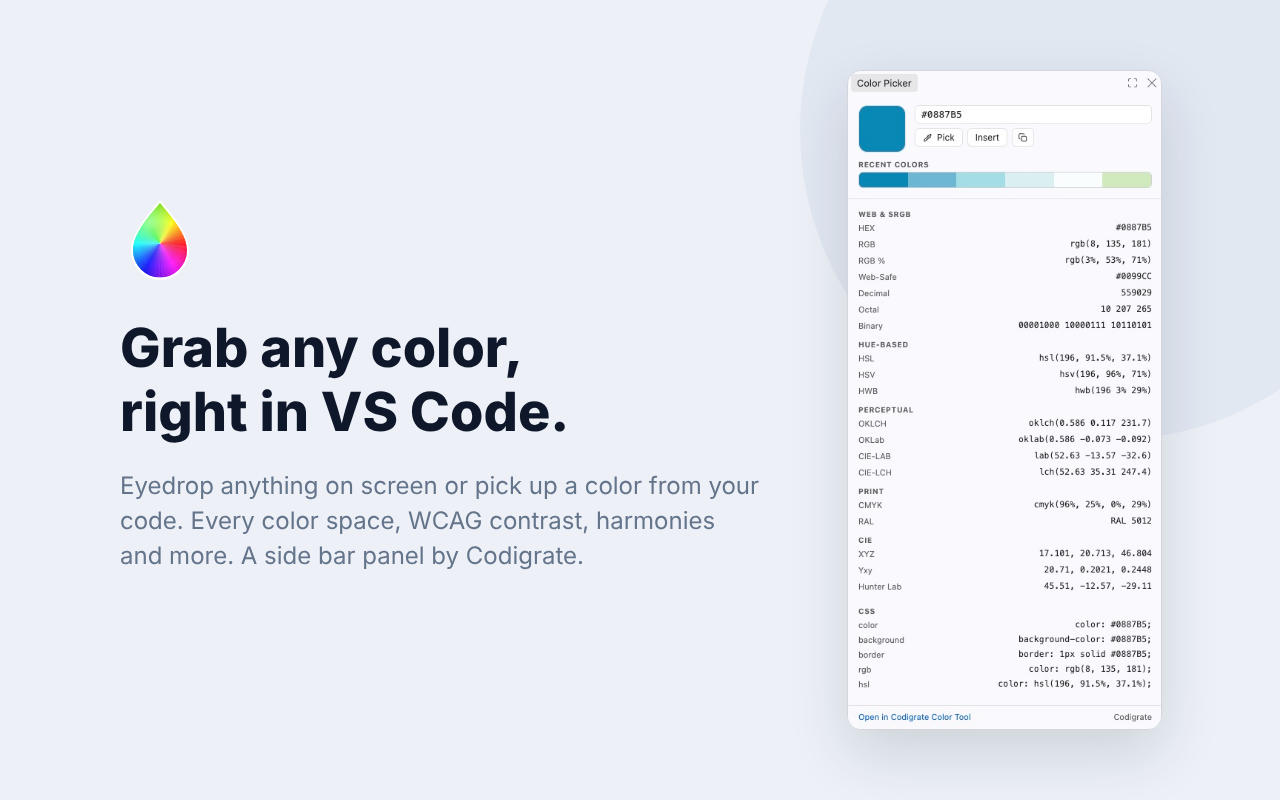
A complete color companion for VS Code, Cursor and every editor built on them. Pick any color on your screen with the eyedropper, or put the cursor on a color in your code, then read everything about it in one side bar panel: conversions across every common color space, WCAG accessibility checks, harmony schemes, tint and shade ramps and color temperature.
Features
- Eyedrop anywhere. Sample any pixel on your screen: your code, a design tool, an image, anything you can see.
- Works with your code. Put the cursor on a hex color (
#RGB or #RRGGBB) and it appears in the panel, one click away. Insert writes the current color back: over the color under the cursor, or at the cursor.
- Conversions. Hex, RGB, RGB %, Web-Safe, Decimal, Octal, Binary, HSL, HSV, HWB, OKLCH, OKLab, CIE-LAB, CIE-LCH, CMYK, nearest RAL Classic, XYZ, Yxy and Hunter Lab, each one click to copy.
- Copy-ready CSS. The color as text, background and border rules in hex, RGB and HSL.
- Accessibility. WCAG 2 contrast ratio and APCA (WCAG 3) of the color as text on white, black and its complementary, both directions, with AA and AAA verdicts.
- Color name. The exact name of the color when it has one, from a table of 6561 names.
- Color channels. The screen (RGB, HSL, HSV) and print (CMYK) channel mix as bars.
- Harmony. Complementary, analogous, monochrome, split complementary, triadic and tetradic companions from the color wheel, one click away.
- Tints, shades and tones. The color stepped toward white, black and gray; click a step to load it.
- Temperature. Whether the color reads warm or cool, with its warmer and cooler neighbours.
- Color vision deficiency. The color beside its simulation under protan, deutan, tritan and monochromacy vision, from mild to severe.
- Recent colors. Your last picks stay in the panel, so the shades you are working with are always one click away.
- Explore in Codigrate. Send any color to the Codigrate color tool for palettes, matching IDE themes and more.
The panel takes its colors from the active VS Code theme. The conversion math is shared with the Codigrate color tool, so values match the website exactly. No sign in, no tracking, no network requests: the only thing stored is the list of your recent colors, in VS Code's own extension storage.
Getting Started
- Install Color Picker by Codigrate from the Extensions view.
- Click the eyedropper icon in the Activity Bar to open the panel.
- Press Pick and click any pixel on your screen, or type a hex value.
- Click any row to copy that value.
Commands
| Command |
What it does |
| Color Picker: Show Color Picker |
Opens the panel |
| Color Picker: Open Color at Cursor |
Loads the hex color under the cursor (or the selected one) into the panel |
| Color Picker: Insert Current Color |
Writes the panel's color into the editor |
Develop
- Open this folder in VS Code.
- Press F5 to start an Extension Development Host with the extension loaded.
node test/host.test.js runs the host tests (no dependencies).
Structure
| File |
Purpose |
package.json |
extension manifest (side bar view, commands) |
extension.js |
the host side: the view, the editor glue, storage, clipboard |
media/panel.css / media/panel.js |
the panel UI and logic (the same panel as the Codigrate Color Picker for Chrome and macOS, with the same math) |
media/color-names.js |
the 6561 exact-hex color names shown under the swatch |
media/ral-classic.js |
the 216 RAL Classic colors used for the nearest-RAL match |
images/ |
the extension icon |
Part of the Codigrate tools family, alongside the in-browser
color,
palette and
gradient tools.
Contributing
Issues and suggestions are welcome. Open an issue on this repository, or reach us at info@codigrate.com.
Contributors

License
The source code for this project is released under the MIT License.
Codigrate
Themes, color tools and developer experience products from Codigrate.
All Themes ·
Color Tools ·
Plugins ·
Blog ·
GitHub
 | Codigrate © 2026 |
| |

