PR Merge Conflict Resolver
Resolve Azure DevOps and GitHub Pull Request merge conflicts directly inside Visual Studio Code with a clean, side-by-side diff editor, live conflict tracking, and AI-powered conflict resolution.
No browser switching. No manual rebasing.
Resolve, review, and submit merges where you write code.
✨ Key Features
- 🔗 Connect to Azure DevOps & GitHub Git repositories
- 🔐 Authenticate via Personal Access Token (PAT) or OAuth 2.0
- 📂 Browse Projects → Repositories → Pull Requests
- ⚠️ Automatically detect merge conflicts in PRs
- 🧩 Resolve conflicts using a side-by-side diff editor
- 🎯 Accept changes from Source or Target branch
- 📁 Bulk Resolve - Accept all source/target for entire folders, groups, or all pending files
- 🤖 AI-Powered Resolution with multi-LLM support (OpenAI, Azure AI, Gemini, Claude, and more)
- � Semantic Merge Pipeline - Chunks files semantically and merges differing blocks via LLM (NEW in v1.1.0)
- 🔀 Smart Method/Function Signature Merging - Automatically creates UNION of method parameters from both branches with AI Union (NEW in v1.1.0)
- 🎯 Method Resolution Preferences - Configure how method conflicts are resolved: use source, target, or AI-powered merge with custom logic (NEW in v1.0.22)
- 🔍 Smart Method/ Function Signature change detection - Uses local analysis to extract method signatures and compare them between source and target branches (without use of AI)
- 🔬 Moved Method/Function Detection - Automatically detects when methods or functions are repositioned within a file and highlights them with interactive SVG connector lines between source and target panels — no AI required (NEW in v1.1.2)
- 🎛️ Smart Conflict Filtering - Group and filter conflicts by source branch, commit range, or related PRs to zero in on what matters most
- 📝 Ignore Formatting - Option to hide whitespace/indentation noise in diffs (NEW in v1.1.0)
- �🧠 LLM Embeddings & Semantic Search with RAG orchestration for intelligent context retrieval
- 📊 Real-time statistics showing conflict resolution progress
- ⚡ Large Codebase Optimized — non-blocking tree loading, batched concurrency, LRU caching, progressive updates (NEW in v1.1.2)
- 🚀 Submit resolved merges back to the PR from VS Code
- 🛠 Supports programming languages C++, C#, JAVA, Python, JavaScript, TypeScript, Go, Rust, Ruby, PHP, Swift, Kotlin
- 🧬 Extensible architecture for adding new LLM providers, embedding models, and custom merge logic
- 🔄 Local Resolved File Sync - Resolved file can be added to resolved list locally so that user can sync all resolved files at once instead of pushing one by one
- 🧪 Continuous updates with new features, optimizations, and LLM integrations based on user feedback
🧠 LLM Embeddings & Semantic Search (NEW)
Advanced RAG-Based Conflict Resolution
The extension now features a sophisticated LLM Embedding Service that uses semantic search with multi-dimensional vectors for intelligent context retrieval:
| Feature |
Description |
| Semantic Search |
Uses cosine similarity to find the most relevant code sections |
| Multi-Dimensional Vectors |
Support for 768D to 4096D embeddings depending on provider |
| Intelligent Code Chunking |
Automatically detects imports, classes, methods, and comments |
| Method-Level Analysis |
Embeds individual method conflicts for targeted resolution |
| Preference Embedding |
Converts your merge preferences into vector space for better context |
| RAG Orchestration |
Combines semantic search results with user preferences for optimal prompts |
Supported Embedding Providers
| Provider |
Embedding Model |
Dimensions |
Notes |
| OpenAI |
text-embedding-ada-002 |
1536D |
Best quality, requires API key |
| Azure OpenAI |
text-embedding-ada-002 |
1536D |
Enterprise deployment |
| Google |
text-embedding-gecko |
768D |
Good performance |
| Ollama |
nomic-embed-text |
4096D |
Local, no API key needed |
| Cohere |
embed-english-v3.0 |
1024D |
Multilingual support |
| Fallback |
TF-IDF |
1536D |
Works offline when APIs unavailable |
How Semantic Search Works
- Content Indexing: Source and target code are chunked intelligently by structure (imports, classes, methods)
- Embedding Generation: Each chunk is converted to a high-dimensional vector using your configured LLM provider
- Preference Embedding: Your AI merge preferences are also embedded for context matching
- Similarity Search: Cosine similarity finds the most relevant code sections for the conflict
- RAG Context Building: Relevant chunks are assembled with similarity scores into the prompt
- Enhanced Resolution: The LLM receives rich, contextually relevant information for better merges
🧬 Semantic Merge Pipeline (NEW in v1.1.0)
The AI merge engine now uses a semantic merge pipeline as the primary approach, delivering significantly more accurate results:
How It Works
- Semantic Chunking: Both source and target files are parsed into meaningful blocks — imports, classes, methods, comments
- Cosine Similarity Matching: Each source chunk is matched to its target counterpart using vector similarity
- Selective LLM Merge: Only chunks that actually differ are sent to the LLM — reducing tokens and improving accuracy
- Source Fingerprint Verification: After merging, unique source "fingerprints" (new params, method calls, strings) are verified in the output
- Automatic Patching: If source changes were dropped, the pipeline automatically patches them back in
- Signature Enforcement: A final pass ensures all method parameters from both branches are present in the merged output
Smart Method Signature Merging
| Scenario |
Result |
| Source adds params |
Uses SOURCE signature (enhancement) |
| Target adds params |
Creates UNION with ALL params from BOTH branches |
| Both add different params |
Combines ALL unique params from both sides |
| Same signature, body changed |
Auto-applies source body changes |
| New method in source |
Auto-inserted into merged output |
| Method removed in source |
Auto-removed from merged output |
Example:
Source: CreateOrder(int orderId, bool validateInventory)
Target: CreateOrder(int orderId)
Result: CreateOrder(int orderId, bool validateInventory)  // Union of all params
🤖 AI-Powered Conflict Resolution
Multi-LLM Provider Support
The extension supports 7 LLM providers for intelligent conflict resolution:
| Provider |
Models |
Features |
| GitHub Copilot |
GPT, Claude, Gemini & o-series (your plan) |
Subscription-based — no API key, via VS Code Language Model API |
| Azure AI |
GPT-5, GPT-4.1, GPT-4o, o3 |
Enterprise-ready, embeddings support |
| OpenAI |
GPT-5.2 Pro, GPT-5 Codex, GPT-4.1 |
Best coding models, Codex series |
| Google Gemini |
Gemini 3 Pro, 2.5 Flash |
1M context window, free tier |
| Anthropic Claude |
Claude Opus 4.5, Claude Sonnet 4.5 |
Advanced reasoning |
| Ollama |
Llama 3.3, CodeLlama, Mistral |
Local/private, no API key |
| Moonshot Kimi |
Kimi K2, Moonshot V1 |
128K context |
| OpenRouter |
All providers via single API |
Unified access |
GitHub Copilot (subscription): Use your existing Copilot subscription for AI-assisted merges — no API key needed. The available models depend on your Copilot plan and are discovered automatically; VS Code prompts you to allow access on first use. Requires VS Code 1.90+ and the GitHub Copilot extension.
API Key vs Subscription:
- Anthropic (Claude Pro/Max) offers both: an API key, or Subscription via your local Claude Code CLI. With
claude installed and signed in, pick Anthropic → Subscription and merges run through claude -p using your own Claude plan — no API key. This is a legitimate route: it drives your own installed claude in its documented headless mode, the extension only sends inputs (the two file versions + your merge config) on stdin, and Claude Code does the inference with your subscription (no API key, no credential reuse). Each merge is a single lightweight call. Caveats: requires Claude Code installed + signed in; usage counts against your Claude subscription's normal limits; depends on the claude CLI interface (which Anthropic may change); your code is sent to Anthropic via Claude Code (as with any cloud LLM). The CLI is run with tools disabled in a temp dir so it never reads or modifies your repo. Set prMergeConflictResolver.llm.claudeCodePath for a non‑PATH install.
- Google Gemini and OpenAI are API‑key only here (no native subscription path) — use GitHub Copilot to access Gemini/GPT/Claude models by subscription.
📖 See docs/llm-subscription-modes.md for how the subscription modes work (architecture, flow diagrams, the Claude Code single‑shot merge, and caveats).
How AI Resolution Works
- Select a conflicted file in the merge editor
- Click "Resolve with AI" button
- The AI analyzes both source and target changes with full context
- Receive an intelligent merged resolution
- Review, edit if needed, and accept
🚀 Getting Started
1. Install the Extension
Search for "PR Merge Conflict Resolver" in the VS Code Extensions Marketplace and install it.
2. Open the Extension
Click the PR Merge Conflict Resolver icon in the Activity Bar or use the Command Palette (Ctrl+Shift+P):
PR Merge Conflict: Configure PR Provider
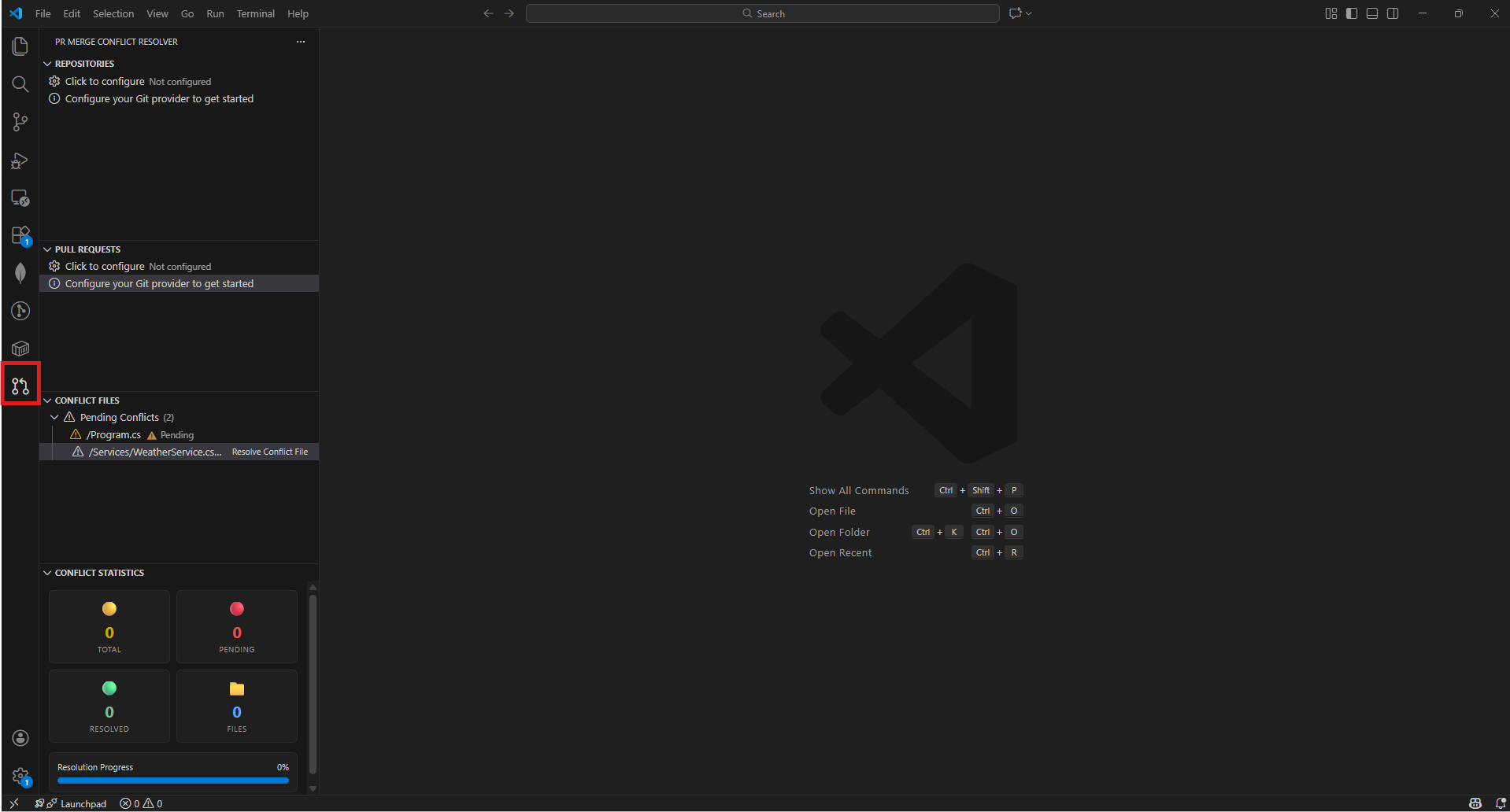
- Click on gear icon of Repositories section or
Ctrl+Shift+P and select PR Merge Conflict: Configure PR Provider
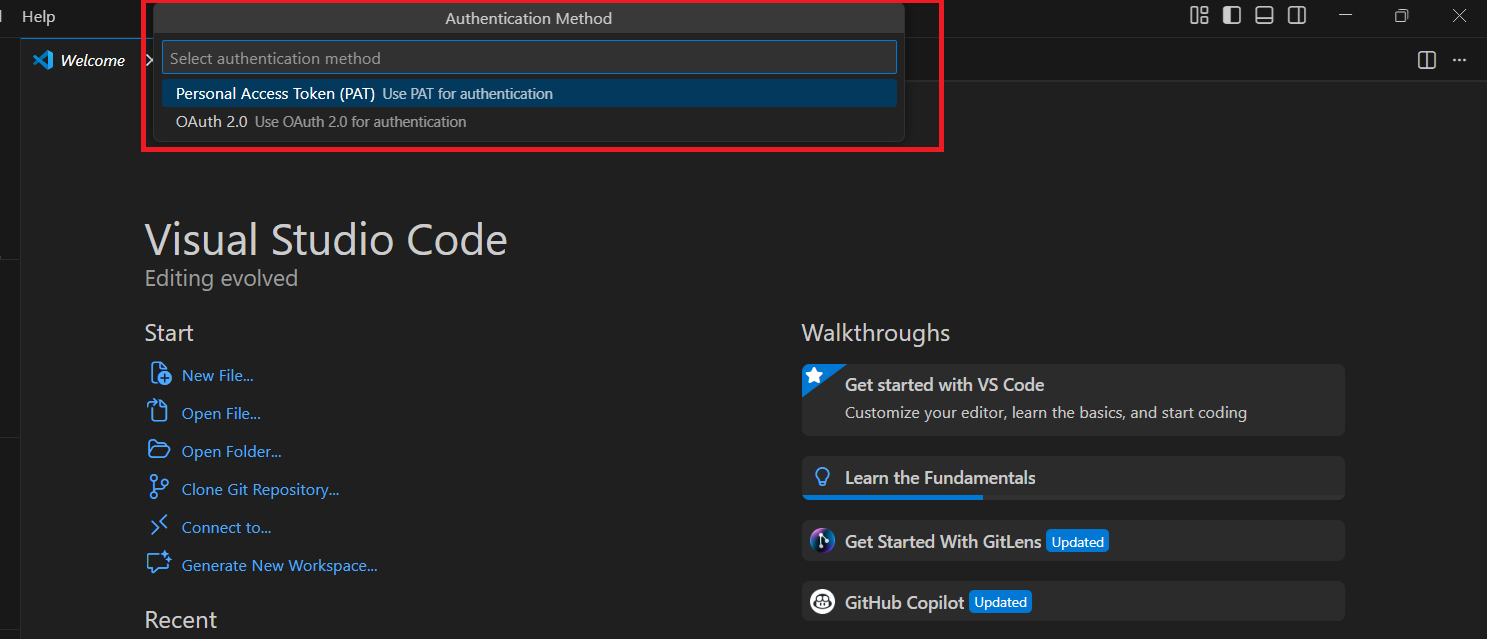
- Choose between Azure DevOps or GitHub as your Git provider
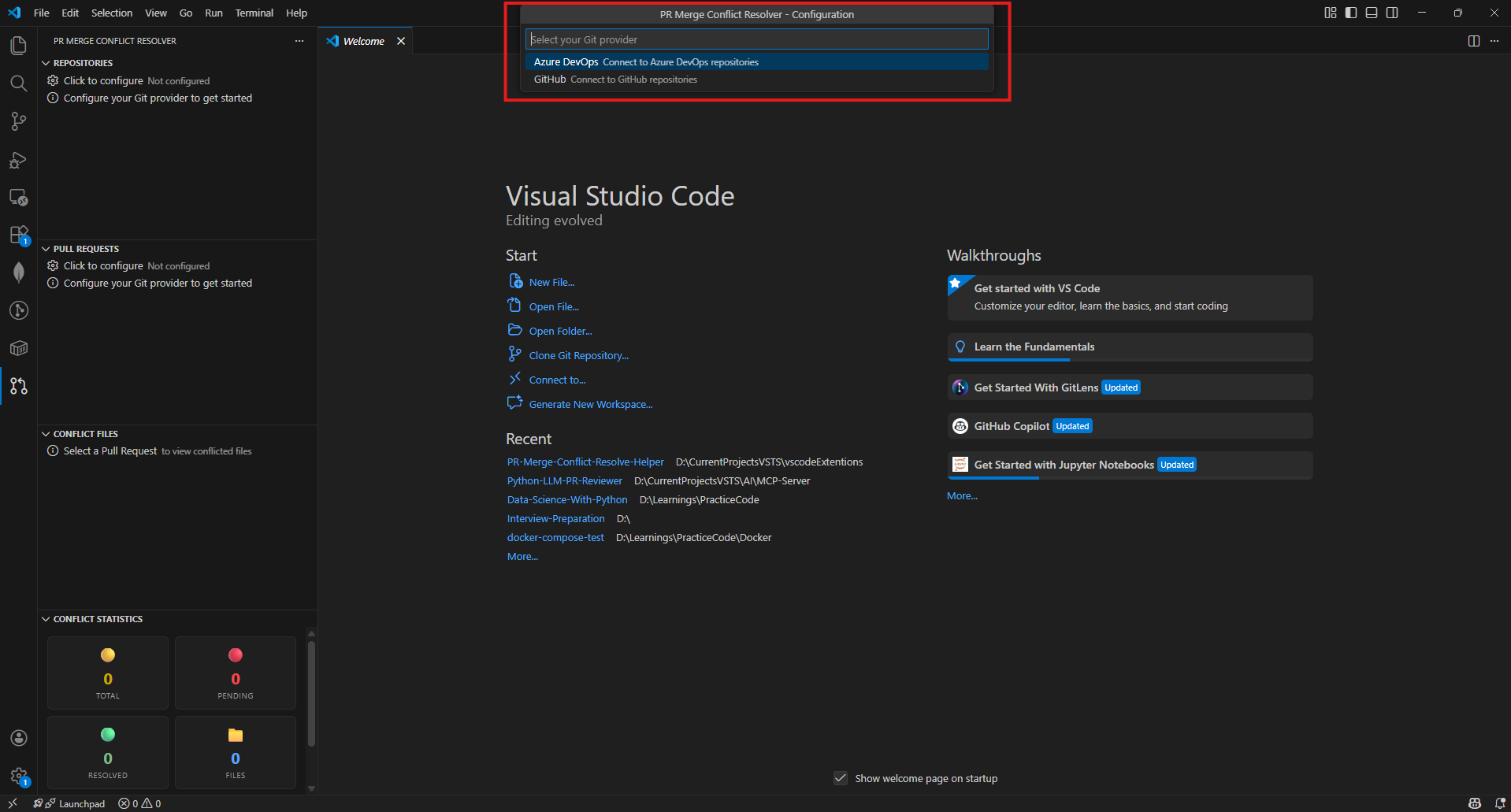
Azure DevOps
When first launched, you'll be prompted to configure:
- Azure DevOps Organization name
- Personal Access Token (PAT) for authentication
- Project - selected from a list or entered manually
- Repository to work with
Project Selection Options:
After entering your organization and PAT, you'll be prompted to choose how to select the project:
| Option |
Description |
When to Use |
| 📋 Select from Project List |
Shows a dropdown of all available projects |
When your PAT has permission to list all projects in the organization |
| ✏️ Enter Project Name Manually |
Type the project name directly |
When you only have access to specific projects (no org-wide project list permission) |
Tip: If fetching the project list fails, you'll automatically be offered the option to enter the project name manually. This ensures the extension works for users with any level of access permissions.
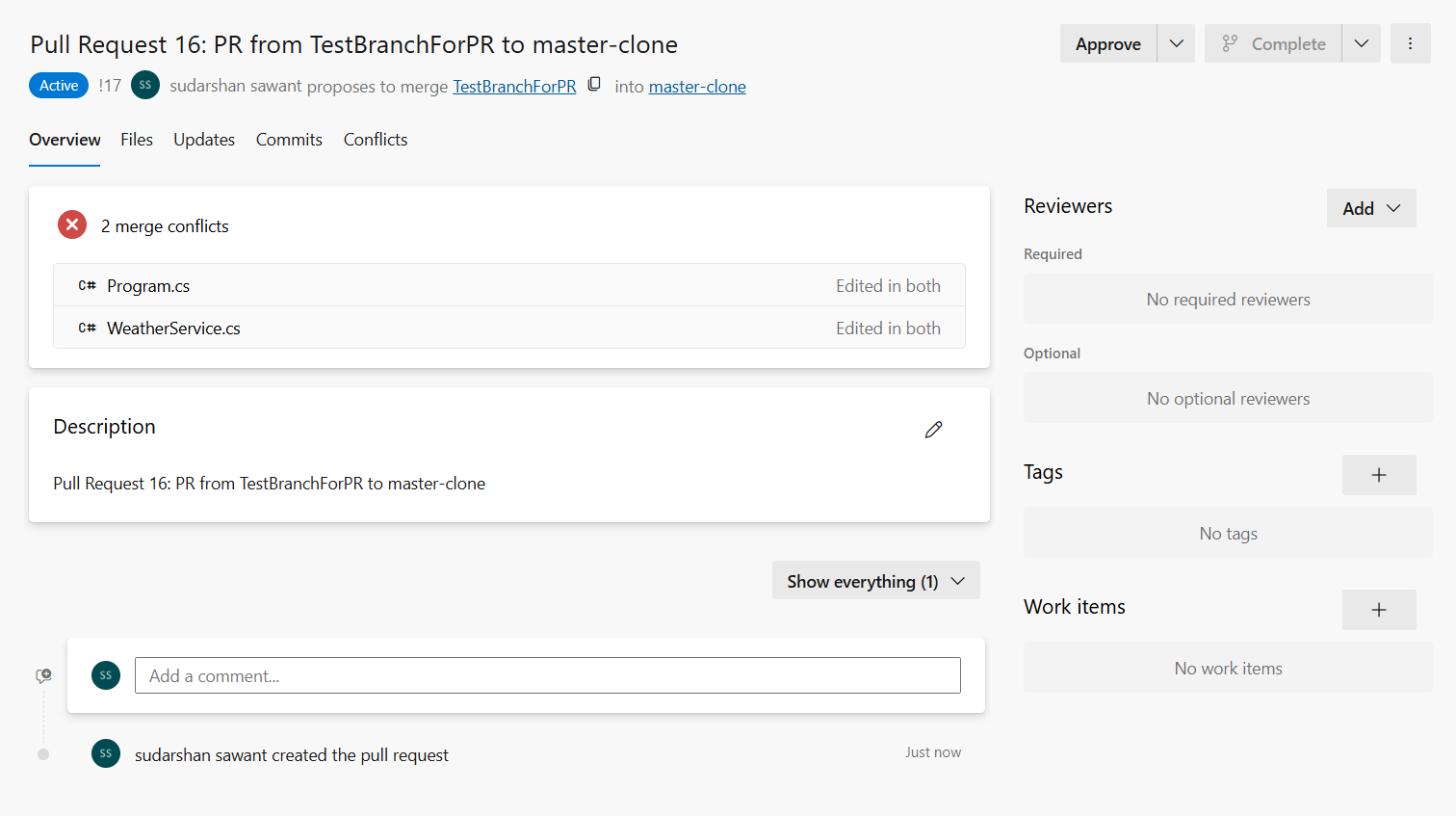
GitHub
For GitHub repositories:
- GitHub Personal Access Token with
repo scope
- Owner/Organization name
- Repository selection
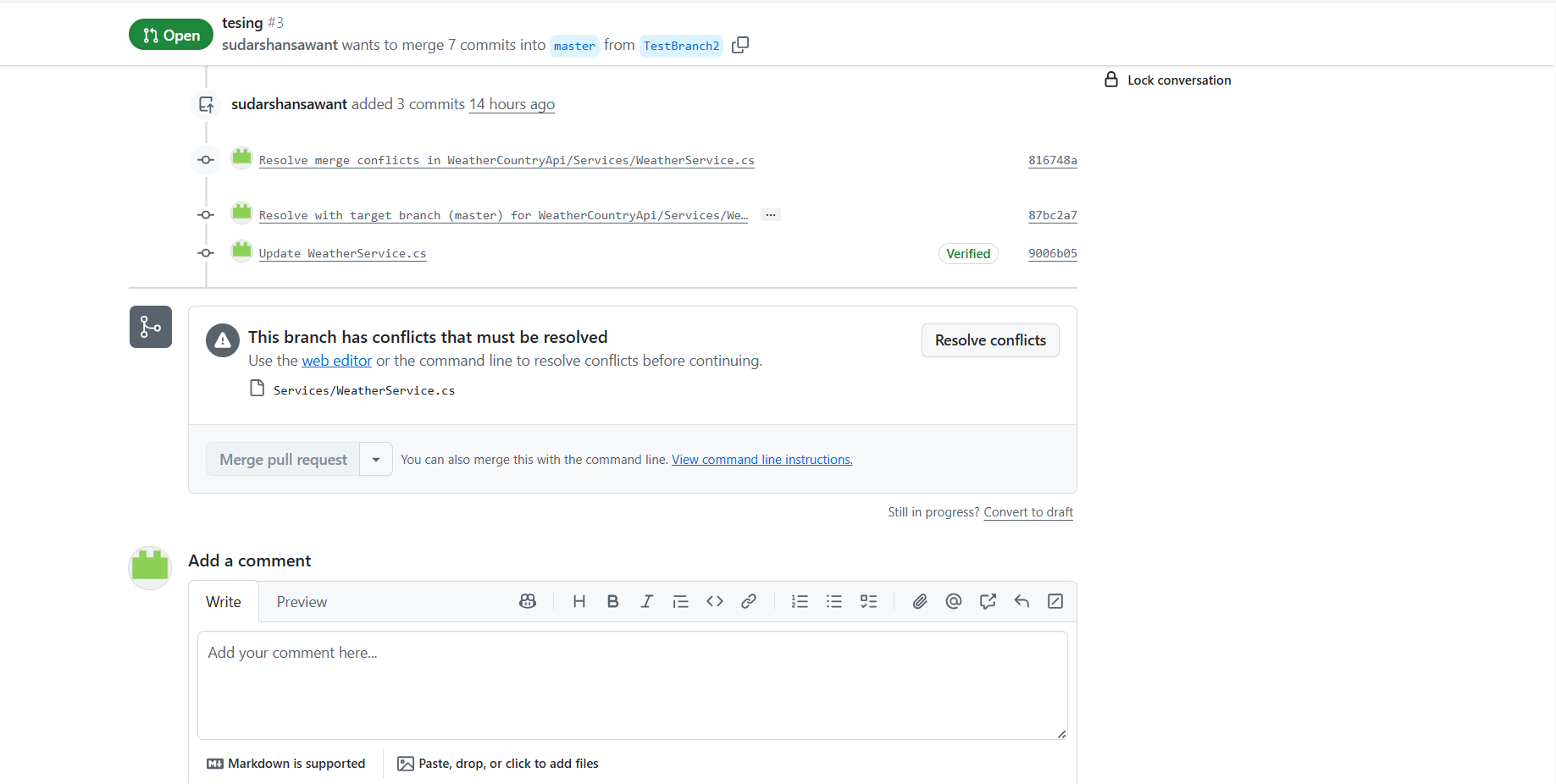
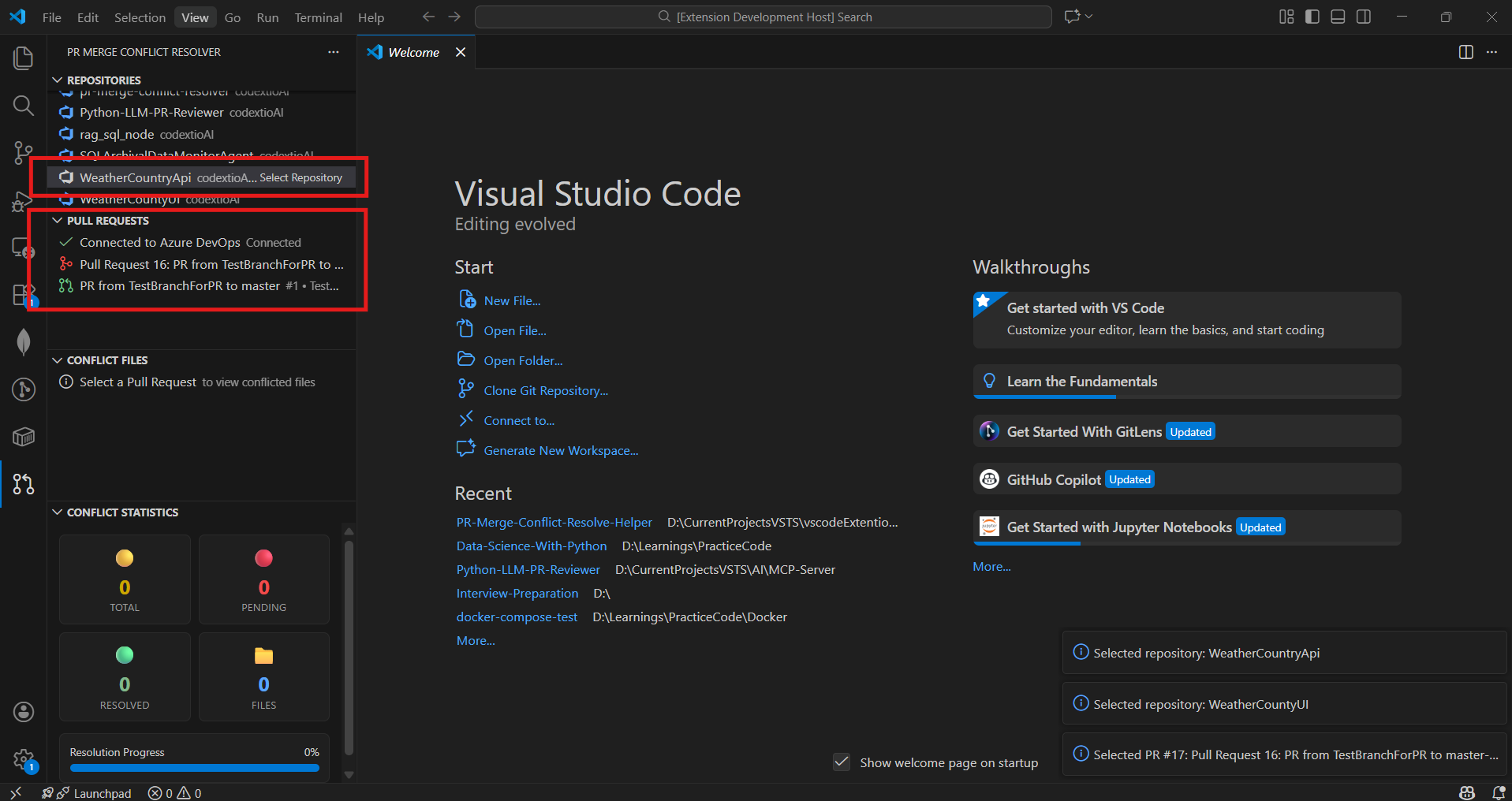
4. Select a Pull Request
- Browse available Pull Requests in the selected repository
- PRs with merge conflicts are automatically highlighted
- Select a PR to view its conflicted files
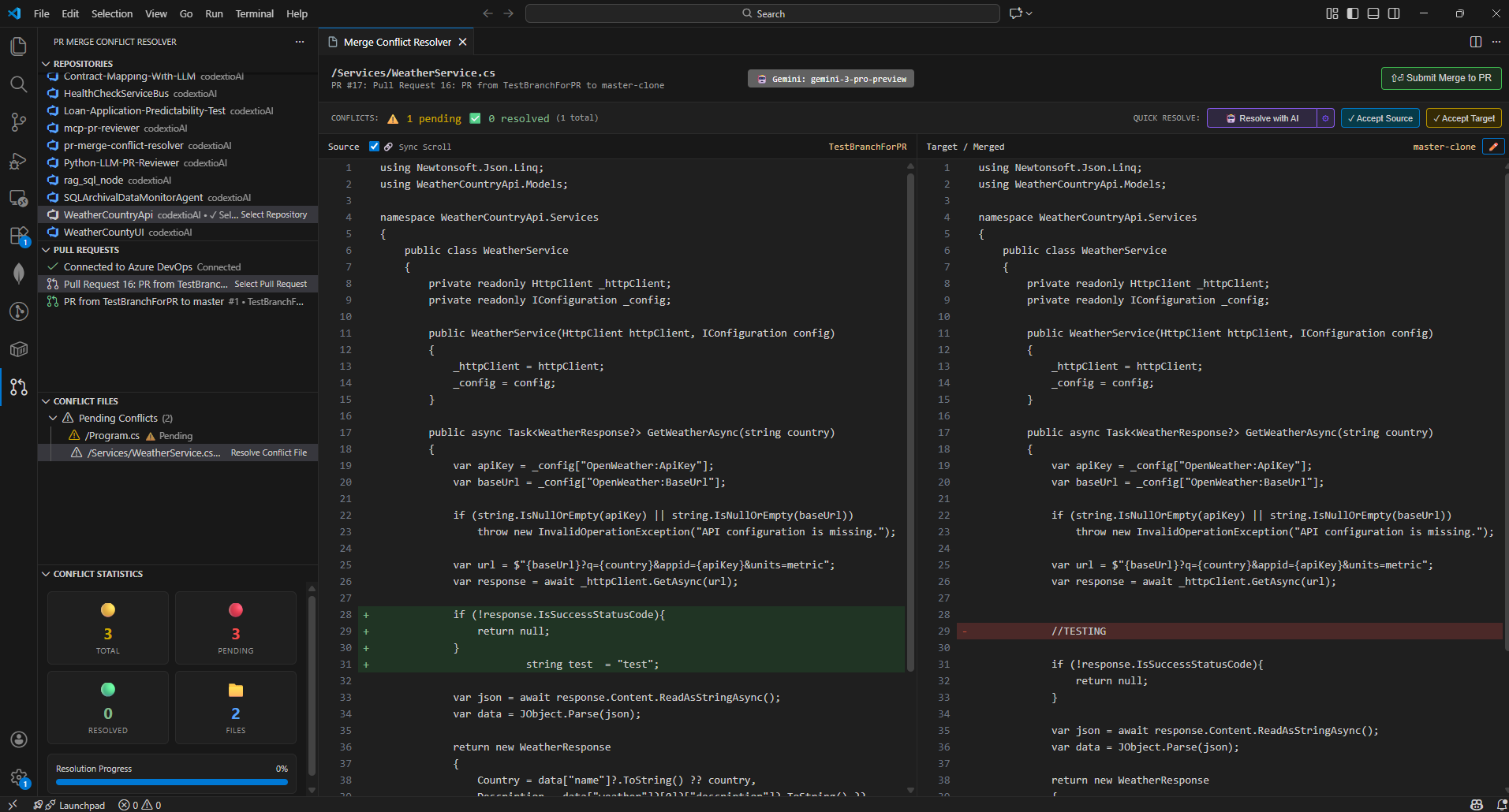
5. Resolve Conflicts
- Click on any conflicted file to open the merge editor
- View source and target branches side-by-side
- Accept changes from either branch or edit manually
- Save your resolution
Edit using quick actions: you can edit manually or use the Accept from Source/Target buttons to quickly resolve sections.
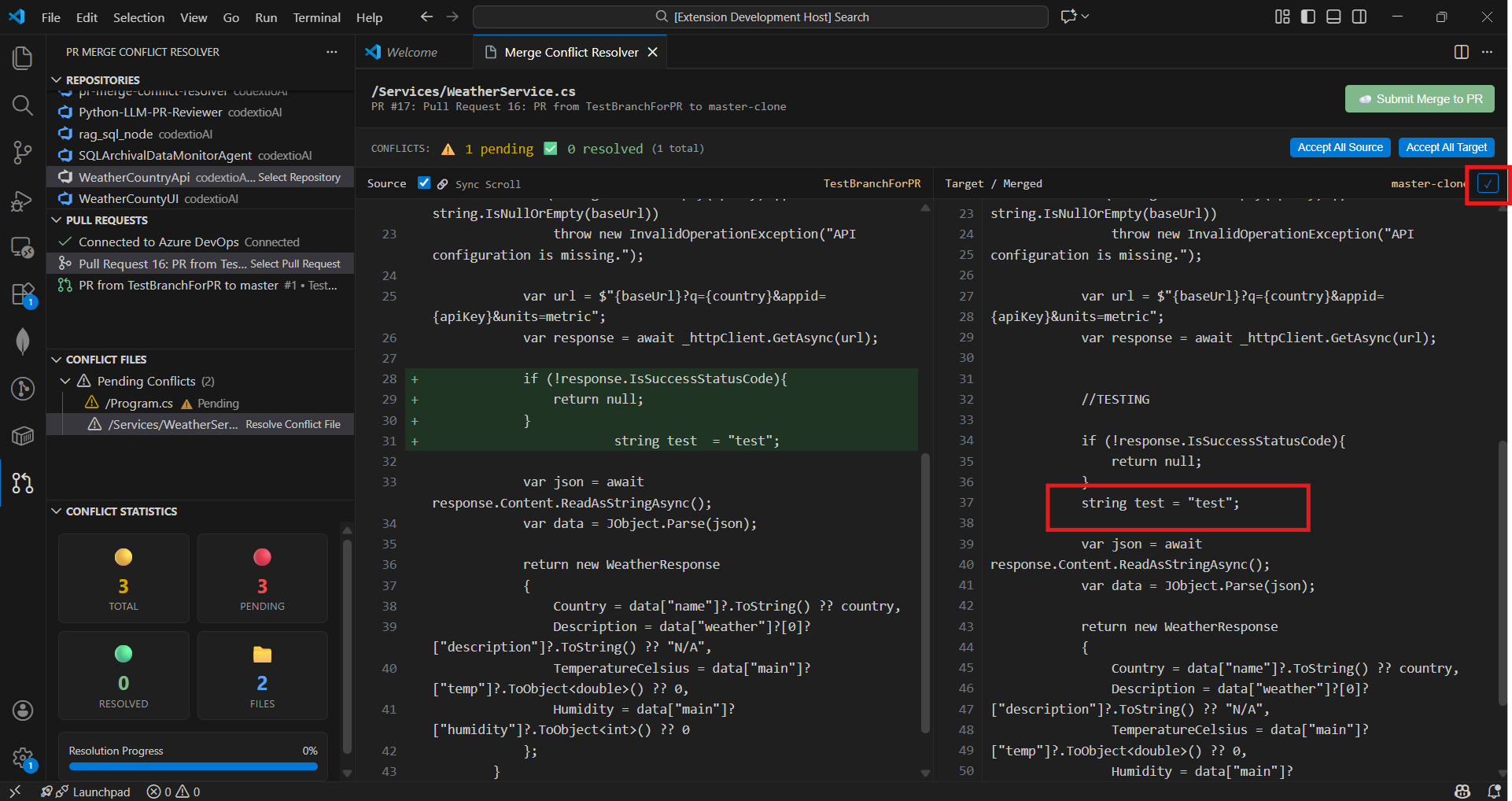
6. Submit Changes To PR
- Once all conflicts in a file are resolved, click Submit Merge to PR
- Enter a commit message
- Changes are pushed directly back to your Azure DevOps PR
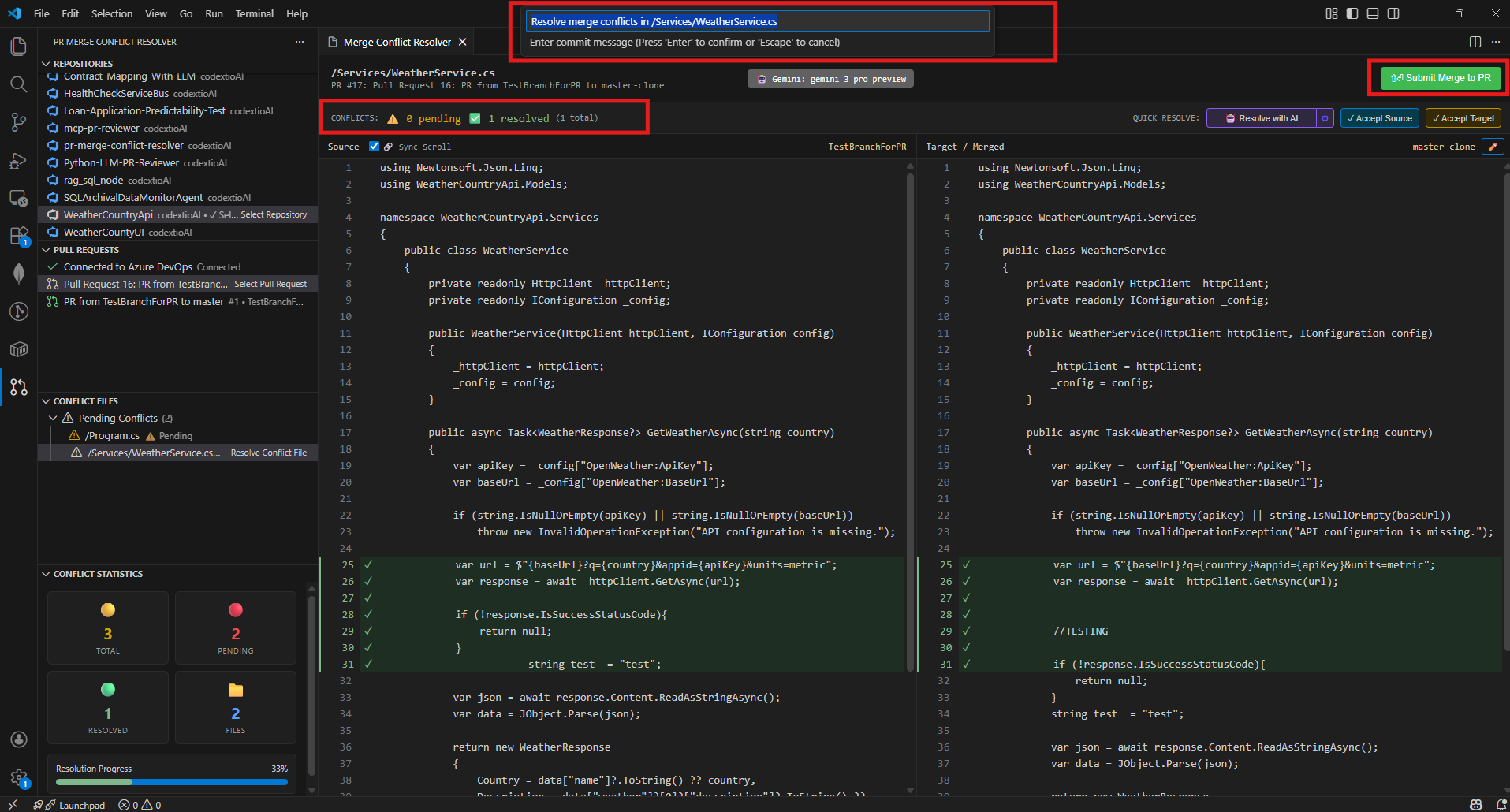
📁 Bulk Resolve Conflicts (NEW)
Quickly resolve multiple conflict files at once using the context menu:
How to Use
Right-click on any of these items in the Conflict Files tree:
- Folder - Resolves all conflict files within that folder
- Filter Group (Source Branch Files / Other PR Files) - Resolves all files in that group
- Section Header (Pending Conflicts) - Resolves ALL pending files
Select "Accept All Source" or "Accept All Target"
Files are resolved locally with the chosen branch content
Click "Sync Resolved Files" (cloud icon) in the toolbar to push changes
Features
| Feature |
Description |
| Batch Resolution |
Resolve entire folders or all pending files with one click |
| Smart Sync Button |
Only appears when there are locally resolved files ready to push |
| Per-File Progress |
Shows progress for each file during sync (e.g., "file.ts (3/10)") |
| Error Recovery |
Files that fail to sync are automatically marked as pending again |
| Resolution Tracking |
Commit messages show how each file was resolved (source/target) |
⚡ Optimized for Large Codebases (NEW in v1.1.2)
PRs with hundreds of conflict files no longer block the UI. The extension uses a multi-layered optimization strategy to keep the tree view responsive:
| Optimization |
Detail |
| Non-Blocking Loading |
Conflict files tree displays instantly with default counts; actual counts stream in via background calculation |
| Batched Concurrency |
File processing uses a pool of 6 concurrent requests — avoids Promise.all bursts that trigger API rate limits |
| LRU Content Cache |
Up to 500 file contents cached with 5-minute TTL; repeated access (expand/collapse, refresh) hits cache instead of API |
| Debounced Refresh |
Tree view refreshes are debounced at 150ms — dozens of background results batch into a single re-render |
| Cancellable Operations |
Switching PRs immediately cancels in-flight calculations so stale results never overwrite fresh data |
| Folder Tree Caching |
Folder hierarchies are cached per conflict status — expanding/collapsing folders is instant |
| Progressive Updates |
Tree refreshes every 10 files during background calculation for incremental progress visibility |
Tip: For very large PRs (200+ conflict files), the tree appears immediately and conflict counts fill in progressively. You can start reviewing files while counts are still loading.
To use AI-powered conflict resolution, you need to configure an LLM provider:
1. Open LLM Configuration
Use the Command Palette (Ctrl+Shift+P) and run:
PR Merge Conflict: Configure LLM
2. Select LLM Provider
Choose from the available providers:
- Azure AI - Enterprise Azure OpenAI deployments
- OpenAI - Direct OpenAI API access
- Google Gemini - Google's AI with large context windows
- Anthropic Claude - Advanced reasoning capabilities
- Ollama - Local models (free, no API key needed)
- Moonshot Kimi - Large context Chinese/English models
- OpenRouter - Access multiple providers with one API key
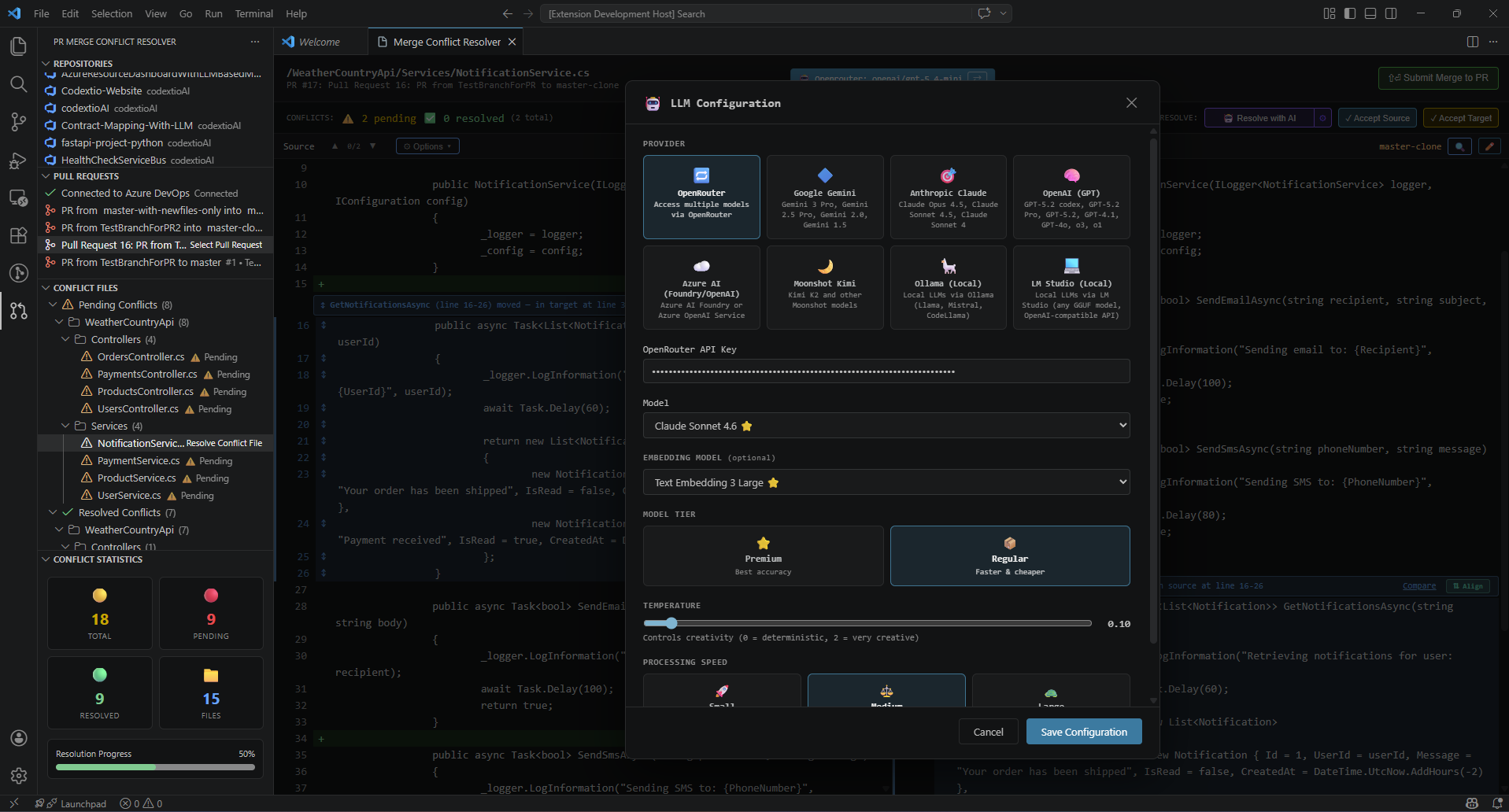
3. Enter API Key
- For cloud providers (OpenAI, Azure, Gemini, Anthropic, etc.), enter your API key
- For Ollama, no API key is required - just ensure Ollama is running locally
- Azure AI: Enter your Azure OpenAI endpoint (e.g.,
https://your-resource.openai.azure.com)
- Ollama: Enter your local endpoint (default:
http://localhost:11434)
5. Select Models
- Choose the chat model for conflict resolution
- Optionally select an embedding model for enhanced context understanding
6. Verify Configuration
Once configured, you'll see a confirmation message. You can now use the "Resolve with AI" button on any conflicted file.
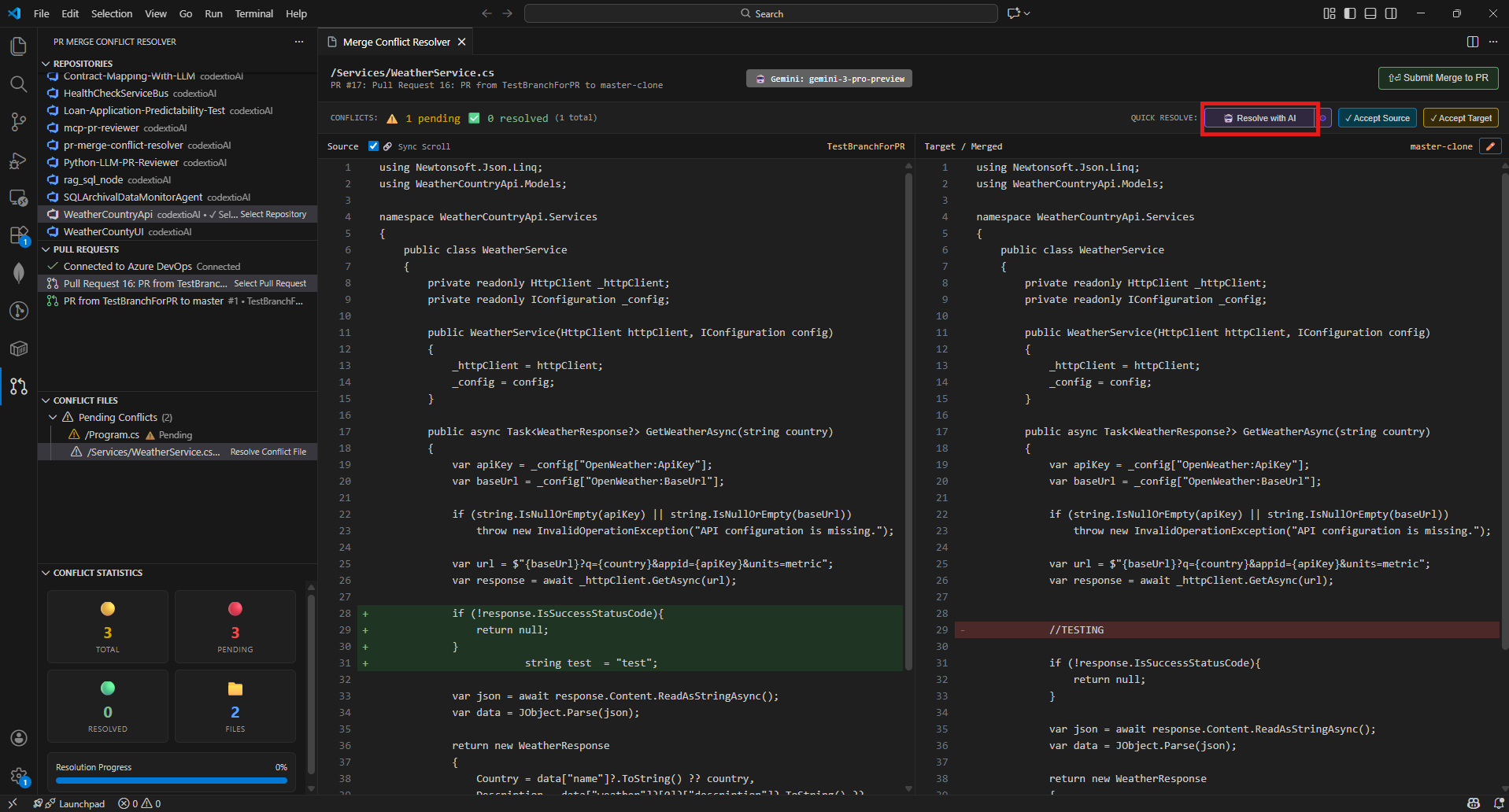
7. AI Starts Resolving
Clicking the button sends the conflict data to the selected LLM, which processes it and returns a merged resolution. During this process, you'll see a loading indicator and see cancel button if you wish to abort.
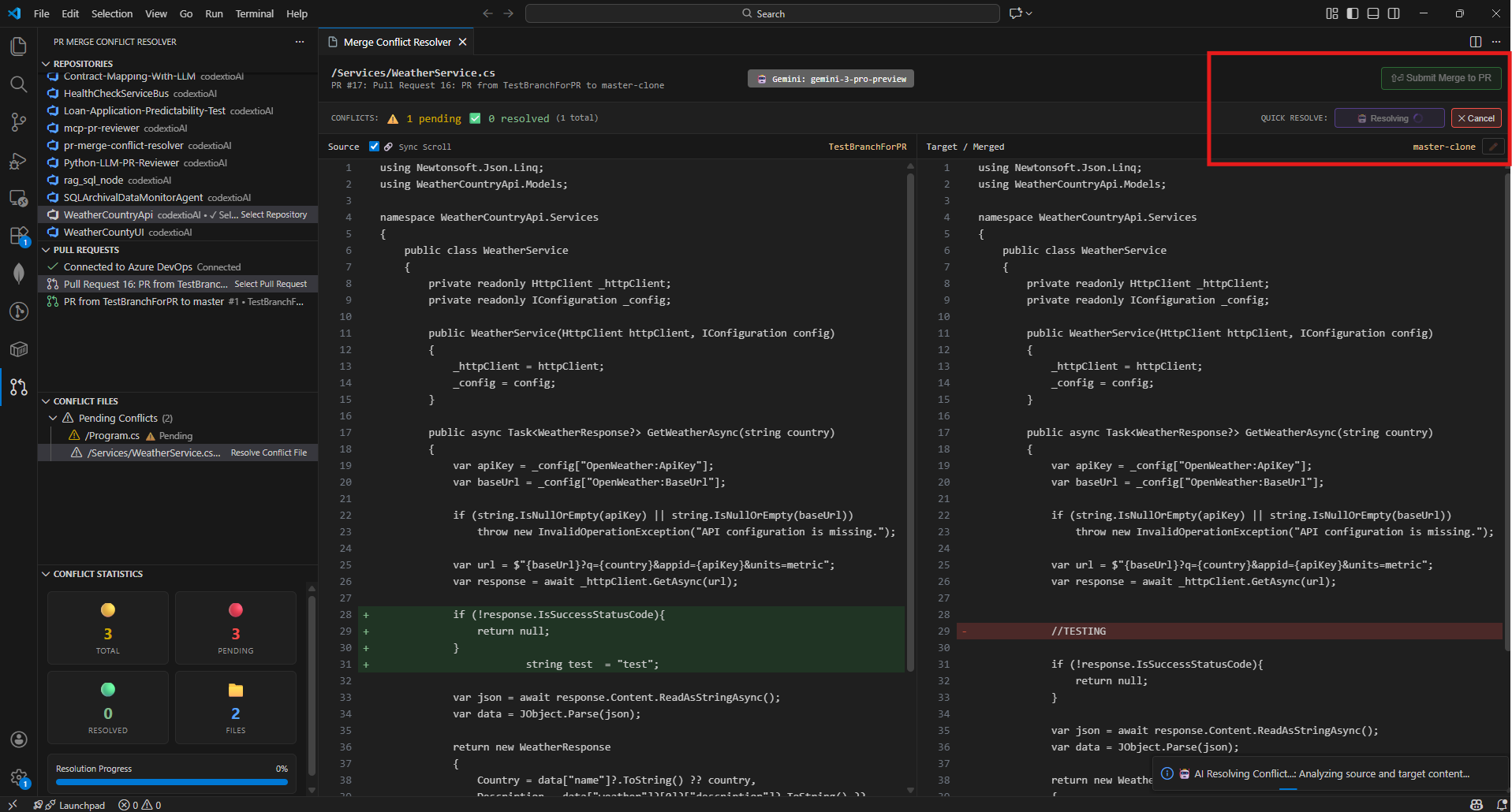
7. AI-Powered Conflict Resolution
The AI suggests a merged resolution based on the context from both branches. You can review the file changes and Submit Merge To PR.
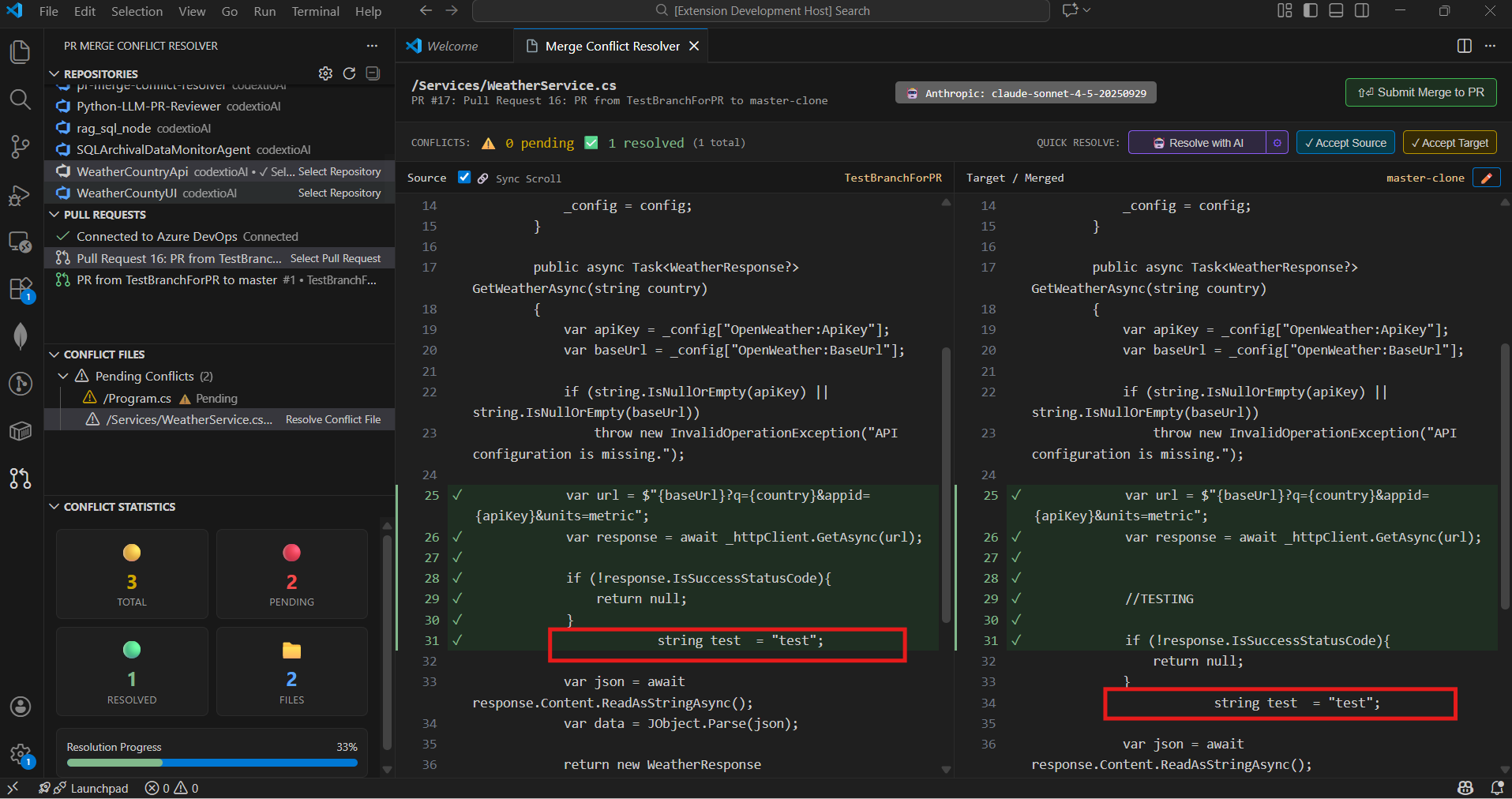
Tip: For best results with code conflicts, use models optimized for coding like Gemini 3 Pro, Claude Opus 4.5, Claude Sonnet 4.5, GPT-5.2 Pro, or KIMI K2.
🧭 Workflow Overview
- Connect to Azure DevOps with your PAT
- Select organization, project, and repository
- Choose a Pull Request with conflicts
- View conflicted files in the Conflict Files panel
- Resolve conflicts using the side-by-side editor
- Track progress in the Conflict Statistics panel
- Submit resolved files back to the PR
🔐 Authentication
The extension supports multiple authentication methods:
Azure DevOps
Personal Access Token (PAT) - Recommended
- Go to Azure DevOps → User Settings → Personal Access Tokens
- Create a new token with:
- Code (Read & Write) permissions
- Pull Request Threads (Read & Write) permissions
- Copy the token and paste it when prompted by the extension
OAuth 2.0
OAuth authentication is also supported for seamless integration with your Azure DevOps account.
GitHub
Personal Access Token
- Go to GitHub → Settings → Developer Settings → Personal Access Tokens
- Generate a new token (classic) with:
- repo scope (Full control of private repositories)
- Copy the token and use it in the extension configuration
Security: All credentials are stored securely using VS Code's Secret Storage API. Tokens are never logged or transmitted outside of Azure DevOps/GitHub API calls.
📊 Features in Detail
Conflict Detection
- Automatically scans PRs for merge conflicts
- Displays conflicted files grouped by status (Pending/Resolved)
- Shows real-time statistics on conflict resolution progress
Side-by-Side Merge Editor
- Left panel: Source branch changes
- Right panel: Target branch / merged view
- Quick actions to accept from source or target
- Manual inline editing for complex conflicts
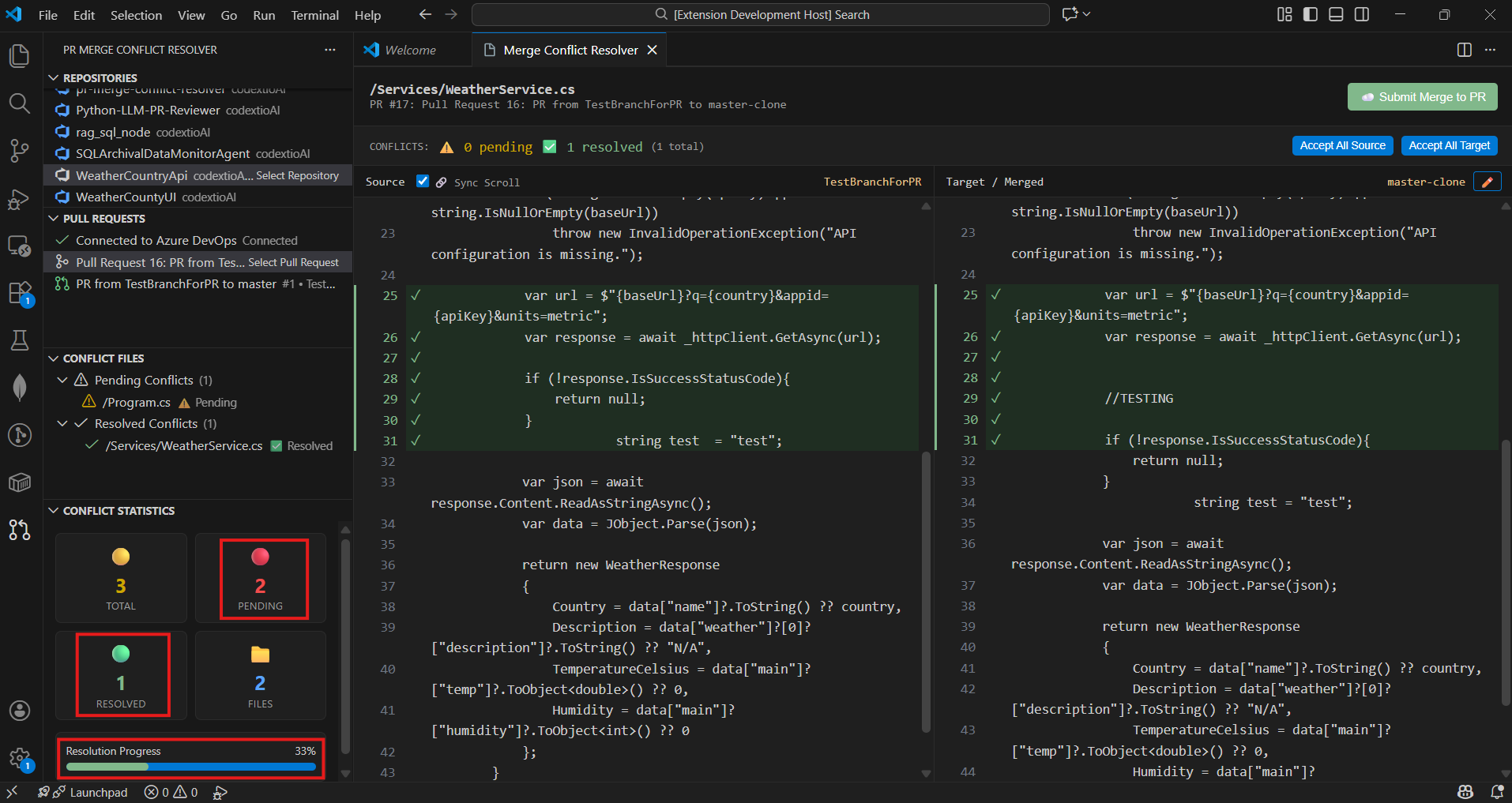
Progress Tracking
- Visual indicators for pending and resolved conflicts
- Live statistics panel showing:
- Total conflicts count
- Pending conflicts
- Resolved files
- Overall resolution percentage
Direct PR Integration
- Submit resolved files directly to the PR
- Add commit messages for each resolution
- No need to switch to browser or use git commands
🛠 Requirements
- Visual Studio Code version
1.90.0 or higher
- Azure DevOps or GitHub account with access to repositories
- Personal Access Token with appropriate permissions:
- Azure DevOps: Code (Read & Write), Pull Request Threads (Read & Write)
- GitHub: repo scope
- For AI-powered resolution (optional) — choose one:
- A GitHub Copilot subscription (no API key — uses VS Code's Language Model API; requires the GitHub Copilot extension)
- An LLM API key: Microsoft Foundry (Azure AI), OpenAI, Gemini, Anthropic, etc.
- Or Ollama for local, free AI resolution
📦 Extension Settings
Configure the extension through VS Code settings:
Provider Settings
prMergeConflictResolver.provider: Git provider (azureDevOps or github)prMergeConflictResolver.azureDevOps.organization: Azure DevOps organization nameprMergeConflictResolver.azureDevOps.project: Azure DevOps project nameprMergeConflictResolver.azureDevOps.repository: Azure DevOps repository nameprMergeConflictResolver.github.owner: GitHub owner/organization nameprMergeConflictResolver.github.repository: GitHub repository name
LLM Settings
prMergeConflictResolver.llm.provider: LLM provider (azure, openai, gemini, anthropic, grok, deepseek, ollama, kimi, openrouter)prMergeConflictResolver.llm.model: Model ID for the selected providerprMergeConflictResolver.llm.embeddingModel: Embedding model for RAG-based resolution
Diff Settings
prMergeConflictResolver.diffContext: Number of context lines in diff (default: 3)prMergeConflictResolver.autoRefreshInterval: Auto-refresh interval in seconds (0 to disable)
🐛 Troubleshooting
"Failed to fetch repositories"
- Verify your PAT has the correct permissions
- Check that your organization name is correct
- Ensure you have access to the specified project
"Command not found" errors
- Reload VS Code window (
Ctrl+Shift+P → "Reload Window")
- Check the extension is activated in the Extensions panel
Conflicts not showing
- Click the refresh icon in the Pull Requests panel
- Verify the PR actually has merge conflicts in Azure DevOps
📄 License
This extension is licensed under the MIT License.
🤝 Support
For issues, feature requests, or contributions:
- Contact: codextio.dev@gmail.com
🎯 Roadmap
Features completed:
- ✅ Azure DevOps support
- ✅ GitHub support
- ✅ Side-by-side merge editor
- ✅ Real-time conflict statistics
- ✅ Multi-LLM provider support (7 providers)
- ✅ AI-powered conflict resolution
- ✅ RAG-based context understanding (in memory limits)
- ✅ LLM Embeddings with semantic search (cosine similarity)
- ✅ Multi-dimensional vector support (768D - 4096D)
- ✅ Intelligent code chunking (imports, classes, methods)
- ✅ Preference embedding for personalized resolution
- ✅ Semantic merge pipeline with chunk-level LLM merging
- ✅ Smart method signature merging (parameter union)
- ✅ Bulk conflict resolution
- ✅ Ignore formatting option for diff view
- ✅ Pipeline details modal with execution statistics
- ✅ Premium/Regular model tier optimization for predictable AI behavior
- ✅ Custom temperature manual entry for fine-tuned control
- ✅ Moved method/function block detection with visual SVG connectors
- ✅ Large codebase optimization — non-blocking loading, batched concurrency, LRU cache, progressive updates
- ✅ Multi-modifier field declaration support in semantic chunker (C#, Java, C++)
- ✅ Constructor body patching for C#/Java/C++ in source-content verification
- ✅ Smooth scroll sync with rAF coalescing and jitter elimination
- ✅ Token stats tracking through verification and streaming LLM calls
- ✅ New method source skeleton order enforcement in post-merge step
- ✅ C# tuple/nullable return type support in method signature detection
- ✅ Skeleton-based method replacement in Local Analysis merge engine
Future enhancements planned:
- Advanced diff algorithms
- Conflict resolution templates
- Team collaboration features
- Multi-file context awareness
📋 Release Notes
v1.2.0 (June 2026 - Feature Release)
🤖 Subscription AI (GitHub Copilot + Claude Code) & ✏️ Live Edit-Mode Diff Colours
- NEW: GitHub Copilot provider — keyless AI-assisted merges via VS Code's Language Model API, using the GPT / Claude / Gemini / o-series models in your Copilot plan (discovered automatically). Requires VS Code 1.90+ and the GitHub Copilot extension
- NEW: Anthropic Claude (Pro/Max) via your local Claude Code CLI — keyless merges through your own signed-in
claude (claude -p); the extension sends only the two file versions + your config and gets back the complete merged file, running tools-disabled in a temp dir (single lightweight call per merge)
- NEW: Edit mode keeps diff colours live — highlights are retained while you edit, and a line edited back to match the source automatically loses its diff colour (and regains it if it diverges)
- NEW: Latest premium models — Claude Opus 4.8, GPT-5.5 / 5.4, plus GLM 4.7/4.6 and Kimi K2 Thinking / K2.7 Code via OpenRouter; Copilot picker lists the official premium families
- FIXED: AI never applies a broken merge — API errors (401/403/404/429, 5xx, timeouts, any non-2XX) now abort with a clear error modal and leave your source/target unchanged; the merge engine produces and validates the complete file (no dropped classes or detached attributes/comments)
- FIXED: GitHub conflicts on freshly-opened PRs are now detected on first load (waits for GitHub's async mergeability; Azure DevOps unaffected)
- FIXED: Claude Code merges no longer produce garbled output (single-shot full-file merge), report time + token stats, and the Windows CLI spawn warning / command-splitting is fixed
v1.1.5 (June 2026 - Patch Release)
🐛 Filter, File-Loading & Edit-Mode Reliability Fixes
- FIXED: Commit-range filter showed no groups when the FROM and TO commits were the same (or when the only relevant change was in the FROM commit) — the GitHub three-dot compare excluded those changes, so PR files went unmarked. The range is now resolved inclusively (same-commit selections fetch that commit's files; ranges include the FROM commit's own changes), with a clear warning when a range matches no PR files
- FIXED: The first conflict file clicked after opening the resolver sometimes rendered an empty panel until a second click — added a webview-ready handshake so the extension only sends file content once the webview is listening
- FIXED: Edit-mode line numbers drifted out of alignment when long lines wrapped across multiple rows — the line-number gutter is now wrap-aware and stays aligned to each logical line (matching the read-only view), realigning on typing and panel resize
- IMPROVED: AI-assisted merge now uses more accurate tree-sitter structural analysis across TypeScript/JavaScript, C#, Java, Python, Go, Rust, PHP, Ruby, and C/C++ — correctly recognizing methods, constructors, top-level functions, decorators/attributes, C# delegates/events/records, and class fields (manual conflict resolution and Local Analysis are unaffected)
v1.1.4 (March 2026 - Patch Release)
🔧 Local Analysis Method Detection & Replacement Fixes
- IMPROVED: C# tuple return types (e.g.,
Task<(List<Order>, int)>) and nullable types (e.g., Task<Order?>) now correctly detected as method conflicts across Local Analysis, diff view, and signature highlighting
- IMPROVED: Local Analysis method replacement rewritten to find methods by their actual scope boundaries instead of line numbers — reliable even when multiple methods are replaced at once
- IMPROVED: Edited target content from the Local Analysis modal is now correctly applied during merge
- FIXED: Selecting "Use All Source" in Local Analysis with multiple methods no longer corrupts method boundaries
v1.1.3 (March 2026 - Patch Release)
🐛 Semantic Merge Accuracy & Pipeline Reliability Fixes
- FIXED: Multi-modifier field declarations (e.g.,
private static readonly) silently dropped from semantic chunking — regex now supports any combination of modifiers for C#, Java, and C++
- FIXED: Constructor body changes dropped by LLM — source-content verification now correctly locates constructors by class name in C#/Java/C++ instead of searching for the literal word "constructor"
- FIXED: Smooth scroll jitter when panels are locked — replaced direct scrollTop with rAF coalescing and activeScroller tracking
- FIXED: Token stats showing 0 in Pipeline Details modal despite successful API calls — verification tokens now tracked, with safety-net estimation fallbacks
- FIXED: New methods not following source skeleton order — POST-MERGE step now enforces source branch ordering for newly inserted methods
v1.1.2 (February 2026 - Patch Release)
🔬 Moved Method Detection & ⚡ Large Codebase Optimizations
- NEW: Moved method/function block detection with LIS-based sequence analysis and visual SVG connectors (Python indentation-based scope detection also supported)
- NEW: Moved method relocation now programmatically matches source branch ordering instead of target branch, ensuring more intuitive conflict resolution and fewer manual adjustments
- NEW: Clicking a moved method highlights its counterpart on the other branch with an SVG connector line, providing clear visual tracking of code relocations
- NEW: Difference Navigator (▲/▼) — Up/down arrows in both Source and Target panel headers to jump between all difference blocks (conflicts, additions, removals, moved methods, signature mismatches)
- NEW: Moved method position preference in AI Resolution form
- IMPROVED: Non-blocking conflict file loading — tree displays immediately while counts calculate in background
- IMPROVED: Batched file processing with concurrency limit of 6 to avoid API rate limiting
- IMPROVED: LRU content cache (500 entries, 5-min TTL) eliminates redundant API calls
- IMPROVED: Debounced tree refresh (150ms) prevents excessive re-renders during background calculation
- IMPROVED: Cancellable background operations — switching PRs cancels in-flight calculations
- IMPROVED: Folder tree caching by conflict status avoids redundant tree rebuilds
- IMPROVED: Progressive tree updates every 10 files for incremental conflict count visibility
- IMPROVED: Hard refresh now clears all locally resolved files and persisted state
- IMPROVED: Overall performance optimizations for PRs with 200+ conflict files, ensuring responsive UI and smooth navigation
- IMPROVED: Resolved file can be added to resolved list locally so that user can sync all resolved files at once instead of pushing one by one
v1.1.1 (February 2026 - Patch Release)
🎯 Model Tier Optimization & Keybinding Fix
- NEW: Premium vs Regular model tier selection — optimizes prompts, batch sizes, and post-processing per model capability for more predictable and accurate AI resolutions
- NEW: Custom temperature manual entry — enter any value within provider-specific range alongside preset options (Precise, Balanced, Creative)
- NEW: Dedicated
Ctrl+G Go to Line shortcut — exclusively opens the extension's Go to Line modal when the Merge Conflict Resolver webview is focused
v1.1.0 (February 2026 - Minor Feature Release)
🧬 Semantic Merge Pipeline & Smart Signature Merging
- NEW: Semantic merge pipeline — files chunked into semantic blocks, matched via cosine similarity, merged individually via LLM
- NEW: Source-content fingerprint verification ensures source changes are never dropped
- NEW: Signature enforcement pass guarantees union of all parameters from both branches
- NEW: Ignore Formatting option in diff view to hide whitespace/indentation noise
- NEW: Pipeline Details Modal with per-stage token/time breakdown and execution statistics
- NEW: Token usage display in AI Summary modal showing total tokens consumed
- IMPROVED: Smart method signature merging creates UNION of parameters instead of dropping them
- IMPROVED: LLM resolution strategy optimized for thinking models with batched conflict resolution
- IMPROVED: Pipeline timeouts increased for complex resolutions (60s architect, 90s builder)
- IMPROVED: Progress notification messages now sync with progress modal steps
- IMPROVED: Method overload detection using
methodName__paramCount keying
- FIXED: Whitespace normalization, diff computation, scroll position, search accuracy
- FIXED: Success modal display and progress modal state transitions
v1.0.26 (February 2026)
📁 Bulk Resolve Conflicts
- NEW: Right-click on folders, filter groups, or section headers to resolve all files at once
- NEW: Smart Sync button only appears when there are locally resolved files ready to push
- NEW: Resolution type tracking for proper commit messages
- FIXED: Inline button click issues and context menu commands
v1.0.25 (February 2026)
🔍 Enhanced Search Functionality
- NEW: In-panel search modal with
Ctrl+F shortcut for both Source and Target views
- NEW: Real-time search highlighting with match navigation (Enter/Shift+Enter)
- NEW: Search results counter showing current position (e.g., "3/10")
- NEW: Backdrop overlay technique for persistent highlights in edit mode
- IMPROVED: Pixel-perfect scroll positioning using actual element positions
- IMPROVED: Focus management keeps search input focused during navigation
- FIXED: Search now accurately scrolls to matches deep in large files
- FIXED: Highlights remain visible in textarea edit mode
- FIXED: "Accept Source" button now properly updates target view with source content
- FIXED: Scroll position preserved when toggling edit mode in target view
- FIXED: LLM status label centered in header area
v1.0.24 (February 2026)
✨ AI Summary & UI Improvements
- NEW: Enhanced AI Summary Modal with two sections:
- "Conflict Resolutions" - shows actual code changes (statements, methods, line changes)
- "Preferences Resolutions" - shows method preference decisions
- NEW: Resolution status labels with color coding ("Used Source", "Kept Target", "Merged")
- NEW: AI Summary now displays for all successful resolution scenarios (Stage 1, Stage 2, Programmatic Fix)
- IMPROVED: Green highlighting for all resolved conflicts in target view
- IMPROVED: Local Analysis modal with green radio buttons and conditional Apply button
- FIXED: Template rendering issues with Handlebars syntax
- FIXED: Edit icon display in toolbar
- CLEANED: Removed debug console.log statements
v1.0.23 (February 2026)
🧠 LLM Embeddings & Semantic Search
- NEW: LLM Embedding Service with multi-provider support
- NEW: Semantic search using cosine similarity for intelligent context retrieval
- NEW: Multi-dimensional vector support (768D - 4096D depending on provider)
- NEW: Intelligent code chunking that detects imports, classes, methods, and comments
- NEW: Method-level conflict embedding for targeted resolution
- NEW: User preference embedding for personalized AI responses
- NEW: RAG orchestration combining semantic search with user preferences
- NEW: Automatic fallback to TF-IDF when LLM embedding APIs are unavailable
- IMPROVED: Enhanced AI resolution prompts with similarity scores and context
v1.0.22 (January 2026)
🤖 AI Merge Preferences & Local Analysis Improvements
- NEW: AI Merge Preferences form with 9 configurable options
- NEW: Method-level conflict decisions (source/target/AI merge)
- NEW: Special instructions support for custom merge behavior
- NEW: Open-Router LLM provider with manual model option
- NEW: Local Analysis modal with improved UI
- NEW: Method/function signature conflict detection support
- Added vertical scrollbars to source/target code blocks
- Reduced stat card heights in Local Analysis Summary View
v1.0.21 (January 2026)
✨ Enhanced Azure DevOps Configuration
- NEW: Manual project name entry option for users with restricted project list permissions
- IMPROVED: Automatic fallback to manual entry when project list fetch fails
- IMPROVED: Flexible project selection workflow accommodating various permission levels
🐛 Bug Fixes
- FIXED: Removed file in Pull Request now handled correctly and resolved without errors
v1.0.20 (January 2026)
🚀 Initial Release
📊 Local Analysis
- Added local conflict analysis without LLM requirement
- Statement-level change detection
- Source/target code comparison view
- Summary statistics for local analysis
v1.0.19 (December 2025)
🤖 Multi-LLM Provider Support
- Added 7 LLM providers (Azure AI, OpenAI, Google Gemini, Anthropic Claude, Ollama, Moonshot Kimi, OpenRouter)
v1.0.0 (December 2025)
- Azure DevOps integration
- GitHub integration
- Side-by-side merge editor
- Real-time conflict statistics
- Direct PR submission
- PAT and OAuth authentication
⚡ Powered by Codextio
| |

