🚀 Overview
Mermaid Browser is a powerhouse, 100% local-first VS Code extension that transforms your markdown and diagramming experience. Whether you are crafting complex system architectures, engineering state machines, documenting database schemas, or writing academic masterclasses, Mermaid Browser provides instant workspace indexing, live visual editing, interactive preview toolbars, and publication-ready Markdown-to-PDF compilation with embedded LaTeX math rendering.
💡 Zero External Dependencies: Unlike other extensions, Mermaid Browser contains its own bundled Mermaid engine, KaTeX math compiler, and PDF generation pipeline. No external Markdown preview extensions or cloud accounts required.
📑 Table of Contents
✨ Key Features
1. Workspace-Wide Diagram Indexer & Explorer
- Automatic Discovery: Instantly parses and indexes all standalone
.mmd / .mermaid files and all ```mermaid fences embedded across Markdown (.md) files in your workspace.
- Fuzzy Search: Search instantly by diagram title, type, file name, or relative folder path.
- Category & Type Filters: Filter by Flowchart, Sequence, Class, State, Entity Relationship (ER), Gantt, Git Graph, Pie, Mindmap, Requirement, C4, and more.
- Side-by-Side Inspector: Split view featuring high-res SVG canvas on one side and editable source with line diagnostics on the other.
- Theme Switcher: Switch between
default, dark, neutral, forest, and base themes on the fly.
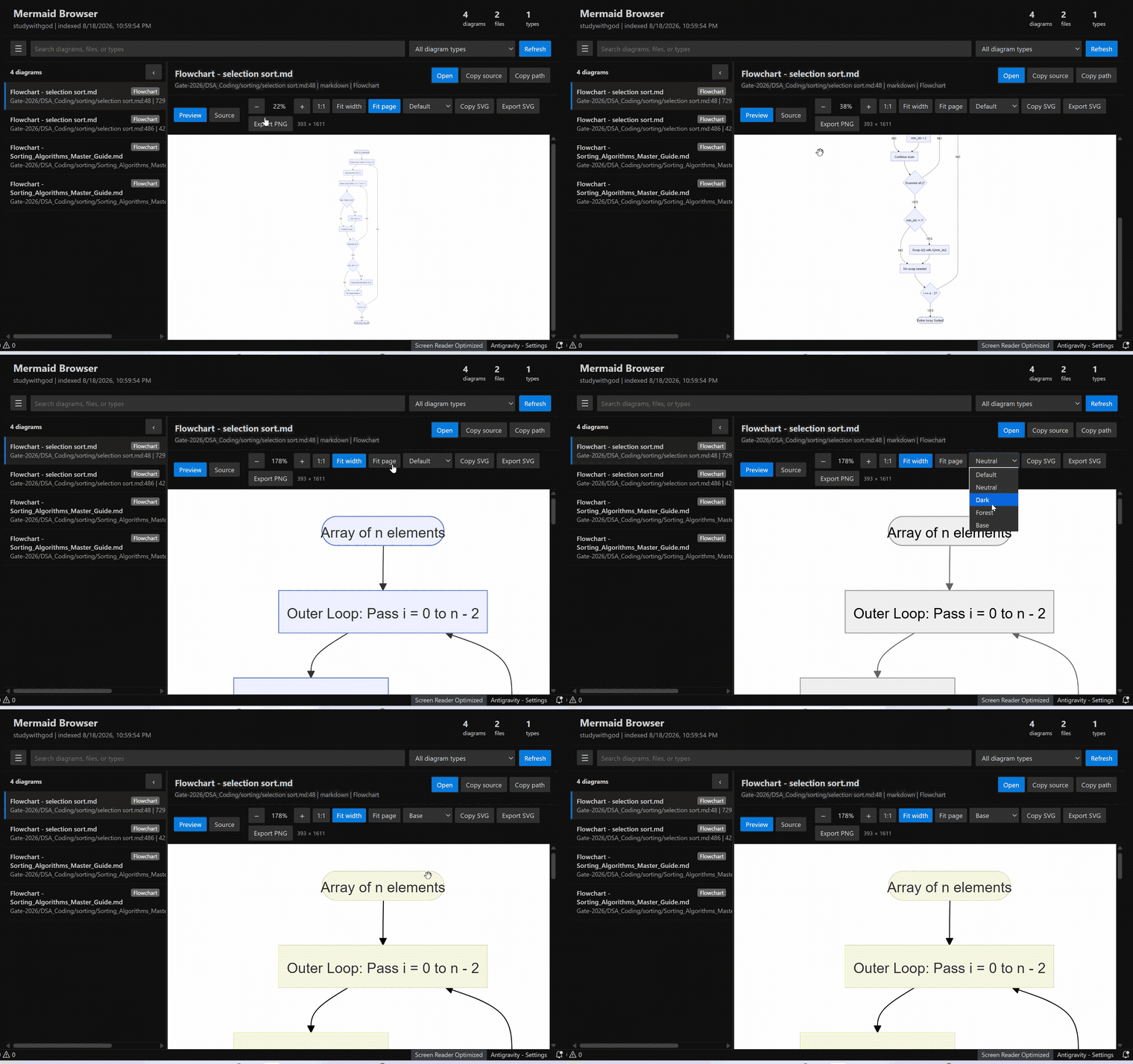
Figure 1: Instant workspace-wide diagram catalog, search filtering, and live SVG inspector.
When previewing any Markdown file in VS Code's native Markdown Preview (Ctrl+Shift+V / Cmd+Shift+V):
- Embedded Controls: Every rendered Mermaid diagram gets a sleek, floating glassmorphism toolbar.
- Zoom & Pan Controls: Zoom In (
+), Zoom Out (-), Reset Zoom, and Auto-Fit to Width.
- Oversized Diagram Protection: Built-in horizontal and vertical scroll containers ensure diagrams never clip or overflow your editor.
- High-DPI Readability: Automatic
viewBox inspection forces crisp typography and high legibility even for giant system flowcharts.
- Direct Actions: One-click
✏️ Edit Live, 📋 Copy Source, and 💾 Export SVG directly from the preview!
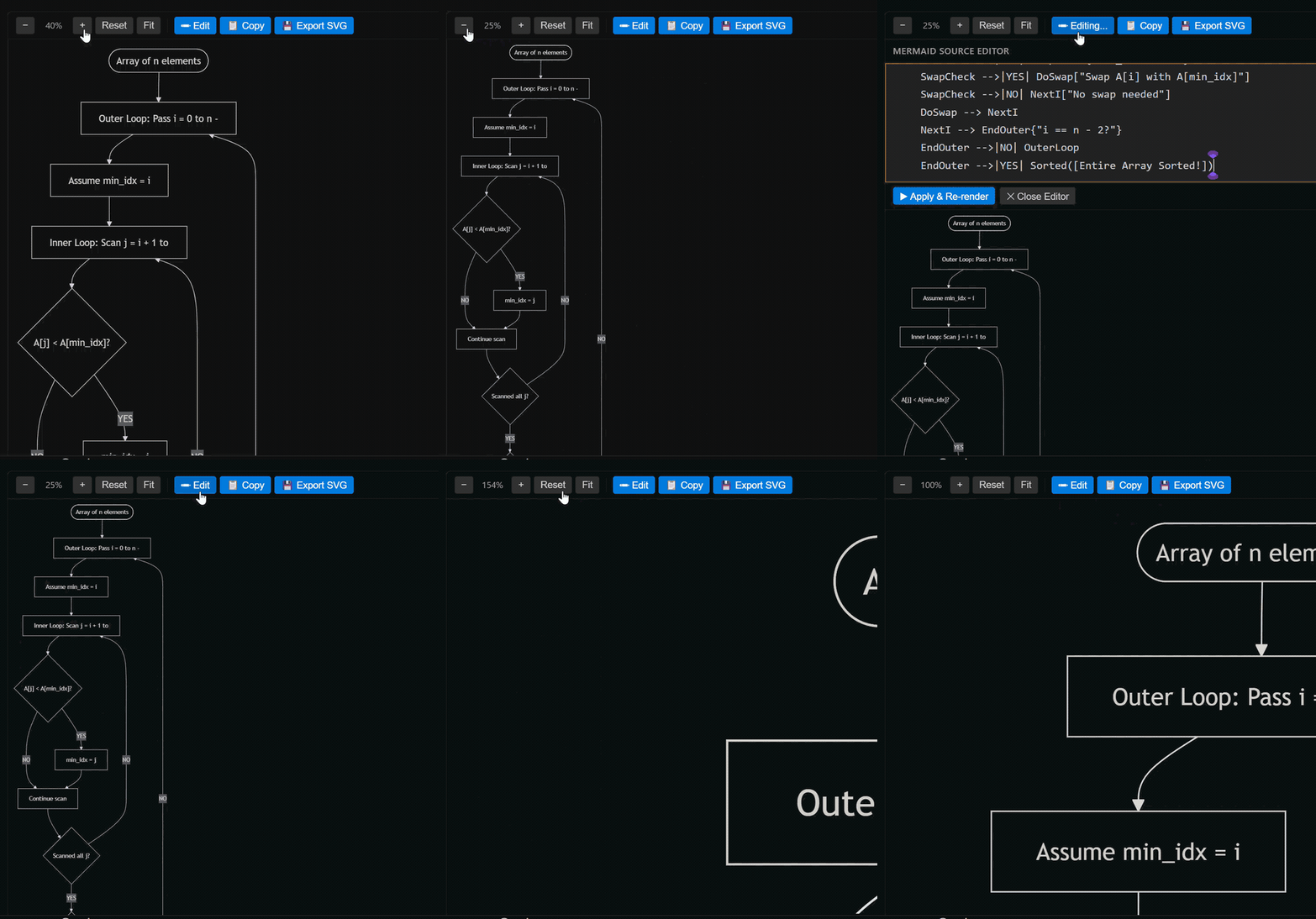
Figure 2: Native Markdown preview floating toolbar with real-time zoom, pan, and live edit controls.
3. CodeLens & Inline Quick Actions
Right above every ```mermaid code block inside .md files, click dedicated CodeLens buttons:
$(preview) Preview Diagram — Jump directly into the diagram browser with this diagram focused.$(edit) Edit Live — Open an interactive live editor panel beside your code with two-way synchronization.$(copy) Copy Diagram Source — Copy clean Mermaid source to your clipboard.$(export) Export Diagram as SVG — Export production-ready vector graphics.
4. Real-Time Two-Way Live Diagram Editor
- Live Side-by-Side Editing: Edit your Mermaid code in a dedicated panel with instantaneous SVG preview rendering.
- Real-Time Sync: Changes made in the live editor seamlessly propagate back to your source Markdown file.
- Syntax Error Diagnostics: Live error banners with exact line numbers and helpful error messages prevent broken diagrams.
- Interactive Canvas: Smooth drag-to-pan, mouse-wheel zooming, and 1-click center alignment.
5. High-Fidelity Markdown-to-PDF Exporter (with KaTeX Math)
Convert comprehensive Markdown documents into stunning, print-ready PDF reports:
- Mermaid Diagrams Rendered as Vector/PNG: Clean diagram rasterization eliminates dark/distorted artifacts and preserves crisp SVG styling.
- LaTeX Math Support (KaTeX): Full support for inline math (
$E = mc^2$) and multiline display equations ($$\sum_{i=1}^n x_i$$) rendered cleanly via native MathML.
- Local & Relative Image Inlining: Automatically resolves and encodes local
.png, .jpg, .svg, and .webp images as inline base64 assets.
- Smart A4 Pagination: Intelligent boundary calculation avoids splitting single code blocks, tables, math formulas, or diagram cards across page breaks.
- 3-Way Trigger Access:
- File Explorer: Right-click any
.md file in the sidebar → Mermaid Browser: Export Markdown as PDF.
- Editor Context: Right-click inside an active Markdown editor →
Mermaid Browser: Export Markdown as PDF.
- Editor Navigation Bar: Click the
$(file-pdf) icon at the top right of your markdown editor.
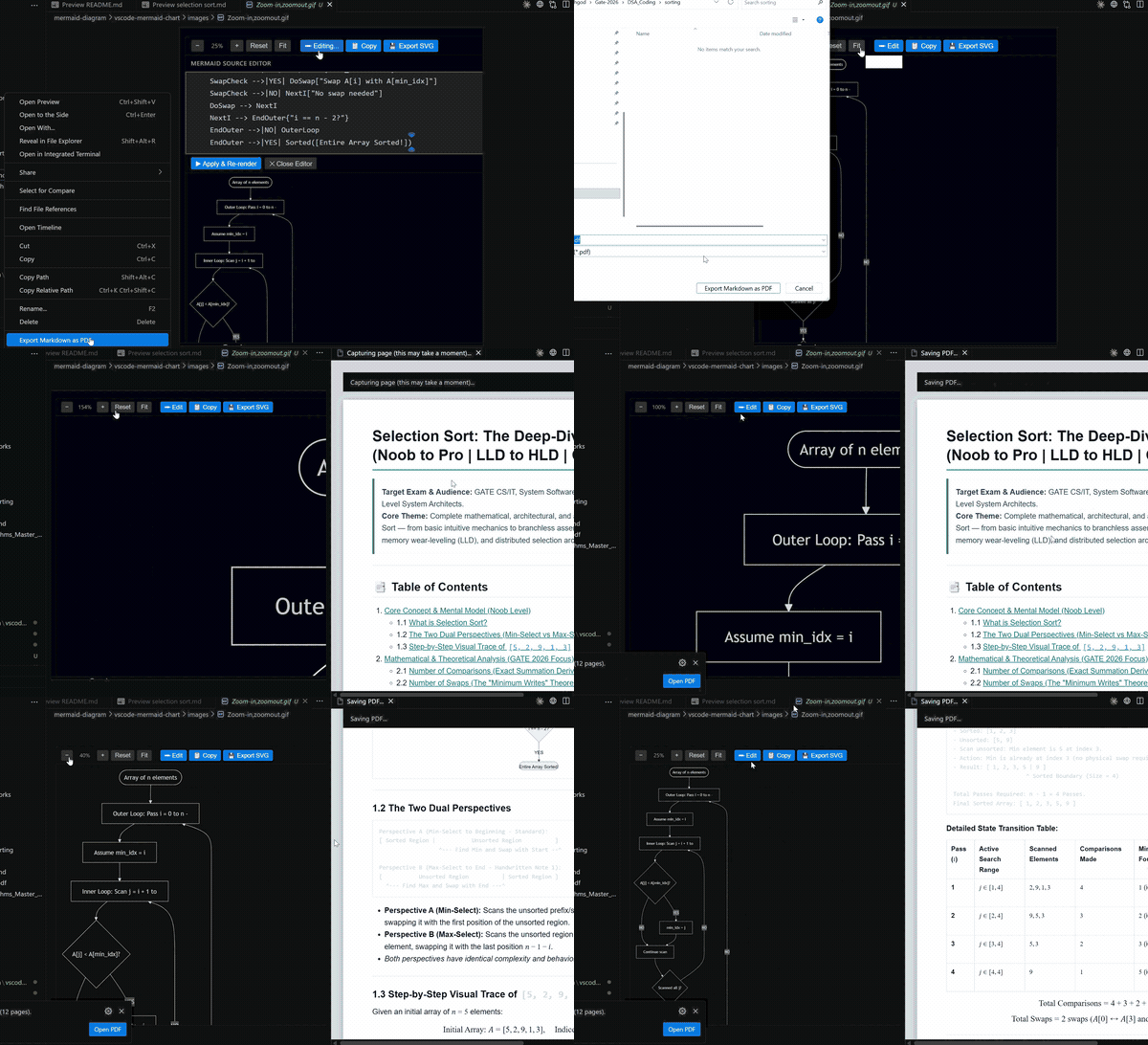
Figure 3: Seamless Markdown-to-PDF export pipeline with KaTeX LaTeX math and rendered Mermaid diagrams.
📊 Supported Diagram Types
Mermaid Browser supports all standard Mermaid syntax flavors:
| Diagram Type |
Syntax Starter |
Typical Use Case |
| Flowchart |
flowchart TD / graph LR |
System architecture, decision trees, CI/CD pipelines |
| Sequence Diagram |
sequenceDiagram |
API request/response flows, microservice interactions |
| Class Diagram |
classDiagram |
Object-oriented domain models, TypeScript/Java architectures |
| State Diagram |
stateDiagram-v2 |
State machines, lifecycle flows, authentication states |
| Entity Relationship (ER) |
erDiagram |
Database schemas, SQL table relationships, ORM mapping |
| Gantt Chart |
gantt |
Project timelines, sprint roadmaps, release milestones |
| Git Graph |
gitGraph |
Git branch models, release workflows, rebase tracking |
| Pie Chart |
pie title ... |
Resource allocation, performance breakdowns, metrics |
| Mindmap |
mindmap |
Brainstorming, domain exploration, taxonomy mapping |
| Quadrant Chart |
quadrantChart |
Priority matrices, technology radars, SWOT analysis |
| Requirement Diagram |
requirementDiagram |
Systems engineering, specification verification |
| C4 Architecture |
C4Context / C4Container |
Cloud infrastructure, microservices ecosystem modeling |
🎯 How to Use & Workflows
Browsing Diagrams in Your Workspace
- Press
Ctrl+Shift+P (or Cmd+Shift+P on macOS).
- Type
Mermaid Browser: Open Workspace Browser and press Enter.
- Use the search bar or category pills to navigate across all diagrams in your project.
Editing a Diagram Inline from Markdown
- Open any
.md file containing a ```mermaid fence.
- Click
Edit Live in the CodeLens above the fence (or right-click and select Mermaid Browser: Edit Live).
- Tweak nodes, connections, labels, or themes in real-time.
Exporting Full Markdown Documents to PDF
- Right-click any
.md file in the File Explorer or editor.
- Select
Mermaid Browser: Export Markdown as PDF.
- Choose destination file name and save.
- Once compiled, click
Open PDF in the notification banner to view the result.
⌨️ Commands Reference
| Command |
Title |
Context / Keybinding |
Description |
mermaidBrowser.open |
Open Workspace Browser |
Palette, Explorer, Editor Title |
Opens the searchable workspace diagram catalogue |
mermaidBrowser.previewDiagram |
Preview Current Diagram |
Palette, Editor Title (.mmd) |
Previews the currently active .mmd/.mermaid file |
mermaidBrowser.createDiagram |
Create Diagram |
Command Palette |
Scaffolds a new Mermaid diagram template |
mermaidBrowser.refresh |
Refresh Workspace Index |
Palette, Browser Title |
Re-scans the workspace for new or updated diagrams |
mermaidBrowser.exportMarkdownPdf |
Export Markdown as PDF |
Palette, Explorer, Editor Title |
Converts active Markdown document to formatted PDF |
mermaidBrowser.editLive |
Edit Live |
CodeLens, Editor Context |
Launches split-view interactive live editor |
mermaidBrowser.copyInline |
Copy Diagram Source |
CodeLens |
Copies raw Mermaid diagram text to clipboard |
mermaidBrowser.exportSvgInline |
Export Diagram as SVG |
CodeLens |
Exports isolated diagram to clean SVG format |
⚙️ Configuration & Settings
Customize Mermaid Browser behavior via VS Code Settings (Ctrl+, or Cmd+, → search Mermaid Browser):
{
  // Maximum number of workspace files indexed by Mermaid Browser
  "mermaidBrowser.fileLimit": 2500,

  // Index Mermaid code fences found inside Markdown (.md) files
  "mermaidBrowser.includeMarkdown": true,

  // Default Mermaid theme used for diagram rendering
  // Options: "default" | "dark" | "neutral" | "forest" | "base"
  "mermaidBrowser.previewTheme": "default"
}
🔒 Privacy & Architecture
- 100% Offline & Local-First: No data, telemetry, code snippets, or diagrams are ever transmitted over the network.
- Strict Content Security Policy (CSP): Webviews run with hardened security rules preventing unauthorized script execution or remote asset injection.
- Fast Build Bundle: Compiled using
esbuild into high-performance browser and Node.js bundles.
- Lightweight Footprint: Memory-efficient AST parsing ensures instantaneous indexing even across repositories with thousands of files.
🛠️ Build & Contribution
Contributions, bug reports, and feature suggestions are warmly welcomed!
📖 Read our complete Contributing Guide (CONTRIBUTING.md) for detailed project architecture, webview debugging workflows, coding standards, and PR submission checklists.
Quick Start for Developers
# 1. Clone the repository
git clone https://github.com/Dragonwinner/Mermaid-Browser-Live-Editor.git
cd Mermaid-Browser-Live-Editor

# 2. Install dependencies
pnpm install

# 3. Typecheck & Compile TypeScript bundles (esbuild)
pnpm run check
pnpm run compile

# 4. Package as a local .vsix extension
pnpm run package
Running in Debug Mode
- Open the project folder in VS Code or Antigravity IDE.
- Press F5 to launch an Extension Development Host instance.
- Test diagram browsing, live editing, and PDF exporting in real time.
- For details on how to debug webview message passing and developer tools, see
CONTRIBUTING.md.
📄 License & Notices
Distributed under the MIT License. See LICENSE.txt for full terms.
Third-party licenses and notices are documented in THIRD_PARTY_NOTICES.md.
Crafted with ❤️ by codewithgod
Empowering developers, architects, and researchers with next-generation diagramming tools.
| |