A second set of eyes before you merge.
AI-powered code reviews directly in your IDE. Catches security flaws, broken logic, race conditions, and regressions before you commit or push — then routes one-click fixes to your favorite AI coding agent.
AI coding tools let you write code 10x faster. But reviews still happen hours or days later in pull requests. CodePeel reviews your code instantly in VS Code, Cursor, and Windsurf — catching bugs, security flaws, and regressions before you even commit.
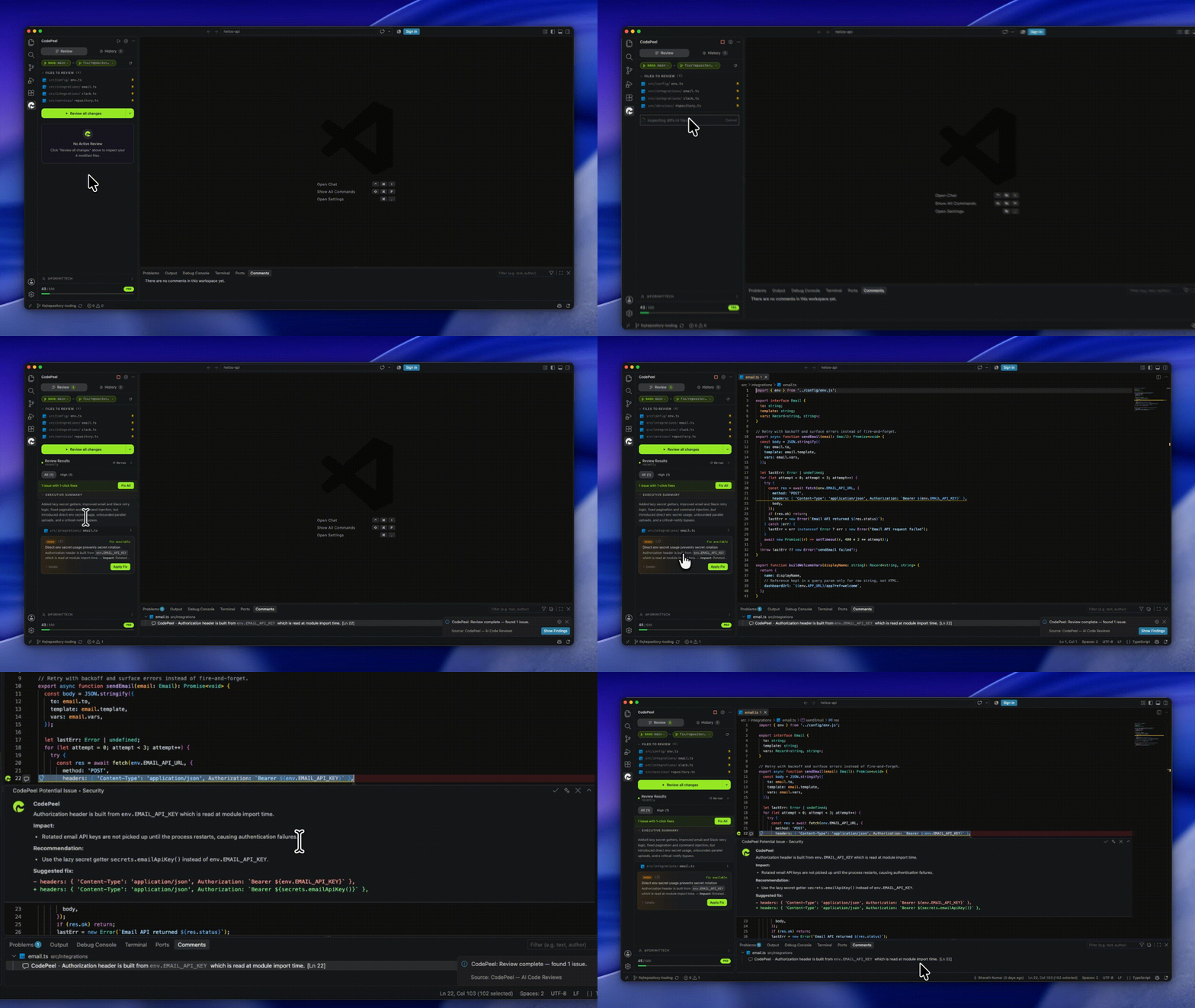
✨ Why CodePeel
- Reviews in the IDE: No waiting for PR review cycles. Get feedback on uncommitted or staged changes as you write code.
- Works with your AI agent: One-click hand-off to GitHub Copilot, Cursor, Claude Code, Cline, or any coding agent to apply fixes.
- Senior dev quality: Catches race conditions, memory leaks, security holes, and architectural issues — not just trivial linting rules.
- Instant 1-Click Fixes: Fix typos, null checks, and logic errors directly in your file with a single click.
- Full-width diff highlights: Offending lines stand out immediately with full-width background color bands and clean red/green inline comment threads.
- Zero configuration: No OpenAI/Anthropic API keys or repo webhooks required. Works out of the box.
- Language agnostic: Works with TypeScript, JavaScript, Python, Go, Rust, Java, C++, PHP, and every language your team uses.
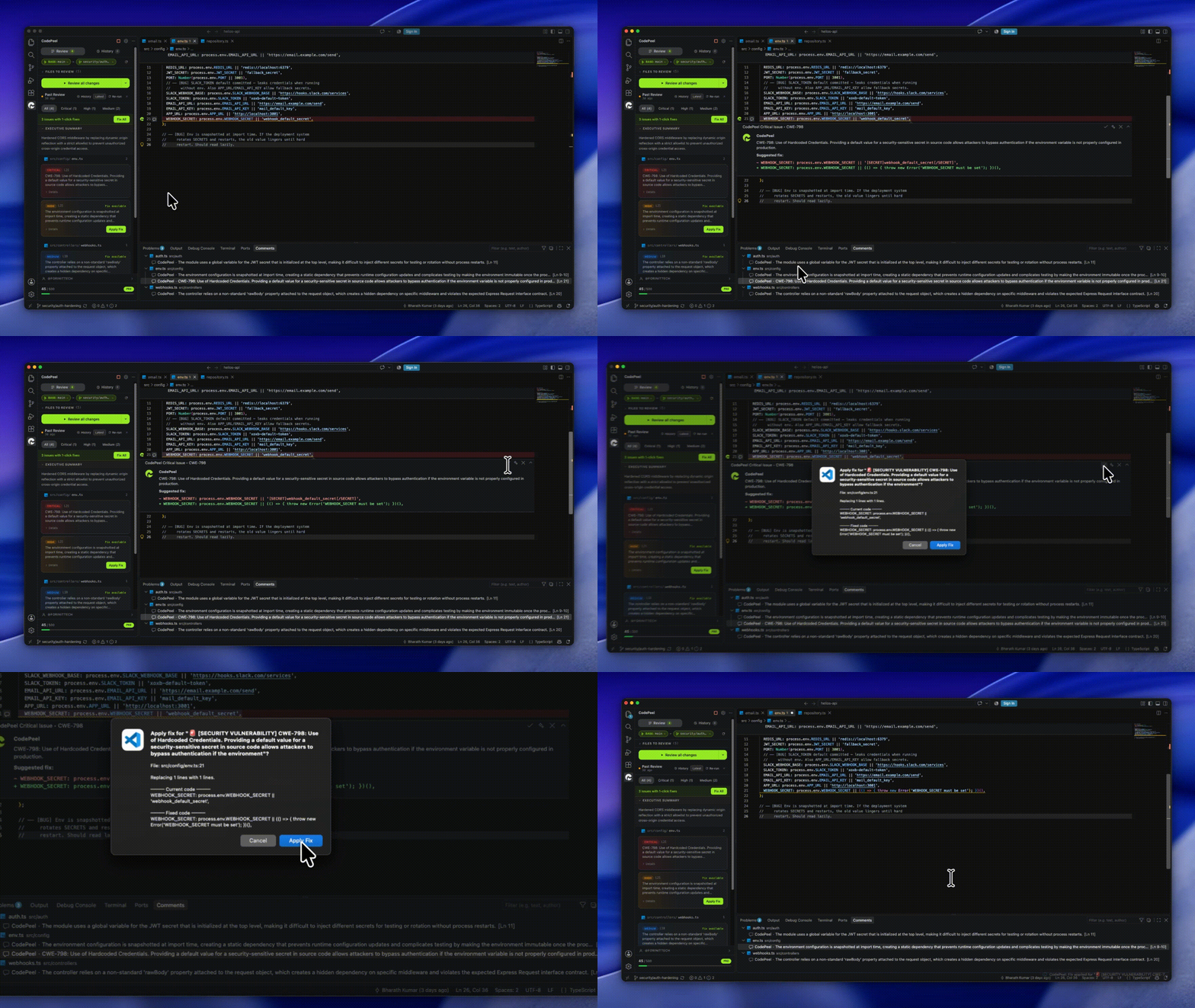
🚀 Key Features
- Line-by-line reviews: Every line gets reviewed with context from your entire changeset and git history.
- Review uncommitted changes: Catch issues before committing. Reduce PR comment noise by 80%.
- One-click fixes: Apply simple fixes directly to code with a single click.
- Fix with AI: Complex fixes automatically hand off to your preferred AI coding agent with pre-populated prompts and diff context.
- Whole-line diff highlighting: Full-width color bands in your editor buffer + inline comment threads make problem spots unmistakable.
- Branch comparisons: Compare working changes or diff branch commits against
main or custom targets.
- Review history: Revisit past reviews, track resolved issues, and compare audits across branches.
🤖 Supported coding agents
- Native (Copilot): Direct integration with GitHub Copilot Chat in VS Code.
- Cursor: Dispatches code context and fixes into Cursor Composer / Chat.
- Claude Code: Launches an interactive
claude terminal session ready to execute.
- Cline & Roo Code: Opens the agent panel and initiates the task automatically.
- Windsurf / Cascade: Hands off contextual fix prompts to Cascade.
- Terminal CLI (Aider / OpenCode / Codex): Launches a pair-programming session in your integrated terminal.
- Clipboard: Universal fallback copying formatted prompt with file path, line numbers, and fix code for any AI agent.
Works in VS Code, Cursor, and Windsurf editors.
🏁 Getting Started
- Install CodePeel from the VS Code Marketplace (search
CodePeel).
- Sign In with your GitHub account when prompted.
- Open any project and click the Play icon on the CodePeel sidebar (or press
Cmd+Shift+R / Ctrl+Shift+R).
- Inspect findings in the sidebar or inline in your code, and click Apply Fix or Fix with AI.
🔒 Privacy & Security
- Your code is never used for training AI models.
- Diffs are encrypted in transit via TLS and analyzed in memory.
- Code snippets and diffs are never stored on disk or shared.
- Files ignored by your
.gitignore are automatically excluded from reviews.
❓ Frequently Asked Questions
Q: How is CodePeel different from GitHub Copilot or Cursor?
A: Copilot and Cursor help you write code faster. CodePeel acts as your dedicated reviewer — catching security flaws, logic bugs, and race conditions before code ever reaches a pull request. Use them together: CodePeel reviews the code, then hands the fix straight back to your agent.
Q: Do I need to create a Pull Request to get a review?
A: No. CodePeel reviews uncommitted, staged, or committed local changes directly inside your editor as you write, catching issues before you commit or open a PR.
Q: Does CodePeel require my own OpenAI or Anthropic API key?
A: No. CodePeel runs through its own cloud review engine with zero API key configuration required. Just sign in with GitHub and start reviewing.
Q: How does "Fix with AI" work?
A: Clicking Fix with AI packages the issue and surrounding diff context, then hands it straight off to your preferred coding agent (Copilot, Cursor, Claude Code, Cline, Roo Code, or Cascade) to apply the fix.
Q: Is my code private and secure?
A: Yes. Your code is never stored on disk and is never used to train AI models. Reviews are encrypted in transit and analyzed entirely in memory.

