CodeMD
Run the tests that cover your Coding Agent's change before you commit. Create the tests it didn't write. Track every product feature and whether it is tested.
Free with local Ollama. Run existing tests, create missing ones, and discover features with an Ollama model on your own machine: no API keys, no subscriptions, no usage charges.

Features at a glance
- Run the tests that cover your change. CodeMD follows the callgraph from each changed function to its callers and finds only the existing tests that exercise the change.
- Create the tests Coding Agents skip. Call-path, caller-contract, changed-pair integration and highest-risk-path tests, plus unit tests for new functions.
- Feature catalog from your code. Features are extracted from the repository and kept current, and you can add, edit, hide, order and confirm them.
- Feature test coverage. For each feature, see which functions are tested, which tests passed or failed last, and what is still untested.
- Check a feature before shipping. Its tests, runs, recorded bugs and a read-only review of what still blocks it, in one click.
- Code graph and change impact. An interactive graph of how functions, files and features connect, and what an edit affects.
- Your choice of Coding Agent. Claude Code, Codex, free local Ollama, or no AI at all.
- Safe by default. Nothing runs until you click, and tests run in an isolated copy of your workspace.
Get started
- Install CodeMD and open its Activity Bar icon.
- Run Generate CodeMD for the current workspace.
- Open Features to review the feature catalog and readiness evidence.
- Click Check Uncommitted Edits.
- Choose Find Relevant Tests, create a missing test if appropriate, and click Run when you are ready.
Pre-commit testing
Claude Code, Codex, and other Coding Agents write a lot of tests while they fix code. Soon nobody knows which of those tests cover the change in front of them, so they don't get run.
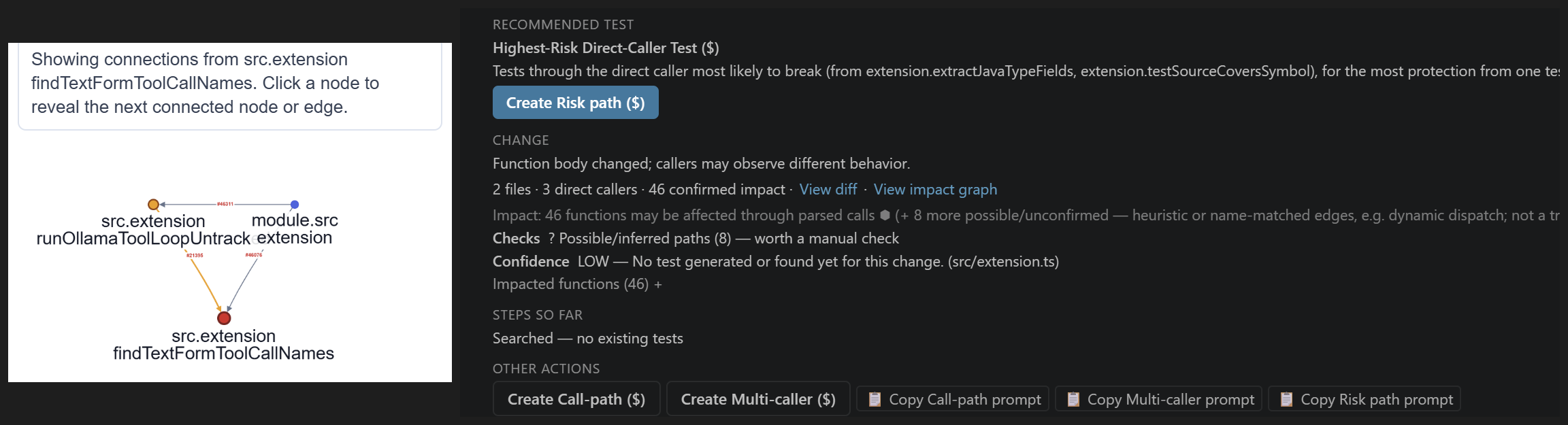
Click Check Uncommitted Edits before you commit, or Check Latest Commit after. CodeMD lists every changed function, follows the callgraph to its callers, and finds only the existing tests that exercise this change. Run them with one click per function, or all at once with Run Affected Tests.
- Saves time. You run the handful of tests that matter, not the whole suite and not nothing.
- Covering tests get run. The existing tests that reach the change your Coding Agent just made are found and offered on every commit, instead of being forgotten.
- The regression suite, without the overhead. CodeMD builds the unit and regression suite for each change from the code itself.
For each changed function you can:
- Click Find Relevant Tests for one function, or run the bulk free-test action for a risk tier you select.
- Run confirmed existing tests and read their real process result.
- Create a free replay test when CodeMD can safely reuse literal inputs from a real caller.
- Ask Claude, Codex, or a local Ollama model to create a missing test when the applicable action is available.
- Run a generated test separately after reviewing it. Creating a test does not automatically execute it.
- Inspect captured output, coverage evidence when available, and recorded defects.
Tests that Coding Agents don't write
Coding Agents write single-function tests: they call one function and check its result. Bugs often hide where functions meet, so CodeMD also creates the next level of tests, grounded in the real callgraph:
- Call-path and call-chain tests that exercise a changed function through the real callers that reach it.
- Integration tests across changed function pairs and multiple callers, so a change that works alone but breaks its callers is caught.
- Contract tests for callers that rely on behavior the change may have broken.
- Highest-risk path tests for the direct caller most likely to be hurt by the change.
- Unit tests for new functions, using a real caller from the callgraph.
All test actions require a click. Auto Mode is disabled. Test generation writes only under .codemd/generated_tests/; it does not edit analyzed source files.
Feature management
Tests tell you whether functions work. Features tell you whether the product works.
- Features are extracted from the code automatically. CodeMD builds a feature catalog from repository evidence, with optional feature naming and cross-checking from your selected Coding Agent, and keeps it current as code changes.
- Mapped to your own feature list. Set your product's feature list on the codemd.dev dashboard and CodeMD maps each feature to the code that implements it. It re-maps on its own when the code, the tests, or the list change.
- Curate the catalog. Edit feature names and descriptions, archive or restore them, accept or reject rediscovered suggestions, and promote, downgrade, hide, restore, or clean up candidates without deleting repository source.
- Notes and sub-features. Add product and feature notes so context stays with the repository. Plan sub-features manually or ask Claude, Codex, or Ollama to identify them from functions already linked to a feature.
- Link features to code. Link features to their implementation functions with Claude, Codex, or Ollama, then inspect the feature map, mapping quality and implementation signals.
- Feature test coverage. For every feature, see which of its functions are tested, which tests passed or failed on their last run, execution evidence, recent changes, and what is still untested.
- Check features before shipping. Check Feature shows whether a feature is ready to ship: its tests, runs, recorded bugs, and a read-only review by your Coding Agent of what still blocks it.
- Track team progress. See which features are implemented, which are still in progress, and what changed recently, for the whole team on the codemd.dev dashboard.
The Modify Feature action is currently a read-only planning and analysis conversation with Claude Code or Codex. CodeMD saves the response as feature context; it does not apply source changes.
Code graph visualization
- Open an interactive graph for a function, file, search result, feature, or change.
- Follow connections between functions and files.
- See which parts of the repository may be affected by an uncommitted edit or recent commit.
- Open graph nodes directly in the editor and expand the view as you investigate.
- Give Claude Code or Codex read-only access to the same repository structure through the optional CodeMD MCP server.
Choose a Coding Agent
- Claude Code: feature analysis, feature-to-function linking, test creation, command discovery when needed, and supported failure diagnosis.
- Codex: the same structured Coding Agent workflows where the action supports Codex.
- Ollama Local: free local generation with a model you already installed, such as
llama3.1:8b. It supports test generation, feature naming/linking, and sub-feature discovery, but not source modification or every Claude/Codex workflow.
- No Coding Agent: feature evidence, feature curation, relevant-test lookup, supported local test execution, and free replay-test creation remain available without invoking an AI.
Coding Agent actions run only after you select Use Coding Agent, click an action, and approve the run. Claude and Codex use their locally installed CLIs. Ollama must already be installed, running, and have the selected model pulled.
Reference
Supported languages
| Language |
Existing tests from a changed-function card |
Running a selected/generated test |
Important limit |
| Python |
Click Find Relevant Tests to find and run confirmed matches |
Direct with the project's pytest |
Line coverage is confirmed only when coverage.py is available |
| Go |
Click Find Relevant Tests to find and run confirmed matches |
Direct with go test |
Go runs at package/test-name scope |
| Java |
Click Find Relevant Tests to find and run confirmed matches |
Direct for Maven projects |
Generated-test execution is not implemented for Gradle projects |
| Kotlin |
Click Find Relevant Tests to find and run confirmed matches |
Direct for Maven projects |
Requires Maven, a JDK, and kotlinc; Gradle execution is not implemented |
| C# |
Click Find Relevant Tests to find and run confirmed matches |
Direct with the .NET SDK in an isolated xUnit project |
Requires a discoverable project file and dotnet |
| Rust |
Relevant-test discovery does not currently auto-run a matched Rust test |
A selected/generated test can run with cargo test |
Coverage needs cargo-llvm-cov; otherwise CodeMD reports pass/fail |
| JavaScript / TypeScript |
Test discovery is available; execution is a separate user action |
Uses a detected Jest, Vitest, Mocha, or Ava setup; CodeMD runs the command and reads its exit code |
CodeMD does not install a test framework; unusual or ambiguous commands may need Claude or Codex to identify them |
No row means “runs when a change is checked.” Every execution shown above begins with an explicit user action.
Safety boundaries
- Tests that CodeMD executes itself run in a separate, isolated copy of the workspace—not against the original source files. Changes made by a test stay in that temporary copy; commands handed to your own terminal remain under your control.
- Generated-test safety checks reject known file writes, deletes, renames, and process starts outside temporary storage or
.codemd/.
- CodeMD test-creation workflows never grant an agent permission to edit analyzed source.
- AI-generated output can be wrong; review generated tests and planning responses before relying on them.
Requirements
- Python 3 for local analysis.
- The relevant project toolchain for any test you choose to execute.
- Claude Code CLI, Codex CLI, or Ollama only for actions that use that provider.
Data collection and privacy
CodeMD analyzes your code on your machine. The code map, test results, bug history and agent transcripts stay in .codemd/ in your workspace. Nothing CodeMD shares contains source code, diffs, test output, commit messages, prompts, or your name or email. What leaves your machine, and when, is listed below.
Anonymous usage telemetry. CodeMD records which tabs you open and which panel actions you run, as fixed ids (for example catalog or runSecurityReview), plus the Coding Agent mode and provider you pick. VS Code adds its own common properties: a pseudonymous machine and session id, the VS Code and CodeMD versions, and the operating system. This data is sent over HTTPS to codemd.dev through VS Code's own telemetry API, so it follows your telemetry.telemetryLevel setting. Set that setting to off and CodeMD sends no telemetry; the change applies immediately, and events not yet sent are dropped. Every event and property is listed in telemetry.json in the extension folder.
Product metrics: only if you agree, separately for each repository. CodeMD asks before it shares anything. You can choose Share Automatically, Not Now or Never for This Repo. Until you choose Share Automatically, nothing is published.
- The metrics are feature and sub-feature names and statuses, coverage, tests passing and failing, and bugs, plus a per-feature callgraph with function names. Other function identifiers are salted hashes, and no developer is named.
- CodeMD pushes them with your own Git credentials to a separate
codemd-metrics branch of your own GitHub repository. It never touches your working tree or code branches, and nothing goes to codemd.dev.
- Public repositories are never published automatically.
- To stop publishing everywhere, turn off
codemdGraphs.productMetricsAutoPublish. To remove published data, delete the branch.
Test runs: recorded locally, pushed only when you choose. For the codemd.dev Testboard, CodeMD records each test run and generated test on your local codemd-metrics branch: test file path, target function name and file, pass/fail, coverage, run time, commit and a content hash. Nothing leaves your machine until you run Codemd: Push Test Runs to GitHub. It works only for a repository whose product metrics you chose to share, and asks before every push. Turn off codemdGraphs.recordTestRuns to stop recording.
GitHub sign-in (optional). While you are signed in to GitHub in CodeMD, the Features tab downloads the product and feature list you typed on codemd.dev for this repository. CodeMD sends your GitHub access token and the repository's owner/name to codemd.dev, which uses them only to check that you can read the repository. When signed out, nothing is sent.
The codemd.dev dashboard: only after you grant access. codemd.dev cannot read your codemd-metrics branch until you do two things. First, sign in to codemd.dev with GitHub. Second, install the CodeMD Permissions GitHub App on that repository. After that, codemd.dev runs its analysis on the branch and shows the test progress and feature dashboard. It shows them only to signed-in users whose GitHub account can access the repository. To revoke access, uninstall the app from your GitHub settings. The branch is part of your repository, so anyone with read access to the repository on GitHub can read it there too.
Coding Agents. Claude Code, Codex and Ollama run only when you start an action. What each provider does with the context it receives is governed by that provider's own terms.
See the privacy policy and license terms.
Visit codemd.dev.
| |

